
Válasszon nyelvet

IRS Form 4136 – Fillable PDF for Fuel Tax Credits

  1. Ország USA
  2. Nyelv angol
  3. Tevékenység Adók
  4. Osztály Internal Revenue Service
IRS Form 4136 – Fillable PDF for Fuel Tax Credits

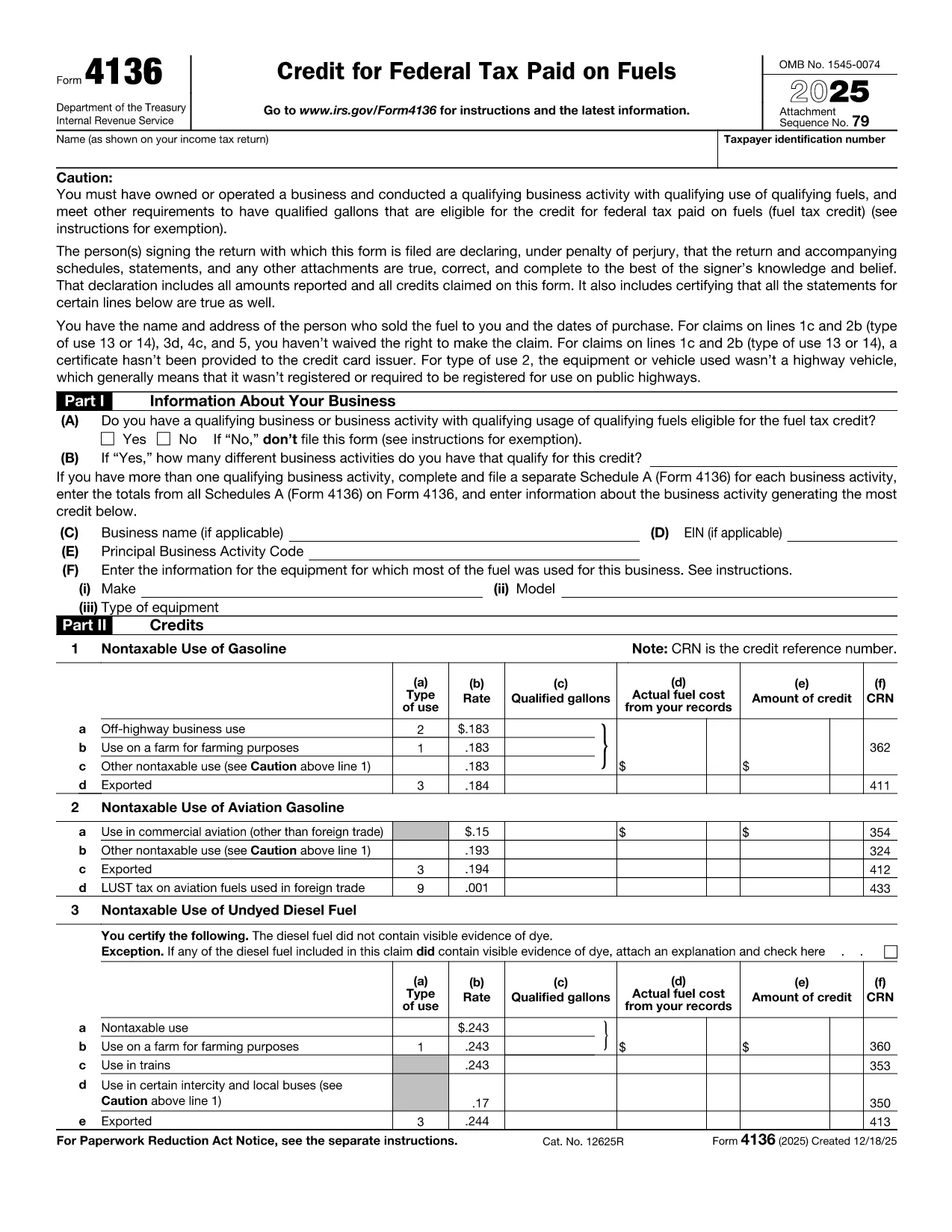
Form 4136, Credit for Federal Tax Paid on Fuels, lets eligible taxpayers claim a credit for excise taxes paid on gasoline, diesel, aviation gasoline, kerosene, and other qualified fuels. Whether you run a farming operation, a construction fleet, or an aviation business, this form can reduce your tax liability.

What Is Form 4136 and Who Can Use It?

The IRS issues Form 4136 to businesses and individuals who use fuel for non‑taxable purposes such as off‑highway equipment, farming, or export. The credit applies to:

  • Gasoline used on farms, construction sites, or in certain commercial vehicles.
  • Diesel fuel for off‑road machinery.
  • Aviation gasoline for eligible aircraft.
  • Kerosene and other special fuels.

If you are the ultimate purchaser of the fuel, you are the only party who can claim the credit.

How to Complete the Fillable Form 4136 on Formize

Instead of downloading the PDF and editing it with a separate program, simply click the “Fill out this form” button on this page. The Formize PDF Filler app will load the official fillable version of Form 4136, letting you:

  1. Enter your business name, EIN, and filing year.
  2. Select the type of fuel and the qualified use (e.g., off‑highway, farm, export).
  3. Input gallons used and the calculated credit amount.
  4. Electronically sign and submit the form directly to the IRS portal (if you have e‑file capability) or print for mailing.

The interface is fully responsive, saves your progress automatically, and validates entries to reduce errors.

Common Mistakes to Avoid When Filing Form 4136

  • Using personal fuel purchases: Only fuel used for business or qualified non‑taxable purposes qualifies.
  • Incorrect rate application: Each fuel type has a specific credit rate; double‑check the IRS rate table.
  • Missing export documentation: If you claim export credits, attach a bill of lading or customs receipt.
  • Failing to sign: The form requires a signature under penalty of perjury; the Formize app adds a digital signature field.

Download the Official Fillable PDF

When you need an offline copy, you can download the current IRS version of Form 4136 directly from the link below. The file is a fillable PDF, compatible with Adobe Acrobat, Foxit, and the Formize online editor.

Download IRS Form 4136 (PDF)

Utasítás

GYIK
  • What types of fuel qualify for a credit on Form 4136?

    Gasoline, diesel fuel, aviation gasoline, kerosene, and other fuels listed in the IRS instructions qualify when used for non‑taxable purposes such as off‑highway business use, farming, or export.

  • Can I claim a credit for fuel used in personal vehicles?

    No. The credit is only available for fuel used in business operations or other qualified non‑taxable uses. Personal use does not qualify.

  • Do I need supporting documentation for the credit?

    Yes. Keep receipts, fuel invoices, and, for exported fuel, a bill of lading or customs documentation. The IRS may request these records during an audit.

  • Is the fillable PDF compatible with all PDF editors?

    The official Form 4136 PDF is fillable in Adobe Acrobat, Foxit Reader, and the Formize online editor. All fields retain their functionality across platforms.

  • How often is Form 4136 updated?

    The IRS releases a new version each tax year. The link provided points to the current version; older versions are available in the IRS prior‑year archive.

  • Can I file Form 4136 electronically?

    Yes, if you use tax software that supports IRS e‑file for fuel credits. Otherwise, print the completed form, sign it, and mail it with your return.

  • What is the deadline to submit Form 4136?

    Form 4136 must be filed with the tax return for the year in which the fuel was used, typically by the April filing deadline (or October if you file an extension).

HOGYAN KELL

A(z) Form 4136 ingyenes online kitöltése 3 egyszerű lépésben:

  1. 1
    Open the Fillable Form
    Click the “Fill out this form” button on the page. The Formize PDF Filler app will load the official Form 4136.
  2. 2
    Enter Your Information
    Fill in your business name, EIN, fuel type, gallons used, and select the appropriate credit rate. The app validates each field in real time.
  3. 3
    Sign and Save
    Add your digital signature, review the summary, and either download the completed PDF for mailing or submit it electronically if you have e‑file access.
PDF-kitöltő alkalmazás formázása
RÓL RŐL

Adónyomtatványok

A Form 4136 egyike azon adóűrlapoknak, amelyek az adókkal kapcsolatos információk illetékes adóhatóság felé történő bejelentésére szolgálnak. Különféle adóformák léteznek, beleértve a szövetségi, állami és helyi adóformákat, amelyek az adófizető körülményeitől és helyétől függően változhatnak.

JELLEMZŐK

PDF kitöltő

A PDF űrlapok online kitöltésének legegyszerűbb módja

  • Gyorsan töltse ki a következőt: Form 4136
    Módot keres a(z) Form 4136 online gyors kitöltésére? Online ingyenes PDF űrlapkitöltőnkkel tudni fogja, hogyan kell szerkeszteni és kitölteni ezt a pdf dokumentumot kevesebb mint egy perc alatt.
  • Könnyen használható online PDF szerkesztő
    Eleged van abból, hogy kinyomtatja a PDF-fájlokat, hogy szerkeszthesse őket, mielőtt újra beolvassa és visszaküldi őket? PDF dokumentumok szerkesztése ingyen online. Használja online pdf-szerkesztőnket, hogy időt és papírt takarítson meg.
  • Remek eszközök, minden platformon
    Kíváncsi arra, hogyan töltse ki a Form 4136 mezőt Mac számítógépen, vagy hogyan használhat ingyenes PDF-kitöltőt? Online PDF eszközeink minden platformon működnek.
  • Biztonságos fájltárolás
    A befejezett „Form 4136” fájlokat az Amazon Cloud hosting által kezelt, biztonságos adatbázisban tároljuk. Fájljait bármikor törölheti rendszerünkből. Mindenesetre ezek a fájlok 24 óra elteltével automatikusan törlődnek.
  • Csevegés Form 4136 felhasználóval
    Csevegés "Form 4136" felhasználóval a Chatize oldalon, amely egy ingyenes PDF-olvasó segéd. Tegyen fel kérdéseket, és kapjon választ a következőtől: "Form 4136". Csak kattintson a fenti Csevegés dokumentummal gombra.

Kitöltési munkamenet törlése

Törli a kiválasztott kitöltési munkamenetet? Ebben az esetben az űrlap kitöltésének előrehaladása elvész.

Szerkesztési munkamenet törlése

Törli a kiválasztott szerkesztési munkamenetet? Ebben az esetben az űrlap létrehozásának és szerkesztésének előrehaladása elvész.