
Válasszon nyelvet

Form 4461-C Fillable PDF – Download & Complete Online

  1. Ország USA
  2. Nyelv angol
  3. Tevékenység Adók
  4. Osztály Internal Revenue Service
Form 4461-C Fillable PDF – Download & Complete Online

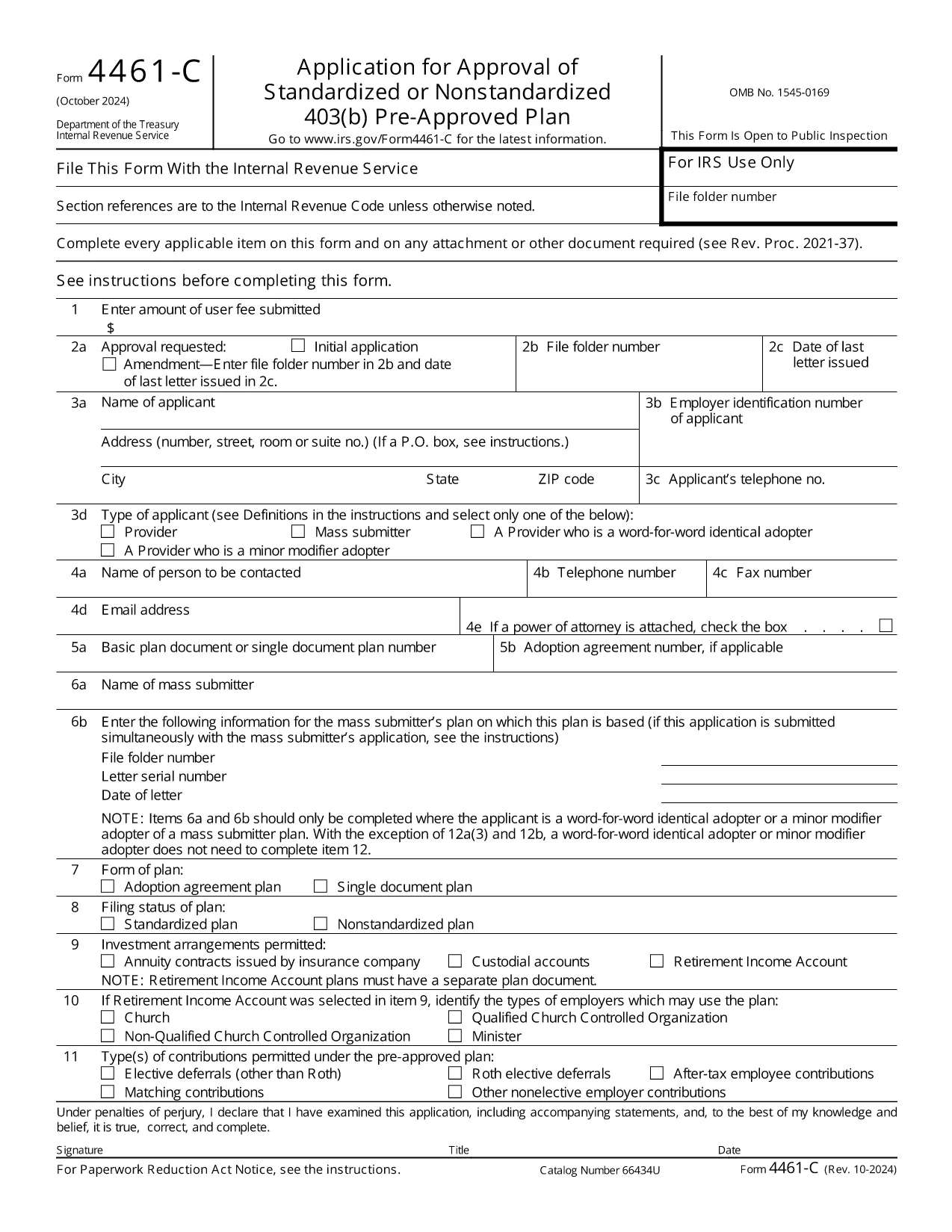
The IRS Form 4461‑C is the official application used by providers or mass submitters of a 403(b) pre‑approved plan. It must be filed for each separate adoption agreement or for each single‑document plan where no adoption agreement is used. Our fillable PDF lets you complete the form quickly, accurately, and securely.

What Is Form 4461‑C?

Form 4461‑C is part of the IRS’s pre‑approval process for employee benefit plans under section 401(a) of the Internal Revenue Code. It captures essential plan details, adoption agreements, and supporting documentation required for IRS approval.

How to Fill Out Form 4461‑C Online

Instead of downloading the PDF and opening a separate editor, simply click the "Fill out this form" button on this page. The Formize PDF Filler will load in your browser, allowing you to:

  1. Enter information directly into each field.
  2. Save your progress automatically.
  3. Validate entries with built‑in checks.
  4. Download the completed, IRS‑ready PDF or submit it electronically.

Common Mistakes to Avoid

  • Leaving required fields blank: The filler highlights missing data before you can save.
  • Mismatched plan numbers: Double‑check the plan identification numbers on line 12(a).
  • Incorrect signatures: Use the electronic signature option or print and sign where required.
  • Submitting outdated versions: This page always provides the latest revision (Rev. 10‑2024).

Submission & Acceptance Guidelines

After completing the form, you can either:

  • Download the PDF and mail it to the IRS address listed in the instructions.
  • Upload the PDF through the IRS e‑file portal if you have an authorized transmitter.

Keep a copy for your records and track the submission status using the IRS’s online tools.

FAQs About Form 4461‑C

For quick answers, scroll down to the FAQ section below.

GYIK
  • Who must file Form 4461‑C?

    Any provider or mass submitter of a 403(b) pre‑approved plan must file Form 4461‑C for each separate adoption agreement or single‑document plan.

  • Can I file Form 4461‑C electronically?

    Yes. After completing the fillable PDF, you can upload it through the IRS e‑file portal if you have an authorized transmitter.

  • How many copies of Form 4461‑C are required?

    Submit one copy of Form 4461‑C for each adoption agreement or each single‑document plan, plus any supporting documents listed on line 12(a).

  • What is the latest revision of Form 4461‑C?

    The current version is Rev. 10‑2024, which is the PDF linked on this page.

  • Do I need a signature on the PDF?

    Yes. The form requires the plan sponsor’s signature. You can use the electronic signature feature in Formize or print, sign, and scan the completed form.

  • Where do I send the completed form?

    Mail the completed form to the address specified in the IRS instructions, or submit it electronically via the IRS e‑file system.

HOGYAN KELL

A(z) Form 4461-C ingyenes online kitöltése 4 egyszerű lépésben:

  1. 1
    Open the Fillable Form
    Click the "Fill out this form" button on the page. The Formize PDF Filler loads instantly in your browser.
  2. 2
    Enter Your Information
    Complete each field. Required fields are highlighted. Use the auto‑save feature to protect your data.
  3. 3
    Review & Sign
    Check all entries for accuracy, add electronic signatures where allowed, and correct any validation warnings.
  4. 4
    Download or Submit
    When finished, download the completed PDF for mailing or upload it to the IRS e‑file system.
PDF-kitöltő alkalmazás formázása
RÓL RŐL

Adónyomtatványok

A Form 4461-C egyike azon adóűrlapoknak, amelyek az adókkal kapcsolatos információk illetékes adóhatóság felé történő bejelentésére szolgálnak. Különféle adóformák léteznek, beleértve a szövetségi, állami és helyi adóformákat, amelyek az adófizető körülményeitől és helyétől függően változhatnak.

JELLEMZŐK

PDF kitöltő

A PDF űrlapok online kitöltésének legegyszerűbb módja

  • Gyorsan töltse ki a következőt: Form 4461-C
    Módot keres a(z) Form 4461-C online gyors kitöltésére? Online ingyenes PDF űrlapkitöltőnkkel tudni fogja, hogyan kell szerkeszteni és kitölteni ezt a pdf dokumentumot kevesebb mint egy perc alatt.
  • Könnyen használható online PDF szerkesztő
    Eleged van abból, hogy kinyomtatja a PDF-fájlokat, hogy szerkeszthesse őket, mielőtt újra beolvassa és visszaküldi őket? PDF dokumentumok szerkesztése ingyen online. Használja online pdf-szerkesztőnket, hogy időt és papírt takarítson meg.
  • Remek eszközök, minden platformon
    Kíváncsi arra, hogyan töltse ki a Form 4461-C mezőt Mac számítógépen, vagy hogyan használhat ingyenes PDF-kitöltőt? Online PDF eszközeink minden platformon működnek.
  • Biztonságos fájltárolás
    A befejezett „Form 4461-C” fájlokat az Amazon Cloud hosting által kezelt, biztonságos adatbázisban tároljuk. Fájljait bármikor törölheti rendszerünkből. Mindenesetre ezek a fájlok 24 óra elteltével automatikusan törlődnek.
  • Csevegés Form 4461-C felhasználóval
    Csevegés "Form 4461-C" felhasználóval a Chatize oldalon, amely egy ingyenes PDF-olvasó segéd. Tegyen fel kérdéseket, és kapjon választ a következőtől: "Form 4461-C". Csak kattintson a fenti Csevegés dokumentummal gombra.

Kitöltési munkamenet törlése

Törli a kiválasztott kitöltési munkamenetet? Ebben az esetben az űrlap kitöltésének előrehaladása elvész.

Szerkesztési munkamenet törlése

Törli a kiválasztott szerkesztési munkamenetet? Ebben az esetben az űrlap létrehozásának és szerkesztésének előrehaladása elvész.