
Válasszon nyelvet

Fillable Form W-8ECI – Claim Effectively Connected Income

  1. Ország USA
  2. Nyelv angol
  3. Tevékenység Adók
  4. Osztály Internal Revenue Service
Fillable Form W-8ECI – Claim Effectively Connected Income

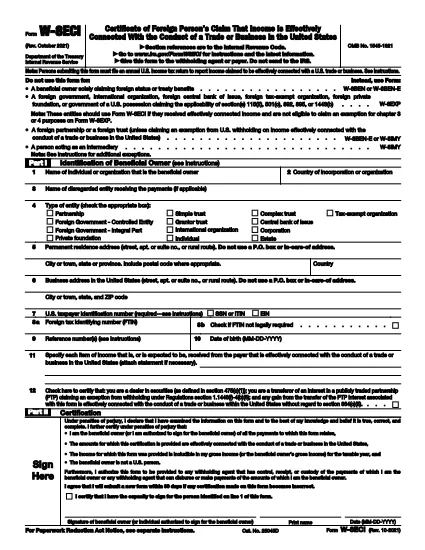
The IRS Form W-8ECI (Certificate of Foreign Person’s Claim That Income Is Effectively Connected With the Conduct of a Trade or Business in the United States) is required when a foreign individual or entity receives income that is effectively connected (ECI) with a U.S. trade or business. Using a fillable PDF saves time, reduces errors, and lets you submit the form electronically.

What Is Form W-8ECI?

Form W-8ECI certifies that the income you receive is ECI and therefore subject to regular U.S. income tax withholding rather than the 30% flat rate applied to non‑effectively connected payments. The form also provides the IRS with your taxpayer identification number (TIN) and details about the trade or business activities.

When and Who Must Use Form W-8ECI

  • Foreign individuals, corporations, partnerships, or trusts earning ECI from U.S. sources.
  • Payments such as rents, royalties, interest, or services that are connected to a U.S. trade or business.
  • When you are not eligible to claim a chapter 3 or 4 exemption on Form W-8EXP.

Step‑by‑Step Guide to Completing the Fillable PDF

Follow the simple steps below to fill out the form directly on our page without downloading any software.

Common Mistakes to Avoid

  • Leaving the U.S. TIN blank or entering an incorrect number.
  • Using the wrong version of the form (always choose the latest revision).
  • Failing to sign and date the form – an unsigned form is invalid.
  • Confusing “effectively connected income” with “portfolio interest” – the latter uses a different form.

Why Choose Formize’s Online PDF Filler

Our cloud‑based PDF Filler loads instantly, keeps your data secure, and lets you download a completed, IRS‑ready PDF in seconds. No extra plugins, no printing, no scanning.

Utasítás

GYIK
  • Do I need a U.S. Social Security Number to file Form W-8ECI?

    No. Foreign entities can use an Individual Taxpayer Identification Number (ITIN) or an Employer Identification Number (EIN) issued by the IRS.

  • How often must I renew Form W-8ECI?

    The form is valid until the end of the third calendar year after the year it was signed, unless a change in circumstances makes the information incorrect.

  • Can I use Form W-8ECI for royalty payments?

    Yes, if the royalties are derived from a trade or business in the United States and are considered ECI. Otherwise, a different form may be required.

  • What happens if I submit an unsigned Form W-8ECI?

    The payer must treat the payment as non‑effectively connected and apply the 30% withholding rate, which could result in over‑withholding.

  • Is the fillable PDF on Formize compliant with IRS standards?

    Absolutely. The PDF mirrors the official IRS version (Rev. October 2021) and meets all formatting and field requirements.

  • Can I edit the form after I download it?

    Yes, the downloaded PDF remains fully editable with any standard PDF editor, but it’s best to complete the form online to avoid errors.

  • Do I need to send Form W-8ECI to the IRS directly?

    No. The completed form is provided to the U.S. withholding agent or payer, who then forwards the necessary information to the IRS.

  • Is there a fee to use Formize’s PDF filler for Form W-8ECI?

    Formize offers this fillable version for free. No hidden charges or subscription are required.

HOGYAN KELL

A(z) W-8ECI form ingyenes online kitöltése 4 egyszerű lépésben:

  1. 1
    Open the Fillable Form
    Click the “Fill out this form” button on the page. The Formize PDF Filler app will load in your browser within a few seconds.
  2. 2
    Enter Your Information
    Complete each field – name, address, U.S. TIN, and details of the effectively connected income. All fields are interactive and validated.
  3. 3
    Review and Sign
    Use the built‑in signature tool to add your electronic signature, then double‑check that every required box is filled.
  4. 4
    Download or Submit
    When the form is complete, click “Download PDF” to save a copy for your records, or use the “Submit to IRS” option if your payer accepts electronic submission.
PDF-kitöltő alkalmazás formázása
RÓL RŐL

Adónyomtatványok

A W-8ECI form egyike azon adóűrlapoknak, amelyek az adókkal kapcsolatos információk illetékes adóhatóság felé történő bejelentésére szolgálnak. Különféle adóformák léteznek, beleértve a szövetségi, állami és helyi adóformákat, amelyek az adófizető körülményeitől és helyétől függően változhatnak.

JELLEMZŐK

PDF kitöltő

A PDF űrlapok online kitöltésének legegyszerűbb módja

  • Gyorsan töltse ki a következőt: W-8ECI form
    Módot keres a(z) W-8ECI form online gyors kitöltésére? Online ingyenes PDF űrlapkitöltőnkkel tudni fogja, hogyan kell szerkeszteni és kitölteni ezt a pdf dokumentumot kevesebb mint egy perc alatt.
  • Könnyen használható online PDF szerkesztő
    Eleged van abból, hogy kinyomtatja a PDF-fájlokat, hogy szerkeszthesse őket, mielőtt újra beolvassa és visszaküldi őket? PDF dokumentumok szerkesztése ingyen online. Használja online pdf-szerkesztőnket, hogy időt és papírt takarítson meg.
  • Remek eszközök, minden platformon
    Kíváncsi arra, hogyan töltse ki a W-8ECI form mezőt Mac számítógépen, vagy hogyan használhat ingyenes PDF-kitöltőt? Online PDF eszközeink minden platformon működnek.
  • Biztonságos fájltárolás
    A befejezett „W-8ECI form” fájlokat az Amazon Cloud hosting által kezelt, biztonságos adatbázisban tároljuk. Fájljait bármikor törölheti rendszerünkből. Mindenesetre ezek a fájlok 24 óra elteltével automatikusan törlődnek.
  • Csevegés W-8ECI form felhasználóval
    Csevegés "W-8ECI form" felhasználóval a Chatize oldalon, amely egy ingyenes PDF-olvasó segéd. Tegyen fel kérdéseket, és kapjon választ a következőtől: "W-8ECI form". Csak kattintson a fenti Csevegés dokumentummal gombra.

Kitöltési munkamenet törlése

Törli a kiválasztott kitöltési munkamenetet? Ebben az esetben az űrlap kitöltésének előrehaladása elvész.

Szerkesztési munkamenet törlése

Törli a kiválasztott szerkesztési munkamenetet? Ebben az esetben az űrlap létrehozásának és szerkesztésének előrehaladása elvész.