Válasszon nyelvet

Fillable UST‑6 Application Form – Download & Complete Online

  1. Nyelv angol
  2. Ország USA
  3. Tevékenység Environmental Permits
  4. Osztály Department of Environmental Quality
Fillable UST‑6 Application Form – Download & Complete Online

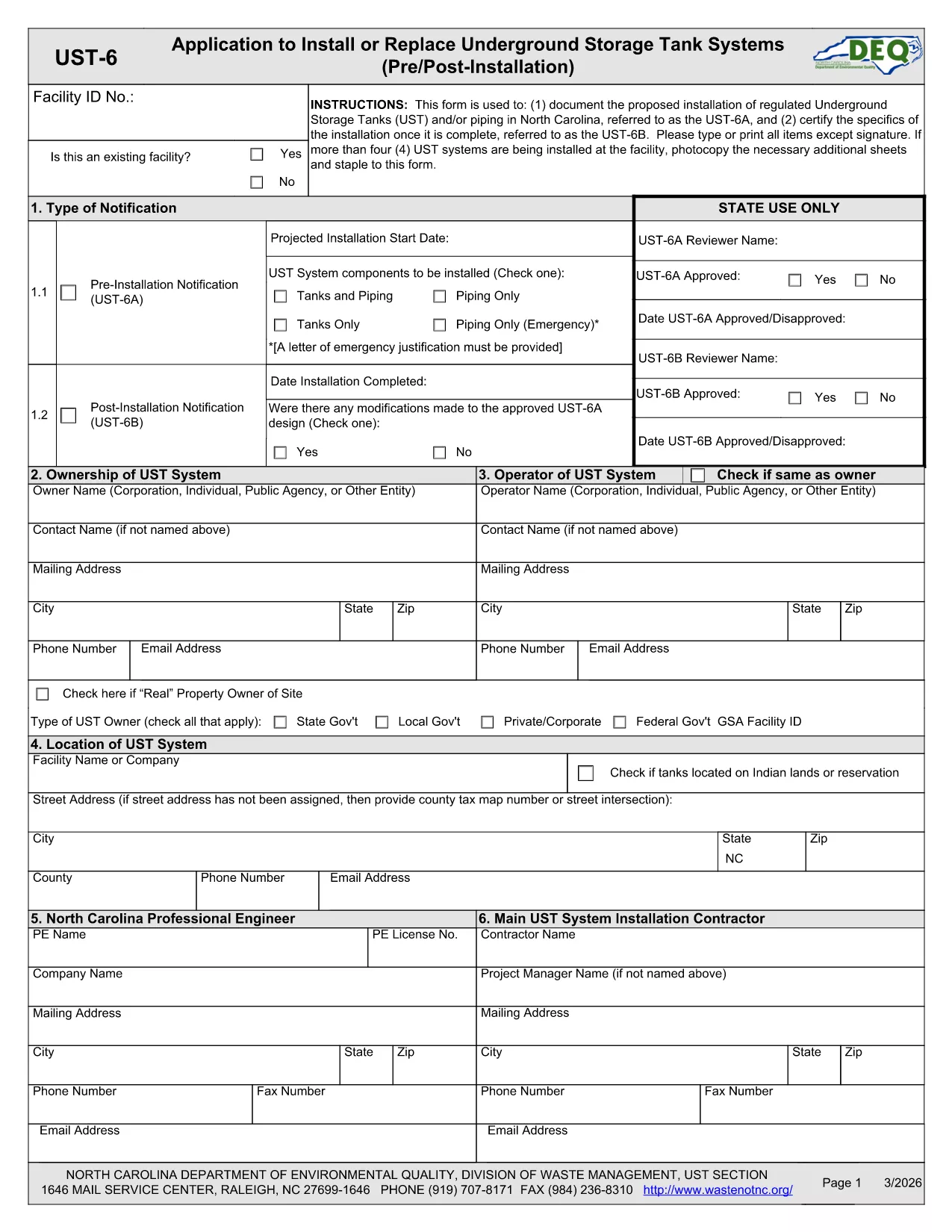
The UST‑6 Application Form is the official certification required by the North Carolina Department of Environmental Quality (DEQ) for pre‑installation of underground storage tanks. This fillable PDF lets you enter data directly on the page, validate fields, and save a clean, printable copy.

What Is the UST‑6 Application Form?

Designed for tank owners, installers, and engineers, the UST‑6 collects essential information such as tank specifications, site location, and compliance statements. It must be submitted to DEQ before any underground storage tank is placed in service.

Why Use a Fillable PDF with Formize?

  • Instant online editing: No need to download a separate PDF editor.
  • Auto‑validation: Required fields are highlighted, reducing rejection rates.
  • Secure saving: Store a completed version in the cloud or download a PDF for record‑keeping.
  • Mobile friendly: Fill out the form from any device.

Step‑by‑Step Guide to Completing the UST‑6 Form

Follow the simple steps below to finish your application without hassle.

Common Mistakes to Avoid

Skipping sections, entering mismatched units, or forgetting the certification signature are typical errors that cause delays. Double‑check each field before submitting.

Where to Submit Your Completed Form

After saving the filled PDF, email it to ustpermits@deq.nc.gov or upload it through the DEQ online portal as instructed in the form’s cover letter.

GYIK
  • Is the UST‑6 form available as a free fillable PDF?

    Yes. The official UST‑6 PDF is free to download and can be completed online with Formize’s fillable PDF viewer.

  • Do I need special software to edit the UST‑6 form?

    No. Formize’s web‑based filler works in any modern browser, so you don’t need Adobe Acrobat or other PDF editors.

  • Can I save my progress and return later?

    Absolutely. Use the “Save” feature to store a draft in the cloud, then reopen it later to continue filling out the form.

  • What happens if I miss a required field?

    The validator highlights missing required fields in red and prevents you from downloading until all mandatory sections are completed.

  • Is the filled PDF accepted by the North Carolina DEQ?

    Yes. As long as the form is fully completed, signed, and saved as a PDF, it meets DEQ’s submission standards.

  • Can I print the completed form directly from Formize?

    Yes. After saving, click “Print” to generate a printer‑ready version of your completed UST‑6 application.

  • Do I need to attach supporting documents?

    The UST‑6 form instructions specify any supporting documents (e.g., site plans) should be attached separately when you submit the PDF.

  • How long does it take to get approval after submission?

    Processing time varies, but most DEQ reviews are completed within 10‑15 business days if the form is correctly filled.

HOGYAN KELL

A(z) UST‑6 form ingyenes online kitöltése 5 egyszerű lépésben:

  1. 1
    Open the Fillable Form
    Click the “Fill out this form” button on the page. The Formize PDF Filler app loads instantly in your browser.
  2. 2
    Enter Your Information
    Type directly into each field. Required fields are marked with a red asterisk and will alert you if something is missing.
  3. 3
    Validate & Review
    Use the “Validate” button to check for common errors. Review each section to ensure accuracy.
  4. 4
    Save or Download
    When finished, click “Save” to store the form in your cloud workspace, or “Download” to get a PDF copy for printing or emailing.
  5. 5
    Submit to DEQ
    Follow the submission instructions on the form – typically email to ustpermits@deq.nc.gov or upload via the DEQ portal.
PDF-kitöltő alkalmazás formázása
RÓL RŐL

UST‑6 form sablon

A PDF-dokumentumok megtekintésére és kitöltésére szolgáló hagyományos funkciókkal, valamint a webalkalmazás és az adaptív elrendezés előnyeivel percek alatt teljesítheti a UST‑6 form.

JELLEMZŐK

PDF kitöltő

A PDF űrlapok online kitöltésének legegyszerűbb módja

  • Gyorsan töltse ki a következőt: UST‑6 form
    Módot keres a(z) UST‑6 form online gyors kitöltésére? Online ingyenes PDF űrlapkitöltőnkkel tudni fogja, hogyan kell szerkeszteni és kitölteni ezt a pdf dokumentumot kevesebb mint egy perc alatt.
  • Könnyen használható online PDF szerkesztő
    Eleged van abból, hogy kinyomtatja a PDF-fájlokat, hogy szerkeszthesse őket, mielőtt újra beolvassa és visszaküldi őket? PDF dokumentumok szerkesztése ingyen online. Használja online pdf-szerkesztőnket, hogy időt és papírt takarítson meg.
  • Remek eszközök, minden platformon
    Kíváncsi arra, hogyan töltse ki a UST‑6 form mezőt Mac számítógépen, vagy hogyan használhat ingyenes PDF-kitöltőt? Online PDF eszközeink minden platformon működnek.
  • Biztonságos fájltárolás
    A befejezett „UST‑6 form” fájlokat az Amazon Cloud hosting által kezelt, biztonságos adatbázisban tároljuk. Fájljait bármikor törölheti rendszerünkből. Mindenesetre ezek a fájlok 24 óra elteltével automatikusan törlődnek.
  • Csevegés UST‑6 form felhasználóval
    Csevegés "UST‑6 form" felhasználóval a Chatize oldalon, amely egy ingyenes PDF-olvasó segéd. Tegyen fel kérdéseket, és kapjon választ a következőtől: "UST‑6 form". Csak kattintson a fenti Csevegés dokumentummal gombra.

Kitöltési munkamenet törlése

Törli a kiválasztott kitöltési munkamenetet? Ebben az esetben az űrlap kitöltésének előrehaladása elvész.

Szerkesztési munkamenet törlése

Törli a kiválasztott szerkesztési munkamenetet? Ebben az esetben az űrlap létrehozásának és szerkesztésének előrehaladása elvész.