Válasszon nyelvet

MVR-27H Fillable PDF – North Carolina Vehicle Record Form

  1. Nyelv angol
  2. Ország USA
  3. Tevékenység Vehicle Records
  4. Osztály Közlekedési Minisztérium
MVR-27H Fillable PDF – North Carolina Vehicle Record Form

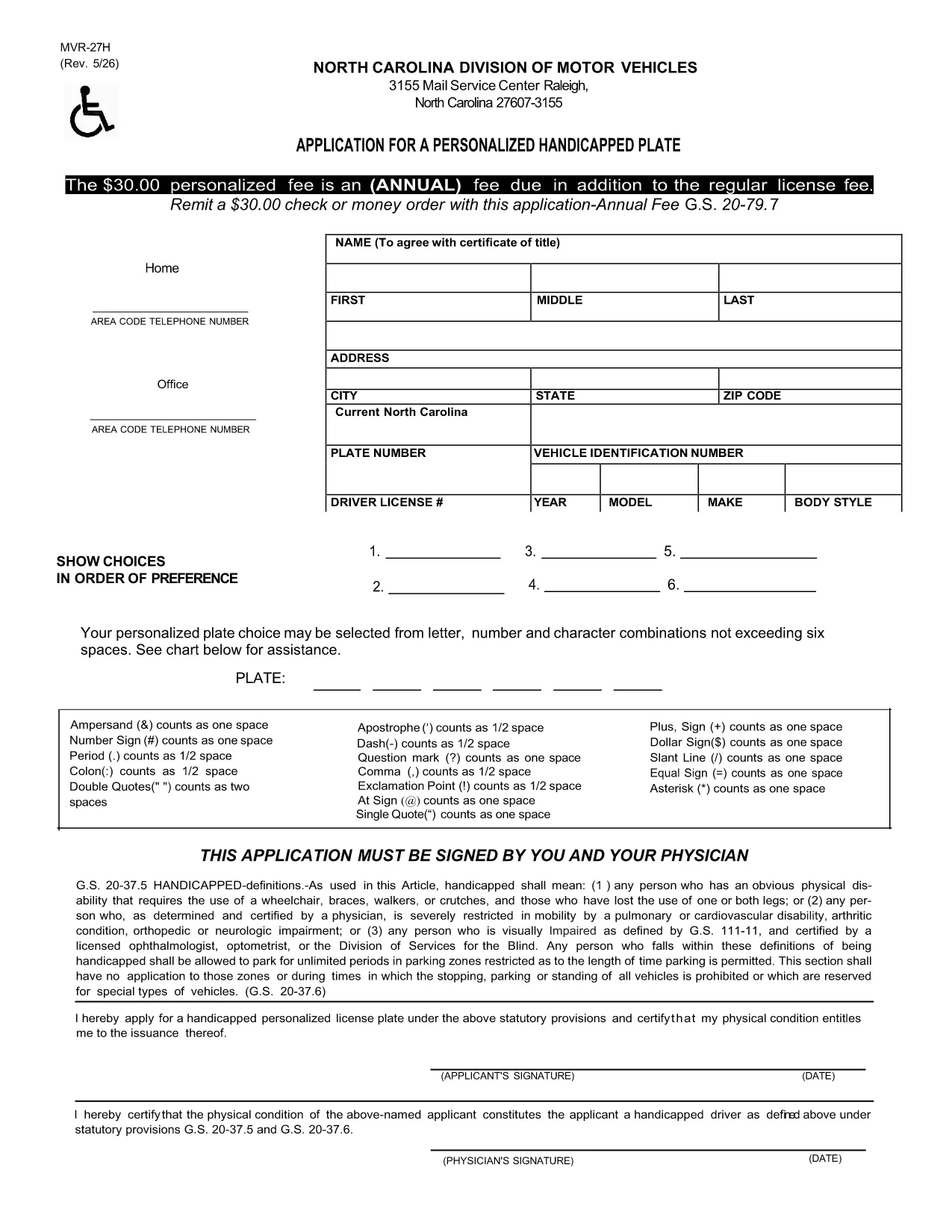
The MVR-27H is the official Motor Vehicle Record request used by the North Carolina Department of Transportation (NCDOT). Whether you need a driving history for an employer, insurance company, or personal records, this form gathers the required information quickly and securely.

What Is the MVR-27H Form?

The MVR-27H requests a detailed driving record for a specific driver. It is commonly used for:

  • Employer background checks
  • Insurance underwriting
  • Legal proceedings

The form requires basic personal data, driver’s license number, and the purpose of the request. Because it is a state‑issued document, the form must be completed accurately to avoid processing delays.

How to Fill Out the MVR-27H Online with Formize

Instead of downloading a static PDF and searching for a separate editor, you can fill the form directly on our page using the Formize PDF Filler app. Follow these simple steps:

  1. Click the **"Fill out this form"** button below.
  2. Wait a few seconds while the Formize PDF Filler loads the MVR-27H template.
  3. Enter your information in the highlighted fields. The app automatically saves your progress.
  4. Review the completed form for any errors.
  5. Click **"Download Completed PDF"** to save a copy or **"Submit"** if you have a secure upload option.

Common Mistakes & Tips for a Successful Submission

  • Incorrect License Number: Double‑check the driver’s license number; a single digit error can cause a rejection.
  • Missing Signature: The Formize app includes a digital signature field—make sure to sign before downloading.
  • Unclear Purpose: Specify the exact reason (e.g., "Insurance underwriting") to meet NCDOT requirements.
  • Outdated Contact Info: Provide a current phone number and email so the Department can reach you if needed.

Where to Submit the Completed Form

After you download the filled PDF, mail or fax it to the address listed on the form’s last page. For faster processing, you may also submit it through the NCDOT online portal if you have an account.

Need help? Review the FAQs below or contact the NCDOT directly.

GYIK
  • What does MVR-27H stand for?

    MVR‑27H is the Motor Vehicle Record request form used by the North Carolina Department of Transportation to provide detailed driving histories.

  • Can I fill out the MVR-27H on a mobile device?

    Yes. The Formize PDF Filler works on smartphones and tablets, allowing you to complete the form from any browser.

  • Do I need a PDF editor to use the fillable form?

    No. The form is fully fillable online through the Formize app; no additional software is required.

  • How long does it take for NCDOT to process the request?

    Processing typically takes 5‑7 business days after the completed form is received, but times may vary during peak periods.

  • Is there a fee for submitting the MVR-27H?

    Yes, the NCDOT charges a nominal processing fee. Check the last page of the form for the current amount and accepted payment methods.

  • What should I do if I make a mistake after downloading?

    You can reopen the saved PDF in the Formize app, correct the error, and download a new version. Alternatively, fill out a fresh form using the "Fill out this form" button.

  • Where can I find the official instructions for MVR-27H?

    The official instructions are included on the last page of the PDF linked below and on the NCDOT website.

HOGYAN KELL

A(z) MVR-27H ingyenes online kitöltése 4 egyszerű lépésben:

  1. 1
    Open the Fillable Form
    Click the "Fill out this form" button on the page. The Formize PDF Filler app will load the MVR-27H template automatically.
  2. 2
    Enter Your Information
    Type your details into each highlighted field. The app saves your entries in real time.
  3. 3
    Review & Sign
    Check all fields for accuracy, then use the digital signature box to sign the document.
  4. 4
    Download or Submit
    Press "Download Completed PDF" to save a copy, or use the provided submission options to send the form to NCDOT.
PDF-kitöltő alkalmazás formázása
RÓL RŐL

MVR-27H sablon

A PDF-dokumentumok megtekintésére és kitöltésére szolgáló hagyományos funkciókkal, valamint a webalkalmazás és az adaptív elrendezés előnyeivel percek alatt teljesítheti a MVR-27H.

JELLEMZŐK

PDF kitöltő

A PDF űrlapok online kitöltésének legegyszerűbb módja

  • Gyorsan töltse ki a következőt: MVR-27H
    Módot keres a(z) MVR-27H online gyors kitöltésére? Online ingyenes PDF űrlapkitöltőnkkel tudni fogja, hogyan kell szerkeszteni és kitölteni ezt a pdf dokumentumot kevesebb mint egy perc alatt.
  • Könnyen használható online PDF szerkesztő
    Eleged van abból, hogy kinyomtatja a PDF-fájlokat, hogy szerkeszthesse őket, mielőtt újra beolvassa és visszaküldi őket? PDF dokumentumok szerkesztése ingyen online. Használja online pdf-szerkesztőnket, hogy időt és papírt takarítson meg.
  • Remek eszközök, minden platformon
    Kíváncsi arra, hogyan töltse ki a MVR-27H mezőt Mac számítógépen, vagy hogyan használhat ingyenes PDF-kitöltőt? Online PDF eszközeink minden platformon működnek.
  • Biztonságos fájltárolás
    A befejezett „MVR-27H” fájlokat az Amazon Cloud hosting által kezelt, biztonságos adatbázisban tároljuk. Fájljait bármikor törölheti rendszerünkből. Mindenesetre ezek a fájlok 24 óra elteltével automatikusan törlődnek.
  • Csevegés MVR-27H felhasználóval
    Csevegés "MVR-27H" felhasználóval a Chatize oldalon, amely egy ingyenes PDF-olvasó segéd. Tegyen fel kérdéseket, és kapjon választ a következőtől: "MVR-27H". Csak kattintson a fenti Csevegés dokumentummal gombra.

Kitöltési munkamenet törlése

Törli a kiválasztott kitöltési munkamenetet? Ebben az esetben az űrlap kitöltésének előrehaladása elvész.

Szerkesztési munkamenet törlése

Törli a kiválasztott szerkesztési munkamenetet? Ebben az esetben az űrlap létrehozásának és szerkesztésének előrehaladása elvész.