Válasszon nyelvet

Virginia DMV CRD 93 Information Request Form (Fillable PDF)

  1. Ország USA
  2. Nyelv angol
  3. Tevékenység Jogsi
  4. Állapot Virginia
Virginia DMV CRD 93 Information Request Form (Fillable PDF)

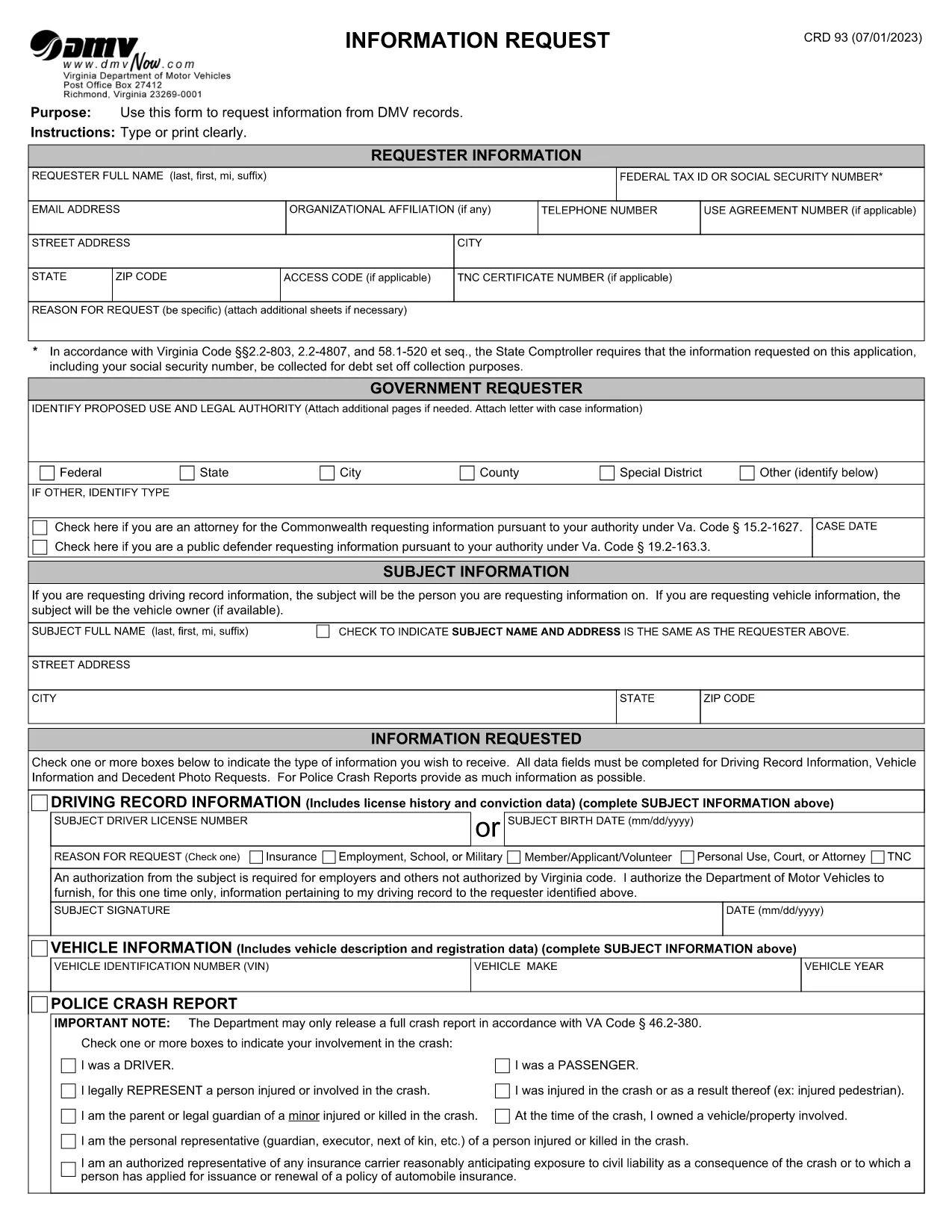
The CRD 93 is Virginia’s official Information Request form used to obtain driving records, vehicle data, crash reports, and other DMV‑maintained information. Traditionally you would print, fill, sign, and mail the form, but with Formize you can complete the same document entirely online – faster, error‑free, and fully fillable PDF ready.

What Is the CRD 93 Form?

Issued by the Virginia Department of Motor Vehicles (DMV), the CRD 93 allows individuals, businesses, and law‑enforcement agencies to request specific records such as:

  • Driver’s license history
  • Vehicle registration details
  • Police crash reports
  • Decedent photographs and other special‑request items

Because the form contains sensitive personal data, the DMV requires a clear statement of purpose and, in many cases, a fee.

How to Complete the CRD 93 Online with Formize

Instead of downloading, printing, and scanning, simply click the “Fill out this form” button below. Formize will load the official PDF into its secure PDF Filler app, letting you type, sign, and save directly in your browser.

Common Mistakes to Avoid

  • Leaving required fields blank: The DMV will reject incomplete requests.
  • Incorrect identification numbers: Double‑check Social Security or Tax ID numbers.
  • Vague reason for request: Provide a specific, lawful purpose (e.g., “court‑ordered driver‑record review”).
  • Missing signatures: Use the electronic signature tool; a handwritten signature on a printed copy is no longer required.

Where to Submit Your Request

After completing the form, download the signed PDF and mail it to:

Virginia Department of Motor Vehicles
Information Request Division
P.O. Box 27412
Richmond, VA 23269‑7412

Include any required fees (check or money order) as instructed on the last page of the form.

Download the Official Fillable PDF

Ready to start? Click the button below to open the official CRD 93 PDF in Formize’s filler.

Fill out this form

GYIK
  • What is the purpose of the CRD 93 form?

    The CRD 93 is used to request specific DMV records in Virginia, such as driver histories, vehicle registrations, crash reports, and decedent photos.

  • Can I submit the CRD 93 electronically?

    Virginia DMV still requires a mailed PDF with any applicable fees, but you can complete the form electronically using Formize and then print or email the PDF to yourself for mailing.

  • Do I need a Virginia address to use this form?

    No. The form can be used by anyone who has a lawful reason to request the records, regardless of residency, as long as the request complies with Virginia law.

  • How long does it take to receive the requested records?

    Processing times vary. Standard requests typically take 10‑15 business days after the DMV receives your completed form and payment.

  • What fees are associated with a CRD 93 request?

    Fees depend on the type of record requested (e.g., driver history, crash report). The fee schedule is listed on the last page of the form.

  • Is a handwritten signature still required?

    No. An electronic signature created in the Formize PDF Filler satisfies the DMV’s signature requirement.

  • Can I request records for someone else?

    Yes, but you must provide a valid reason, proof of authority (e.g., power of attorney), and the subject’s identifying information.

  • What should I do if I make a mistake on the form?

    Because the PDF is fillable, you can edit any field before saving. If you’ve already downloaded the PDF, simply open it again in Formize, correct the error, and re‑save.

HOGYAN KELL

A(z) CRD 93 ingyenes online kitöltése 5 egyszerű lépésben:

  1. 1
    Open the Fillable Form
    Click the “Fill out this form” button above. The official CRD 93 PDF loads instantly in Formize’s secure PDF Filler.
  2. 2
    Enter Your Information
    Type your name, Tax ID or Social Security Number, address, and detailed reason for the request directly into the fields.
  3. 3
    Add Subject Details
    Provide the driver’s license number, vehicle VIN, or other identifiers for the record you are requesting.
  4. 4
    Sign Electronically
    Use the built‑in signature tool to add a digital signature. No printer or scanner needed.
  5. 5
    Save and Submit
    Download the completed PDF, attach the required fee, and mail it to the Virginia DMV address shown on the form.
PDF-kitöltő alkalmazás formázása
RÓL RŐL

Vezetői engedély igénylőlapok

A legtöbb országban kötelező a vezetői engedély megléte, mielőtt elindulhat az út. A vezetői engedély megszerzése fontos mérföldkő mindenkinek, aki autót szeretne vezetni.

A CRD 93 az egyik vezetői engedélykérelmező űrlap, amely olyan dokumentumok, amelyek segítségével információkat gyűjtenek azoktól az emberektől, akik jogosítványt szeretnének igényelni. Általában tartalmazza a kérelmező nevét, születési idejét, azonosító számát, elérhetőségét, valamint a jogosítvány előzményeit és tapasztalatait tartalmazó mezőket.

JELLEMZŐK

PDF kitöltő

A PDF űrlapok online kitöltésének legegyszerűbb módja

  • Gyorsan töltse ki a következőt: CRD 93
    Módot keres a(z) CRD 93 online gyors kitöltésére? Online ingyenes PDF űrlapkitöltőnkkel tudni fogja, hogyan kell szerkeszteni és kitölteni ezt a pdf dokumentumot kevesebb mint egy perc alatt.
  • Könnyen használható online PDF szerkesztő
    Eleged van abból, hogy kinyomtatja a PDF-fájlokat, hogy szerkeszthesse őket, mielőtt újra beolvassa és visszaküldi őket? PDF dokumentumok szerkesztése ingyen online. Használja online pdf-szerkesztőnket, hogy időt és papírt takarítson meg.
  • Remek eszközök, minden platformon
    Kíváncsi arra, hogyan töltse ki a CRD 93 mezőt Mac számítógépen, vagy hogyan használhat ingyenes PDF-kitöltőt? Online PDF eszközeink minden platformon működnek.
  • Biztonságos fájltárolás
    A befejezett „CRD 93” fájlokat az Amazon Cloud hosting által kezelt, biztonságos adatbázisban tároljuk. Fájljait bármikor törölheti rendszerünkből. Mindenesetre ezek a fájlok 24 óra elteltével automatikusan törlődnek.
  • Csevegés CRD 93 felhasználóval
    Csevegés "CRD 93" felhasználóval a Chatize oldalon, amely egy ingyenes PDF-olvasó segéd. Tegyen fel kérdéseket, és kapjon választ a következőtől: "CRD 93". Csak kattintson a fenti Csevegés dokumentummal gombra.

Kitöltési munkamenet törlése

Törli a kiválasztott kitöltési munkamenetet? Ebben az esetben az űrlap kitöltésének előrehaladása elvész.

Szerkesztési munkamenet törlése

Törli a kiválasztott szerkesztési munkamenetet? Ebben az esetben az űrlap létrehozásának és szerkesztésének előrehaladása elvész.