
Válasszon nyelvet

Virginia DL 569 Emergency Contact Application (Fillable PDF)

  1. Ország USA
  2. Nyelv angol
  3. Tevékenység Jogsi
  4. Állapot Virginia
Virginia DL 569 Emergency Contact Application (Fillable PDF)

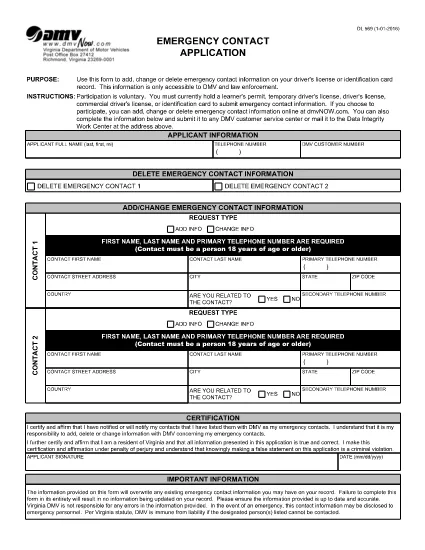
The DL 569 is the Virginia Department of Motor Vehicles (DMV) Emergency Contact Application. It lets you add, change, or delete emergency contact information linked to your driver’s license or state ID. Keeping this information up‑to‑date can help law enforcement and DMV staff reach your designated contacts quickly in an emergency.

What Is the DL 569 Form?

This form is a short, printable PDF that captures:

  • Primary and secondary emergency contacts
  • Relationship to you
  • Phone numbers and mailing address
  • Signature and date

Because it’s a fillable PDF, you can complete it directly in your browser without needing special software.

How to Fill Out the DL 569 Online

Instead of downloading the PDF and opening a separate editor, simply click the “Fill out this form” button on this page. The Formize PDF Filler will load instantly, allowing you to type, select, and sign the form online.

  1. Click Fill out this form below.
  2. The Formize PDF Filler app opens in a new tab.
  3. Enter each field carefully – the form will highlight required sections.
  4. Save your progress at any time with the Save button.
  5. When finished, click Submit to download the completed PDF.

Common Mistakes to Avoid

  • Leaving a required field blank – the filler will block submission.
  • Entering an incorrect phone format (use 10‑digit numbers without dashes).
  • Forgetting to sign and date the form.
  • Using a non‑Virginia address for a Virginia driver’s license.

Where to Submit Your Completed Form

After you download the completed PDF, you can:

  • Mail it to your local Virginia DMV office.
  • Drop it off in person at any DMV service center.
  • Upload it via the Virginia DMV online portal if you have an account.

Make sure to keep a copy for your records.

GYIK
  • Do I need Adobe Acrobat to fill out DL 569?

    No. The Formize PDF Filler works in any modern browser, so you can complete the form without installing additional software.

  • Can I edit the form after I download it?

    Yes, but you’ll need a PDF editor. To avoid extra steps, finish all edits in the online filler before downloading.

  • Is there a fee to submit the DL 569?

    No. The Emergency Contact Application is free to complete and submit.

  • How long does the DMV keep my emergency contact information?

    The DMV retains the information as long as your driver’s license or ID is active. Update the form whenever contacts change.

  • What if I make a mistake on the form?

    Simply reopen the fillable PDF, correct the error, and download a new version before submitting.

  • Can I submit the form electronically?

    Yes, if you have a Virginia DMV online account you can upload the completed PDF directly through the portal.

  • Do I need to provide both a primary and secondary contact?

    Providing a secondary contact is optional but recommended for added safety.

  • Is the DL 569 accepted for non‑Virginia licenses?

    The form is specific to Virginia driver’s licenses and state IDs only.

HOGYAN KELL

A(z) DL 569 ingyenes online kitöltése 5 egyszerű lépésben:

  1. 1
    Open the Fillable Form
    Click the "Fill out this form" button below. The Formize PDF Filler loads instantly in a new browser tab.
  2. 2
    Enter Your Information
    Type your emergency contacts, relationship, phone numbers, and address directly into the highlighted fields.
  3. 3
    Save and Review
    Use the Save button to keep a draft. Review each entry for accuracy before finalizing.
  4. 4
    Submit and Download
    When all fields are completed, click Submit to generate a finished PDF. Download and keep a copy for your records.
  5. 5
    Send to the DMV
    Mail, drop off, or upload the completed PDF to your nearest Virginia DMV office.
PDF-kitöltő alkalmazás formázása
RÓL RŐL

Vezetői engedély igénylőlapok

A legtöbb országban kötelező a vezetői engedély megléte, mielőtt elindulhat az út. A vezetői engedély megszerzése fontos mérföldkő mindenkinek, aki autót szeretne vezetni.

A DL 569 az egyik vezetői engedélykérelmező űrlap, amely olyan dokumentumok, amelyek segítségével információkat gyűjtenek azoktól az emberektől, akik jogosítványt szeretnének igényelni. Általában tartalmazza a kérelmező nevét, születési idejét, azonosító számát, elérhetőségét, valamint a jogosítvány előzményeit és tapasztalatait tartalmazó mezőket.

JELLEMZŐK

PDF kitöltő

A PDF űrlapok online kitöltésének legegyszerűbb módja

  • Gyorsan töltse ki a következőt: DL 569
    Módot keres a(z) DL 569 online gyors kitöltésére? Online ingyenes PDF űrlapkitöltőnkkel tudni fogja, hogyan kell szerkeszteni és kitölteni ezt a pdf dokumentumot kevesebb mint egy perc alatt.
  • Könnyen használható online PDF szerkesztő
    Eleged van abból, hogy kinyomtatja a PDF-fájlokat, hogy szerkeszthesse őket, mielőtt újra beolvassa és visszaküldi őket? PDF dokumentumok szerkesztése ingyen online. Használja online pdf-szerkesztőnket, hogy időt és papírt takarítson meg.
  • Remek eszközök, minden platformon
    Kíváncsi arra, hogyan töltse ki a DL 569 mezőt Mac számítógépen, vagy hogyan használhat ingyenes PDF-kitöltőt? Online PDF eszközeink minden platformon működnek.
  • Biztonságos fájltárolás
    A befejezett „DL 569” fájlokat az Amazon Cloud hosting által kezelt, biztonságos adatbázisban tároljuk. Fájljait bármikor törölheti rendszerünkből. Mindenesetre ezek a fájlok 24 óra elteltével automatikusan törlődnek.
  • Csevegés DL 569 felhasználóval
    Csevegés "DL 569" felhasználóval a Chatize oldalon, amely egy ingyenes PDF-olvasó segéd. Tegyen fel kérdéseket, és kapjon választ a következőtől: "DL 569". Csak kattintson a fenti Csevegés dokumentummal gombra.

Kitöltési munkamenet törlése

Törli a kiválasztott kitöltési munkamenetet? Ebben az esetben az űrlap kitöltésének előrehaladása elvész.

Szerkesztési munkamenet törlése

Törli a kiválasztott szerkesztési munkamenetet? Ebben az esetben az űrlap létrehozásának és szerkesztésének előrehaladása elvész.