
Válasszon nyelvet

Visual Examination Report – Fillable PDF for Washington State Drivers

  1. Nyelv angol
  2. Ország USA
  3. Tevékenység Jogsi
  4. Állapot Washington
Visual Examination Report – Fillable PDF for Washington State Drivers

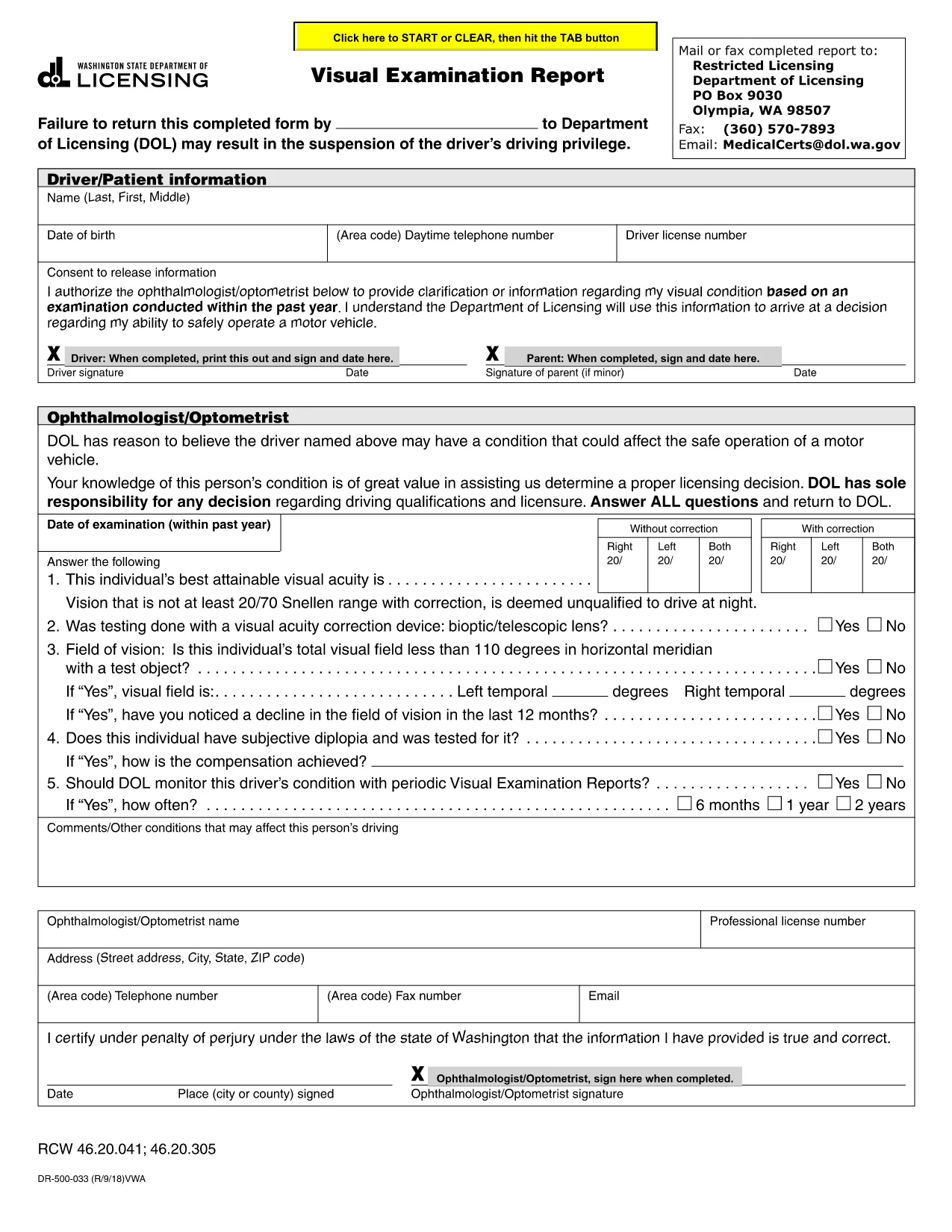
The Visual Examination Report is a mandatory medical form used by the Washington State Department of Licensing (DOL) to verify that a driver meets the vision standards required for a valid driver’s license. Historically, drivers had to print, fill out by hand, and mail the form, but with Formize’s fillable PDF you can complete it online in minutes.

What Is the Visual Examination Report?

This form collects essential information about a driver’s visual acuity, field of vision, and any corrective lenses required. A licensed physician, optometrist, or ophthalmologist must sign the report, confirming that the driver meets the state’s vision requirements.

Why Use a Fillable PDF Form?

  • Fast & secure: No printing or scanning required.
  • Auto‑save: Your progress is saved as you type.
  • Built‑in validation: Prevents missing or incorrect entries.
  • Direct submission: Download the completed PDF and upload it to the DOL portal or attach it to an email.

Step‑by‑Step Guide to Completing the Report

Follow the simple steps below to finish the Visual Examination Report using Formize’s PDF filler.

Common Mistakes to Avoid

  • Leaving the physician’s signature section blank.
  • Entering vision numbers without the required units (e.g., 20/40 instead of 20/40).
  • Submitting an outdated form version – always use the latest PDF provided below.

Where to Submit Your Completed Form

After you download the filled PDF, you can:

  • Upload it directly to the Washington DOL online portal.
  • Mail it to the address listed on the form.
  • Bring a printed copy to your nearest licensing office.

Need help? Review the FAQs below or contact your eye‑care professional for clarification.

GYIK
  • Who can complete the Visual Examination Report?

    Only a licensed physician, optometrist, or ophthalmologist authorized to practice in Washington can fill out and sign the report.

  • Do I need to print the form after filling it online?

    No. You can download the completed PDF and upload it directly to the DOL website, or email it to the licensing office.

  • What vision standards must I meet?

    Washington requires a visual acuity of at least 20/40 in each eye, with or without corrective lenses, and a normal field of vision.

  • Can I use a scanned copy of a handwritten form?

    A scanned handwritten form is accepted but may cause processing delays. Using the fillable PDF ensures faster review.

  • How long is the Visual Examination Report valid?

    The report is valid for 12 months from the date of the physician’s signature. After that, a new exam is required.

  • What should I do if I make a mistake while filling the form?

    Use the “Reset” button in the Formize filler to clear the field, or simply edit the incorrect entry before downloading.

  • Is there a fee to submit the Visual Examination Report?

    There is no separate fee for the report itself, but the Washington DOL may charge a processing fee for license renewal or replacement.

HOGYAN KELL

A(z) visual examination report ingyenes online kitöltése 5 egyszerű lépésben:

  1. 1
    Open the Fillable Form
    Click the “Fill out this form” button on the page. The Formize PDF Filler app will open in a new tab.
  2. 2
    Wait for the Filler to Load
    The app loads the visual examination report automatically. This may take a few seconds depending on your connection.
  3. 3
    Enter the Required Information
    Complete each field – driver details, vision test results, and physician’s certification. Use the drop‑down menus where provided.
  4. 4
    Review and Sign
    Double‑check all entries for accuracy. The physician can add a digital signature directly in the filler.
  5. 5
    Download or Submit
    When finished, click “Download PDF” to save a copy or use the “Submit” button to send it straight to the Washington DOL portal.
PDF-kitöltő alkalmazás formázása
RÓL RŐL

Vezetői engedély igénylőlapok

A legtöbb országban kötelező a vezetői engedély megléte, mielőtt elindulhat az út. A vezetői engedély megszerzése fontos mérföldkő mindenkinek, aki autót szeretne vezetni.

A visual examination report az egyik vezetői engedélykérelmező űrlap, amely olyan dokumentumok, amelyek segítségével információkat gyűjtenek azoktól az emberektől, akik jogosítványt szeretnének igényelni. Általában tartalmazza a kérelmező nevét, születési idejét, azonosító számát, elérhetőségét, valamint a jogosítvány előzményeit és tapasztalatait tartalmazó mezőket.

JELLEMZŐK

PDF kitöltő

A PDF űrlapok online kitöltésének legegyszerűbb módja

  • Gyorsan töltse ki a következőt: visual examination report
    Módot keres a(z) visual examination report online gyors kitöltésére? Online ingyenes PDF űrlapkitöltőnkkel tudni fogja, hogyan kell szerkeszteni és kitölteni ezt a pdf dokumentumot kevesebb mint egy perc alatt.
  • Könnyen használható online PDF szerkesztő
    Eleged van abból, hogy kinyomtatja a PDF-fájlokat, hogy szerkeszthesse őket, mielőtt újra beolvassa és visszaküldi őket? PDF dokumentumok szerkesztése ingyen online. Használja online pdf-szerkesztőnket, hogy időt és papírt takarítson meg.
  • Remek eszközök, minden platformon
    Kíváncsi arra, hogyan töltse ki a visual examination report mezőt Mac számítógépen, vagy hogyan használhat ingyenes PDF-kitöltőt? Online PDF eszközeink minden platformon működnek.
  • Biztonságos fájltárolás
    A befejezett „visual examination report” fájlokat az Amazon Cloud hosting által kezelt, biztonságos adatbázisban tároljuk. Fájljait bármikor törölheti rendszerünkből. Mindenesetre ezek a fájlok 24 óra elteltével automatikusan törlődnek.
  • Csevegés visual examination report felhasználóval
    Csevegés "visual examination report" felhasználóval a Chatize oldalon, amely egy ingyenes PDF-olvasó segéd. Tegyen fel kérdéseket, és kapjon választ a következőtől: "visual examination report". Csak kattintson a fenti Csevegés dokumentummal gombra.

Kitöltési munkamenet törlése

Törli a kiválasztott kitöltési munkamenetet? Ebben az esetben az űrlap kitöltésének előrehaladása elvész.

Szerkesztési munkamenet törlése

Törli a kiválasztott szerkesztési munkamenetet? Ebben az esetben az űrlap létrehozásának és szerkesztésének előrehaladása elvész.