
Válasszon nyelvet

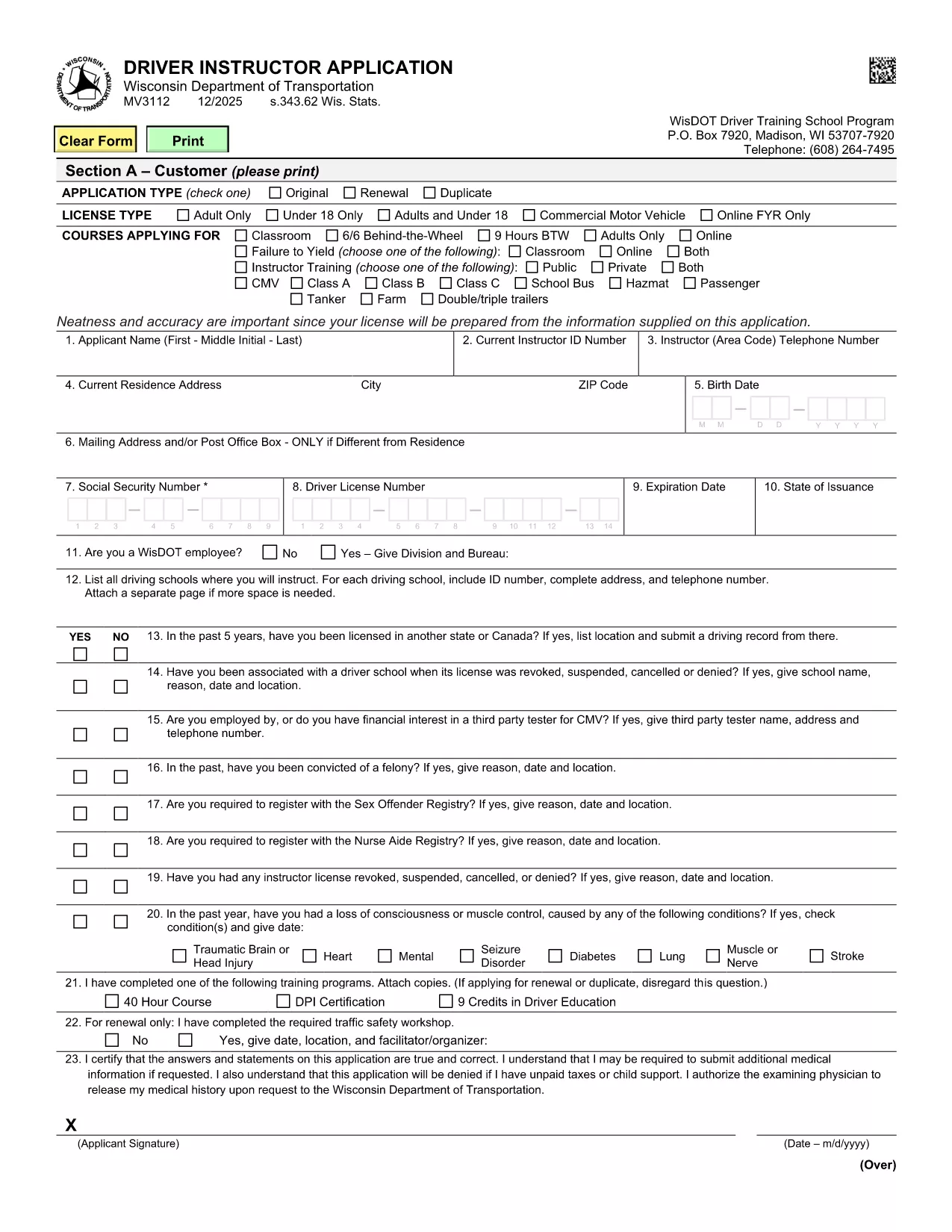
Wisconsin MV3112 Driver Instructor Application – Fillable PDF

  1. Nyelv angol
  2. Ország USA
  3. Tevékenység Jogsi
  4. Állapot Wisconsin
Wisconsin MV3112 Driver Instructor Application – Fillable PDF

The MV3112 is the official Driver Instructor Application required by the Wisconsin Department of Transportation (WisDOT). Whether you’re starting a new driver‑training school or adding an instructor to an existing program, this form must be completed, signed, and submitted before you can begin teaching.

Formize makes the MV3112 completely fillable online. No more printing, scanning, or hand‑writing. Simply click the “Fill out this form” button, enter your information, and download a completed PDF ready for submission.

What Is the MV3112 Form?

The MV3112 collects personal data, driving history, medical qualifications, and background information about the applicant. It also includes a certification section where you attest that all statements are true and that you meet WisDOT’s eligibility criteria.

How to Complete the MV3112 Online

Follow these quick steps to fill the form using Formize’s PDF Filler:

  • Click the Fill out this form button on this page.
  • Wait for the Formize PDF Filler to load (a few seconds).
  • Enter all required information in the highlighted fields.
  • Upload any supporting documents (e.g., medical clearance, driver record).
  • Save the completed PDF, print it, sign where required, and mail it to WisDOT.

Common Mistakes to Avoid

Even a small error can delay your application. Keep these tips in mind:

  • Missing signatures: Every signature box must be signed in ink after printing.
  • Incomplete medical info: Attach the most recent medical examination if requested.
  • Incorrect fee amount: Verify the current fee on WisDOT’s website before mailing.
  • Out‑of‑date driver record: Use a driver record dated within the last 90 days.

Submission Guidelines & Fees

After you’ve filled and printed the form, mail it to:

Wisconsin Department of Transportation
Division of Driver Services
P.O. Box 7448
Madison, WI 53707‑7448

Include the application fee (check the latest WisDOT fee schedule) and any required medical documentation. Processing typically takes 10‑14 business days.

Need Help? Frequently Asked Questions

Below are answers to the most common questions about the MV3112.

GYIK
  • Who is eligible to use the MV3112 form?

    Any individual who wishes to become a licensed driver instructor in Wisconsin, including those starting a new school or joining an existing one.

  • Do I need a medical examination?

    A medical exam is required only if WisDOT requests it. Attach a current medical report (within 60 days) when requested.

  • What is the application fee?

    The fee varies; check WisDOT’s current fee schedule on their website before submitting the form.

  • Can I submit the MV3112 electronically?

    WisDOT currently requires a printed, signed copy. The online filler speeds up data entry, but you must mail the final PDF.

  • How long does processing take?

    Standard processing is 10‑14 business days after WisDOT receives the complete, signed application.

  • What should I do if I make a mistake on the form?

    Correct any errors before printing. If you discover a mistake after mailing, contact WisDOT to request a replacement form.

  • Is there a deadline for submitting the MV3112?

    There is no fixed deadline, but you should submit the application before you begin any instructor activities to avoid penalties.

  • Where can I find additional guidance?

    Visit the WisDOT Driver Services website for detailed instructions, fee information, and contact details for further assistance.

HOGYAN KELL

A(z) MV3112 ingyenes online kitöltése 5 egyszerű lépésben:

  1. 1
    Open the Fillable Form
    Click the “Fill out this form” button on this page. The Formize PDF Filler will open in a new tab.
  2. 2
    Enter Your Information
    Type your details into each highlighted field. Use the drop‑down menus where available for easy selection.
  3. 3
    Upload Supporting Documents
    Attach required files such as medical clearance or a recent driver record using the upload icons.
  4. 4
    Save and Print
    When every field is completed, click “Save PDF”. Print the document, sign the required sections in ink, and prepare it for mailing.
  5. 5
    Submit to WisDOT
    Mail the signed PDF along with the application fee to the WisDOT address listed on the form.
PDF-kitöltő alkalmazás formázása
RÓL RŐL

Vezetői engedély igénylőlapok

A legtöbb országban kötelező a vezetői engedély megléte, mielőtt elindulhat az út. A vezetői engedély megszerzése fontos mérföldkő mindenkinek, aki autót szeretne vezetni.

A MV3112 az egyik vezetői engedélykérelmező űrlap, amely olyan dokumentumok, amelyek segítségével információkat gyűjtenek azoktól az emberektől, akik jogosítványt szeretnének igényelni. Általában tartalmazza a kérelmező nevét, születési idejét, azonosító számát, elérhetőségét, valamint a jogosítvány előzményeit és tapasztalatait tartalmazó mezőket.

JELLEMZŐK

PDF kitöltő

A PDF űrlapok online kitöltésének legegyszerűbb módja

  • Gyorsan töltse ki a következőt: MV3112
    Módot keres a(z) MV3112 online gyors kitöltésére? Online ingyenes PDF űrlapkitöltőnkkel tudni fogja, hogyan kell szerkeszteni és kitölteni ezt a pdf dokumentumot kevesebb mint egy perc alatt.
  • Könnyen használható online PDF szerkesztő
    Eleged van abból, hogy kinyomtatja a PDF-fájlokat, hogy szerkeszthesse őket, mielőtt újra beolvassa és visszaküldi őket? PDF dokumentumok szerkesztése ingyen online. Használja online pdf-szerkesztőnket, hogy időt és papírt takarítson meg.
  • Remek eszközök, minden platformon
    Kíváncsi arra, hogyan töltse ki a MV3112 mezőt Mac számítógépen, vagy hogyan használhat ingyenes PDF-kitöltőt? Online PDF eszközeink minden platformon működnek.
  • Biztonságos fájltárolás
    A befejezett „MV3112” fájlokat az Amazon Cloud hosting által kezelt, biztonságos adatbázisban tároljuk. Fájljait bármikor törölheti rendszerünkből. Mindenesetre ezek a fájlok 24 óra elteltével automatikusan törlődnek.
  • Csevegés MV3112 felhasználóval
    Csevegés "MV3112" felhasználóval a Chatize oldalon, amely egy ingyenes PDF-olvasó segéd. Tegyen fel kérdéseket, és kapjon választ a következőtől: "MV3112". Csak kattintson a fenti Csevegés dokumentummal gombra.

Kitöltési munkamenet törlése

Törli a kiválasztott kitöltési munkamenetet? Ebben az esetben az űrlap kitöltésének előrehaladása elvész.

Szerkesztési munkamenet törlése

Törli a kiválasztott szerkesztési munkamenetet? Ebben az esetben az űrlap létrehozásának és szerkesztésének előrehaladása elvész.