Válasszon nyelvet

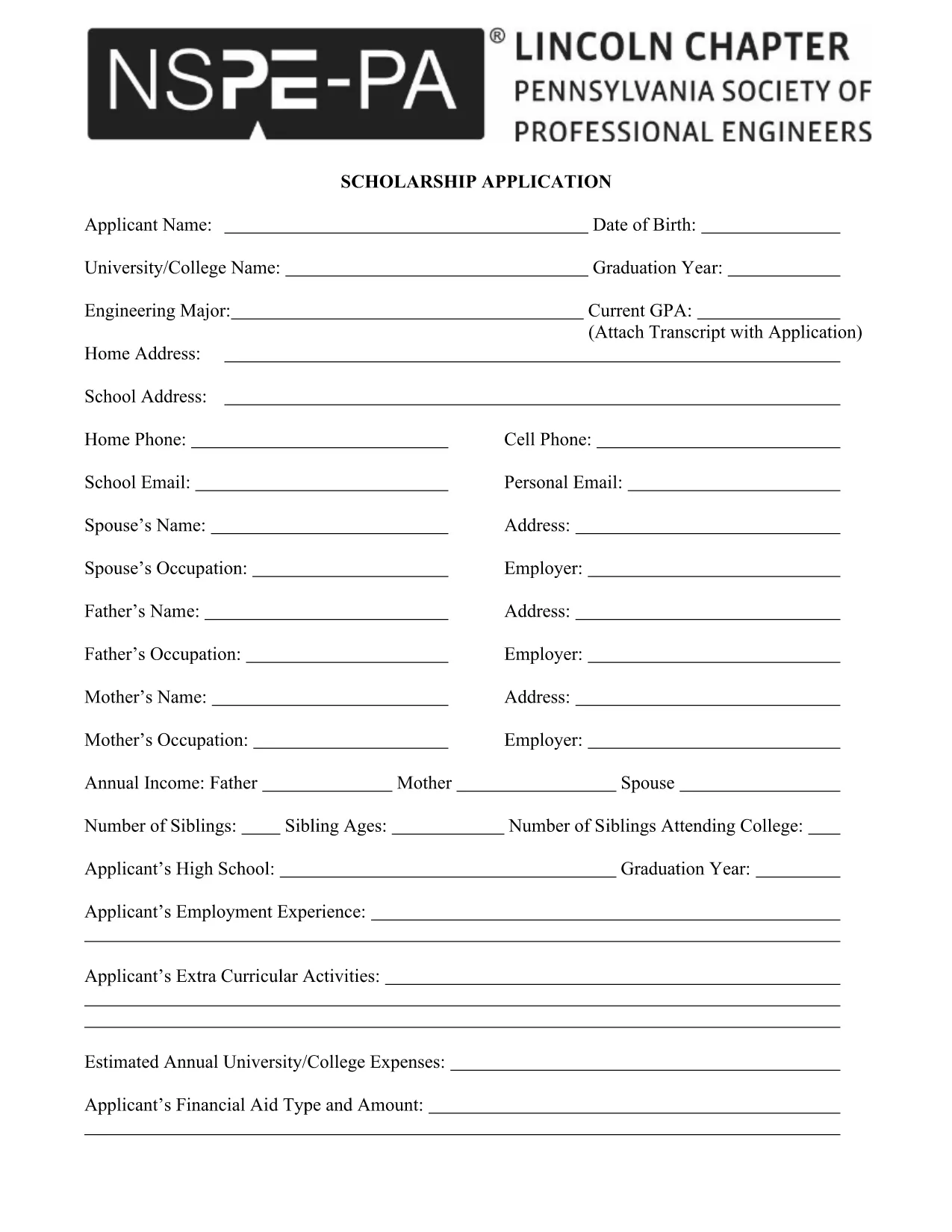
PSPE Scholarship Application Form (Fillable PDF)

  1. Ország USA
  2. Nyelv angol
  3. Tevékenység Scholarships
  4. Osztály Education
PSPE Scholarship Application Form (Fillable PDF)

The PSPE scholarship application is a fillable PDF that lets students apply for financial aid with ease. Instead of printing, printing, and scanning, you can complete the entire form directly in your browser using the Formize PDF Filler.

Why Choose the PSPE Scholarship?

PSPE (Professional Society for Engineers) offers scholarships to high‑school seniors and college students pursuing engineering degrees. The award helps cover tuition, books, and project costs, giving you a head start in your engineering career.

How to Fill the PSPE Application Online

Follow these simple steps to complete the form without leaving the page:

  1. Click the "Fill out this form" button below.
  2. Wait a few seconds while the Formize PDF Filler app loads.
  3. Enter your personal information, academic history, and essay responses directly into the fillable fields.
  4. Use the "Save" button to store a copy on your device or cloud storage.
  5. When you’re satisfied, click "Submit" to download the completed PDF for email or upload.

Common Mistakes to Avoid

  • Leaving required fields blank: The filler highlights empty required sections in red.
  • Exceeding word limits: Keep essays within the specified word count (usually 200‑words).
  • Using the wrong file format: This form is a PDF; do not convert it to Word or Excel before filling.
  • Not saving a backup: Always click "Save" before closing the browser.

Submit Your Completed Form Securely

After you finish, download the filled PDF and attach it to the official PSPE submission email or upload portal. The PDF retains all your entries, signatures, and timestamps, ensuring a professional presentation.

Ready to start? Click the button below and let Formize do the heavy lifting for you.

GYIK
  • Do I need Adobe Acrobat to fill the PSPE form?

    No. The Formize PDF Filler works directly in your browser, so no extra software is required.

  • Can I save my progress and finish later?

    Yes. Use the "Save" button to download a partially completed PDF, then reopen it in Formize to continue.

  • What file format should I submit?

    Submit the final document as a PDF. The fillable PDF retains all entered data and signatures.

  • Is there a word limit for the essay section?

    The PSPE guidelines require a minimum of 200 words. The filler shows a live word count to help you stay within limits.

  • Can I print a hard copy after filling the form?

    Absolutely. After saving, open the PDF in any viewer and print it like any other document.

  • What if I make a mistake after saving?

    Re‑open the saved PDF in Formize, correct the error, and save again. The form is fully editable.

  • Is my personal information secure?

    Formize processes the PDF locally in your browser; no data is stored on external servers unless you choose to upload it.

  • When is the deadline for the PSPE scholarship?

    Check the official PSPE website for the current application deadline; it is typically posted on the scholarship announcement page.

HOGYAN KELL

A(z) PSPE scholarship application ingyenes online kitöltése 4 egyszerű lépésben:

  1. 1
    Click the Fill Button
    Press the "Fill out this form" button on the page to launch the Formize PDF Filler.
  2. 2
    Wait for the Filler to Load
    A short loading screen appears; the fillable PDF will open automatically.
  3. 3
    Complete Each Section
    Enter your information, answer essay prompts, and double‑check required fields highlighted in red.
  4. 4
    Save and Submit
    Click "Save" to download the completed PDF, then email or upload it according to PSPE's submission guidelines.
PDF-kitöltő alkalmazás formázása
RÓL RŐL

PSPE scholarship application sablon

A PDF-dokumentumok megtekintésére és kitöltésére szolgáló hagyományos funkciókkal, valamint a webalkalmazás és az adaptív elrendezés előnyeivel percek alatt teljesítheti a PSPE scholarship application.

JELLEMZŐK

PDF kitöltő

A PDF űrlapok online kitöltésének legegyszerűbb módja

  • Gyorsan töltse ki a következőt: PSPE scholarship application
    Módot keres a(z) PSPE scholarship application online gyors kitöltésére? Online ingyenes PDF űrlapkitöltőnkkel tudni fogja, hogyan kell szerkeszteni és kitölteni ezt a pdf dokumentumot kevesebb mint egy perc alatt.
  • Könnyen használható online PDF szerkesztő
    Eleged van abból, hogy kinyomtatja a PDF-fájlokat, hogy szerkeszthesse őket, mielőtt újra beolvassa és visszaküldi őket? PDF dokumentumok szerkesztése ingyen online. Használja online pdf-szerkesztőnket, hogy időt és papírt takarítson meg.
  • Remek eszközök, minden platformon
    Kíváncsi arra, hogyan töltse ki a PSPE scholarship application mezőt Mac számítógépen, vagy hogyan használhat ingyenes PDF-kitöltőt? Online PDF eszközeink minden platformon működnek.
  • Biztonságos fájltárolás
    A befejezett „PSPE scholarship application” fájlokat az Amazon Cloud hosting által kezelt, biztonságos adatbázisban tároljuk. Fájljait bármikor törölheti rendszerünkből. Mindenesetre ezek a fájlok 24 óra elteltével automatikusan törlődnek.
  • Csevegés PSPE scholarship application felhasználóval
    Csevegés "PSPE scholarship application" felhasználóval a Chatize oldalon, amely egy ingyenes PDF-olvasó segéd. Tegyen fel kérdéseket, és kapjon választ a következőtől: "PSPE scholarship application". Csak kattintson a fenti Csevegés dokumentummal gombra.

Kitöltési munkamenet törlése

Törli a kiválasztott kitöltési munkamenetet? Ebben az esetben az űrlap kitöltésének előrehaladása elvész.

Szerkesztési munkamenet törlése

Törli a kiválasztott szerkesztési munkamenetet? Ebben az esetben az űrlap létrehozásának és szerkesztésének előrehaladása elvész.