Válasszon nyelvet

Youth Empowerment Services Application Form (Fillable PDF)

  1. Ország USA
  2. Nyelv angol
  3. Osztály Health and Human Services
  4. Tevékenység Youth Empowerment
Youth Empowerment Services Application Form (Fillable PDF)

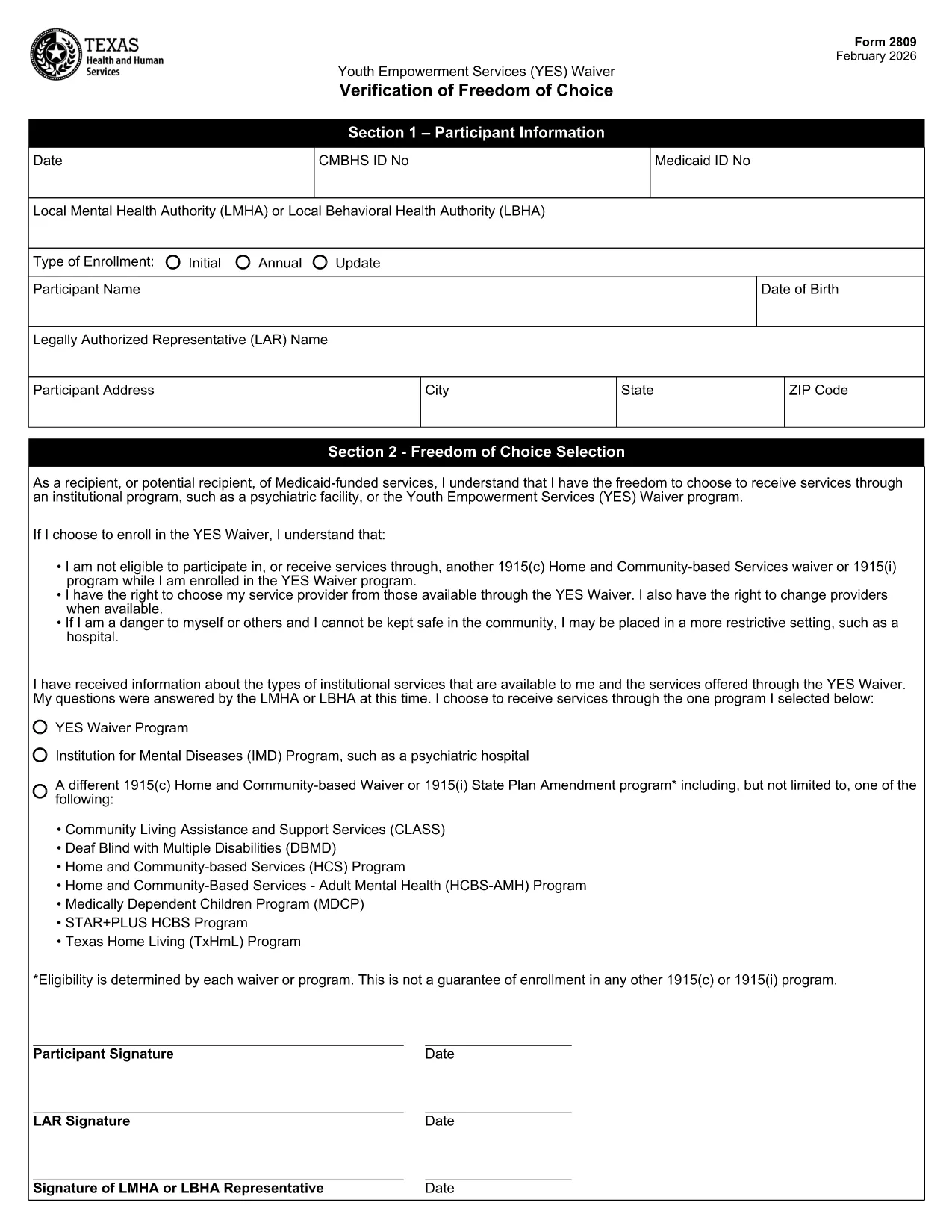
Looking for a quick, paper‑less way to apply for Youth Empowerment Services (YES) in Texas? The official YES Waiver Verification Form (Form 2809) is now available as a fillable PDF on Formize. You can complete the entire application online, save a copy for your records, and submit it without ever printing a single page.

This page explains everything you need to know about the form, the sections you’ll encounter, and best practices to avoid common errors.

What Is the Youth Empowerment Application?

The Youth Empowerment Services (YES) Waiver Verification is used by local mental health authorities (LMHA) or local behavioral health authorities (LBHA) to document a participant’s choice to receive community‑based services instead of institutional care. It serves as the official application for eligibility and enrollment in the YES program.

How to Fill the Form Online

Instead of downloading the PDF and opening it in a separate editor, simply click the "Fill out this form" button on this page. The Formize PDF Filler app will load automatically, allowing you to type directly into each field.

Key Sections & Required Information

  • Date & IDs: Enter the current date, CMBHS ID, and Medicaid ID.
  • Participant Details: Full name, date of birth, and contact address.
  • Legal Authorized Representative (LAR): Name and signature of the LAR.
  • Choice of Service: Select the YES Waiver program or an alternative option.
  • Signatures: Participant (or X mark), LAR, and LMHA/LBHA representative.

Common Mistakes to Avoid

  • Leaving required fields blank – the form will not save until every mandatory field is completed.
  • Using an illegible signature – type your name or use the built‑in signature tool for a clear, printable mark.
  • Choosing the wrong enrollment type (Initial vs. Annual) – verify the purpose of your submission before selecting.
  • Entering outdated ID numbers – double‑check your CMBHS and Medicaid numbers with your provider.

Download & Print Options

If you still prefer a hard copy, you can download the completed PDF after filling it out and print it using any standard printer. The file remains fully editable until you finalize and save the document.

Ready to start? Click the button below, fill out the form in seconds, and take the next step toward youth empowerment.

GYIK
  • Is the Youth Empowerment Services form free to use?

    Yes. The fillable PDF is provided at no cost, and Formize lets you complete it online for free.

  • Can I edit the form after I’ve saved it?

    As long as you keep the file in its original fillable format, you can reopen it in Formize and make changes.

  • Do I need Adobe Reader to fill out the form?

    No. Formize’s web‑based PDF filler works in any modern browser without additional software.

  • What happens if I make a mistake in a required field?

    The Formize validator will highlight missing or incorrect entries, preventing you from saving until they’re corrected.

  • How do I submit the completed form to the authorities?

    Download the finished PDF and follow the submission instructions from your LMHA or LBHA—usually via secure email or a physical drop‑off.

  • Is my personal information safe when using Formize?

    Formize uses SSL encryption for all data transmitted between your browser and our servers, ensuring your information remains private.

  • Can I print a hard copy after filling it out online?

    Absolutely. After saving, click the download button and print the PDF like any standard document.

  • Do I need a Texas address to use this form?

    The YES Waiver Verification is specific to Texas youth empowerment programs, so a Texas residency or enrollment through a Texas authority is required.

HOGYAN KELL

A(z) youth empowerment application ingyenes online kitöltése 4 egyszerű lépésben:

  1. 1
    Open the Fillable Form
    Click the "Fill out this form" button on the page. The Formize PDF Filler loads in your browser.
  2. 2
    Complete All Required Fields
    Enter dates, IDs, participant details, and select the appropriate enrollment type. Use the signature tool for signatures.
  3. 3
    Save and Download
    When you finish, click "Save". You can download the completed PDF for your records or print it if needed.
  4. 4
    Submit the Application
    Send the saved PDF to your local mental health authority (LMHA) or behavioral health authority (LBHA) as instructed.
PDF-kitöltő alkalmazás formázása
RÓL RŐL

youth empowerment application sablon

A PDF-dokumentumok megtekintésére és kitöltésére szolgáló hagyományos funkciókkal, valamint a webalkalmazás és az adaptív elrendezés előnyeivel percek alatt teljesítheti a youth empowerment application.

JELLEMZŐK

PDF kitöltő

A PDF űrlapok online kitöltésének legegyszerűbb módja

  • Gyorsan töltse ki a következőt: youth empowerment application
    Módot keres a(z) youth empowerment application online gyors kitöltésére? Online ingyenes PDF űrlapkitöltőnkkel tudni fogja, hogyan kell szerkeszteni és kitölteni ezt a pdf dokumentumot kevesebb mint egy perc alatt.
  • Könnyen használható online PDF szerkesztő
    Eleged van abból, hogy kinyomtatja a PDF-fájlokat, hogy szerkeszthesse őket, mielőtt újra beolvassa és visszaküldi őket? PDF dokumentumok szerkesztése ingyen online. Használja online pdf-szerkesztőnket, hogy időt és papírt takarítson meg.
  • Remek eszközök, minden platformon
    Kíváncsi arra, hogyan töltse ki a youth empowerment application mezőt Mac számítógépen, vagy hogyan használhat ingyenes PDF-kitöltőt? Online PDF eszközeink minden platformon működnek.
  • Biztonságos fájltárolás
    A befejezett „youth empowerment application” fájlokat az Amazon Cloud hosting által kezelt, biztonságos adatbázisban tároljuk. Fájljait bármikor törölheti rendszerünkből. Mindenesetre ezek a fájlok 24 óra elteltével automatikusan törlődnek.
  • Csevegés youth empowerment application felhasználóval
    Csevegés "youth empowerment application" felhasználóval a Chatize oldalon, amely egy ingyenes PDF-olvasó segéd. Tegyen fel kérdéseket, és kapjon választ a következőtől: "youth empowerment application". Csak kattintson a fenti Csevegés dokumentummal gombra.

Kitöltési munkamenet törlése

Törli a kiválasztott kitöltési munkamenetet? Ebben az esetben az űrlap kitöltésének előrehaladása elvész.

Szerkesztési munkamenet törlése

Törli a kiválasztott szerkesztési munkamenetet? Ebben az esetben az űrlap létrehozásának és szerkesztésének előrehaladása elvész.