Válasszon nyelvet

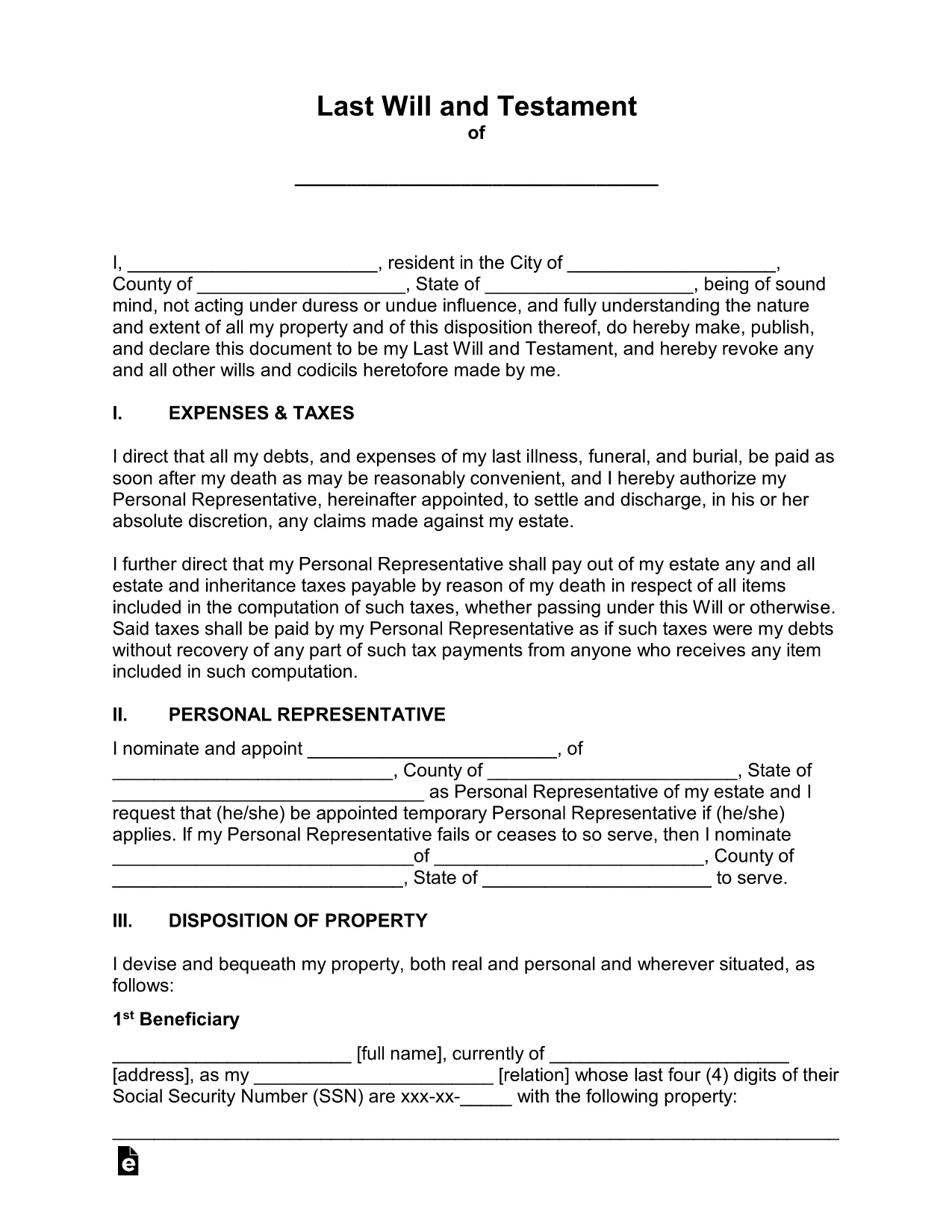
Free Fillable Legal Will Form Template

  1. Ország USA
  2. Nyelv angol
  3. Osztály Legal
  4. Tevékenység Estate Planning
Free Fillable Legal Will Form Template

Planning for the future has never been easier. Our free fillable legal will form lets you create a binding Last Will and Testament in minutes—no printer, no fax, no attorney fees.

Why Use a Fillable Will Form?

Traditional paper wills require careful handwriting, legible printing, and often a notary. A fillable PDF eliminates those hassles. You can type directly into each field, save changes, and securely store the document online. The form complies with U.S. estate‑planning standards, making it suitable for most states.

How to Complete the Legal Will Form Online

Simply click the "Fill out this form" button on this page. The Formize PDF Filler app will load in your browser, and you can start entering your information right away. No extra software download is needed.

Common Mistakes to Avoid When Drafting a Will

  • Leaving fields blank – every section should be completed or marked as "N/A".
  • Using vague language – be specific about assets, beneficiaries, and guardians.
  • Forgetting to sign and date – an unsigned will is not legally enforceable.
  • Not updating the will after major life events – revisit the form after marriage, divorce, birth, or purchase of significant assets.

Key Sections of the Will Template

The template includes:

  • Testator Information – your full legal name and address.
  • Executor Appointment – who will manage your estate.
  • Beneficiary Designations – how assets are distributed.
  • Guardian Selection – for minor children or dependents.
  • Signature & Witnesses – legal signing requirements.

When you finish, click Save to download a completed PDF, then print, sign, and store it in a safe place.

GYIK
  • Is a fillable PDF will legally binding?

    Yes, as long as it is signed, dated, and witnessed according to your state’s requirements, a fillable PDF has the same legal effect as a handwritten will.

  • Do I need a notary for this will?

    Most states do not require a notary for a will, but they do require two disinterested witnesses. Check your local laws for any specific requirements.

  • Can I edit the form after I download it?

    After you download the completed PDF, you can reopen it in Formize’s editor to make further changes, but you’ll need to re‑sign any edited sections.

  • What if I have a large estate with many assets?

    The template includes sections for real property, personal belongings, financial accounts, and digital assets. You can add supplemental schedules if needed.

  • How should I store my finished will?

    Store the signed original in a fire‑proof safe, and give copies to your executor, a trusted family member, or your attorney. Keep a digital copy in a secure cloud service.

  • Is this form suitable for all U.S. states?

    The template follows general U.S. will‑making principles and works in most states. However, some states have unique provisions (e.g., community property). Review local statutes or consult an attorney if you have specific concerns.

HOGYAN KELL

A(z) legal will form ingyenes online kitöltése 5 egyszerű lépésben:

  1. 1
    Open the Fillable Form
    Click the "Fill out this form" button on the page. The Formize PDF Filler will launch directly in your browser.
  2. 2
    Wait for the Filler to Load
    A few seconds may pass while the app loads. Once ready, you’ll see editable fields highlighted in blue.
  3. 3
    Enter Your Information
    Type your personal details, executor name, beneficiaries, and any guardians into the appropriate sections.
  4. 4
    Review and Validate
    Double‑check each entry for accuracy. Use the built‑in validation to catch missed required fields.
  5. 5
    Sign & Download
    Add your electronic signature, have the required witnesses sign, then click "Download" to save the completed will to your device.
PDF-kitöltő alkalmazás formázása
RÓL RŐL

legal will form sablon

A PDF-dokumentumok megtekintésére és kitöltésére szolgáló hagyományos funkciókkal, valamint a webalkalmazás és az adaptív elrendezés előnyeivel percek alatt teljesítheti a legal will form.

JELLEMZŐK

PDF kitöltő

A PDF űrlapok online kitöltésének legegyszerűbb módja

  • Gyorsan töltse ki a következőt: legal will form
    Módot keres a(z) legal will form online gyors kitöltésére? Online ingyenes PDF űrlapkitöltőnkkel tudni fogja, hogyan kell szerkeszteni és kitölteni ezt a pdf dokumentumot kevesebb mint egy perc alatt.
  • Könnyen használható online PDF szerkesztő
    Eleged van abból, hogy kinyomtatja a PDF-fájlokat, hogy szerkeszthesse őket, mielőtt újra beolvassa és visszaküldi őket? PDF dokumentumok szerkesztése ingyen online. Használja online pdf-szerkesztőnket, hogy időt és papírt takarítson meg.
  • Remek eszközök, minden platformon
    Kíváncsi arra, hogyan töltse ki a legal will form mezőt Mac számítógépen, vagy hogyan használhat ingyenes PDF-kitöltőt? Online PDF eszközeink minden platformon működnek.
  • Biztonságos fájltárolás
    A befejezett „legal will form” fájlokat az Amazon Cloud hosting által kezelt, biztonságos adatbázisban tároljuk. Fájljait bármikor törölheti rendszerünkből. Mindenesetre ezek a fájlok 24 óra elteltével automatikusan törlődnek.
  • Csevegés legal will form felhasználóval
    Csevegés "legal will form" felhasználóval a Chatize oldalon, amely egy ingyenes PDF-olvasó segéd. Tegyen fel kérdéseket, és kapjon választ a következőtől: "legal will form". Csak kattintson a fenti Csevegés dokumentummal gombra.

Kitöltési munkamenet törlése

Törli a kiválasztott kitöltési munkamenetet? Ebben az esetben az űrlap kitöltésének előrehaladása elvész.

Szerkesztési munkamenet törlése

Törli a kiválasztott szerkesztési munkamenetet? Ebben az esetben az űrlap létrehozásának és szerkesztésének előrehaladása elvész.