Válasszon nyelvet

USCIS Form G-1041 – Genealogy Index Search Request (Fillable PDF)

  1. Ország USA
  2. Nyelv angol
  3. Osztály Amerikai Állampolgársági és Bevándorlási Szolgálat
USCIS Form G-1041 – Genealogy Index Search Request (Fillable PDF)

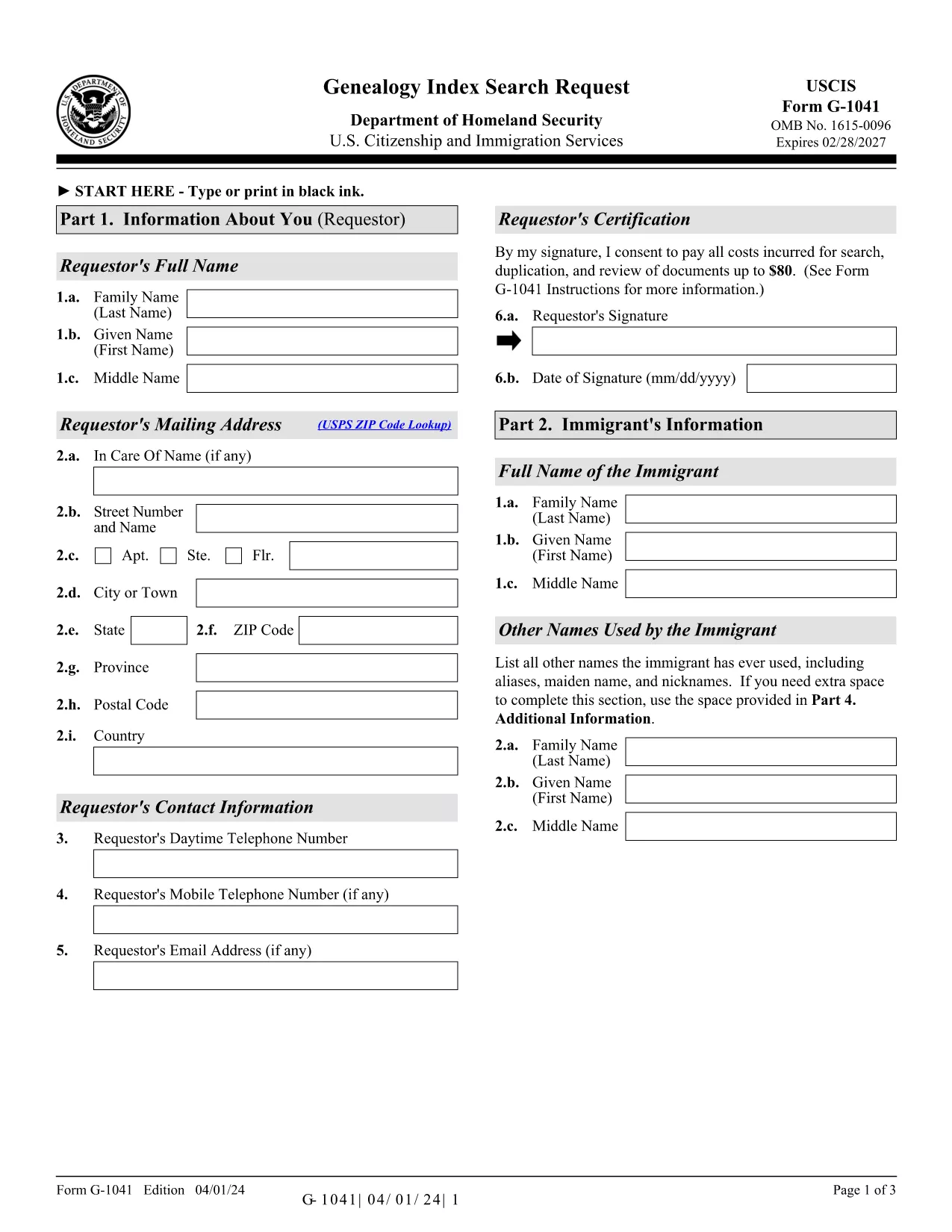
Form G-1041, the Genealogy Index Search Request, is the official USCIS form used to ask the agency to search its historical immigration records for a specific ancestor. This form is essential for anyone researching family history, preparing a citizenship application, or seeking proof of a relative’s immigration status.

The form is available as a fillable PDF that you can complete directly in your browser with Formize’s PDF Filler. No extra software is required – simply click the “Fill out this form” button, wait for the Formize app to load, and start entering your information.

Below you will find step‑by‑step instructions, helpful tips, and answers to the most common questions about Form G-1041.

Key features of the fillable G-1041 PDF:

  • All fields are interactive – you can type, select dates, and add check marks.
  • Automatic validation helps prevent common errors before you submit.
  • Electronic signature option saves you a trip to the printer.
  • Secure download of the official USCIS edition (04/01/24).

Remember to review the edition date at the bottom of each page; USCIS may reject forms that mix different editions.

GYIK
  • What is the purpose of Form G‑1041?

    Form G‑1041 requests USCIS to search its historical immigration indices for a specific individual. It is used for genealogy research, citizenship applications, and proof of immigration status.

  • Can I file Form G‑1041 online?

    Yes. USCIS offers an online filing option through its Genealogy Program page. The fillable PDF on Formize can also be completed online and then submitted electronically if the online portal is available.

  • Do I need to pay a fee to submit G‑1041?

    A filing fee is required for the search request. Check the USCIS Fee Schedule for the current amount and payment methods (credit/debit card, ACH, or prepaid card).

  • What supporting documents should I include?

    Include any evidence that helps identify the ancestor: death certificate (if under 100 years old), obituaries, gravestone photos, church records, or Social Security Death Index entries.

  • How long does USCIS take to respond?

    Response times vary, but USCIS typically replies within 30‑45 days after receiving a complete request and payment.

  • Can I sign the form with a handwritten signature?

    Yes, you may print, sign, and scan the form. However, the electronic signature option in Formize is faster and accepted by USCIS.

  • What edition of Form G‑1041 should I use?

    Always use the latest edition posted on the USCIS website. The current edition date is 04/01/24 and appears at the bottom of each page of the PDF.

  • Do I need to submit original documents?

    Only submit originals if USCIS specifically requests them. Otherwise, provide clear photocopies or digital scans along with certified English translations if needed.

  • Where do I mail the completed form?

    Mail the completed form, supporting documents, and payment to: USCIS Attn: Genealogy Program, P.O. Box 805925, Chicago, IL 60680‑4188.

  • What if I make a mistake after submitting?

    Contact the USCIS Genealogy Program as soon as possible. You may need to submit a corrected form with a brief explanation of the error.

HOGYAN KELL

A(z) G-1041 ingyenes online kitöltése 5 egyszerű lépésben:

  1. 1
    Click the Fill‑out Button
    On the Formize page, locate the bright “Fill out this form” button and click it. This launches the Formize PDF Filler in a new window.
  2. 2
    Wait for the PDF Filler to Load
    The Formize app loads the official G‑1041 PDF. A loading bar will appear; wait a few seconds for all fields to become interactive.
  3. 3
    Enter Your Information
    Fill in each required field: personal details, ancestor’s name, dates, and supporting evidence. Use the drop‑down menus and date pickers where available.
  4. 4
    Review and Sign Electronically
    Double‑check the entered data for accuracy. When you’re satisfied, use the electronic signature field to sign the form.
  5. 5
    Submit or Download the Completed Form
    You can either submit the completed PDF directly to USCIS through their online portal (if available) or download the signed PDF to mail it to the Chicago Lockbox.
PDF-kitöltő alkalmazás formázása
RÓL RŐL

G-1041 sablon

A PDF-dokumentumok megtekintésére és kitöltésére szolgáló hagyományos funkciókkal, valamint a webalkalmazás és az adaptív elrendezés előnyeivel percek alatt teljesítheti a G-1041.

JELLEMZŐK

PDF kitöltő

A PDF űrlapok online kitöltésének legegyszerűbb módja

  • Gyorsan töltse ki a következőt: G-1041
    Módot keres a(z) G-1041 online gyors kitöltésére? Online ingyenes PDF űrlapkitöltőnkkel tudni fogja, hogyan kell szerkeszteni és kitölteni ezt a pdf dokumentumot kevesebb mint egy perc alatt.
  • Könnyen használható online PDF szerkesztő
    Eleged van abból, hogy kinyomtatja a PDF-fájlokat, hogy szerkeszthesse őket, mielőtt újra beolvassa és visszaküldi őket? PDF dokumentumok szerkesztése ingyen online. Használja online pdf-szerkesztőnket, hogy időt és papírt takarítson meg.
  • Remek eszközök, minden platformon
    Kíváncsi arra, hogyan töltse ki a G-1041 mezőt Mac számítógépen, vagy hogyan használhat ingyenes PDF-kitöltőt? Online PDF eszközeink minden platformon működnek.
  • Biztonságos fájltárolás
    A befejezett „G-1041” fájlokat az Amazon Cloud hosting által kezelt, biztonságos adatbázisban tároljuk. Fájljait bármikor törölheti rendszerünkből. Mindenesetre ezek a fájlok 24 óra elteltével automatikusan törlődnek.
  • Csevegés G-1041 felhasználóval
    Csevegés "G-1041" felhasználóval a Chatize oldalon, amely egy ingyenes PDF-olvasó segéd. Tegyen fel kérdéseket, és kapjon választ a következőtől: "G-1041". Csak kattintson a fenti Csevegés dokumentummal gombra.

Kitöltési munkamenet törlése

Törli a kiválasztott kitöltési munkamenetet? Ebben az esetben az űrlap kitöltésének előrehaladása elvész.

Szerkesztési munkamenet törlése

Törli a kiválasztott szerkesztési munkamenetet? Ebben az esetben az űrlap létrehozásának és szerkesztésének előrehaladása elvész.