Válasszon nyelvet

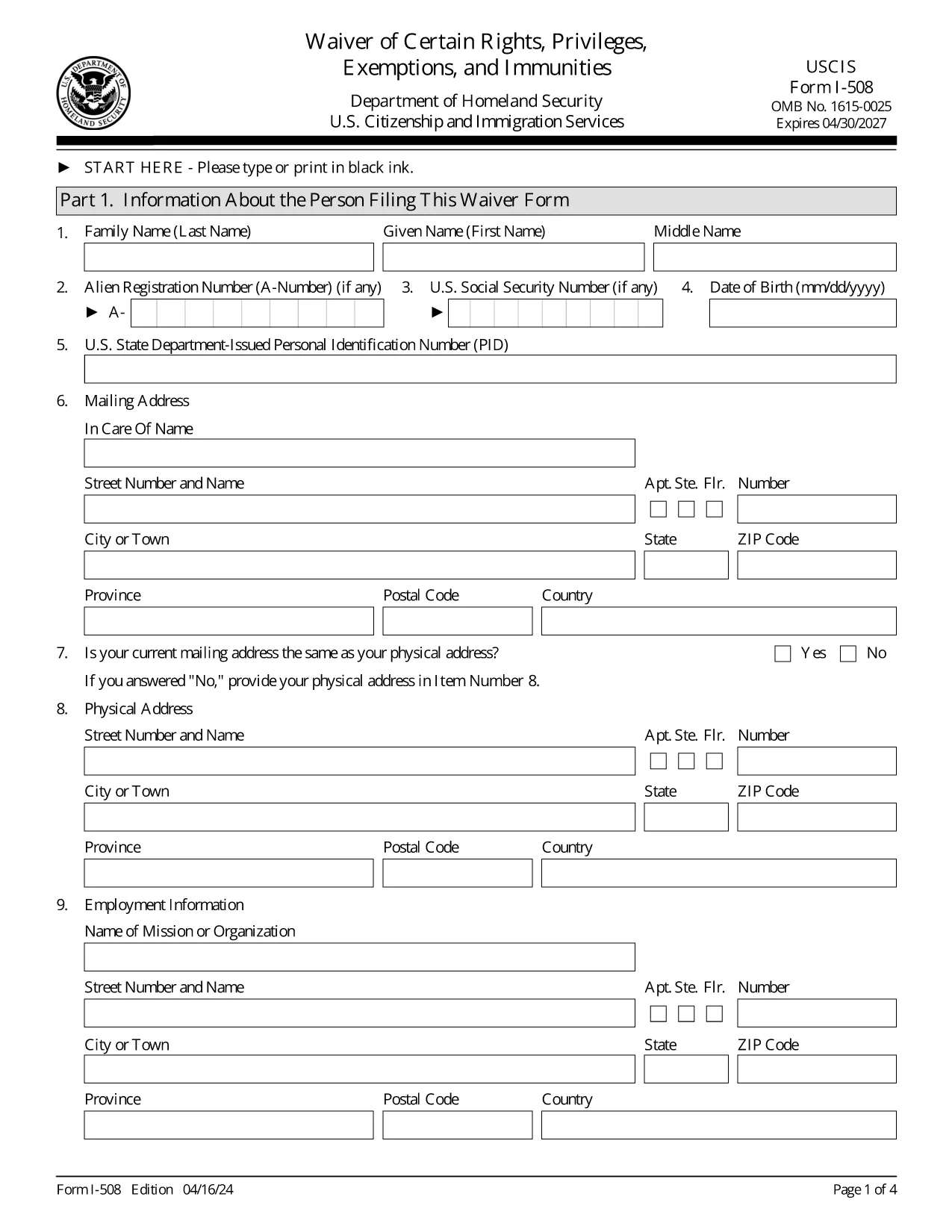
Form I-508 – Waiver of Rights, Privileges, Exemptions & Immunities

  1. Ország USA
  2. Nyelv angol
  3. Osztály Amerikai Állampolgársági és Bevándorlási Szolgálat
Form I-508 – Waiver of Rights, Privileges, Exemptions & Immunities

The USCIS Form I-508 is a request to waive diplomatic rights, privileges, exemptions, and immunities for non‑U.S. citizens employed by foreign governments or international organizations. It is required when you hold an occupational status that would otherwise qualify you for A, G, or E nonimmigrant status.

What Is Form I-508?

This waiver allows you to retain your current immigration status (e.g., lawful permanent resident) while working for a foreign mission. It is mandated by Section 247(b) of the Immigration and Nationality Act (INA). If you do not submit a signed I‑508, USCIS may automatically convert your status to the appropriate diplomatic category.

How to Fill Out I-508 Using Formize

Instead of downloading, printing, and editing a PDF, simply click the “Fill out this form” button on our page. The Formize PDF Filler app loads the official USCIS document and lets you complete every field online.

Common Mistakes to Avoid

  • Leaving any required field blank – the form will not submit.
  • Using the wrong edition date – make sure the bottom of each page shows the 04/16/24 edition.
  • Forgetting to sign the certification section – an unsigned form is rejected.
  • Uploading a PDF from a different edition – only the official USCIS version works.

Where to File the Completed Waiver

File the completed I‑508 with the USCIS office handling your primary immigration application:

  • If you are filing with Form I‑131 (Travel Document), submit I‑508 to the same office.
  • If you are adjusting status (Form I‑485), file I‑508 with that office.

Need More Help?

Review USCIS filing tips, double‑check the edition date, and ensure every page is included. The Formize platform saves your progress, so you can review before final submission.

GYIK
  • Who must file Form I-508?

    Anyone who is a non‑U.S. citizen working for a foreign government mission or international organization and who would otherwise qualify for A, G, or E nonimmigrant status.

  • Can I submit I-508 electronically?

    USCIS currently requires a printed and signed PDF. Use Formize to fill the form, then print and sign before mailing.

  • What happens if I don’t file I-508?

    USCIS will automatically convert your status to the appropriate diplomatic category, which may affect your eligibility for adjustment of status.

  • Is there a filing fee for Form I-508?

    No separate fee is listed for I-508; any applicable fees are covered under the primary application (e.g., I‑131 or I‑485).

  • How do I know I have the correct edition of the form?

    The bottom of each page shows the edition date. The latest edition (04/16/24) is the one provided by USCIS and used by Formize.

  • Can I edit a saved Formize I-508 later?

    Yes. Your work is saved in your Formize account, allowing you to return, edit, and re‑download the form at any time before final submission.

HOGYAN KELL

A(z) I-508 ingyenes online kitöltése 5 egyszerű lépésben:

  1. 1
    Open the Fillable Form
    Click the “Fill out this form” button on the page. The Formize PDF Filler app will load the official I-508 document.
  2. 2
    Complete Each Section
    Enter your personal information, employment details, and waiver statements. All fields are required; the app highlights any missing data.
  3. 3
    Review & Sign
    Use the built‑in review mode to verify every answer. Add your electronic signature in the certification box.
  4. 4
    Save or Download
    When you’re satisfied, click “Save” to store the filled form in your account or “Download” to get a PDF copy for filing.
  5. 5
    Submit to USCIS
    Print the final PDF (if required) and mail it to the USCIS office handling your case, following the filing instructions on the form.
PDF-kitöltő alkalmazás formázása
RÓL RŐL

I-508 sablon

A PDF-dokumentumok megtekintésére és kitöltésére szolgáló hagyományos funkciókkal, valamint a webalkalmazás és az adaptív elrendezés előnyeivel percek alatt teljesítheti a I-508.

JELLEMZŐK

PDF kitöltő

A PDF űrlapok online kitöltésének legegyszerűbb módja

  • Gyorsan töltse ki a következőt: I-508
    Módot keres a(z) I-508 online gyors kitöltésére? Online ingyenes PDF űrlapkitöltőnkkel tudni fogja, hogyan kell szerkeszteni és kitölteni ezt a pdf dokumentumot kevesebb mint egy perc alatt.
  • Könnyen használható online PDF szerkesztő
    Eleged van abból, hogy kinyomtatja a PDF-fájlokat, hogy szerkeszthesse őket, mielőtt újra beolvassa és visszaküldi őket? PDF dokumentumok szerkesztése ingyen online. Használja online pdf-szerkesztőnket, hogy időt és papírt takarítson meg.
  • Remek eszközök, minden platformon
    Kíváncsi arra, hogyan töltse ki a I-508 mezőt Mac számítógépen, vagy hogyan használhat ingyenes PDF-kitöltőt? Online PDF eszközeink minden platformon működnek.
  • Biztonságos fájltárolás
    A befejezett „I-508” fájlokat az Amazon Cloud hosting által kezelt, biztonságos adatbázisban tároljuk. Fájljait bármikor törölheti rendszerünkből. Mindenesetre ezek a fájlok 24 óra elteltével automatikusan törlődnek.
  • Csevegés I-508 felhasználóval
    Csevegés "I-508" felhasználóval a Chatize oldalon, amely egy ingyenes PDF-olvasó segéd. Tegyen fel kérdéseket, és kapjon választ a következőtől: "I-508". Csak kattintson a fenti Csevegés dokumentummal gombra.

Kitöltési munkamenet törlése

Törli a kiválasztott kitöltési munkamenetet? Ebben az esetben az űrlap kitöltésének előrehaladása elvész.

Szerkesztési munkamenet törlése

Törli a kiválasztott szerkesztési munkamenetet? Ebben az esetben az űrlap létrehozásának és szerkesztésének előrehaladása elvész.