Válasszon nyelvet

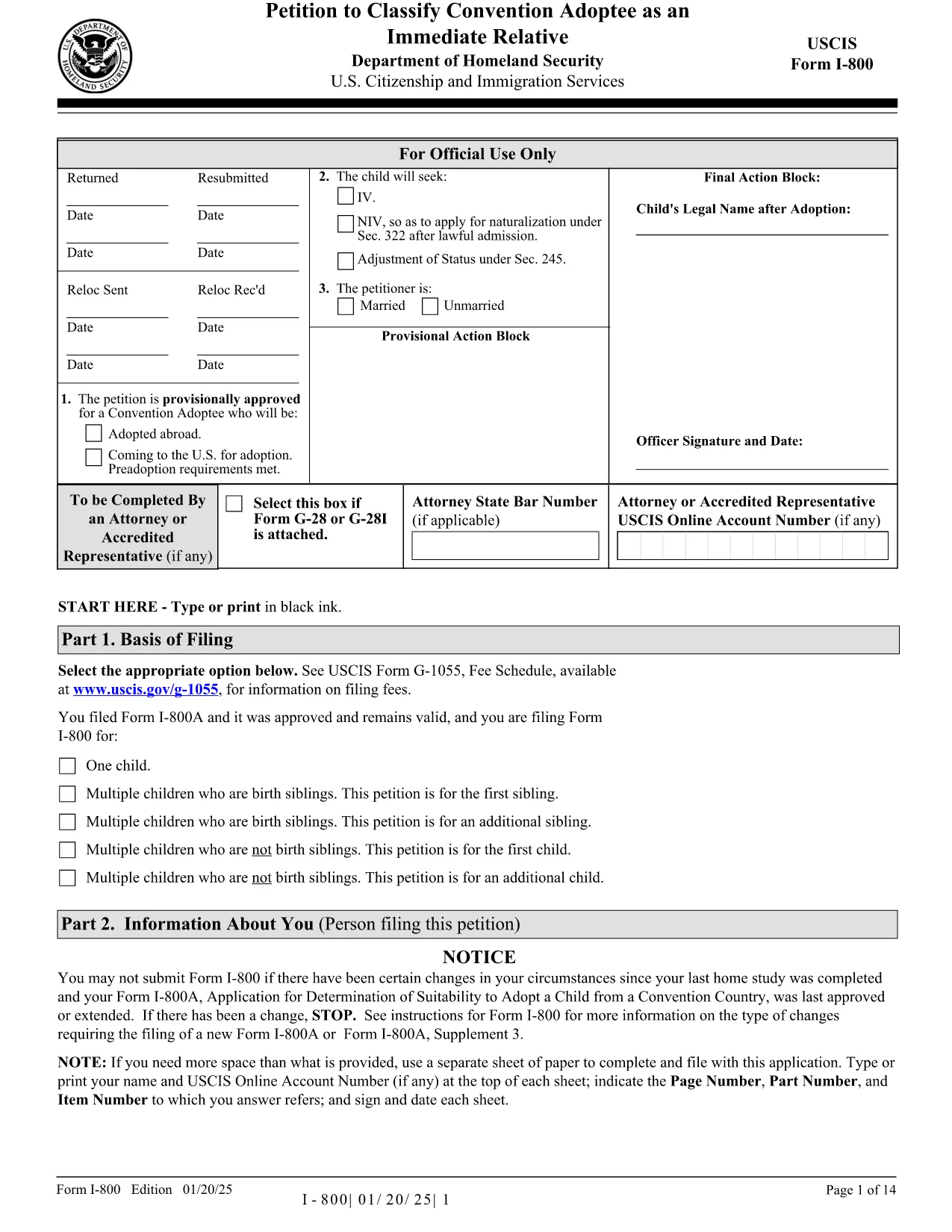
Form I-800 – Petition to Classify a Convention Adoptee

  1. Ország USA
  2. Nyelv angol
  3. Osztály Amerikai Állampolgársági és Bevándorlási Szolgálat
Form I-800 – Petition to Classify a Convention Adoptee

The Form I-800 (Petition to Classify Convention Adoptee as an Immediate Relative) is used by U.S. citizen prospective adoptive parents to finalize the immigration process for a child adopted from a Hague Convention country. This page provides the official fillable PDF, step‑by‑step instructions, and tips to ensure a smooth filing.

What is Form I-800?

Form I-800 is filed after you have an approved Form I-800A (Application for Determination of Suitability to Adopt a Child from a Convention Country). It requests the U.S. Citizenship and Immigration Services (USCIS) to recognize the child as an immediate relative, allowing the child to obtain an immigrant visa.

Eligibility & Required Documents

  • U.S. citizen petitioner (adoptive parent) – must be at least 21 years old.
  • Approved Form I-800A approval notice.
  • Proof of the child’s habitually residing in a Convention country.
  • Article 16 report, adoption agency statements, and post‑placement plans (if applicable).
  • Form I-864 (Affidavit of Support) or I-864EZ.
  • Any required medical examinations, translations, and certifications.

How to Complete the Fillable Form Online

Instead of downloading the PDF and editing it with a separate editor, simply click the "Fill out this form" button on this page. The Formize PDF Filler app will load the fillable version instantly. Follow the on‑screen prompts, save your progress, and download the completed PDF ready for submission.

Common Mistakes to Avoid

  • Using pages from different edition dates – all pages must match the edition date shown at the bottom of the form.
  • Leaving required fields blank (e.g., Part 2 – Information About You).
  • Submitting original documents unless specifically requested.
  • Failing to attach English translations for foreign‑language documents.
  • Paying the filing fee with a personal check – USCIS now requires electronic payment methods.

Where to File & Pay the Fee

Mail the completed Form I-800 and supporting evidence to the USCIS Adoption Lockbox (Dallas, TX). Payment can be made with a credit/debit card using Form G‑1450, or via ACH with Form G‑1650. Check the latest fee schedule on the USCIS website before filing.

Ready to start? Click the button below to open the fillable version and begin your adoption petition today.

GYIK
  • Do I need an approved Form I-800A before filing Form I-800?

    Yes. USCIS requires an approved Form I-800A before you can submit Form I-800.

  • Can I file Form I-800 online?

    Form I-800 itself must be submitted as a PDF by mail, but you can fill it out online using the Formize fillable version.

  • What is the current filing fee for Form I-800?

    Check the USCIS Fee Schedule for the most up‑to‑date amount. Payment must be made electronically (credit/debit card or ACH).

  • How long does USCIS take to process Form I-800?

    Processing times vary; typically 6‑12 months. You can check real‑time estimates on the USCIS case status page.

  • What should I do if I receive a Request for Evidence (RFE)?

    Respond promptly with the requested documents, following the RFE deadline. Include the RFE notice number on all correspondence.

  • Can I submit original documents with my Form I-800?

    Only submit originals if USCIS specifically asks for them. Otherwise, provide clear photocopies and certified translations.

  • Is there a way to track my mailed Form I-800?

    Yes. Use a traceable mailing service (USPS Certified Mail, FedEx, UPS) and keep the receipt for your records.

  • What if the child is adopted from a non‑Convention country?

    Form I-800 is only for Convention adoptees. For non‑Convention cases, you must file Form I-600 or I-600A.

HOGYAN KELL

A(z) Form I-800 ingyenes online kitöltése 5 egyszerű lépésben:

  1. 1
    Open the Fillable Form
    Click the "Fill out this form" button on the page. The Formize PDF Filler app loads the official Form I-800 instantly.
  2. 2
    Enter Your Information
    Complete each section, following the on‑screen prompts. Required fields are highlighted in red.
  3. 3
    Save and Review
    Use the "Save" button to store your progress. Review all entries for accuracy before finalizing.
  4. 4
    Download the Completed PDF
    When all fields are filled, click "Download" to get a PDF ready for mailing to USCIS.
  5. 5
    Submit to USCIS
    Mail the downloaded Form I-800 with supporting documents and the correct filing fee to the USCIS Adoption Lockbox.
PDF-kitöltő alkalmazás formázása
RÓL RŐL

Form I-800 sablon

A PDF-dokumentumok megtekintésére és kitöltésére szolgáló hagyományos funkciókkal, valamint a webalkalmazás és az adaptív elrendezés előnyeivel percek alatt teljesítheti a Form I-800.

JELLEMZŐK

PDF kitöltő

A PDF űrlapok online kitöltésének legegyszerűbb módja

  • Gyorsan töltse ki a következőt: Form I-800
    Módot keres a(z) Form I-800 online gyors kitöltésére? Online ingyenes PDF űrlapkitöltőnkkel tudni fogja, hogyan kell szerkeszteni és kitölteni ezt a pdf dokumentumot kevesebb mint egy perc alatt.
  • Könnyen használható online PDF szerkesztő
    Eleged van abból, hogy kinyomtatja a PDF-fájlokat, hogy szerkeszthesse őket, mielőtt újra beolvassa és visszaküldi őket? PDF dokumentumok szerkesztése ingyen online. Használja online pdf-szerkesztőnket, hogy időt és papírt takarítson meg.
  • Remek eszközök, minden platformon
    Kíváncsi arra, hogyan töltse ki a Form I-800 mezőt Mac számítógépen, vagy hogyan használhat ingyenes PDF-kitöltőt? Online PDF eszközeink minden platformon működnek.
  • Biztonságos fájltárolás
    A befejezett „Form I-800” fájlokat az Amazon Cloud hosting által kezelt, biztonságos adatbázisban tároljuk. Fájljait bármikor törölheti rendszerünkből. Mindenesetre ezek a fájlok 24 óra elteltével automatikusan törlődnek.
  • Csevegés Form I-800 felhasználóval
    Csevegés "Form I-800" felhasználóval a Chatize oldalon, amely egy ingyenes PDF-olvasó segéd. Tegyen fel kérdéseket, és kapjon választ a következőtől: "Form I-800". Csak kattintson a fenti Csevegés dokumentummal gombra.

Kitöltési munkamenet törlése

Törli a kiválasztott kitöltési munkamenetet? Ebben az esetben az űrlap kitöltésének előrehaladása elvész.

Szerkesztési munkamenet törlése

Törli a kiválasztott szerkesztési munkamenetet? Ebben az esetben az űrlap létrehozásának és szerkesztésének előrehaladása elvész.