Válasszon nyelvet

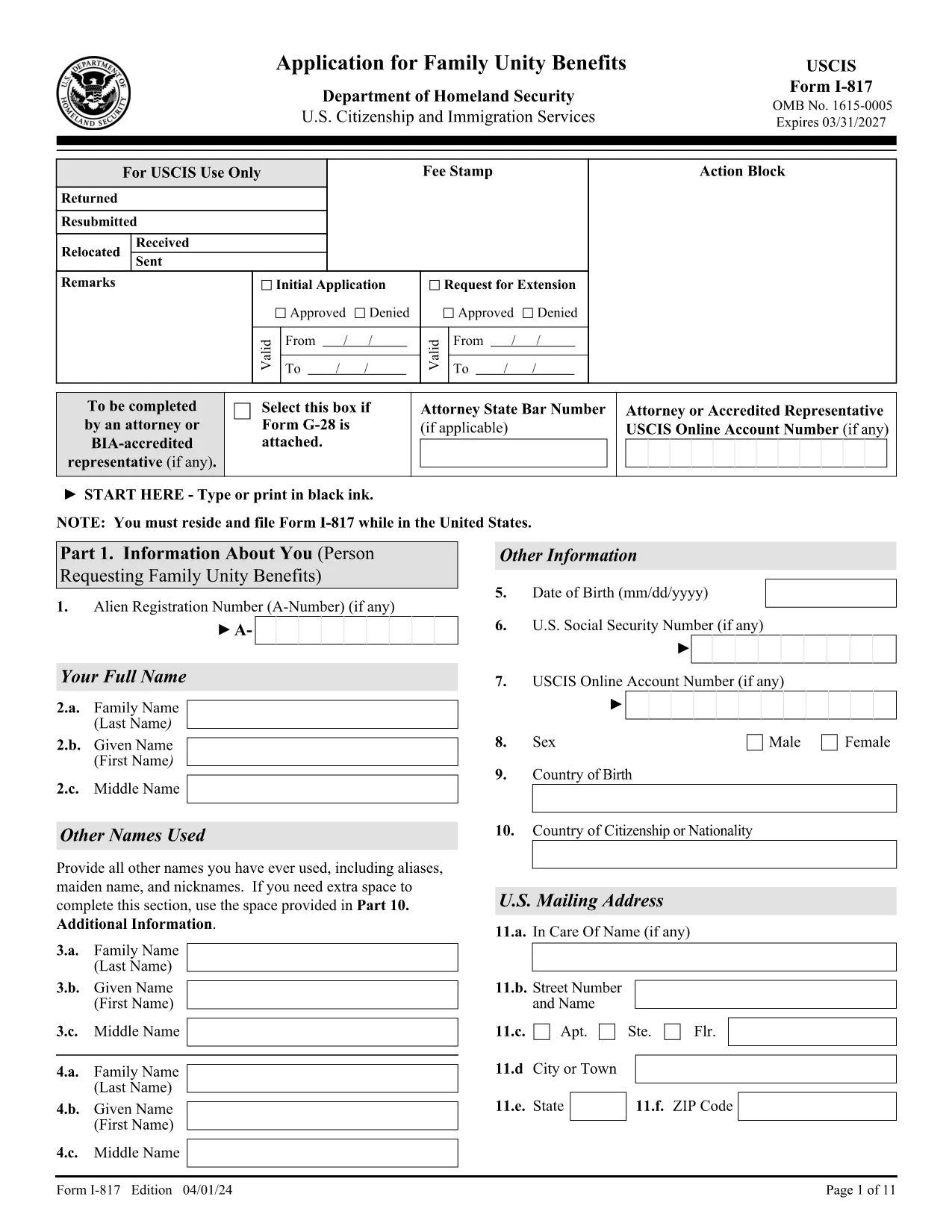
I-817 Application for Family Unity Benefits – Fillable PDF

  1. Ország USA
  2. Nyelv angol
  3. Osztály Amerikai Állampolgársági és Bevándorlási Szolgálat
I-817 Application for Family Unity Benefits – Fillable PDF

The Form I-817 is the official United States Citizenship and Immigration Services (USCIS) application used to request initial or extended benefits under the Family Unity Program. Whether you are applying for the first time or seeking an extension, the form must be completed accurately to avoid rejection.

What Is Form I-817?

I-817 collects personal information about the applicant and the qualifying family member (spouse or parent). The form is part of USCIS’s effort to keep families together while they navigate immigration processes.

How to Fill Out the I-817 Form Online

Instead of printing, printing, and scanning, you can complete the form directly in your browser using Formize’s built‑in PDF filler:

  1. Click the "Fill out this form" button on this page.
  2. Wait a few seconds while the Formize PDF Filler app loads.
  3. Enter your information in each fillable field. The app automatically saves your progress.
  4. Review the completed form for accuracy.
  5. Click "Submit" to download the finished PDF or print it for mailing.

Common Mistakes & Tips for a Successful Submission

  • Missing signatures: An unsigned form will be rejected. Sign at the bottom of the last page.
  • Incorrect edition date: Ensure the PDF shows the edition date 04/01/24 on every page.
  • Incomplete sections: Part 1 (your personal info) and Part 3 (relationship info) are required.
  • Wrong filing address: Check USCIS’s Direct Filing Addresses page for the correct lockbox.
  • Forgot the E‑Notification form (G‑1145): Attach it if you want email/text confirmation of receipt.

Where to File Your Completed I-817

After completing the form, follow USCIS’s filing instructions. The address varies by state and whether you are using a courier service. Visit the USCIS Direct Filing Addresses page for the most up‑to‑date location.

Download the Official I-817 PDF

The official, up‑to‑date PDF is hosted by USCIS. Click the button below to open the fillable version in Formize or to download it directly.

Fill out this form

GYIK
  • Who is eligible to file Form I-817?

    U.S. citizens and lawful permanent residents can request Family Unity Benefits for a spouse or parent who is a qualifying relative.

  • Is there a filing fee for I-817?

    Yes. Check the current USCIS Fee Schedule for the exact amount, as fees can change annually.

  • Can I submit the I-817 form electronically?

    USCIS currently requires a paper submission, but you can complete the form online with Formize, then print and mail it.

  • What happens if I miss a required field?

    USCIS will reject the form and send a notice. Fill every required field, especially Part 1 and Part 3.

  • Do I need to attach Form G‑1145 for e‑notification?

    Attaching Form G‑1145 is optional but recommended if you want an email or text confirmation when USCIS receives your application.

  • How long does USCIS take to process an I-817 application?

    Processing times vary by service center; typically it ranges from 2 to 6 months. Check the USCIS Processing Times page for current estimates.

  • Can I edit the I-817 after I’ve mailed it?

    No. If you need to make changes, you must submit a new Form I-817 with the correct information.

  • Where can I find the latest edition of Form I-817?

    The most recent edition (04/01/24) is available on the USCIS website – the link provided on this page points to that version.

HOGYAN KELL

A(z) I-817 form ingyenes online kitöltése 5 egyszerű lépésben:

  1. 1
    Open the Fillable Form
    Click the "Fill out this form" button on the page. The Formize PDF Filler will open in a new tab.
  2. 2
    Load the Formize PDF Filler
    Wait a few seconds while the app loads the I-817 PDF. All fields become editable.
  3. 3
    Enter Your Information
    Type your details into each highlighted field. The app saves your entries automatically.
  4. 4
    Review & Sign
    Double‑check every section, then add your electronic signature at the bottom of the last page.
  5. 5
    Download or Print
    Click "Submit" to download the completed PDF or print it for mailing to the USCIS lockbox address.
PDF-kitöltő alkalmazás formázása
RÓL RŐL

I-817 form sablon

A PDF-dokumentumok megtekintésére és kitöltésére szolgáló hagyományos funkciókkal, valamint a webalkalmazás és az adaptív elrendezés előnyeivel percek alatt teljesítheti a I-817 form.

JELLEMZŐK

PDF kitöltő

A PDF űrlapok online kitöltésének legegyszerűbb módja

  • Gyorsan töltse ki a következőt: I-817 form
    Módot keres a(z) I-817 form online gyors kitöltésére? Online ingyenes PDF űrlapkitöltőnkkel tudni fogja, hogyan kell szerkeszteni és kitölteni ezt a pdf dokumentumot kevesebb mint egy perc alatt.
  • Könnyen használható online PDF szerkesztő
    Eleged van abból, hogy kinyomtatja a PDF-fájlokat, hogy szerkeszthesse őket, mielőtt újra beolvassa és visszaküldi őket? PDF dokumentumok szerkesztése ingyen online. Használja online pdf-szerkesztőnket, hogy időt és papírt takarítson meg.
  • Remek eszközök, minden platformon
    Kíváncsi arra, hogyan töltse ki a I-817 form mezőt Mac számítógépen, vagy hogyan használhat ingyenes PDF-kitöltőt? Online PDF eszközeink minden platformon működnek.
  • Biztonságos fájltárolás
    A befejezett „I-817 form” fájlokat az Amazon Cloud hosting által kezelt, biztonságos adatbázisban tároljuk. Fájljait bármikor törölheti rendszerünkből. Mindenesetre ezek a fájlok 24 óra elteltével automatikusan törlődnek.
  • Csevegés I-817 form felhasználóval
    Csevegés "I-817 form" felhasználóval a Chatize oldalon, amely egy ingyenes PDF-olvasó segéd. Tegyen fel kérdéseket, és kapjon választ a következőtől: "I-817 form". Csak kattintson a fenti Csevegés dokumentummal gombra.

Kitöltési munkamenet törlése

Törli a kiválasztott kitöltési munkamenetet? Ebben az esetben az űrlap kitöltésének előrehaladása elvész.

Szerkesztési munkamenet törlése

Törli a kiválasztott szerkesztési munkamenetet? Ebben az esetben az űrlap létrehozásának és szerkesztésének előrehaladása elvész.