Válasszon nyelvet

Work Permit Application Form – Fillable PDF (I‑765)

  1. Ország USA
  2. Nyelv angol
  3. Tevékenység Work Permits
  4. Osztály USCIS
Work Permit Application Form – Fillable PDF (I‑765)

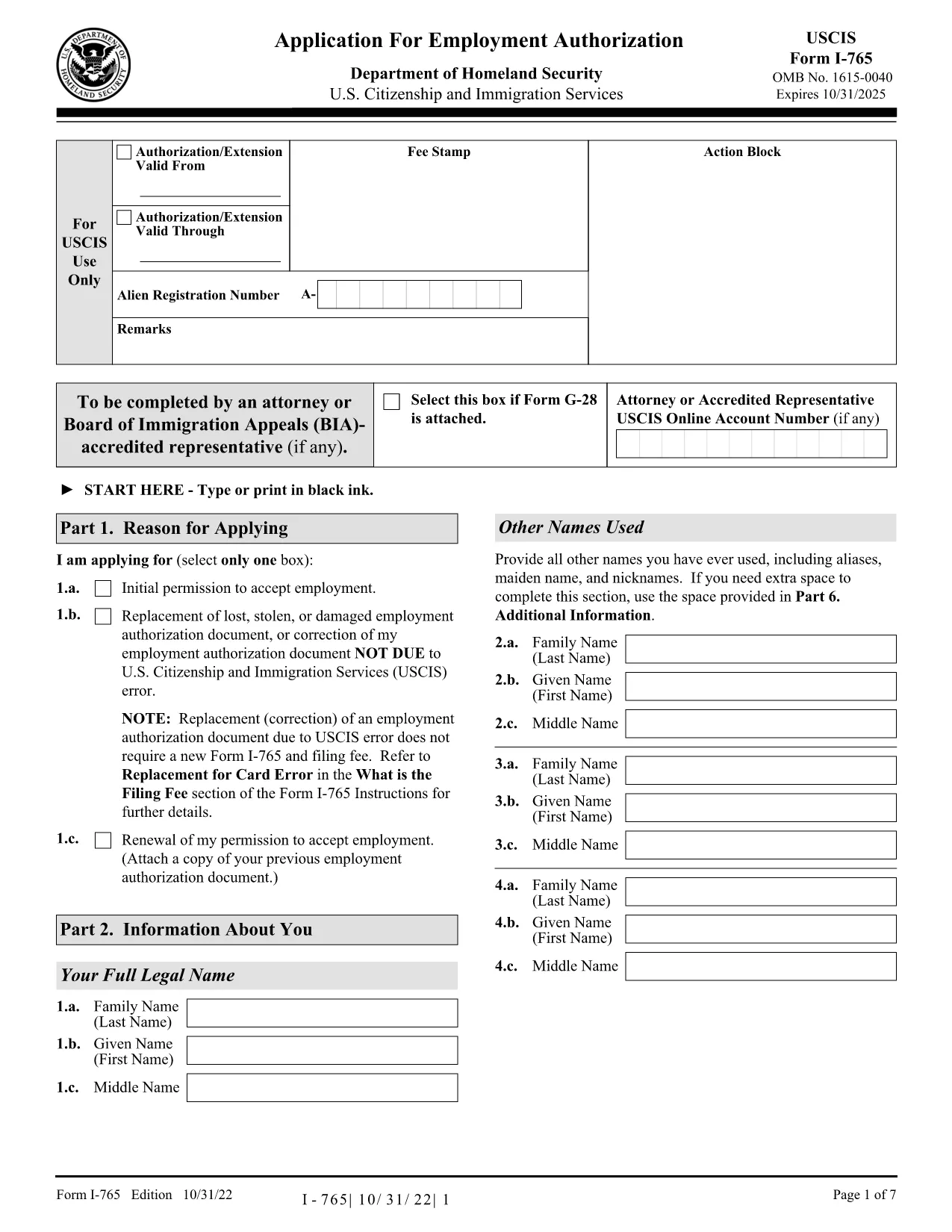
The I‑765, Application for Employment Authorization is the official United States Citizenship and Immigration Services (USCIS) form used by eligible non‑citizens to request a work permit (Employment Authorization Document – EAD). Our fillable PDF version lets you complete the form quickly, accurately, and securely, without printing or manual data entry.

What Is the I-765 Work Permit Form?

The I‑765 is required for many immigration categories, including students on Optional Practical Training (OPT), asylum seekers, and individuals with a pending adjustment of status. The form collects personal information, immigration status, eligibility category, and supporting documentation details.

Why Use a Fillable PDF with Formize?

Formize’s online PDF Filler loads the official I‑765 PDF directly in your browser. Benefits include:

  • Auto‑save while you type – no lost data.
  • Built‑in validation helps you avoid common errors.
  • Instant download of a completed, printable PDF.
  • Secure, no‑install solution – all work stays in your browser.

Step‑by‑Step Guide to Completing the Form

See the howto section below for a quick walkthrough.

Common Mistakes to Avoid

  • Leaving the “Eligibility Category” blank or using the wrong code.
  • Submitting an outdated version of the I‑765 (always use the latest edition).
  • Forgetting to sign the form – electronic signatures are accepted when you print.
  • Omitting required supporting documents, which can cause a denial.

Where to Submit Your Completed Application

After you download the filled PDF, follow USCIS filing instructions for your specific eligibility category. Most applicants submit by mail; some categories allow online filing through the USCIS portal.

Ready to start? Click the button below, fill out the form in seconds, and download your completed I‑765.

GYIK
  • Who can file the I‑765 form?

    Anyone with a non‑immigrant status that permits employment authorization, such as F‑1 students (OPT), asylum applicants, and individuals with pending adjustment of status.

  • Do I need a PDF editor to fill the I‑765?

    No. With Formize you can fill the official PDF directly in your browser—no additional software required.

  • Is an electronic signature accepted on the I‑765?

    USCIS requires a handwritten signature on the printed form. After completing the form online, print it, sign, and then submit.

  • Can I submit the I‑765 online?

    Some eligibility categories allow online filing through the USCIS website. Check the USCIS filing guide for your specific category.

  • What is the filing fee for the I‑765?

    The fee varies by category and can change annually. Refer to the USCIS fee schedule for the most up‑to‑date amount.

  • How long does it take to receive the work permit?

    Processing times range from 2 to 6 months, depending on USCIS workload and the applicant’s category.

  • What supporting documents do I need?

    Typical documents include a copy of your passport, current visa, I‑94 arrival/departure record, and proof of eligibility (e.g., I‑20 for OPT).

  • What if I make a mistake after submitting?

    If you discover an error, you can file a new I‑765 with the corrected information, but you’ll need to pay the filing fee again.

HOGYAN KELL

A(z) work permit application ingyenes online kitöltése 5 egyszerű lépésben:

  1. 1
    Click the Fill‑out Button
    Press the “Fill out this form” button on the page. The Formize PDF Filler app will open the I‑765 PDF in a new tab.
  2. 2
    Wait for the Filler to Load
    The app automatically loads the fillable fields. This usually takes a few seconds.
  3. 3
    Enter Your Information
    Type directly into each field. The filler validates dates, numbers, and required entries as you go.
  4. 4
    Review and Save
    When you finish, click “Review”. Check for any highlighted errors, then click “Save & Download” to get your completed PDF.
  5. 5
    Print or Submit
    Print the saved PDF, sign where required, and mail it to the USCIS address shown in the form instructions.
PDF-kitöltő alkalmazás formázása
RÓL RŐL

work permit application sablon

A PDF-dokumentumok megtekintésére és kitöltésére szolgáló hagyományos funkciókkal, valamint a webalkalmazás és az adaptív elrendezés előnyeivel percek alatt teljesítheti a work permit application.

JELLEMZŐK

PDF kitöltő

A PDF űrlapok online kitöltésének legegyszerűbb módja

  • Gyorsan töltse ki a következőt: work permit application
    Módot keres a(z) work permit application online gyors kitöltésére? Online ingyenes PDF űrlapkitöltőnkkel tudni fogja, hogyan kell szerkeszteni és kitölteni ezt a pdf dokumentumot kevesebb mint egy perc alatt.
  • Könnyen használható online PDF szerkesztő
    Eleged van abból, hogy kinyomtatja a PDF-fájlokat, hogy szerkeszthesse őket, mielőtt újra beolvassa és visszaküldi őket? PDF dokumentumok szerkesztése ingyen online. Használja online pdf-szerkesztőnket, hogy időt és papírt takarítson meg.
  • Remek eszközök, minden platformon
    Kíváncsi arra, hogyan töltse ki a work permit application mezőt Mac számítógépen, vagy hogyan használhat ingyenes PDF-kitöltőt? Online PDF eszközeink minden platformon működnek.
  • Biztonságos fájltárolás
    A befejezett „work permit application” fájlokat az Amazon Cloud hosting által kezelt, biztonságos adatbázisban tároljuk. Fájljait bármikor törölheti rendszerünkből. Mindenesetre ezek a fájlok 24 óra elteltével automatikusan törlődnek.
  • Csevegés work permit application felhasználóval
    Csevegés "work permit application" felhasználóval a Chatize oldalon, amely egy ingyenes PDF-olvasó segéd. Tegyen fel kérdéseket, és kapjon választ a következőtől: "work permit application". Csak kattintson a fenti Csevegés dokumentummal gombra.

Kitöltési munkamenet törlése

Törli a kiválasztott kitöltési munkamenetet? Ebben az esetben az űrlap kitöltésének előrehaladása elvész.

Szerkesztési munkamenet törlése

Törli a kiválasztott szerkesztési munkamenetet? Ebben az esetben az űrlap létrehozásának és szerkesztésének előrehaladása elvész.