
Válasszon nyelvet

Kansas TR-69 Title Reassignment Addendum – Fillable PDF

  1. Ország USA
  2. Nyelv angol
  3. Tevékenység Jármű regisztráció
  4. Állapot Kansas
Kansas TR-69 Title Reassignment Addendum – Fillable PDF

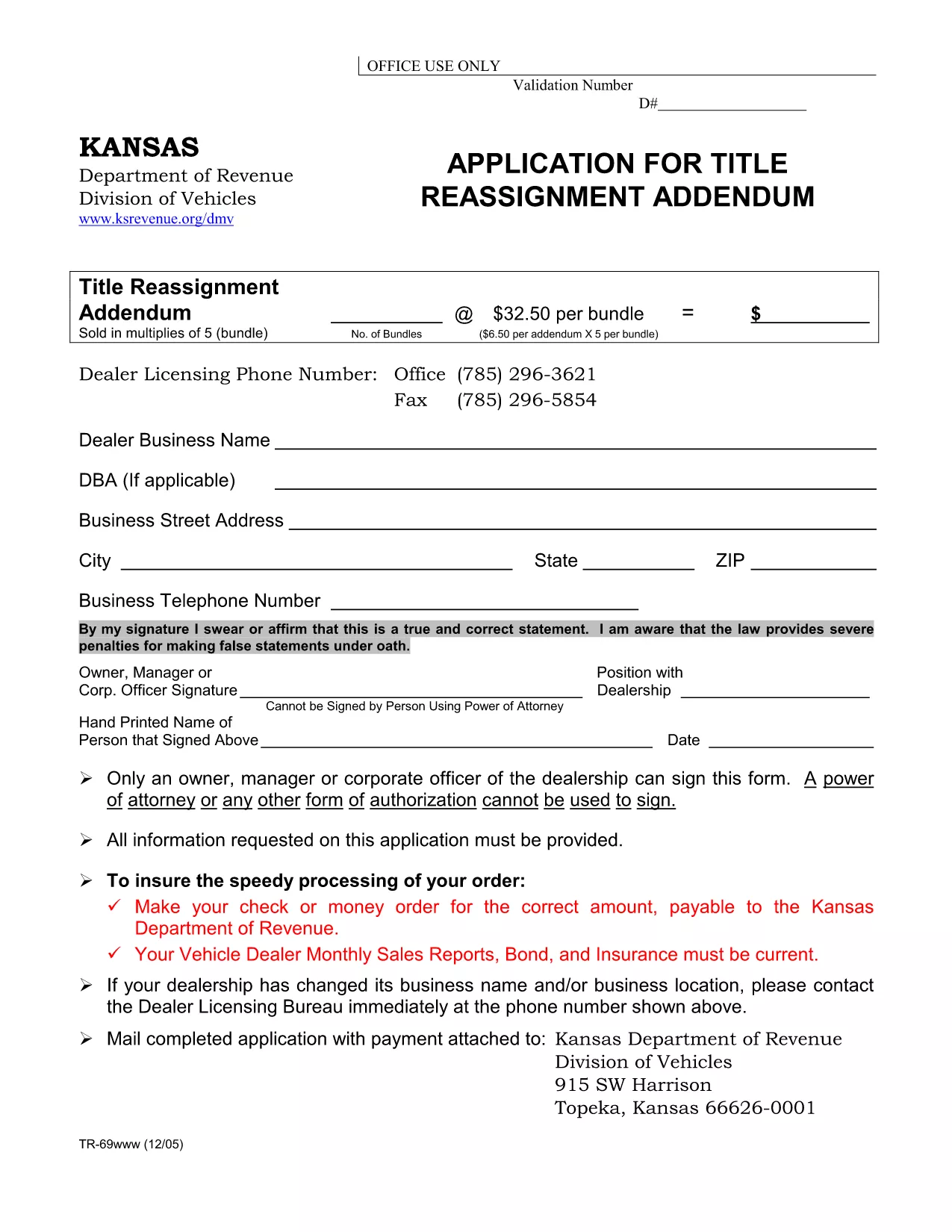
The TR-69 form (Title Reassignment Addendum) is required by the Kansas Department of Motor Vehicles when a vehicle’s title is being reassigned to a new owner, dealership, or corporate entity. This fillable PDF lets you complete the form quickly, accurately, and without the need for any desktop PDF editor.

Our online Fill out this form button launches the Formize PDF Filler app directly in your browser. The tool preserves the original layout, validates required fields, and lets you save a completed copy for printing or electronic submission.

Below you’ll find step‑by‑step instructions, tips for avoiding typical errors, and answers to the most common questions about the TR‑69 form.

What Is the TR-69 Form?

The TR‑69 is a Kansas DMV document used for:

  • Transferring a vehicle title between private parties.
  • Assigning a title to a dealership or corporate fleet.
  • Correcting ownership information after a merger or acquisition.

Because the form involves legal ownership, every field must be completed accurately and signed where required.

How to Fill Out the TR-69 Online with Formize

Instead of downloading the PDF and opening it in a separate editor, simply click the “Fill out this form” button on this page. The Formize PDF Filler will load in seconds, allowing you to enter data directly on the page.

Common Mistakes to Avoid

  • Leaving required fields blank: The filler highlights missing information before you can save.
  • Incorrect VIN format: Use 17 characters without spaces or dashes.
  • Mismatched names: Ensure the name on the form matches the name on the current title.
  • Missing signatures: The digital signature field must be completed; otherwise the DMV will reject the form.

Where to Submit the Completed Form

After saving the filled PDF, you can:

  • Print and deliver it to your local Kansas DMV office.
  • Mail it to the address listed on the form.
  • Upload it through the Kansas DMV’s online portal if you have an account.

Having a clean, correctly completed TR‑69 will speed up the title reassignment process and reduce the chance of a return.

GYIK
  • Do I need a PDF editor to use the TR‑69 form?

    No. The Formize PDF Filler works entirely in your web browser, so you don’t need Adobe Acrobat or any other software.

  • Is the online filler secure?

    Yes. Formize uses HTTPS encryption, and your data is processed locally in your browser. Nothing is stored on our servers unless you choose to save it.

  • Can I submit the TR‑69 electronically after filling it out?

    The Kansas DMV currently accepts only printed copies for title reassignment, but you can upload the PDF to the DMV portal if you have an online account.

  • What if I make a mistake after saving?

    Open the saved PDF again with the Formize filler, correct the error, and re‑download the updated version.

  • How long is the TR‑69 valid once completed?

    The form does not expire, but you should submit it within 30 days to avoid delays caused by outdated vehicle information.

HOGYAN KELL

A(z) TR-69 form ingyenes online kitöltése 4 egyszerű lépésben:

  1. 1
    Click the Fill‑out Button
    On this page, click the “Fill out this form” button. The Formize PDF Filler app will open in a new browser tab.
  2. 2
    Wait for the Filler to Load
    Give the app a few seconds to load the TR‑69 template. You’ll see editable fields appear over the original PDF layout.
  3. 3
    Complete All Required Fields
    Enter vehicle information, VIN, buyer/seller details, and any lien information. Required fields are highlighted in blue.
  4. 4
    Save or Download Your Completed Form
    When every field is filled and signed, click “Save” to store a copy in your browser or “Download” to get a PDF you can print or email.
PDF-kitöltő alkalmazás formázása
RÓL RŐL

Gépjármű regisztrációs űrlapok

Ha gépjárművel, pótkocsival vagy csónakkal rendelkezik, vagy lízingel, bizonyos kötelezettségeket kell teljesítenie annak érdekében, hogy járművét jogszerűen nyilvántartsa és biztonságosan tartsa.

A TR-69 form egyike a gépjármű-nyilvántartási űrlapoknak, amelyek olyan dokumentumok, amelyek a gépjárművek megfelelő állami vagy tartományi hatóságnál történő regisztrálásához használhatók. Ezekre az űrlapokra jellemzően akkor van szükség, ha egy személy új vagy használt járművet vásárol, vagy ha új államba vagy tartományba költözik egy járművel.

A gépjármű-nyilvántartáshoz szükséges pontos követelmények és nyomtatványok helyenként változhatnak, de általában a folyamat magában foglalja a járműről, a tulajdonosról és a jármű zálogjogáról szóló információkat.

A regisztrációs űrlapok és a díjak benyújtása után az állami vagy tartományi hatóság forgalmi engedélyt vagy rendszámot állít ki a jármű tulajdonosának. Ez a regisztráció lehetővé teszi a jármű legális üzemeltetését közutakon és autópályákon.

JELLEMZŐK

PDF kitöltő

A PDF űrlapok online kitöltésének legegyszerűbb módja

  • Gyorsan töltse ki a következőt: TR-69 form
    Módot keres a(z) TR-69 form online gyors kitöltésére? Online ingyenes PDF űrlapkitöltőnkkel tudni fogja, hogyan kell szerkeszteni és kitölteni ezt a pdf dokumentumot kevesebb mint egy perc alatt.
  • Könnyen használható online PDF szerkesztő
    Eleged van abból, hogy kinyomtatja a PDF-fájlokat, hogy szerkeszthesse őket, mielőtt újra beolvassa és visszaküldi őket? PDF dokumentumok szerkesztése ingyen online. Használja online pdf-szerkesztőnket, hogy időt és papírt takarítson meg.
  • Remek eszközök, minden platformon
    Kíváncsi arra, hogyan töltse ki a TR-69 form mezőt Mac számítógépen, vagy hogyan használhat ingyenes PDF-kitöltőt? Online PDF eszközeink minden platformon működnek.
  • Biztonságos fájltárolás
    A befejezett „TR-69 form” fájlokat az Amazon Cloud hosting által kezelt, biztonságos adatbázisban tároljuk. Fájljait bármikor törölheti rendszerünkből. Mindenesetre ezek a fájlok 24 óra elteltével automatikusan törlődnek.
  • Csevegés TR-69 form felhasználóval
    Csevegés "TR-69 form" felhasználóval a Chatize oldalon, amely egy ingyenes PDF-olvasó segéd. Tegyen fel kérdéseket, és kapjon választ a következőtől: "TR-69 form". Csak kattintson a fenti Csevegés dokumentummal gombra.

Kitöltési munkamenet törlése

Törli a kiválasztott kitöltési munkamenetet? Ebben az esetben az űrlap kitöltésének előrehaladása elvész.

Szerkesztési munkamenet törlése

Törli a kiválasztott szerkesztési munkamenetet? Ebben az esetben az űrlap létrehozásának és szerkesztésének előrehaladása elvész.