
Válasszon nyelvet

Wisconsin MV2016 Substitute Renewal & Non‑Operation Statement (Fillable PDF)

  1. Nyelv angol
  2. Ország USA
  3. Tevékenység Jármű regisztráció
  4. Állapot Wisconsin
Wisconsin MV2016 Substitute Renewal & Non‑Operation Statement (Fillable PDF)

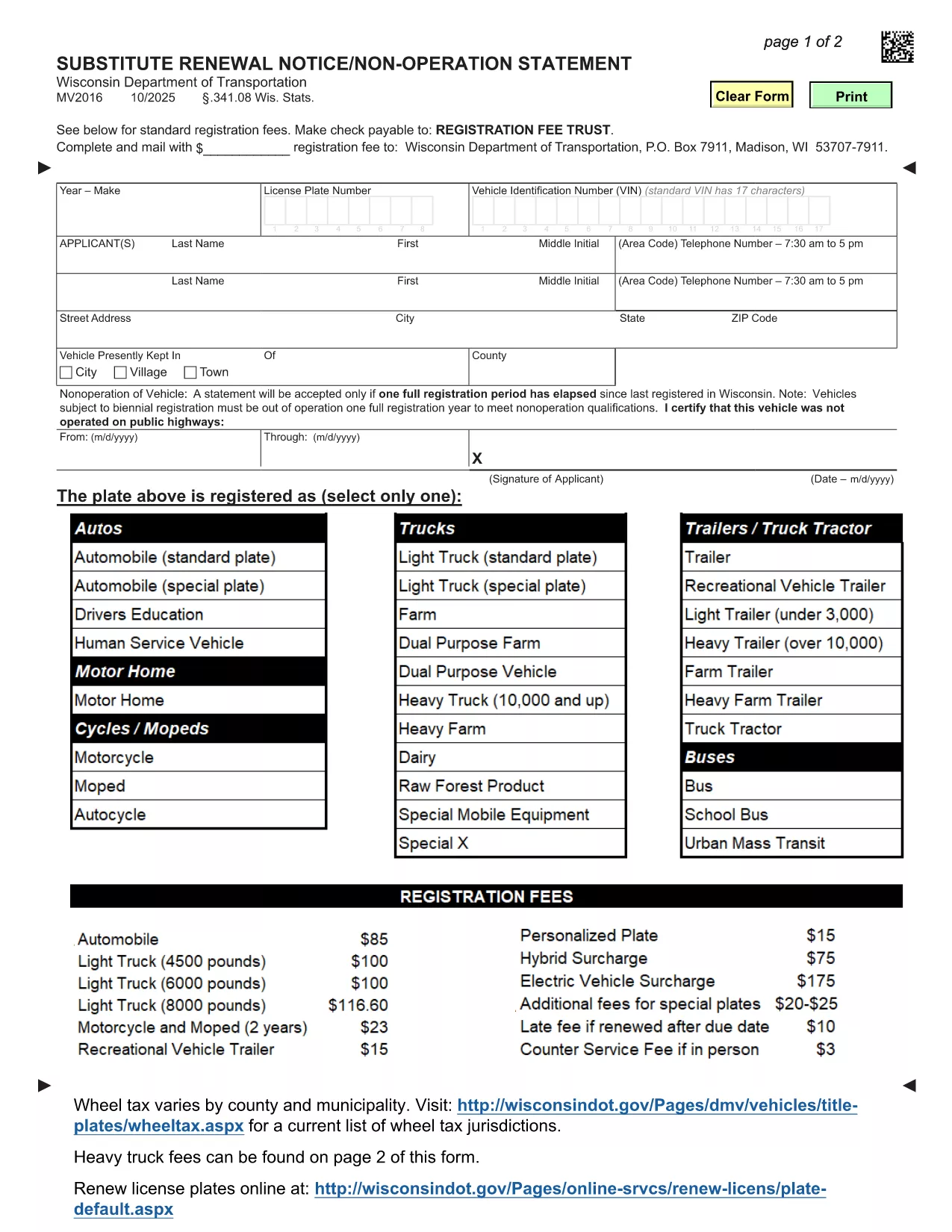
The MV2016 is Wisconsin's official Substitute Renewal Notice and Non‑Operation Statement. It is required when a vehicle is not being operated for a full registration period or when you need to renew a registration without a title transfer.

What Is the MV2016 Form?

MV2016 is a fillable PDF provided by the Wisconsin Department of Transportation (WisDOT). The form captures essential details such as vehicle identification, owner information, and the reason for non‑operation or renewal.

When Do You Need to File MV2016?

  • Vehicle has been out of service for an entire registration year.
  • You are renewing a registration but do not have a recent title.
  • You need to certify that the vehicle was not operated on public highways during the specified period.

How to Complete MV2016 Online with Formize

Instead of downloading the PDF and opening a separate editor, simply click the "Fill out this form" button on this page. The Formize PDF Filler app will load in your browser, letting you complete the form instantly.

Common Mistakes to Avoid

  • Skipping the signature field: The form is invalid without an owner’s signature.
  • Incorrect dates: Ensure the non‑operation period covers a full registration year.
  • Wrong vehicle type code: Use the exact code listed on your registration (e.g., RDTR for road tractors).

Download, Save, and Submit Your Completed Form

After filling out MV2016 with Formize, click Save to download the completed PDF. Mail or bring the printed copy to your local Wisconsin DMV office. Remember, electronic submission is not accepted for this form.

GYIK
  • Do I need to print MV2016 after filling it online?

    Yes. Wisconsin DMV requires a hard‑copy signature. Print the completed PDF and sign it before submitting.

  • Can I submit MV2016 electronically?

    No. The MV2016 must be mailed or delivered in person to a Wisconsin DMV office; electronic submission is not accepted.

  • What if my vehicle is a truck or bus?

    Select the appropriate vehicle type code (e.g., HTK for trucks, BUS for buses) on the form. The fee schedule varies by vehicle class.

  • How long does the non‑operation period have to be?

    The vehicle must be out of operation for a full registration year (12 months) before you can certify non‑operation on MV2016.

  • Is there a fee for filing MV2016?

    There is no separate fee for the MV2016 itself, but any outstanding registration fees or quarterly fees must be paid when you submit the form.

  • Can I use a mobile device to fill out MV2016?

    Yes. The Formize PDF Filler works on most modern browsers, including mobile Safari and Chrome, allowing you to complete the form on a phone or tablet.

  • What if I make a mistake after saving?

    Open the saved PDF again in Formize, correct the error, and re‑save. Ensure the final version is the one you print and submit.

  • Do I need a Wisconsin driver’s license to file MV2016?

    No. The form is for vehicle owners; a Wisconsin driver’s license is not required, but you must provide a valid mailing address.

  • Where can I find help if I get stuck?

    Contact your local Wisconsin DMV office at (608) 264‑7447 for assistance with the MV2016 form.

  • Is the MV2016 form available in languages other than English?

    The official Wisconsin DOT version is only provided in English.

HOGYAN KELL

A(z) MV2016 ingyenes online kitöltése 5 egyszerű lépésben:

  1. 1
    Open the Fillable Form
    Click the "Fill out this form" button on the page. The Formize PDF Filler loads directly in your browser.
  2. 2
    Enter Required Information
    Complete each field – owner details, vehicle identification number, registration dates, and the reason for non‑operation or renewal.
  3. 3
    Sign the Form
    Use the signature field at the bottom of the form. You can type your name or draw a signature with your mouse/touchscreen.
  4. 4
    Save and Download
    When all fields are filled, click the "Save" button in Formize. A completed PDF will be downloaded to your computer.
  5. 5
    Submit to the DMV
    Print the saved PDF and mail it or bring it in person to your nearest Wisconsin DMV office.
PDF-kitöltő alkalmazás formázása
RÓL RŐL

Gépjármű regisztrációs űrlapok

Ha gépjárművel, pótkocsival vagy csónakkal rendelkezik, vagy lízingel, bizonyos kötelezettségeket kell teljesítenie annak érdekében, hogy járművét jogszerűen nyilvántartsa és biztonságosan tartsa.

A MV2016 egyike a gépjármű-nyilvántartási űrlapoknak, amelyek olyan dokumentumok, amelyek a gépjárművek megfelelő állami vagy tartományi hatóságnál történő regisztrálásához használhatók. Ezekre az űrlapokra jellemzően akkor van szükség, ha egy személy új vagy használt járművet vásárol, vagy ha új államba vagy tartományba költözik egy járművel.

A gépjármű-nyilvántartáshoz szükséges pontos követelmények és nyomtatványok helyenként változhatnak, de általában a folyamat magában foglalja a járműről, a tulajdonosról és a jármű zálogjogáról szóló információkat.

A regisztrációs űrlapok és a díjak benyújtása után az állami vagy tartományi hatóság forgalmi engedélyt vagy rendszámot állít ki a jármű tulajdonosának. Ez a regisztráció lehetővé teszi a jármű legális üzemeltetését közutakon és autópályákon.

JELLEMZŐK

PDF kitöltő

A PDF űrlapok online kitöltésének legegyszerűbb módja

  • Gyorsan töltse ki a következőt: MV2016
    Módot keres a(z) MV2016 online gyors kitöltésére? Online ingyenes PDF űrlapkitöltőnkkel tudni fogja, hogyan kell szerkeszteni és kitölteni ezt a pdf dokumentumot kevesebb mint egy perc alatt.
  • Könnyen használható online PDF szerkesztő
    Eleged van abból, hogy kinyomtatja a PDF-fájlokat, hogy szerkeszthesse őket, mielőtt újra beolvassa és visszaküldi őket? PDF dokumentumok szerkesztése ingyen online. Használja online pdf-szerkesztőnket, hogy időt és papírt takarítson meg.
  • Remek eszközök, minden platformon
    Kíváncsi arra, hogyan töltse ki a MV2016 mezőt Mac számítógépen, vagy hogyan használhat ingyenes PDF-kitöltőt? Online PDF eszközeink minden platformon működnek.
  • Biztonságos fájltárolás
    A befejezett „MV2016” fájlokat az Amazon Cloud hosting által kezelt, biztonságos adatbázisban tároljuk. Fájljait bármikor törölheti rendszerünkből. Mindenesetre ezek a fájlok 24 óra elteltével automatikusan törlődnek.
  • Csevegés MV2016 felhasználóval
    Csevegés "MV2016" felhasználóval a Chatize oldalon, amely egy ingyenes PDF-olvasó segéd. Tegyen fel kérdéseket, és kapjon választ a következőtől: "MV2016". Csak kattintson a fenti Csevegés dokumentummal gombra.

Kitöltési munkamenet törlése

Törli a kiválasztott kitöltési munkamenetet? Ebben az esetben az űrlap kitöltésének előrehaladása elvész.

Szerkesztési munkamenet törlése

Törli a kiválasztott szerkesztési munkamenetet? Ebben az esetben az űrlap létrehozásának és szerkesztésének előrehaladása elvész.