Válasszon nyelvet

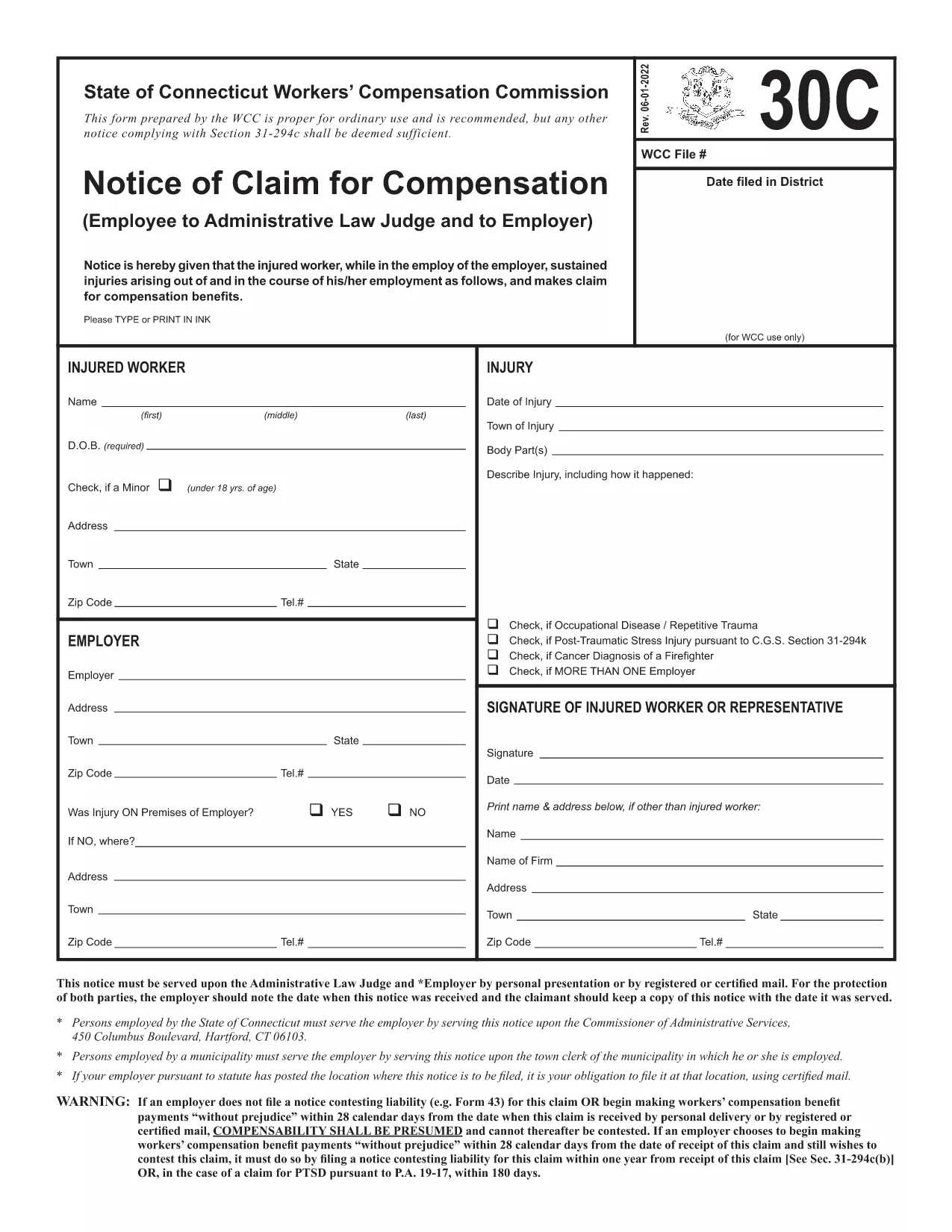
Form 30C – Notice of Claim for Workers’ Compensation

  1. Nyelv angol
  2. Ország USA
  3. Osztály Workers' Compensation
  4. Tevékenység Workers' Compensation Claims
Form 30C – Notice of Claim for Workers’ Compensation

The Form 30C is the official "Notice of Claim for Compensation" used in Connecticut workers’ compensation cases. It must be filed promptly after a work‑related injury or occupational disease to protect your right to benefits.

What Is Form 30C and When Is It Required?

Form 30C is required whenever an employee suffers an injury or illness that is believed to be job‑related. Connecticut law sets a filing deadline of one year from the date of injury (or three years from the first manifestation of a disease). Submitting this form starts the claims process with the Workers’ Compensation Commission (WCC).

How to Complete the Fillable Form 30C Online

Instead of downloading a static PDF, simply click the "Fill out this form" button on this page. The Formize PDF Filler app will load the fillable version of Form 30C, allowing you to type directly into each field, add dates, and sign electronically.

  • Step 1: Click the blue "Fill out this form" button.
  • Step 2: Wait a few seconds while the Formize PDF Filler loads.
  • Step 3: Complete every required field – the app highlights missing information.
  • Step 4: Save your progress or submit the form directly to the WCC district office and your employer.

Common Mistakes to Avoid When Filing Form 30C

Even a small error can delay your claim. Keep these tips in mind:

  • Missing signatures: Both the employee and employer must sign.
  • Incorrect dates: Verify the injury date and the date you are filing.
  • Incomplete contact info: Provide a current phone number and mailing address.
  • Failing to attach supporting documents: Include medical reports or accident reports when required.

Using the online fillable version reduces these errors because required fields are flagged in real time.

Need a printable copy? You can still download the original PDF below, but we highly recommend the online filler for a faster, error‑free experience.

GYIK
  • What is the filing deadline for Form 30C?

    You must file Form 30C within one year of the injury date, or within three years from the first symptom of an occupational disease.

  • Can I file Form 30C online?

    Yes. Using the Formize PDF Filler, you can complete the fillable version directly in your browser without downloading a static PDF.

  • Do I need a lawyer to fill out Form 30C?

    A lawyer is not required to complete the form, but you may consult one if you have complex medical or legal questions.

  • What happens if I miss the filing deadline?

    Missing the deadline may result in a denial of benefits. In some cases, you can request an extension, but it must be approved by the Workers’ Compensation Commission.

  • Do I need to attach supporting documents?

    Yes. Include any medical reports, accident reports, or employer statements that support your claim.

  • Can I print the completed form for my records?

    After completing the form online, you can download a PDF copy and print it for your personal records.

  • Where do I send the completed Form 30C?

    Send a copy to the appropriate WCC district office and provide a copy to your employer. The online filler can generate the correct mailing addresses.

HOGYAN KELL

A(z) Form 30C ingyenes online kitöltése 3 egyszerű lépésben:

  1. 1
    Open the Fillable Form
    Click the "Fill out this form" button on the page. The Formize PDF Filler will open the fillable Form 30C in your browser.
  2. 2
    Enter Your Information
    Type directly into each highlighted field. The filler validates dates, signatures, and required sections in real time.
  3. 3
    Save or Submit
    When all fields are complete, either save a copy for your records or submit the form electronically to the Connecticut Workers’ Compensation Commission and your employer.
PDF-kitöltő alkalmazás formázása
RÓL RŐL

Form 30C sablon

A PDF-dokumentumok megtekintésére és kitöltésére szolgáló hagyományos funkciókkal, valamint a webalkalmazás és az adaptív elrendezés előnyeivel percek alatt teljesítheti a Form 30C.

JELLEMZŐK

PDF kitöltő

A PDF űrlapok online kitöltésének legegyszerűbb módja

  • Gyorsan töltse ki a következőt: Form 30C
    Módot keres a(z) Form 30C online gyors kitöltésére? Online ingyenes PDF űrlapkitöltőnkkel tudni fogja, hogyan kell szerkeszteni és kitölteni ezt a pdf dokumentumot kevesebb mint egy perc alatt.
  • Könnyen használható online PDF szerkesztő
    Eleged van abból, hogy kinyomtatja a PDF-fájlokat, hogy szerkeszthesse őket, mielőtt újra beolvassa és visszaküldi őket? PDF dokumentumok szerkesztése ingyen online. Használja online pdf-szerkesztőnket, hogy időt és papírt takarítson meg.
  • Remek eszközök, minden platformon
    Kíváncsi arra, hogyan töltse ki a Form 30C mezőt Mac számítógépen, vagy hogyan használhat ingyenes PDF-kitöltőt? Online PDF eszközeink minden platformon működnek.
  • Biztonságos fájltárolás
    A befejezett „Form 30C” fájlokat az Amazon Cloud hosting által kezelt, biztonságos adatbázisban tároljuk. Fájljait bármikor törölheti rendszerünkből. Mindenesetre ezek a fájlok 24 óra elteltével automatikusan törlődnek.
  • Csevegés Form 30C felhasználóval
    Csevegés "Form 30C" felhasználóval a Chatize oldalon, amely egy ingyenes PDF-olvasó segéd. Tegyen fel kérdéseket, és kapjon választ a következőtől: "Form 30C". Csak kattintson a fenti Csevegés dokumentummal gombra.

Kitöltési munkamenet törlése

Törli a kiválasztott kitöltési munkamenetet? Ebben az esetben az űrlap kitöltésének előrehaladása elvész.

Szerkesztési munkamenet törlése

Törli a kiválasztott szerkesztési munkamenetet? Ebben az esetben az űrlap létrehozásának és szerkesztésének előrehaladása elvész.