
Ընտրել լեզուն

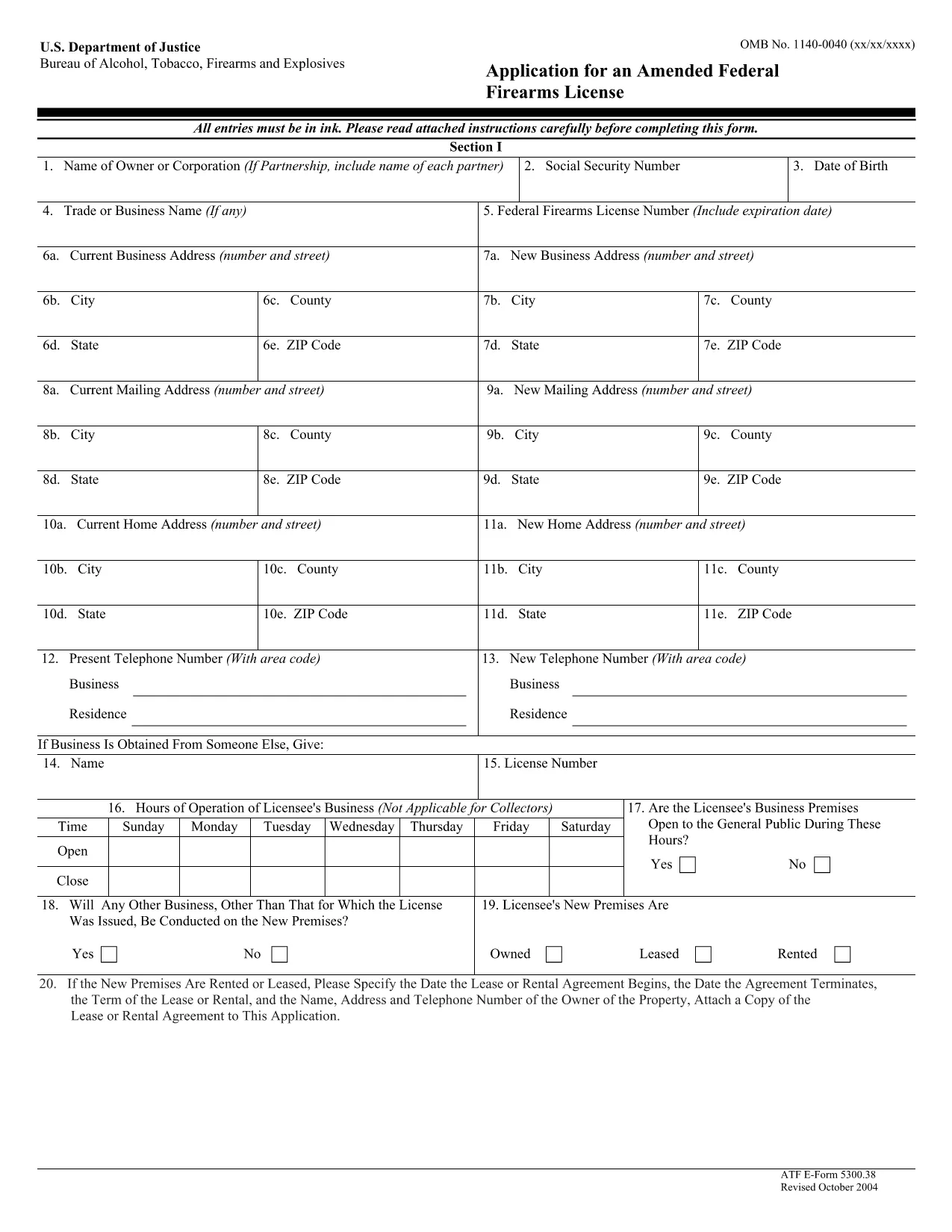
ATF Form 5300.38 – Amended Federal Firearms License Application

  1. Լեզու Անգլերեն
  2. Երկիր ԱՄՆ
  3. բաժին Ալկոհոլի, ծխախոտի, հրազենի և պայթուցիկ նյութերի Բերո
  4. Ոլորտ Հրազեններ
ATF Form 5300.38 – Amended Federal Firearms License Application

The ATF Form 5300.38 is the official application used to request an amendment to an existing Federal Firearms License (FFL). Whether you need to add a new class of firearms, change your business address, or update other license details, this form is required by the Bureau of Alcohol, Tobacco, Firearms and Explosives (ATF).

Formize.com offers a 100% fillable, searchable PDF version of the ATF Form 5300.38. You can either download the PDF to complete it offline or use our integrated online PDF filler to fill it out instantly in your browser—no extra software needed.

What is ATF Form 5300.38?

This form is titled “Application for an Amended Federal Firearms License” and is governed by 18 U.S.C. Chapter 44. It is used by existing FFL holders to request any change to their license that does not require a completely new application.

How to Fill Out the Form Online

Follow the simple steps below to complete the form securely with Formize’s PDF Filler:

  • Click the “Fill out this form” button on this page.
  • Wait a few seconds while the Formize PDF Filler loads the fillable ATF Form 5300.38.
  • Enter your information directly into each field. The filler validates dates, phone numbers, and required fields in real time.
  • Review the completed form, sign electronically if required, and click “Download” or “Print”.
  • Mail the signed form to the ATF Federal Firearms Licensing Center as instructed.

Common Mistakes to Avoid

Even a small error can delay processing. Keep these tips in mind:

  • Incorrect ATF Number: Double‑check your current FFL number.
  • Missing Signatures: All required signatures must be original or an accepted electronic signature.
  • Out‑of‑Date Addresses: Use the exact mailing address listed on your current license.
  • Incomplete Attachments: If you’re adding a new class, include the appropriate supplemental pages.

Where to Submit Your Application

After completing the form, mail it to:

Chief, Federal Firearms Licensing Center
2600 Century Parkway NE
Atlanta, GA 30345
United States

Use certified mail or a reputable courier to ensure delivery tracking.

Download the Official PDF

If you prefer to fill out the form offline, click the download button below to get the official ATF Form 5300.38 PDF directly from the government source.

Download ATF Form 5300.38 PDF

ՀՏՀ
  • Is the ATF Form 5300.38 available as a fillable PDF?

    Yes. Formize provides a fully fillable PDF version that you can complete online or download for offline use.

  • Do I need a digital signature for this form?

    The ATF accepts electronic signatures for most sections, but the final signature line often requires a wet ink signature. Check the instructions on the form.

  • How long does it take for the ATF to process an amendment?

    Processing times vary, but most amended license requests are reviewed within 4‑6 weeks after receipt.

  • Can I submit the form electronically?

    The ATF still requires a hard‑copy submission by mail. You can, however, fill out the form electronically and print it for mailing.

  • What should I do if I make a mistake after printing?

    Cross out the error with a single line, initial the change, and complete the rest of the form. For major errors, it’s best to start a new copy.

  • Is there a fee for filing an amendment?

    Generally, there is no additional fee for amending an existing FFL unless the amendment adds a new class of firearms, which may incur a fee.

  • Where can I find the official ATF instructions for Form 5300.38?

    The official instruction sheet is included as the first page of the PDF linked above or can be accessed on the ATF website.

  • Do I need to attach any supporting documents?

    Depending on the amendment, you may need to attach a copy of your current license, a new business location map, or other relevant documentation.

ԻՆՉՊԵՍ

Ինչպես լրացնել ATF Form 5300.38-ն անվճար, առցանց՝ 5 հեշտ քայլերով.

  1. 1
    Click the Fill‑out Button
    Press the “Fill out this form” button on this page to launch the Formize PDF Filler.
  2. 2
    Wait for the Filler to Load
    The fillable ATF Form 5300.38 will appear in your browser within a few seconds.
  3. 3
    Enter Your Information
    Complete each field. The tool validates entries and highlights required sections.
  4. 4
    Review and Sign
    Check the completed form for accuracy, add an electronic signature if allowed, and save.
  5. 5
    Download or Print
    Download the finished PDF or print it to mail to the ATF Federal Firearms Licensing Center.
Ձևավորել PDF Filler հավելվածը
ՄԱՍԻՆ

Ալկոհոլի, ծխախոտի, հրազենի և պայթուցիկ նյութերի (ATF) ձևերի Bereau

ATF Form 5300.38-ը պաշտոնական ձևերից մեկն է, որն օգտագործվում է ATF-ի՝ Միացյալ Նահանգների Արդարադատության նախարարության դաշնային իրավապահ գործակալության կողմից: ATF-ն պատասխանատու է ալկոհոլի, ծխախոտի, հրազենի և պայթուցիկ նյութերի հետ կապված դաշնային օրենքների և կանոնակարգերի կատարման համար: Այս ձևաթղթերը օգտագործվում են տարբեր նպատակներով, այդ թվում՝ այս ոլորտներում ներգրավված ձեռնարկությունների և անհատների գրանցման, լիցենզավորման և կարգավորման համար: Ահա ATF ձևերի մի քանի օրինակ.

ATF Ձև 4473. այս ձևը օգտագործվում է ֆոնային ստուգման գործընթացի համար, երբ անձը զենք է գնում դաշնային լիցենզավորված հրազենի վաճառողից: Այն հավաքում է տեղեկատվություն գնորդի ինքնության, ծագման և հրազեն ունենալու իրավունքի մասին:

ATF Ձև 1. այս ձևն օգտագործվում է հրազենի պատրաստման և գրանցման համար դիմելու համար: Այն սովորաբար օգտագործվում է այն անհատների համար, ովքեր ցանկանում են արտադրել հրազեն անձնական օգտագործման համար կամ գոյություն ունեցող հրազենը փոխակերպել այլ կոնֆիգուրացիայի:

ATF Ձև 4. այս ձևը օգտագործվում է մեկ ֆիզիկական կամ իրավաբանական անձից հրազենի փոխանցման և գրանցման համար: Այն սովորաբար օգտագործվում է մասնավոր կողմից հրազեն գնելու կամ տրեստի կամ կորպորացիայի հրազեն փոխանցելու գործընթացում:

ATF Ձև 6. այս ձևը օգտագործվում է հրազենի, զինամթերքի և ATF-ի կողմից կարգավորվող որոշ այլ ապրանքների ներմուծման համար: Այն պահանջվում է անհատների կամ ձեռնարկությունների համար, ովքեր ցանկանում են նման ապրանքներ ներմուծել Միացյալ Նահանգներ:

ATF Ձև 7. այս ձևը օգտագործվում է դաշնային հրազենի լիցենզիայի (FFL) կիրառման և երկարաձգման համար: Այն պահանջվում է հրազենի արտադրության, առևտրի կամ ներմուծման բիզնեսով զբաղվող անհատների կամ ձեռնարկությունների համար:

ATF Ձև 5320.20. Այս ձևը օգտագործվում է հրազենի փոխադրման ծանուցման և հաստատման համար: կամ կործանարար սարքեր պետական ​​գծերով:

ATF Ձև 5400.13. Այս ձևն օգտագործվում է գրանցման և հաշվետվությունների համար պայթուցիկ նյութեր և սարքեր.

Սրանք ATF ձևերի ընդամենը մի քանի օրինակներ են, որոնք օգտագործվում են տարբեր նպատակներով՝ կապված ալկոհոլի, ծխախոտի, հրազենի և պայթուցիկ նյութերի մասին դաշնային օրենքների կարգավորման և կիրարկման հետ: Պահանջվող հատուկ ձևերը կախված են իրականացվող որոշակի գործունեությունից կամ գործարքից և կիրառվող կանոնակարգերից: Կարևոր է խորհրդակցել Ալկոհոլի, ծխախոտի, հրազենի և պայթուցիկ նյութերի բյուրոյի պաշտոնական կայքին (www.atf.gov) կամ փնտրել պրոֆեսիոնալ առաջնորդություն՝ ճշգրիտ և արդի տեղեկատվության համար։ ձեր իրավիճակին համապատասխան ATF-ի հատուկ ձևերի վերաբերյալ:

ՀԱՏԿՈՒԹՅՈՒՆՆԵՐ

PDF լցոնիչ

Առցանց ATF Form 5300.38-ը լրացնելու ամենահեշտ ձևը

  • Արագ լրացրեք ATF Form 5300.38
    Փնտրու՞մ եք միջոց՝ արագորեն լրացնելու ATF Form 5300.38 առցանց: Մեր առցանց անվճար PDF ձևաթուղթ լրացնողի միջոցով դուք կիմանաք, թե ինչպես խմբագրել և լրացնել այս pdf փաստաթուղթը մեկ րոպեից պակաս ժամանակում:
  • Հեշտ օգտագործման առցանց PDF խմբագիր
    Հոգնե՞լ եք PDF ֆայլեր տպելուց, որպեսզի կարողանաք դրանք խմբագրել, նախքան նորից սկանավորելը և հետ ուղարկելը: Խմբագրել PDF փաստաթղթերը անվճար առցանց: Օգտագործեք մեր առցանց pdf խմբագրիչը ժամանակ և թուղթ խնայելու համար:
  • Հիանալի գործիքներ, բոլոր հարթակներ
    Զարմանում եք, թե ինչպես լրացնել ATF Form 5300.38-ը Mac-ում, կամ գուցե ինչպես անվճար օգտագործել PDF լցոնիչը: Մեր առցանց PDF գործիքներն աշխատում են բոլոր հարթակներում:
  • Անվտանգ ֆայլերի պահպանում
    Ավարտված «ATF Form 5300.38» ֆայլերը պահվում են պաշտպանված տվյալների բազայում, որը կառավարվում է Amazon Cloud հոսթինգի կողմից: Ցանկացած ժամանակ կարող եք ջնջել ձեր ֆայլերը մեր համակարգից: Ամեն դեպքում, այս ֆայլերը ավտոմատ կերպով ջնջվում են 24 ժամ հետո:
  • Զրուցեք ATF Form 5300.38-ի հետ
    Զրուցեք «ATF Form 5300.38»-ի հետ Chatize-ում, որը PDF ընթերցողի անվճար օգնական է: Հարցեր տվեք և ստացեք պատասխաններ «ATF Form 5300.38»-ից։ Պարզապես սեղմեք վերևում գտնվող Զրույց փաստաթղթի հետ կոճակը:

Ջնջել լրացման նիստը

Ջնջե՞լ ընտրված լրացման աշխատաշրջանը: Այս դեպքում ձևը լրացնելու ձեր առաջընթացը կկորչի:

Ջնջել խմբագրման նիստը

Ջնջե՞լ ընտրված խմբագրման աշխատաշրջանը: Այս դեպքում ձևը ստեղծելու և խմբագրելու ձեր առաջընթացը կկորչի: