Ընտրել լեզուն

Application Form B – Inborn Errors of Metabolism (Fillable PDF)

  1. Լեզու Անգլերեն
  2. Երկիր Ավստրալիա
  3. Գործունեություն Health Assistance
  4. բաժին Առողջապահության և ընտանիքի բարեկեցության վարչություն
Application Form B – Inborn Errors of Metabolism (Fillable PDF)

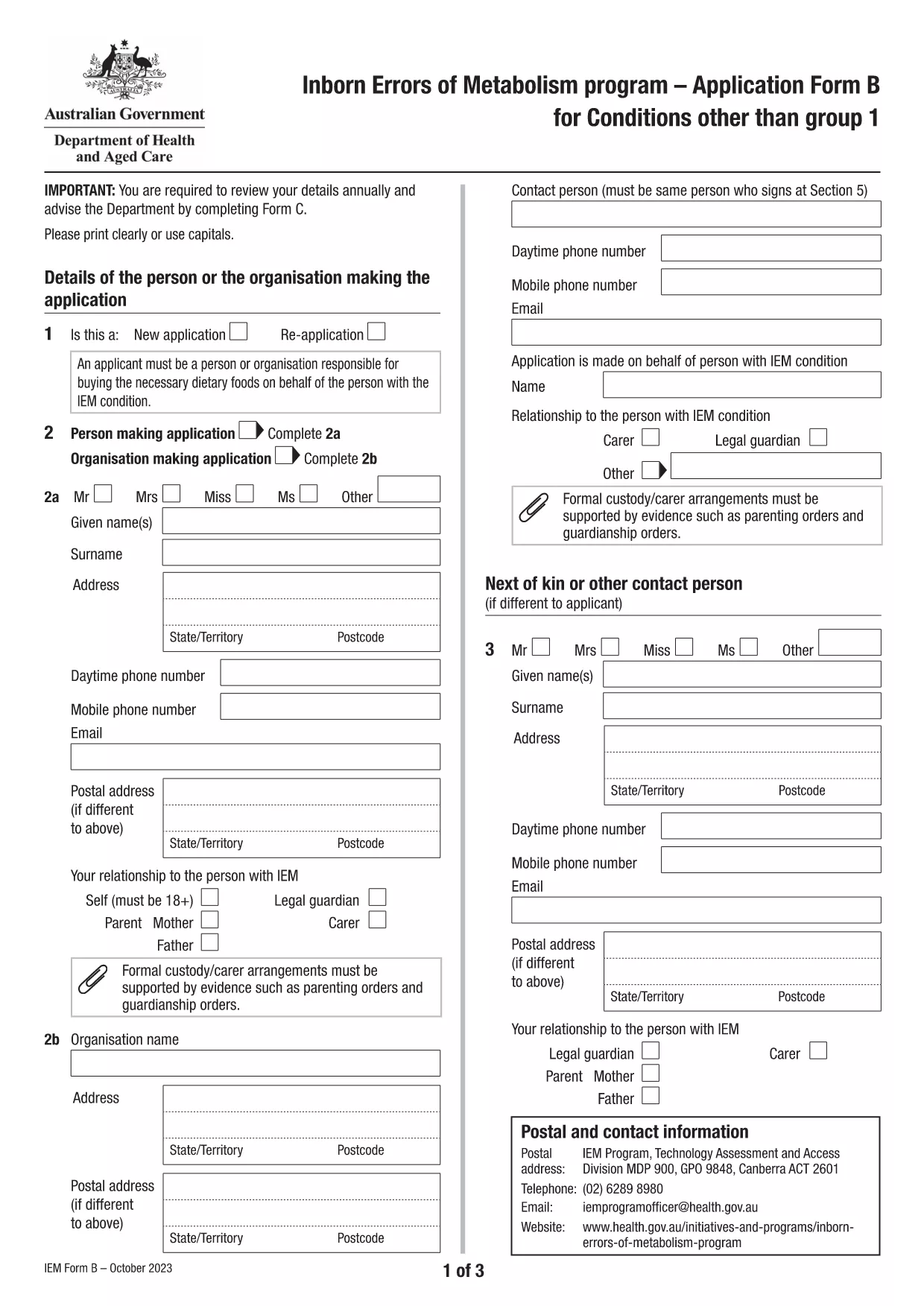
Application Form B is the Australian Government’s official form for individuals with Inborn Errors of Metabolism (excluding Group 1 conditions) who are applying for financial assistance. The form is now available as a fillable PDF that can be completed directly in your browser using the Formize PDF Filler app.

What is Application Form B?

This form collects detailed medical, demographic, and financial information required to assess eligibility for the Inborn Errors of Metabolism (IEM) program. It replaces the older paper‑only version, allowing faster processing and reduced errors.

Who Needs to Use This Form?

  • Patients diagnosed with any IEM condition listed under "Conditions other than Group 1" (e.g., Maple Syrup Urine Disease, Homocystinuria, etc.).
  • Parents or legal guardians applying on behalf of a minor.
  • Healthcare providers assisting a client with the application.

How to Complete the Form Online with Formize

Instead of downloading the PDF and opening a separate editor, simply click the "Fill out this form" button on this page. The Formize PDF Filler will load in a secure window, letting you type directly into each field.

Common Mistakes to Avoid

  • Leaving required fields blank – the filler highlights missing information before you can submit.
  • Using outdated medical terminology – refer to the latest diagnosis code provided by your specialist.
  • Submitting unsigned forms – the digital signature field must be completed before saving.

Download the Fillable PDF

If you prefer the traditional method, you can still download the original PDF from the Australian Department of Health. The file is fully searchable and printable.

Download Application Form B (PDF)

ՀՏՀ
  • What conditions are covered by Application Form B?

    Form B is for all Inborn Errors of Metabolism except Group 1 conditions (DHPR, hyperphenylalaninemia, and PKU). A full list is provided on the form itself.

  • Can I submit the form electronically?

    Yes. After completing the fillable PDF with Formize, you can save it and upload the file through the Department of Health’s online portal.

  • Do I need a doctor’s signature?

    A medical practitioner must sign the "Medical Officer’s Confirmation" section. This can be done digitally if the practitioner has a compatible e‑signature tool.

  • How often must I re‑apply?

    Eligibility is reviewed annually. You must submit a new Application Form B each year to continue receiving assistance.

  • Is there a fee to use Formize?

    No. Formize’s online filler is free for all public government PDFs, including Application Form B.

  • What should I do if I make a mistake after saving?

    Open the saved PDF again with Formize, correct the error, and re‑save. Avoid editing the file with non‑fillable PDF editors to prevent corruption.

ԻՆՉՊԵՍ

Ինչպես լրացնել Application Form B-ն անվճար, առցանց՝ 5 հեշտ քայլերով.

  1. 1
    Open the online filler
    Click the "Fill out this form" button on the page. The Formize PDF Filler app will open in a new tab.
  2. 2
    Enter your information
    Type directly into each highlighted field. Use the navigation bar at the top to jump between sections.
  3. 3
    Add digital signatures
    When you reach the signature section, click the signature box and follow the prompts to create a secure digital signature.
  4. 4
    Review and save
    Use the built‑in validator to check for missing or incorrect data, then click "Save" to download a completed copy.
  5. 5
    Submit your application
    Print the saved PDF (if required) and mail it to the address listed on the form, or upload it via the Department of Health portal.
Ձևավորել PDF Filler հավելվածը
ՄԱՍԻՆ

Application Form B ձևանմուշ

PDF փաստաթուղթը դիտելու և լրացնելու գործառույթների ավանդական փաթեթով, որը զուգորդվում է վեբ հավելվածի առավելությունների և արձագանքող դասավորության հետ, դուք կարող եք լրացնել Application Form B-ը րոպեների ընթացքում:

ՀԱՏԿՈՒԹՅՈՒՆՆԵՐ

PDF լցոնիչ

Առցանց Application Form B-ը լրացնելու ամենահեշտ ձևը

  • Արագ լրացրեք Application Form B
    Փնտրու՞մ եք միջոց՝ արագորեն լրացնելու Application Form B առցանց: Մեր առցանց անվճար PDF ձևաթուղթ լրացնողի միջոցով դուք կիմանաք, թե ինչպես խմբագրել և լրացնել այս pdf փաստաթուղթը մեկ րոպեից պակաս ժամանակում:
  • Հեշտ օգտագործման առցանց PDF խմբագիր
    Հոգնե՞լ եք PDF ֆայլեր տպելուց, որպեսզի կարողանաք դրանք խմբագրել, նախքան նորից սկանավորելը և հետ ուղարկելը: Խմբագրել PDF փաստաթղթերը անվճար առցանց: Օգտագործեք մեր առցանց pdf խմբագրիչը ժամանակ և թուղթ խնայելու համար:
  • Հիանալի գործիքներ, բոլոր հարթակներ
    Զարմանում եք, թե ինչպես լրացնել Application Form B-ը Mac-ում, կամ գուցե ինչպես անվճար օգտագործել PDF լցոնիչը: Մեր առցանց PDF գործիքներն աշխատում են բոլոր հարթակներում:
  • Անվտանգ ֆայլերի պահպանում
    Ավարտված «Application Form B» ֆայլերը պահվում են պաշտպանված տվյալների բազայում, որը կառավարվում է Amazon Cloud հոսթինգի կողմից: Ցանկացած ժամանակ կարող եք ջնջել ձեր ֆայլերը մեր համակարգից: Ամեն դեպքում, այս ֆայլերը ավտոմատ կերպով ջնջվում են 24 ժամ հետո:
  • Զրուցեք Application Form B-ի հետ
    Զրուցեք «Application Form B»-ի հետ Chatize-ում, որը PDF ընթերցողի անվճար օգնական է: Հարցեր տվեք և ստացեք պատասխաններ «Application Form B»-ից։ Պարզապես սեղմեք վերևում գտնվող Զրույց փաստաթղթի հետ կոճակը:

Ջնջել լրացման նիստը

Ջնջե՞լ ընտրված լրացման աշխատաշրջանը: Այս դեպքում ձևը լրացնելու ձեր առաջընթացը կկորչի:

Ջնջել խմբագրման նիստը

Ջնջե՞լ ընտրված խմբագրման աշխատաշրջանը: Այս դեպքում ձևը ստեղծելու և խմբագրելու ձեր առաջընթացը կկորչի: