Ընտրել լեզուն

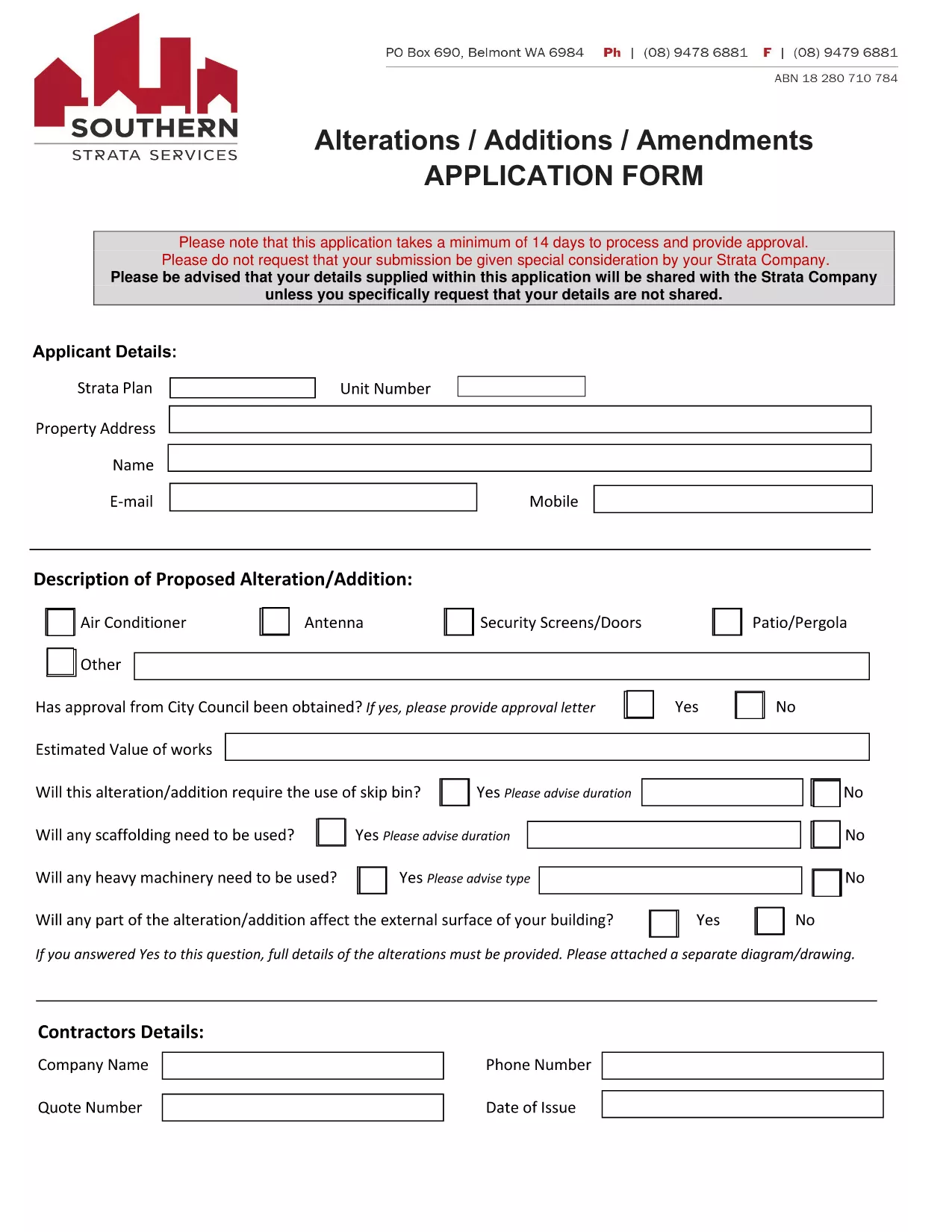
Amendments, Alterations & Renewal Form (Fillable PDF)

  1. Երկիր Ավստրալիա
  2. Լեզու Անգլերեն
  3. Գործունեություն Property Management Legal Forms
Amendments, Alterations & Renewal Form (Fillable PDF)

Whether you need to amend a lease, request an alteration to a property, or renew an existing agreement, the Amendments, Alterations & Renewal Form is your one‑stop solution. This fillable PDF is hosted on Formize, so you can complete it instantly in your browser—no extra software required.

Why Use This Fillable Form

  • Fully searchable and editable fields.
  • Automatic saving prevents data loss.
  • Compliant with Australian property‑management standards.
  • Instant download of a printable version after submission.

How to Complete the Form Online

Simply click the "Fill out this form" button on this page. The Formize PDF Filler app will load, presenting you with a clean, user‑friendly interface. Enter your information, attach any required documents, and click **Submit** when you’re ready.

Common Mistakes to Avoid

  • Leaving mandatory fields blank – they are highlighted in red.
  • Uploading files in unsupported formats (PDF, JPG, PNG only).
  • Submitting without a signature – use the built‑in signature field.
  • Failing to double‑check dates; processing can take up to 14 days.

Submission Guidelines & Processing Time

After you submit, your request is routed to the relevant Strata or property manager. The standard processing time is **14 business days**. You will receive a confirmation email with a reference number to track the status of your amendment, alteration, or renewal request.

Need a printable copy? Click the **Download PDF** button after submission to keep a hard copy for your records.

ՀՏՀ
  • Is this form really free to use?

    Yes. The fillable PDF and the Formize online filler are completely free. No registration or payment is required.

  • Can I save my progress and finish later?

    The Formize app automatically saves your entries in the browser session. If you close the window, you can reopen the form using the same link and continue where you left off (as long as you haven’t submitted it yet).

  • What file types can I attach as supporting documents?

    You can upload PDF, JPG, or PNG files up to 5 MB each. Larger files should be compressed before attaching.

  • How long does it take for my amendment to be approved?

    Standard processing time is 14 business days. Complex alterations may require additional review, which will be communicated via email.

  • Do I need a digital signature?

    A digital signature entered in the Formize PDF Filler satisfies the legal requirement for a signed amendment or alteration request.

  • What if I make a mistake after submitting?

    Contact your Strata manager or property administrator with the reference number. They can advise whether a new form is needed or if an amendment can be made to the existing submission.

  • Can I print a hard copy after I submit?

    Yes. After submission, a "Download PDF" button appears. Click it to save a printable version for your records.

ԻՆՉՊԵՍ

Ինչպես լրացնել amendments form-ն անվճար, առցանց՝ 5 հեշտ քայլերով.

  1. 1
    Open the Form
    Visit this landing page and locate the "Fill out this form" button near the top of the page.
  2. 2
    Launch Formize PDF Filler
    Click the button; the Formize PDF Filler app loads in your browser with all fields ready for entry.
  3. 3
    Enter Your Details
    Complete each section—personal information, property details, amendment/alteration description, and any supporting documents.
  4. 4
    Add Your Signature
    Use the built‑in signature field to sign electronically. This satisfies the legal requirement for a signed request.
  5. 5
    Review & Submit
    Double‑check all entries, then click the **Submit** button. You’ll receive a confirmation email with a reference number.
Ձևավորել PDF Filler հավելվածը
ՄԱՍԻՆ

amendments form ձևանմուշ

PDF փաստաթուղթը դիտելու և լրացնելու գործառույթների ավանդական փաթեթով, որը զուգորդվում է վեբ հավելվածի առավելությունների և արձագանքող դասավորության հետ, դուք կարող եք լրացնել amendments form-ը րոպեների ընթացքում:

ՀԱՏԿՈՒԹՅՈՒՆՆԵՐ

PDF լցոնիչ

Առցանց amendments form-ը լրացնելու ամենահեշտ ձևը

  • Արագ լրացրեք amendments form
    Փնտրու՞մ եք միջոց՝ արագորեն լրացնելու amendments form առցանց: Մեր առցանց անվճար PDF ձևաթուղթ լրացնողի միջոցով դուք կիմանաք, թե ինչպես խմբագրել և լրացնել այս pdf փաստաթուղթը մեկ րոպեից պակաս ժամանակում:
  • Հեշտ օգտագործման առցանց PDF խմբագիր
    Հոգնե՞լ եք PDF ֆայլեր տպելուց, որպեսզի կարողանաք դրանք խմբագրել, նախքան նորից սկանավորելը և հետ ուղարկելը: Խմբագրել PDF փաստաթղթերը անվճար առցանց: Օգտագործեք մեր առցանց pdf խմբագրիչը ժամանակ և թուղթ խնայելու համար:
  • Հիանալի գործիքներ, բոլոր հարթակներ
    Զարմանում եք, թե ինչպես լրացնել amendments form-ը Mac-ում, կամ գուցե ինչպես անվճար օգտագործել PDF լցոնիչը: Մեր առցանց PDF գործիքներն աշխատում են բոլոր հարթակներում:
  • Անվտանգ ֆայլերի պահպանում
    Ավարտված «amendments form» ֆայլերը պահվում են պաշտպանված տվյալների բազայում, որը կառավարվում է Amazon Cloud հոսթինգի կողմից: Ցանկացած ժամանակ կարող եք ջնջել ձեր ֆայլերը մեր համակարգից: Ամեն դեպքում, այս ֆայլերը ավտոմատ կերպով ջնջվում են 24 ժամ հետո:
  • Զրուցեք amendments form-ի հետ
    Զրուցեք «amendments form»-ի հետ Chatize-ում, որը PDF ընթերցողի անվճար օգնական է: Հարցեր տվեք և ստացեք պատասխաններ «amendments form»-ից։ Պարզապես սեղմեք վերևում գտնվող Զրույց փաստաթղթի հետ կոճակը:

Ջնջել լրացման նիստը

Ջնջե՞լ ընտրված լրացման աշխատաշրջանը: Այս դեպքում ձևը լրացնելու ձեր առաջընթացը կկորչի:

Ջնջել խմբագրման նիստը

Ջնջե՞լ ընտրված խմբագրման աշխատաշրջանը: Այս դեպքում ձևը ստեղծելու և խմբագրելու ձեր առաջընթացը կկորչի: