
Ընտրել լեզուն

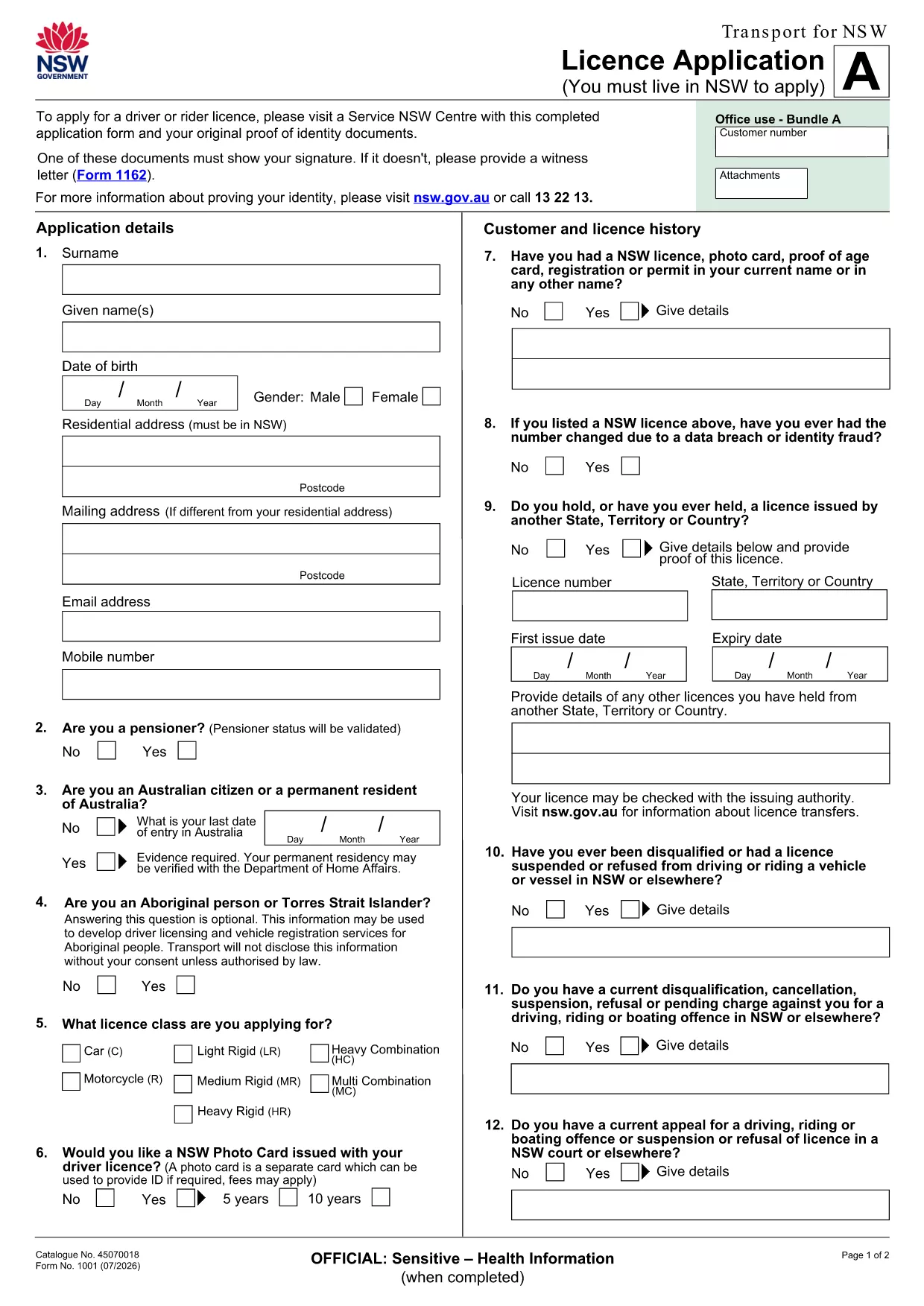
Pre‑Filled Driving Licence Application Form

  1. Լեզու Անգլերեն
  2. Երկիր Ավստրալիա
  3. բաժին Transport for NSW
  4. Գործունեություն Driving Licence
Pre‑Filled Driving Licence Application Form

Obtaining a new driver’s licence or renewing an existing one can be a paperwork hassle. Our pre‑filled driving licence application form removes the guesswork by already inserting your basic details, so you only need to confirm or update the information that matters.

All you have to do is click the Fill out this form button on the page, let the Formize PDF Filler load, and complete the remaining fields in seconds. No extra software, no printing before you’re ready, and the form stays fully compliant with Transport for NSW requirements.

Once you finish, you can download a completed PDF, print it for a manual signature, or submit it electronically where accepted. This streamlined process saves you time, reduces errors, and helps you get your licence faster.

ՀՏՀ
  • Is the pre‑filled licence application really free?

    Yes. The PDF download and the Formize filler are completely free. You only pay any standard licence fees required by Transport for NSW.

  • Do I need Adobe Acrobat to use the form?

    No. Formize’s online PDF filler works in any modern browser, so you don’t need Acrobat or any additional software.

  • Can I edit the pre‑filled information?

    Absolutely. All pre‑filled fields are editable. Simply click the field, update the information, and the change is saved instantly.

  • What if I make a mistake while filling the form?

    You can clear any field by selecting it and pressing Delete, or use the **Reset Form** button in the filler to start over.

  • Do I still need to sign the form with a pen?

    If you submit the form electronically, a digital signature is accepted. For paper submissions, print the completed PDF and sign it with a black pen.

  • How long does it take for the form to load?

    The Formize PDF Filler loads in under 5 seconds on a typical broadband connection.

  • Is my personal data safe while using Formize?

    Formize processes the PDF locally in your browser; no data is stored on external servers, ensuring full privacy.

ԻՆՉՊԵՍ

Ինչպես լրացնել driving licence application-ն անվճար, առցանց՝ 5 հեշտ քայլերով.

  1. 1
    Open the Pre‑Filled Form
    Click the **Fill out this form** button on this page. The Formize PDF Filler app will open in a new tab and load the pre‑filled licence application automatically.
  2. 2
    Review and Update Your Details
    Check the pre‑filled sections (name, address, licence number). Edit any fields that have changed, such as a new address or medical information.
  3. 3
    Complete the Remaining Sections
    Fill in the required fields that were not pre‑filled, like signatures, photo consent, and any supporting documentation.
  4. 4
    Save or Print the Completed Form
    When all fields are completed, click **Save PDF** to download the finished form, or choose **Print** if you need a hard copy for submission.
  5. 5
    Submit the Application
    Follow the instructions on the form to either mail the printed copy or upload the saved PDF through the Transport for NSW online portal.
Ձևավորել PDF Filler հավելվածը
ՄԱՍԻՆ

driving licence application ձևանմուշ

PDF փաստաթուղթը դիտելու և լրացնելու գործառույթների ավանդական փաթեթով, որը զուգորդվում է վեբ հավելվածի առավելությունների և արձագանքող դասավորության հետ, դուք կարող եք լրացնել driving licence application-ը րոպեների ընթացքում:

ՀԱՏԿՈՒԹՅՈՒՆՆԵՐ

PDF լցոնիչ

Առցանց driving licence application-ը լրացնելու ամենահեշտ ձևը

  • Արագ լրացրեք driving licence application
    Փնտրու՞մ եք միջոց՝ արագորեն լրացնելու driving licence application առցանց: Մեր առցանց անվճար PDF ձևաթուղթ լրացնողի միջոցով դուք կիմանաք, թե ինչպես խմբագրել և լրացնել այս pdf փաստաթուղթը մեկ րոպեից պակաս ժամանակում:
  • Հեշտ օգտագործման առցանց PDF խմբագիր
    Հոգնե՞լ եք PDF ֆայլեր տպելուց, որպեսզի կարողանաք դրանք խմբագրել, նախքան նորից սկանավորելը և հետ ուղարկելը: Խմբագրել PDF փաստաթղթերը անվճար առցանց: Օգտագործեք մեր առցանց pdf խմբագրիչը ժամանակ և թուղթ խնայելու համար:
  • Հիանալի գործիքներ, բոլոր հարթակներ
    Զարմանում եք, թե ինչպես լրացնել driving licence application-ը Mac-ում, կամ գուցե ինչպես անվճար օգտագործել PDF լցոնիչը: Մեր առցանց PDF գործիքներն աշխատում են բոլոր հարթակներում:
  • Անվտանգ ֆայլերի պահպանում
    Ավարտված «driving licence application» ֆայլերը պահվում են պաշտպանված տվյալների բազայում, որը կառավարվում է Amazon Cloud հոսթինգի կողմից: Ցանկացած ժամանակ կարող եք ջնջել ձեր ֆայլերը մեր համակարգից: Ամեն դեպքում, այս ֆայլերը ավտոմատ կերպով ջնջվում են 24 ժամ հետո:
  • Զրուցեք driving licence application-ի հետ
    Զրուցեք «driving licence application»-ի հետ Chatize-ում, որը PDF ընթերցողի անվճար օգնական է: Հարցեր տվեք և ստացեք պատասխաններ «driving licence application»-ից։ Պարզապես սեղմեք վերևում գտնվող Զրույց փաստաթղթի հետ կոճակը:

Ջնջել լրացման նիստը

Ջնջե՞լ ընտրված լրացման աշխատաշրջանը: Այս դեպքում ձևը լրացնելու ձեր առաջընթացը կկորչի:

Ջնջել խմբագրման նիստը

Ջնջե՞լ ընտրված խմբագրման աշխատաշրջանը: Այս դեպքում ձևը ստեղծելու և խմբագրելու ձեր առաջընթացը կկորչի: