Ընտրել լեզուն

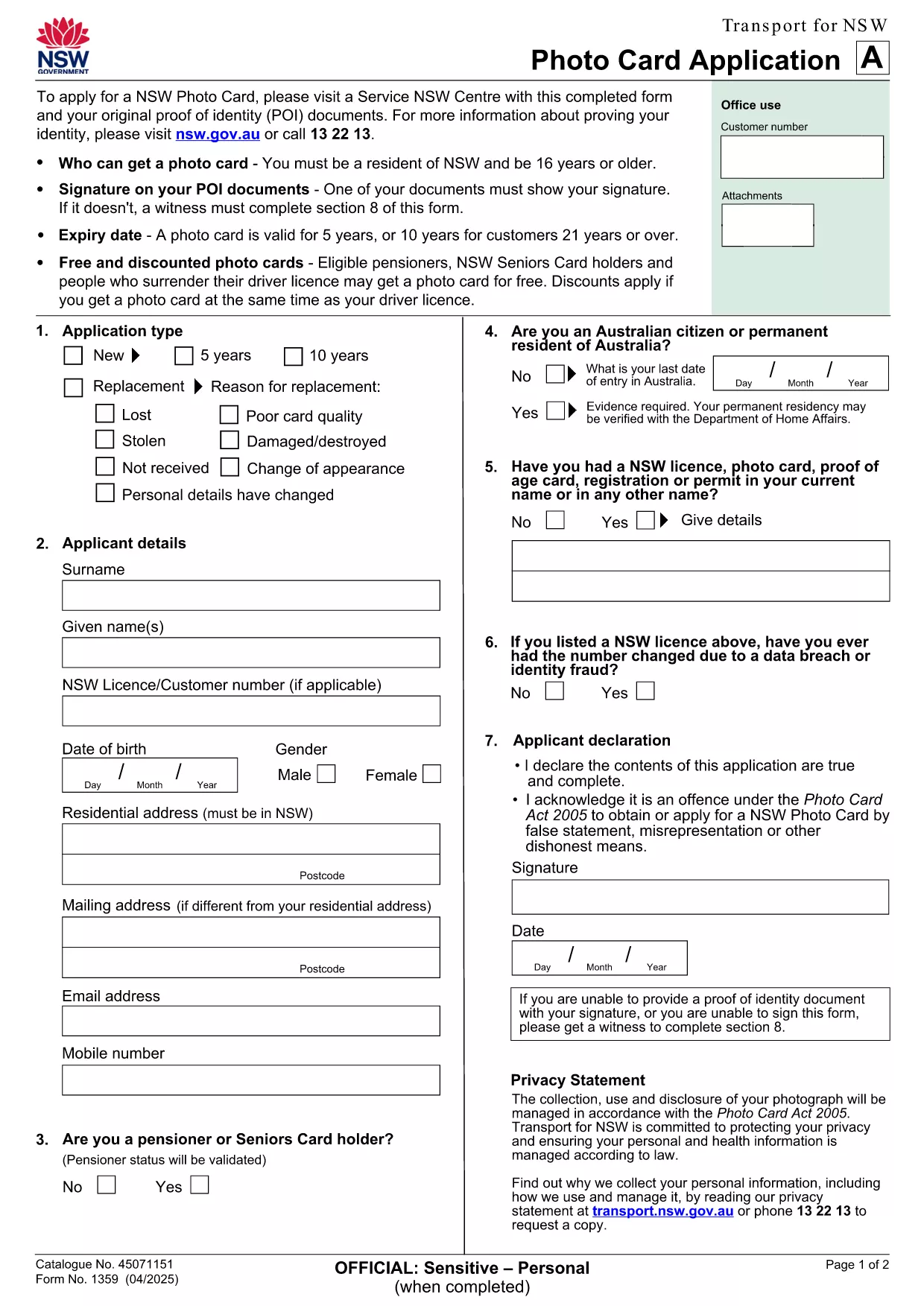
NSW Photo Card Application Form – Fillable PDF with Photo

  1. Երկիր Ավստրալիա
  2. Լեզու Անգլերեն
  3. Գործունեություն Identification
  4. բաժին Transport
NSW Photo Card Application Form – Fillable PDF with Photo

Looking for a fast, secure way to apply for a NSW Photo Card? This page gives you direct access to the official NSW Photo Card application form that includes a dedicated photo field. Whether you prefer to download the PDF or fill it out instantly online, Formize makes the process simple.

Why You Need a NSW Photo Card

A NSW Photo Card is an accepted form of identification for residents aged 16 and over who don’t have a driver licence. It displays your name, address, date of birth and a recent photo, and is valid for up to 10 years for eligible customers.

Key Features of the Fillable PDF Form

  • Built‑in photo placeholder – attach a passport‑style picture directly in the form.
  • Editable text fields for personal details, address, and signature.
  • Auto‑calculation of fees based on eligibility and concessions.
  • Compliant with Transport for NSW security standards.

How to Complete the Form Online with Formize

Instead of downloading the PDF and using a separate editor, simply click the "Fill out this form" button on this page. The Formize PDF Filler app loads in seconds, letting you type, upload a photo, and sign electronically.

Common Mistakes to Avoid

  • Uploading a photo that doesn’t meet the NSW guidelines (e.g., glasses glare, incorrect background).
  • Leaving any mandatory field blank – the filler will highlight missing information.
  • Submitting an outdated address proof; always use a current utility bill or bank statement.

Where to Submit Your Application

After completing the form, print it (if required) and visit any Service NSW Centre. Bring your original identity documents, the signed form, and the photo you uploaded. Cash, card, or EFTPOS payments are accepted.

Need extra help? Review the official Service NSW guide for detailed photo requirements and eligibility criteria.

ՀՏՀ
  • Do I need a driver licence to apply for a NSW Photo Card?

    No. The Photo Card is intended for residents who do not have a driver licence or whose licence has expired.

  • What photo specifications are required?

    The photo must be a clear, front‑facing headshot with a plain background, no glasses glare, and a size of 35mm × 45mm.

  • Can I submit the form entirely online?

    You can fill the form online with Formize, but the final submission must be in person at a Service NSW Centre to have your photo taken and verify identity documents.

  • How long is the Photo Card valid?

    The card is valid for 5 years for most applicants, or 10 years for eligible customers aged 21 and over.

  • Are there any fees or concessions?

    Fees vary based on whether you hold a driver licence and your eligibility for concessions (e.g., seniors, pensioners, carers).

  • What should I do if I cannot attend a Service NSW Centre?

    Eligible applicants with medical reasons can use a photo kit and mail the completed form, as outlined on the Service NSW website.

ԻՆՉՊԵՍ

Ինչպես լրացնել application form with photo-ն անվճար, առցանց՝ 5 հեշտ քայլերով.

  1. 1
    Open the Fillable Form
    Click the "Fill out this form" button on the page. The Formize PDF Filler loads in a new window.
  2. 2
    Enter Your Details
    Type your name, address, date of birth, and any other required information into the highlighted fields.
  3. 3
    Upload Your Photo
    Use the photo placeholder to upload a recent passport‑style picture that meets NSW guidelines.
  4. 4
    Add Your Signature
    Draw or upload a digital signature in the signature field.
  5. 5
    Review & Submit
    Check all fields for completeness, then click "Save & Download" to get a printable copy. Bring the printed form to a Service NSW Centre.
Ձևավորել PDF Filler հավելվածը
ՄԱՍԻՆ

application form with photo ձևանմուշ

PDF փաստաթուղթը դիտելու և լրացնելու գործառույթների ավանդական փաթեթով, որը զուգորդվում է վեբ հավելվածի առավելությունների և արձագանքող դասավորության հետ, դուք կարող եք լրացնել application form with photo-ը րոպեների ընթացքում:

ՀԱՏԿՈՒԹՅՈՒՆՆԵՐ

PDF լցոնիչ

Առցանց application form with photo-ը լրացնելու ամենահեշտ ձևը

  • Արագ լրացրեք application form with photo
    Փնտրու՞մ եք միջոց՝ արագորեն լրացնելու application form with photo առցանց: Մեր առցանց անվճար PDF ձևաթուղթ լրացնողի միջոցով դուք կիմանաք, թե ինչպես խմբագրել և լրացնել այս pdf փաստաթուղթը մեկ րոպեից պակաս ժամանակում:
  • Հեշտ օգտագործման առցանց PDF խմբագիր
    Հոգնե՞լ եք PDF ֆայլեր տպելուց, որպեսզի կարողանաք դրանք խմբագրել, նախքան նորից սկանավորելը և հետ ուղարկելը: Խմբագրել PDF փաստաթղթերը անվճար առցանց: Օգտագործեք մեր առցանց pdf խմբագրիչը ժամանակ և թուղթ խնայելու համար:
  • Հիանալի գործիքներ, բոլոր հարթակներ
    Զարմանում եք, թե ինչպես լրացնել application form with photo-ը Mac-ում, կամ գուցե ինչպես անվճար օգտագործել PDF լցոնիչը: Մեր առցանց PDF գործիքներն աշխատում են բոլոր հարթակներում:
  • Անվտանգ ֆայլերի պահպանում
    Ավարտված «application form with photo» ֆայլերը պահվում են պաշտպանված տվյալների բազայում, որը կառավարվում է Amazon Cloud հոսթինգի կողմից: Ցանկացած ժամանակ կարող եք ջնջել ձեր ֆայլերը մեր համակարգից: Ամեն դեպքում, այս ֆայլերը ավտոմատ կերպով ջնջվում են 24 ժամ հետո:
  • Զրուցեք application form with photo-ի հետ
    Զրուցեք «application form with photo»-ի հետ Chatize-ում, որը PDF ընթերցողի անվճար օգնական է: Հարցեր տվեք և ստացեք պատասխաններ «application form with photo»-ից։ Պարզապես սեղմեք վերևում գտնվող Զրույց փաստաթղթի հետ կոճակը:

Ջնջել լրացման նիստը

Ջնջե՞լ ընտրված լրացման աշխատաշրջանը: Այս դեպքում ձևը լրացնելու ձեր առաջընթացը կկորչի:

Ջնջել խմբագրման նիստը

Ջնջե՞լ ընտրված խմբագրման աշխատաշրջանը: Այս դեպքում ձևը ստեղծելու և խմբագրելու ձեր առաջընթացը կկորչի: