
Ընտրել լեզուն

Driving Licence Renewal Application for Age 70

  1. Երկիր Ավստրալիա
  2. Լեզու Անգլերեն
  3. Գործունեություն Driver Licensing
  4. բաժին Transport
Driving Licence Renewal Application for Age 70

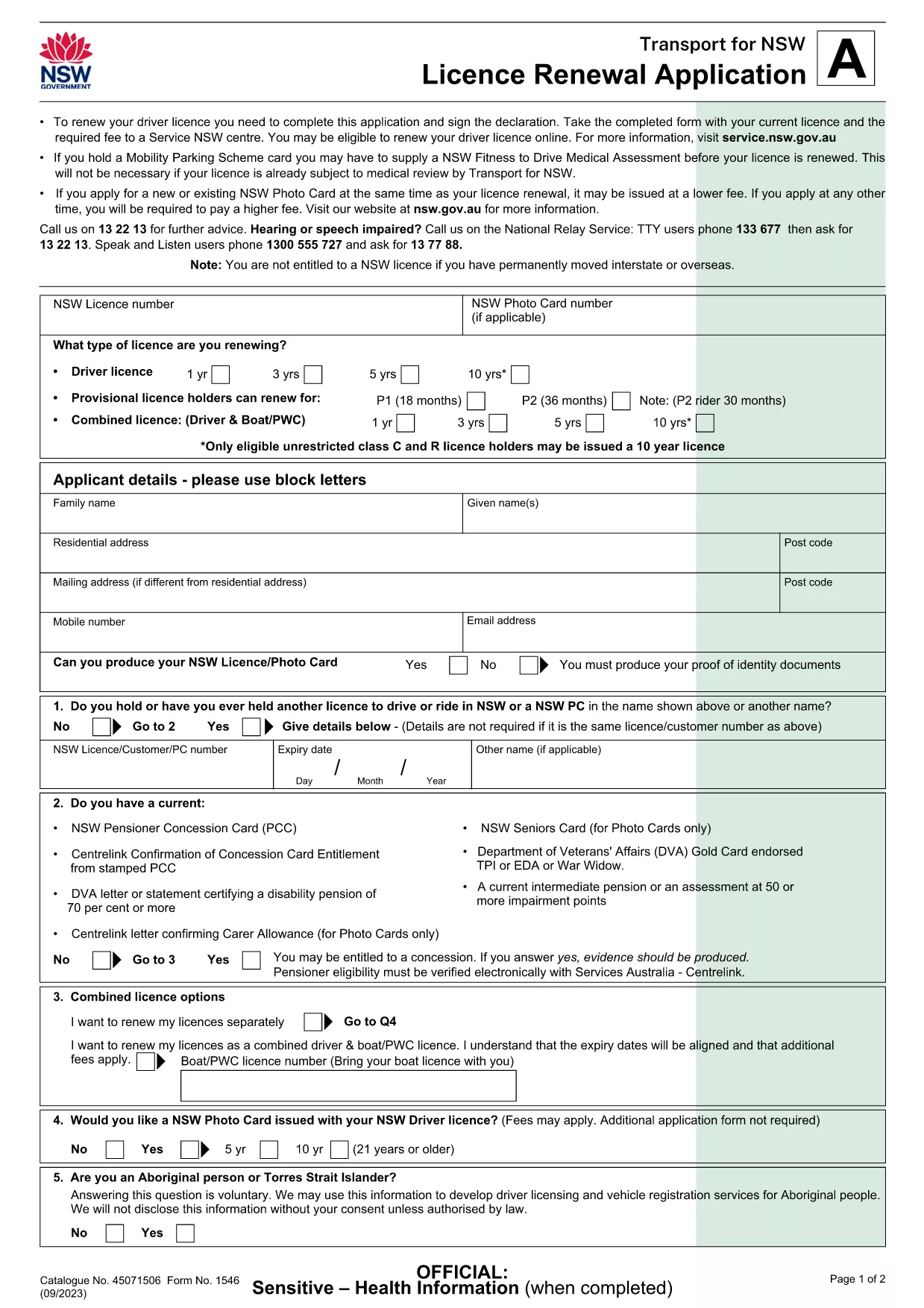
Turning 70 means it’s time to update your driver’s licence to meet the latest safety standards. The Licence Renewal Application (Form 1546) is a fillable PDF that lets you provide all required details from the comfort of home.

This page gives you everything you need – a direct download, an instant online filler, clear instructions, and answers to the most common questions.

Why Renew Your Licence at Age 70?

  • Legal requirement in many jurisdictions to re‑validate fitness to drive.
  • Update your photo and address to keep your record current.
  • Access any new concessions or senior driver programs.

Download & Fill the PDF Form

Click the Fill out this form button below. The Formize PDF Filler app will load the official Licence Renewal Application (PDF) directly in your browser, so you never need to install additional software.

Step‑by‑Step Guide to Complete the Form

Follow the simple steps in the How To section to finish your renewal quickly.

Common Mistakes to Avoid

  • Leaving mandatory fields blank – the filler will highlight them.
  • Using a low‑resolution photo – upload a clear, recent headshot.
  • Forgetting to sign the declaration – you can add a digital signature or print and sign.

Frequently Asked Questions

Scroll down for quick answers to the questions most drivers ask when renewing at 70.

ՀՏՀ
  • Do I need to print the form after filling it online?

    Yes. The Service NSW centre requires a hard copy with your original signature and supporting documents.

  • Can I submit the form electronically?

    Currently the NSW government accepts only paper submissions for licence renewal, so you must print and deliver the form.

  • What identification documents do I need to bring?

    Bring your current driver’s licence, proof of residence (e.g., utility bill), and a recent passport‑style photo.

  • Is there an extra fee for renewing at age 70?

    The renewal fee is the standard rate for senior drivers in NSW; check the Service NSW website for the exact amount.

  • How long does the renewal process take?

    Processing at the centre usually takes 15‑30 minutes once you submit the completed form and payment.

  • What if I make a mistake on the form?

    If you notice an error before printing, simply go back to the Formize filler, correct the field, and re‑download the PDF.

  • Can I use a mobile device to fill the form?

    The Formize filler works best on a desktop or laptop. Mobile browsers may not display all fields correctly.

  • Do I need a separate medical certificate?

    If you have a medical condition that could affect driving, attach a Doctor’s Certificate with the form.

ԻՆՉՊԵՍ

Ինչպես լրացնել renew driving licence at 70-ն անվճար, առցանց՝ 6 հեշտ քայլերով.

  1. 1
    Click the Fill‑Out Button
    Press the “Fill out this form” button on this page. The Formize PDF Filler will open the licence renewal PDF in a secure window.
  2. 2
    Wait for the Filler to Load
    The app loads the fillable fields automatically. This usually takes a few seconds depending on your connection.
  3. 3
    Enter Your Details
    Type your personal information, address, and any medical declarations directly into the highlighted fields.
  4. 4
    Add a Digital Signature (Optional)
    If you have a digital signature, click the signature field and follow the prompts. Otherwise, you can print later to sign.
  5. 5
    Save and Download
    When all fields are complete, click “Save” to download the completed PDF to your device.
  6. 6
    Print, Sign, and Submit
    Print the saved form, sign with a black or blue pen if required, and bring it together with your current licence and fee to the nearest Service NSW centre.
Ձևավորել PDF Filler հավելվածը
ՄԱՍԻՆ

renew driving licence at 70 ձևանմուշ

PDF փաստաթուղթը դիտելու և լրացնելու գործառույթների ավանդական փաթեթով, որը զուգորդվում է վեբ հավելվածի առավելությունների և արձագանքող դասավորության հետ, դուք կարող եք լրացնել renew driving licence at 70-ը րոպեների ընթացքում:

ՀԱՏԿՈՒԹՅՈՒՆՆԵՐ

PDF լցոնիչ

Առցանց renew driving licence at 70-ը լրացնելու ամենահեշտ ձևը

  • Արագ լրացրեք renew driving licence at 70
    Փնտրու՞մ եք միջոց՝ արագորեն լրացնելու renew driving licence at 70 առցանց: Մեր առցանց անվճար PDF ձևաթուղթ լրացնողի միջոցով դուք կիմանաք, թե ինչպես խմբագրել և լրացնել այս pdf փաստաթուղթը մեկ րոպեից պակաս ժամանակում:
  • Հեշտ օգտագործման առցանց PDF խմբագիր
    Հոգնե՞լ եք PDF ֆայլեր տպելուց, որպեսզի կարողանաք դրանք խմբագրել, նախքան նորից սկանավորելը և հետ ուղարկելը: Խմբագրել PDF փաստաթղթերը անվճար առցանց: Օգտագործեք մեր առցանց pdf խմբագրիչը ժամանակ և թուղթ խնայելու համար:
  • Հիանալի գործիքներ, բոլոր հարթակներ
    Զարմանում եք, թե ինչպես լրացնել renew driving licence at 70-ը Mac-ում, կամ գուցե ինչպես անվճար օգտագործել PDF լցոնիչը: Մեր առցանց PDF գործիքներն աշխատում են բոլոր հարթակներում:
  • Անվտանգ ֆայլերի պահպանում
    Ավարտված «renew driving licence at 70» ֆայլերը պահվում են պաշտպանված տվյալների բազայում, որը կառավարվում է Amazon Cloud հոսթինգի կողմից: Ցանկացած ժամանակ կարող եք ջնջել ձեր ֆայլերը մեր համակարգից: Ամեն դեպքում, այս ֆայլերը ավտոմատ կերպով ջնջվում են 24 ժամ հետո:
  • Զրուցեք renew driving licence at 70-ի հետ
    Զրուցեք «renew driving licence at 70»-ի հետ Chatize-ում, որը PDF ընթերցողի անվճար օգնական է: Հարցեր տվեք և ստացեք պատասխաններ «renew driving licence at 70»-ից։ Պարզապես սեղմեք վերևում գտնվող Զրույց փաստաթղթի հետ կոճակը:

Ջնջել լրացման նիստը

Ջնջե՞լ ընտրված լրացման աշխատաշրջանը: Այս դեպքում ձևը լրացնելու ձեր առաջընթացը կկորչի:

Ջնջել խմբագրման նիստը

Ջնջե՞լ ընտրված խմբագրման աշխատաշրջանը: Այս դեպքում ձևը ստեղծելու և խմբագրելու ձեր առաջընթացը կկորչի: