
Ընտրել լեզուն

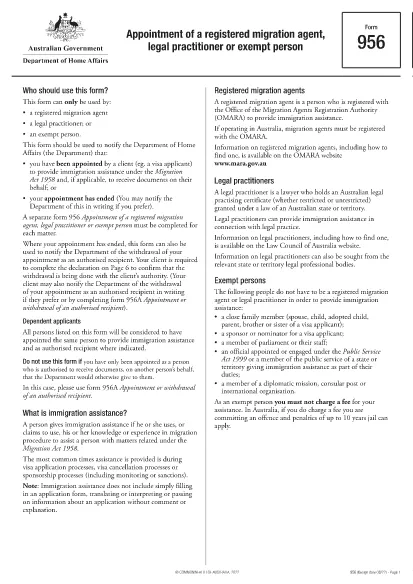
Legal Form PDF – Australian Migration Agent Appointment (Form 956)

  1. Լեզու Անգլերեն
  2. Երկիր Ավստրալիա
  3. Գործունեություն Վիզայի աջակցություն
Legal Form PDF – Australian Migration Agent Appointment (Form 956)

Looking for a reliable, easy‑to‑use legal form PDF? The Australian Migration Agent Appointment Form (Form 956) is a standard legal document required when a client appoints a registered migration agent, legal practitioner, or exempt person. With Formize you can fill, sign, and save the form directly in your browser—no extra software needed.

Why Use a Fillable PDF Form?

Fillable PDFs keep the original layout intact, ensure data is entered in the correct fields, and reduce errors that can cause processing delays. Formize’s online PDF filler adds:

  • Auto‑save while you type
  • Instant validation for required fields
  • Secure storage of your completed document

How to Complete Form 956 Online

Follow the simple steps below to finish the form in minutes.

Common Mistakes to Avoid

Even a small mistake can invalidate the appointment. Watch out for:

  • Leaving required fields blank
  • Using an unofficial signature image
  • Entering an outdated passport or visa number

Where to Submit the Completed Form

Once you have saved the filled PDF, you can either upload it through your ImmiAccount or email it to the relevant case officer as instructed in your client’s correspondence.

FAQs About Form 956

Below are the most common questions we receive about this legal form PDF.

ՀՏՀ
  • What is Form 956 used for?

    Form 956 is the official legal document that appoints a registered migration agent, legal practitioner, or exempt person to act on a client’s behalf in Australian immigration matters.

  • Can I edit Form 956 on a mobile device?

    Yes. Formize’s PDF filler works on all modern browsers, including mobile Safari and Chrome, so you can complete the form on a phone or tablet.

  • Do I need Adobe Acrobat to fill this form?

    No. The form is fully editable within the Formize web app—no additional software is required.

  • Is my data stored securely?

    All data entered in the Formize PDF filler is encrypted in transit (HTTPS) and is not stored on our servers after you download the completed PDF.

  • What should I do if I make a mistake after saving?

    Open the saved PDF again with the Formize filler, correct the error, and re‑download the updated version before submission.

  • Do I need to print the form after filling it online?

    Printing is optional. Most immigration offices accept the digitally signed PDF, but you can print a hard copy if you prefer.

  • How long is Form 956 valid?

    The appointment remains valid until you withdraw it, the migration agent’s registration expires, or the case is closed.

  • Can I use this form for other visa types?

    Form 956 is a generic appointment form and can be used for any visa application where a migration agent is acting on behalf of the client.

ԻՆՉՊԵՍ

Ինչպես լրացնել legal form pdf-ն անվճար, առցանց՝ 5 հեշտ քայլերով.

  1. 1
    Click the "Fill out this form" button
    On the page, locate the bright orange "Fill out this form" button and click it. This launches the Formize PDF Filler app in a new tab.
  2. 2
    Wait for the Formize PDF Filler to load
    The app will automatically load the Form 956 PDF. A progress bar shows when the document is ready for editing.
  3. 3
    Enter your information
    Type directly into each highlighted field. Required fields are marked with a red asterisk and will be validated in real time.
  4. 4
    Review and sign
    Use the built‑in signature tool to add a digital signature. Double‑check every entry for accuracy.
  5. 5
    Download or submit
    When you’re satisfied, click "Download PDF" to save a copy or use the "Submit" button to send it directly to your ImmiAccount.
Ձևավորել PDF Filler հավելվածը
ՄԱՍԻՆ

Վիզայի ձևեր

legal form pdf-ը վիզայի ձևերից մեկն է, որը փաստաթղթեր են, որոնք օգտագործվում են օտար երկիր մուտք գործելու վիզա ստանալու համար: Վիզան փաստաթուղթ է, որը թույլ է տալիս օտարերկրյա քաղաքացուն մուտք գործել, մնալ և երբեմն աշխատել օտար երկրում որոշակի ժամանակահատվածում: Վիզա ստանալու ճշգրիտ ձևերն ու պահանջները տարբեր են՝ կախված երկրից և վիզայի տեսակից:

Վիզայի ձևաթղթերը սովորաբար պահանջում են անձնական տվյալներ, ինչպիսիք են անունը, ծննդյան ամսաթիվը և անձնագրի տվյալները, ինչպես նաև տեղեկություններ ուղևորության նպատակի և տևողության, նախատեսված նպատակակետի և արդյոք դիմողին նախկինում մերժել են վիզա կամ արտաքսել երկրից: Ձևաթղթերը կարող են պահանջել նաև օժանդակ փաստաթղթեր, ինչպիսիք են անձնագիր, լուսանկարներ և ֆինանսական աջակցության ապացույց:

Միացյալ Նահանգներում վիզայի ամենատարածված ձևերն են DS-160 և DS-260 ձևերը: DS-160 ձևը օգտագործվում է ոչ ներգաղթային վիզա ստանալու համար, մինչդեռ DS-260 ձևը օգտագործվում է ներգաղթային վիզա ստանալու համար: Այս ձևաթղթերը պահանջում են մանրամասն տեղեկություններ դիմողի անձնական և ճանապարհորդական պատմության մասին, ինչպես նաև օժանդակ փաստաթղթեր, ինչպիսիք են անձնագիրը, ճանապարհորդության երթուղին և ֆինանսական գրառումները:

Այլ երկրներ կարող են ունենալ վիզայի տարբեր ձևեր և պահանջներ, սակայն հիմնական գործընթացը սովորաբար ներառում է վիզայի դիմումի լրացում, օժանդակ փաստաթղթերի տրամադրում և ԱՄՆ դեսպանատան կամ հյուպատոսության հյուպատոսական աշխատակցի հետ հարցազրույցի մասնակցությունը: Կարևոր է նշել, որ վիզայի դիմումի գործընթացը կարող է բարդ և ժամանակատար լինել, և խորհուրդ է տրվում, որ վիզա փնտրող անհատները խորհրդակցեն ներգաղթի փաստաբանի կամ այլ որակավորված մասնագետի հետ՝ համոզվելու համար, որ բոլոր անհրաժեշտ ձևերն ու պահանջները բավարարված են:

ՀԱՏԿՈՒԹՅՈՒՆՆԵՐ

PDF լցոնիչ

Առցանց legal form pdf-ը լրացնելու ամենահեշտ ձևը

  • Արագ լրացրեք legal form pdf
    Փնտրու՞մ եք միջոց՝ արագորեն լրացնելու legal form pdf առցանց: Մեր առցանց անվճար PDF ձևաթուղթ լրացնողի միջոցով դուք կիմանաք, թե ինչպես խմբագրել և լրացնել այս pdf փաստաթուղթը մեկ րոպեից պակաս ժամանակում:
  • Հեշտ օգտագործման առցանց PDF խմբագիր
    Հոգնե՞լ եք PDF ֆայլեր տպելուց, որպեսզի կարողանաք դրանք խմբագրել, նախքան նորից սկանավորելը և հետ ուղարկելը: Խմբագրել PDF փաստաթղթերը անվճար առցանց: Օգտագործեք մեր առցանց pdf խմբագրիչը ժամանակ և թուղթ խնայելու համար:
  • Հիանալի գործիքներ, բոլոր հարթակներ
    Զարմանում եք, թե ինչպես լրացնել legal form pdf-ը Mac-ում, կամ գուցե ինչպես անվճար օգտագործել PDF լցոնիչը: Մեր առցանց PDF գործիքներն աշխատում են բոլոր հարթակներում:
  • Անվտանգ ֆայլերի պահպանում
    Ավարտված «legal form pdf» ֆայլերը պահվում են պաշտպանված տվյալների բազայում, որը կառավարվում է Amazon Cloud հոսթինգի կողմից: Ցանկացած ժամանակ կարող եք ջնջել ձեր ֆայլերը մեր համակարգից: Ամեն դեպքում, այս ֆայլերը ավտոմատ կերպով ջնջվում են 24 ժամ հետո:
  • Զրուցեք legal form pdf-ի հետ
    Զրուցեք «legal form pdf»-ի հետ Chatize-ում, որը PDF ընթերցողի անվճար օգնական է: Հարցեր տվեք և ստացեք պատասխաններ «legal form pdf»-ից։ Պարզապես սեղմեք վերևում գտնվող Զրույց փաստաթղթի հետ կոճակը:

Ջնջել լրացման նիստը

Ջնջե՞լ ընտրված լրացման աշխատաշրջանը: Այս դեպքում ձևը լրացնելու ձեր առաջընթացը կկորչի:

Ջնջել խմբագրման նիստը

Ջնջե՞լ ընտրված խմբագրման աշխատաշրջանը: Այս դեպքում ձևը ստեղծելու և խմբագրելու ձեր առաջընթացը կկորչի: