
Ընտրել լեզուն

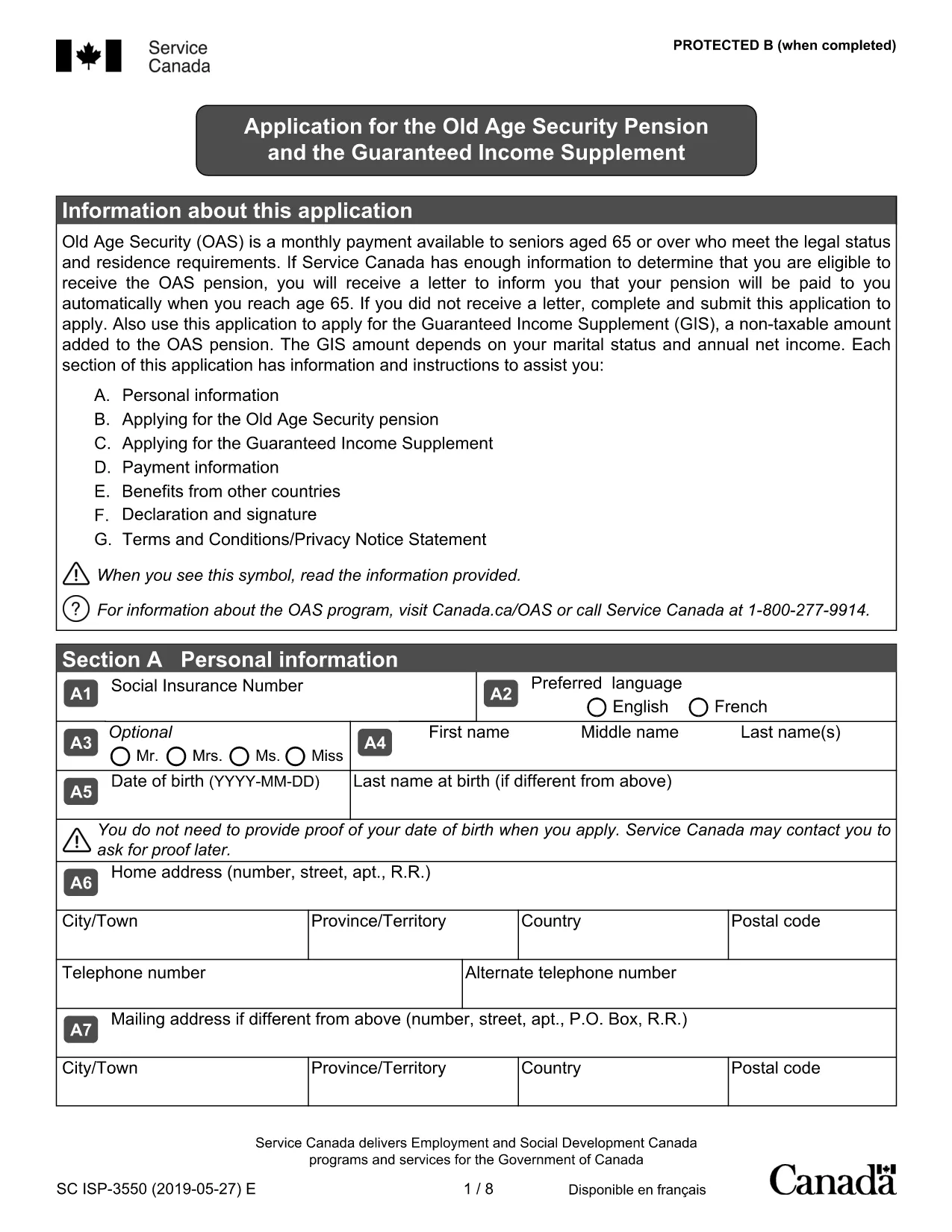
Old Age Pension Application Form (Fillable PDF)

  1. Երկիր Կանադա
  2. Լեզու Անգլերեն
  3. Գործունեություն Pensions
  4. բաժին Service Canada
Old Age Pension Application Form (Fillable PDF)

Applying for the Old Age Pension (Old Age Security) can feel overwhelming, but with our fillable PDF you can complete the entire application online, save time, and reduce errors. The form is fully compatible with the Formize PDF Filler – just click the button, fill the fields, and submit.

Why Choose a Fillable PDF for Your Old Age Pension

  • Instant editing: No need to print, write, scan, or fax.
  • Auto‑save: Your progress is saved automatically, so you can return later.
  • Guided validation: The filler highlights required fields and alerts you to missing information.
  • Secure submission: Export a clean PDF that meets Service Canada’s requirements.

How to Complete the Old Age Pension Application

Follow the simple steps below to fill out the application correctly. Each step corresponds to a section of the PDF.

  1. Open the form: Click the Fill out this form button on this page. The Formize PDF Filler will load the document.
  2. Enter personal details: Provide your full name, date of birth, Social Insurance Number (SIN), and current address.
  3. Residency information: Indicate your citizenship status and the number of years you have lived in Canada.
  4. Financial information: List any income, savings, or property you own. This helps Service Canada assess eligibility.
  5. Partner details (if applicable): Even if your partner is not applying, their information is required for the means test.
  6. Review & submit: Use the built‑in review tool, then download the completed PDF and send it to Service Canada.

Common Mistakes to Avoid

  • Leaving required fields blank – the filler will flag them before you can submit.
  • Using an outdated address – ensure the mailing address matches your myGov profile.
  • Incorrect SIN format – double‑check the nine‑digit number.
  • Omitting partner information – this can delay processing.
  • Submitting an unsigned form – the PDF filler adds an electronic signature option.

Eligibility Checklist

Before you start, make sure you meet the basic criteria:

  • Age 65 or older
  • Canadian citizen or legal resident
  • Minimum 10 years of residence in Canada after age 18
  • Income and assets within the program’s limits

Download & Fill the Form

Ready to begin? Click the button below, let Formize load the PDF, and complete your Old Age Pension application in minutes.

Fill out this form

ՀՏՀ
  • Do I need to print the Old Age Pension form?

    No. The fillable PDF can be completed entirely online using the Formize PDF Filler, then saved as a digital file for submission.

  • What documents do I need to have handy?

    You’ll need your Social Insurance Number (SIN), proof of residency (e.g., driver’s licence), recent bank statements, and details of any assets or income.

  • Can I save my progress and finish later?

    Yes. The Formize filler automatically saves your entries in the browser, so you can close the window and return at any time.

  • Is an electronic signature accepted?

    Service Canada accepts a digitally signed PDF. The Formize filler includes an e‑signature field that meets their requirements.

  • How long does the application process take?

    After submission, Service Canada typically processes an OAS application within 4‑6 weeks, provided all information is complete.

  • What if I make a mistake after I submit?

    Contact Service Canada immediately. You can submit a corrected PDF or provide additional information through your myGov account.

  • Is there a fee to use the fillable PDF?

    No. The PDF and the Formize filler are completely free to use.

ԻՆՉՊԵՍ

Ինչպես լրացնել old age pension application-ն անվճար, առցանց՝ 5 հեշտ քայլերով.

  1. 1
    Open the Fillable Form
    Click the “Fill out this form” button on the page. The Formize PDF Filler loads the Old Age Pension application automatically.
  2. 2
    Enter Your Information
    Type your personal, residency, and financial details into the highlighted fields. Required fields are marked with an asterisk.
  3. 3
    Validate & Review
    The filler checks for missing or incorrectly formatted data. Fix any alerts, then use the built‑in preview to ensure everything looks correct.
  4. 4
    Save or Export
    When you’re satisfied, click “Save” to store a copy in your browser or “Export” to download a clean PDF ready for submission.
  5. 5
    Submit to Service Canada
    Mail or upload the completed PDF to Service Canada according to their instructions. Keep a copy for your records.
Ձևավորել PDF Filler հավելվածը
ՄԱՍԻՆ

old age pension application ձևանմուշ

PDF փաստաթուղթը դիտելու և լրացնելու գործառույթների ավանդական փաթեթով, որը զուգորդվում է վեբ հավելվածի առավելությունների և արձագանքող դասավորության հետ, դուք կարող եք լրացնել old age pension application-ը րոպեների ընթացքում:

ՀԱՏԿՈՒԹՅՈՒՆՆԵՐ

PDF լցոնիչ

Առցանց old age pension application-ը լրացնելու ամենահեշտ ձևը

  • Արագ լրացրեք old age pension application
    Փնտրու՞մ եք միջոց՝ արագորեն լրացնելու old age pension application առցանց: Մեր առցանց անվճար PDF ձևաթուղթ լրացնողի միջոցով դուք կիմանաք, թե ինչպես խմբագրել և լրացնել այս pdf փաստաթուղթը մեկ րոպեից պակաս ժամանակում:
  • Հեշտ օգտագործման առցանց PDF խմբագիր
    Հոգնե՞լ եք PDF ֆայլեր տպելուց, որպեսզի կարողանաք դրանք խմբագրել, նախքան նորից սկանավորելը և հետ ուղարկելը: Խմբագրել PDF փաստաթղթերը անվճար առցանց: Օգտագործեք մեր առցանց pdf խմբագրիչը ժամանակ և թուղթ խնայելու համար:
  • Հիանալի գործիքներ, բոլոր հարթակներ
    Զարմանում եք, թե ինչպես լրացնել old age pension application-ը Mac-ում, կամ գուցե ինչպես անվճար օգտագործել PDF լցոնիչը: Մեր առցանց PDF գործիքներն աշխատում են բոլոր հարթակներում:
  • Անվտանգ ֆայլերի պահպանում
    Ավարտված «old age pension application» ֆայլերը պահվում են պաշտպանված տվյալների բազայում, որը կառավարվում է Amazon Cloud հոսթինգի կողմից: Ցանկացած ժամանակ կարող եք ջնջել ձեր ֆայլերը մեր համակարգից: Ամեն դեպքում, այս ֆայլերը ավտոմատ կերպով ջնջվում են 24 ժամ հետո:
  • Զրուցեք old age pension application-ի հետ
    Զրուցեք «old age pension application»-ի հետ Chatize-ում, որը PDF ընթերցողի անվճար օգնական է: Հարցեր տվեք և ստացեք պատասխաններ «old age pension application»-ից։ Պարզապես սեղմեք վերևում գտնվող Զրույց փաստաթղթի հետ կոճակը:

Ջնջել լրացման նիստը

Ջնջե՞լ ընտրված լրացման աշխատաշրջանը: Այս դեպքում ձևը լրացնելու ձեր առաջընթացը կկորչի:

Ջնջել խմբագրման նիստը

Ջնջե՞լ ընտրված խմբագրման աշխատաշրջանը: Այս դեպքում ձևը ստեղծելու և խմբագրելու ձեր առաջընթացը կկորչի: