
Ընտրել լեզուն

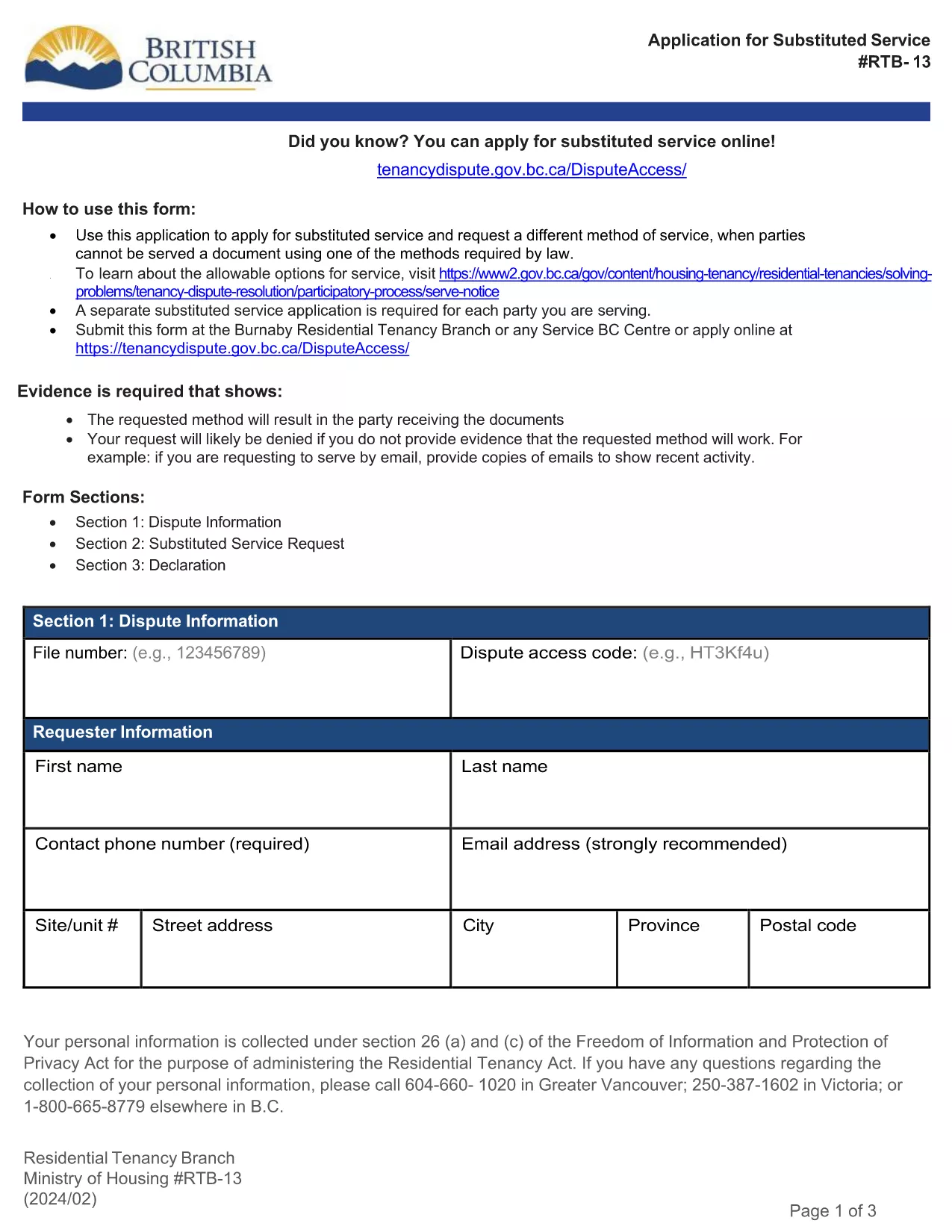
RTB‑13 Application for Substituted Service (Fillable PDF)

  1. Լեզու Անգլերեն
  2. Երկիր Կանադա
  3. Գործունեություն Վարձակալություն
  4. Պետություն Բրիտանական Կոլումբիա
RTB‑13 Application for Substituted Service (Fillable PDF)

The RTB‑13 Application for Substituted Service is the official form used by the British Columbia Residential Tenancy Branch when a party needs the arbitrator to order an alternative method of serving documents. This form is required when the usual service methods under the Residential Tenancy Act cannot be used.

What Is the RTB‑13 Form?

RTB‑13 is a government‑issued, fillable PDF that captures details such as:

  • Parties involved (landlord, tenant, arbitrator)
  • Reason for requesting substituted service
  • Proposed method of service (email, courier, posting, etc.)
  • Supporting evidence or affidavits

When Should You Use RTB‑13?

Use this form if you have tried the standard service methods (personal delivery, registered mail, etc.) and they have failed, or if the other party’s location makes normal service impractical. Common scenarios include:

  • Tenant has moved without leaving a forwarding address.
  • Landlord cannot locate the tenant after multiple attempts.
  • Documents need to be served to a corporate entity that only accepts electronic delivery.

How to Complete the RTB‑13 Online

Instead of downloading the PDF to a desktop editor, simply click the "Fill out this form" button below. The Formize PDF Filler app will load in your browser, allowing you to:

  1. Navigate field‑by‑field using the Tab key.
  2. Enter required information directly into each box.
  3. Attach supporting documents or affidavits.
  4. Save a copy for your records.
  5. Submit the completed form to the Residential Tenancy Branch via email or upload.

Common Mistakes & Tips

  • Missing signatures: The form is invalid without the landlord’s and tenant’s signatures.
  • Incorrect dates: Use the exact date you attempted the standard service.
  • Insufficient detail: Clearly describe why normal service failed and propose a realistic alternative.
  • File size limits: Keep attached PDFs under 5 MB to avoid upload errors.

Download the Fillable PDF

If you prefer to work offline, you can still download the official RTB‑13 PDF using the link below. Open it with the latest version of Adobe Acrobat Reader for full fillable functionality.

ՀՏՀ
  • What is the purpose of RTB‑13?

    RTB‑13 requests that an arbitrator order a different method of serving documents when standard service methods are impossible or have failed.

  • Can I submit RTB‑13 electronically?

    Yes. After completing the fillable PDF with Formize, you can email the PDF or upload it through the Residential Tenancy Branch’s online portal.

  • Do I need a lawyer to fill out RTB‑13?

    No. The form is designed for landlords and tenants to complete themselves, though you may seek legal advice if the situation is complex.

  • How long does the arbitrator take to decide on a substituted service request?

    Processing times vary, but most decisions are issued within 10‑14 business days after the completed form is received.

  • What supporting documents should I include?

    Attach proof of attempted service (e.g., delivery receipts, correspondence), affidavits, and any relevant court orders or notices.

  • Is there a fee for filing RTB‑13?

    There is no filing fee for the RTB‑13 application itself, though other tenancy dispute fees may apply.

  • Can I save my progress and return later?

    Yes. The Formize PDF Filler lets you save a draft on your computer and continue editing at any time.

  • What if I make a mistake after submitting?

    Contact the Residential Tenancy Branch immediately. You may be asked to submit a corrected RTB‑13 with a brief explanation of the changes.

ԻՆՉՊԵՍ

Ինչպես լրացնել RTB-13-ն անվճար, առցանց՝ 5 հեշտ քայլերով.

  1. 1
    Click the Fill‑out Button
    Press the "Fill out this form" button on the page. The Formize PDF Filler loads instantly in your browser.
  2. 2
    Enter Your Information
    Tab through each fillable field, entering the required details such as party names, reasons for substituted service, and proposed method.
  3. 3
    Attach Supporting Documents
    Use the attachment field to upload affidavits, proof of attempted service, or any other evidence the arbitrator may need.
  4. 4
    Save and Review
    Click "Save" to store a copy on your device, then review all entries for accuracy before submitting.
  5. 5
    Submit to the Residential Tenancy Branch
    Follow the on‑screen instructions to email or upload the completed RTB‑13 form directly to the BC Residential Tenancy Branch.
Ձևավորել PDF Filler հավելվածը
ՄԱՍԻՆ

Տանտերերի և/կամ վարձակալների համար վարձակալության պայմանագրերի հետ կապված գործողություններ առաջարկելու ձևեր:

RTB-13-ը բնակարանների վարձակալության պայմանագրերի տեսակն է, որն օգտագործվում է մասնավոր տանտերերի և բնակարանային ասոցիացիաների մեծ մասի կողմից:

Կան մի շարք հարցեր, որոնց վերաբերյալ տանտերերը կամ վարձակալները պետք է հետևեն կանոնակարգով սահմանված որոշակի կանոններին: Որոշ դեպքերում նրանց համար կարող է անհրաժեշտ լինել լրացնել մի ձև, որը կոչվում է «սահմանված ձև», որն առաջարկում է գործողություն, որը կարող է ազդել վարձակալության պայմանագրի մյուս կողմի վրա:

Ձևաթղթերը կոչվում են սահմանված ձևեր, քանի որ դրանցում առկա ձևակերպումները մանրակրկիտ մշակվել են՝ ապահովելու համար, որ ձևը լրացնողը և այն անձը, ում այն ​​մատուցվում է, կարող են հասկանալ, թե ինչ է առաջարկվում և ինչ կարող են անել ի պատասխան: Ճիշտ ձևը չմատակարարելը կարող է անվավեր ճանաչել առաջարկվող գործողությունը:

Դուք չեք կարող փոխել ձևակերպումը այս ձևերում, եթե ձևը չի ասում, որ կարող եք դա անել: Եթե ​​փոխեք ձևակերպումը, ձևը կարող է անվավեր ճանաչվել: Դուք նաև պետք է հետևեք ձևաթղթում նշված ծանուցման ժամկետներին:

ՀԱՏԿՈՒԹՅՈՒՆՆԵՐ

PDF լցոնիչ

Առցանց RTB-13-ը լրացնելու ամենահեշտ ձևը

  • Արագ լրացրեք RTB-13
    Փնտրու՞մ եք միջոց՝ արագորեն լրացնելու RTB-13 առցանց: Մեր առցանց անվճար PDF ձևաթուղթ լրացնողի միջոցով դուք կիմանաք, թե ինչպես խմբագրել և լրացնել այս pdf փաստաթուղթը մեկ րոպեից պակաս ժամանակում:
  • Հեշտ օգտագործման առցանց PDF խմբագիր
    Հոգնե՞լ եք PDF ֆայլեր տպելուց, որպեսզի կարողանաք դրանք խմբագրել, նախքան նորից սկանավորելը և հետ ուղարկելը: Խմբագրել PDF փաստաթղթերը անվճար առցանց: Օգտագործեք մեր առցանց pdf խմբագրիչը ժամանակ և թուղթ խնայելու համար:
  • Հիանալի գործիքներ, բոլոր հարթակներ
    Զարմանում եք, թե ինչպես լրացնել RTB-13-ը Mac-ում, կամ գուցե ինչպես անվճար օգտագործել PDF լցոնիչը: Մեր առցանց PDF գործիքներն աշխատում են բոլոր հարթակներում:
  • Անվտանգ ֆայլերի պահպանում
    Ավարտված «RTB-13» ֆայլերը պահվում են պաշտպանված տվյալների բազայում, որը կառավարվում է Amazon Cloud հոսթինգի կողմից: Ցանկացած ժամանակ կարող եք ջնջել ձեր ֆայլերը մեր համակարգից: Ամեն դեպքում, այս ֆայլերը ավտոմատ կերպով ջնջվում են 24 ժամ հետո:
  • Զրուցեք RTB-13-ի հետ
    Զրուցեք «RTB-13»-ի հետ Chatize-ում, որը PDF ընթերցողի անվճար օգնական է: Հարցեր տվեք և ստացեք պատասխաններ «RTB-13»-ից։ Պարզապես սեղմեք վերևում գտնվող Զրույց փաստաթղթի հետ կոճակը:

Ջնջել լրացման նիստը

Ջնջե՞լ ընտրված լրացման աշխատաշրջանը: Այս դեպքում ձևը լրացնելու ձեր առաջընթացը կկորչի:

Ջնջել խմբագրման նիստը

Ջնջե՞լ ընտրված խմբագրման աշխատաշրջանը: Այս դեպքում ձևը ստեղծելու և խմբագրելու ձեր առաջընթացը կկորչի: