
Ընտրել լեզուն

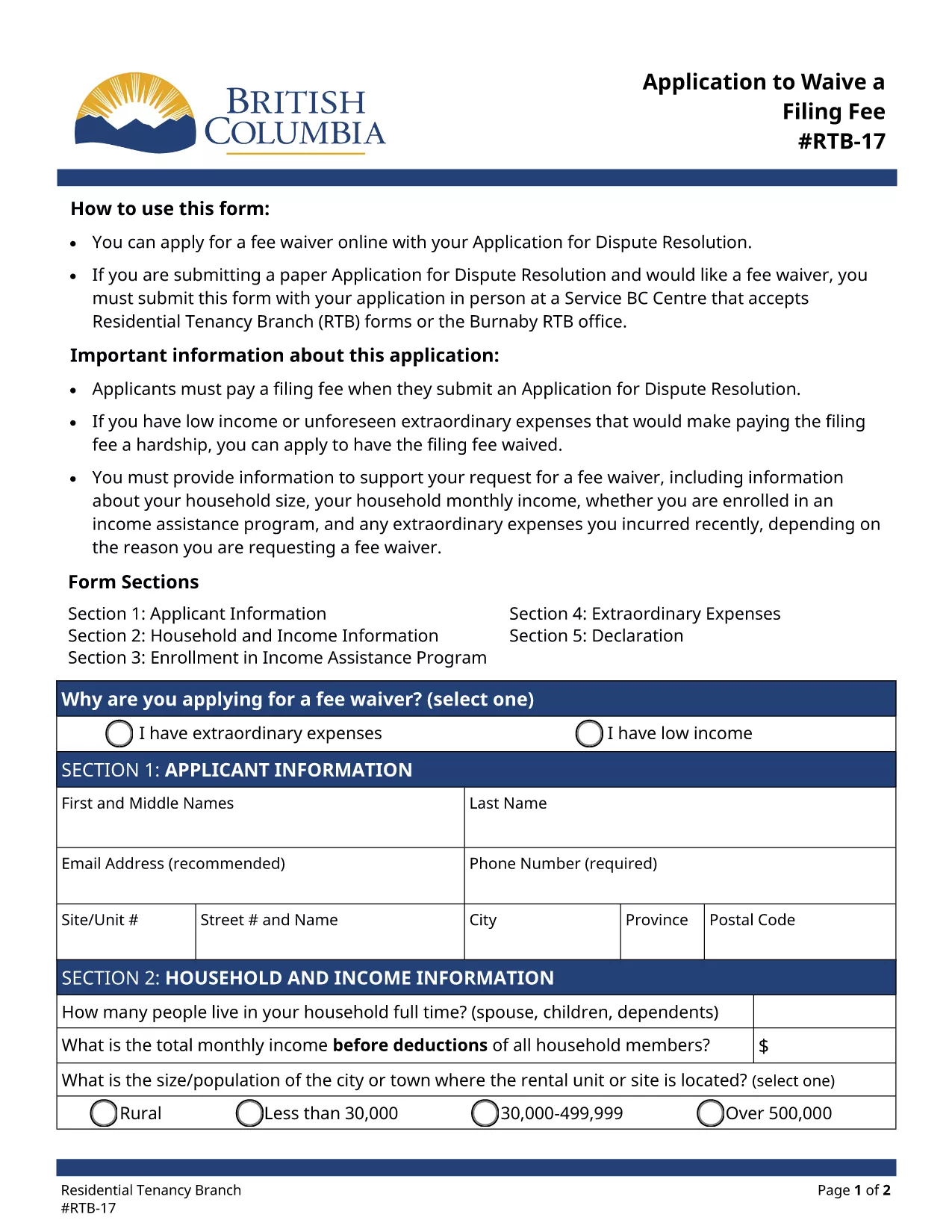
RTB‑17 Application to Waive a Filing Fee (Fillable PDF)

  1. Լեզու Անգլերեն
  2. Երկիր Կանադա
  3. Գործունեություն Վարձակալություն
  4. Պետություն Բրիտանական Կոլումբիա
RTB‑17 Application to Waive a Filing Fee (Fillable PDF)

The RTB‑17 Application to Waive a Filing Fee is the official form used by the British Columbia Residential Tenancy Branch (RTB) when a tenant or landlord needs to request a waiver for the filing fee associated with a dispute resolution application. This form is required under the Residential Tenancy Act and must be completed accurately to avoid processing delays.

What is the RTB‑17 Fee Waiver Form?

RTB‑17 allows applicants to explain why they cannot afford the standard filing fee. Typical reasons include low income, loss of employment, or other financial hardships. The form collects basic personal information, details about the dispute, and supporting documentation.

How to Fill Out RTB‑17 Online with Formize

Formize provides a seamless, fillable PDF experience directly in your browser—no Adobe Reader required. Follow the simple steps below to complete the form in minutes.

Common Mistakes to Avoid When Completing RTB‑17

  • Leaving required fields blank – every field marked with an asterisk must be completed.
  • Submitting outdated contact information – ensure phone numbers and email addresses are current.
  • Failing to attach supporting documents – include proof of income or hardship when requested.

Where to Submit the Completed RTB‑17 Form

After you finish the online fillable version, you can either:

  1. Print and deliver the form in person to a Service BC Centre that accepts RTB forms.
  2. Mail the printed form to the Residential Tenancy Branch address listed on the form.
  3. Submit the PDF electronically through the RTB’s online portal (if available).

Download the Fillable RTB‑17 PDF

If you prefer to work offline, you can download the official fillable PDF directly from the government website. The file is fully compatible with Formize’s PDF Filler.

ՀՏՀ
  • Who is eligible to request a fee waiver using RTB‑17?

    Any tenant or landlord who can demonstrate financial hardship—such as low income, unemployment, or other documented reasons—may apply for a waiver.

  • Can I submit RTB‑17 electronically?

    Yes, after completing the fillable PDF with Formize you can upload the saved file to the RTB’s online portal, if the portal is available for fee‑waiver submissions.

  • What supporting documents should I attach?

    Typical documents include recent pay stubs, a notice of termination of employment, social assistance statements, or any proof that shows you cannot afford the filing fee.

  • How long does it take for the RTB to process a fee waiver?

    Processing times vary, but most fee‑waiver requests are reviewed within 10‑14 business days after receipt of the completed form and supporting evidence.

  • Do I need Adobe Reader to fill out RTB‑17?

    No. Formize’s online PDF filler lets you complete the form directly in your browser without installing Adobe Reader.

  • What if I make a mistake after submitting?

    You can submit a corrected RTB‑17 form with a brief note explaining the changes. Include a copy of the original submission for reference.

  • Is there a cost to use Formize’s fillable PDF service?

    Formize offers free access to fillable PDF forms like RTB‑17. No hidden fees are charged for completing or downloading the form.

ԻՆՉՊԵՍ

Ինչպես լրացնել RTB-17-ն անվճար, առցանց՝ 5 հեշտ քայլերով.

  1. 1
    Click the Fill‑out Button
    On the page, click the bright "Fill out this form" button to launch the Formize PDF Filler.
  2. 2
    Wait for the Filler to Load
    The fillable PDF loads directly in your browser. No download or extra software is required.
  3. 3
    Enter Your Information
    Complete each required field, attach any supporting documents, and double‑check for accuracy.
  4. 4
    Review and Submit
    When you’re satisfied, click "Submit" to generate a completed PDF you can print or save.
  5. 5
    Save a Copy
    Download the final PDF for your records and bring the printed copy to a Service BC Centre or mail it as instructed.
Ձևավորել PDF Filler հավելվածը
ՄԱՍԻՆ

Տանտերերի և/կամ վարձակալների համար վարձակալության պայմանագրերի հետ կապված գործողություններ առաջարկելու ձևեր:

RTB-17-ը բնակարանների վարձակալության պայմանագրերի տեսակն է, որն օգտագործվում է մասնավոր տանտերերի և բնակարանային ասոցիացիաների մեծ մասի կողմից:

Կան մի շարք հարցեր, որոնց վերաբերյալ տանտերերը կամ վարձակալները պետք է հետևեն կանոնակարգով սահմանված որոշակի կանոններին: Որոշ դեպքերում նրանց համար կարող է անհրաժեշտ լինել լրացնել մի ձև, որը կոչվում է «սահմանված ձև», որն առաջարկում է գործողություն, որը կարող է ազդել վարձակալության պայմանագրի մյուս կողմի վրա:

Ձևաթղթերը կոչվում են սահմանված ձևեր, քանի որ դրանցում առկա ձևակերպումները մանրակրկիտ մշակվել են՝ ապահովելու համար, որ ձևը լրացնողը և այն անձը, ում այն ​​մատուցվում է, կարող են հասկանալ, թե ինչ է առաջարկվում և ինչ կարող են անել ի պատասխան: Ճիշտ ձևը չմատակարարելը կարող է անվավեր ճանաչել առաջարկվող գործողությունը:

Դուք չեք կարող փոխել ձևակերպումը այս ձևերում, եթե ձևը չի ասում, որ կարող եք դա անել: Եթե ​​փոխեք ձևակերպումը, ձևը կարող է անվավեր ճանաչվել: Դուք նաև պետք է հետևեք ձևաթղթում նշված ծանուցման ժամկետներին:

ՀԱՏԿՈՒԹՅՈՒՆՆԵՐ

PDF լցոնիչ

Առցանց RTB-17-ը լրացնելու ամենահեշտ ձևը

  • Արագ լրացրեք RTB-17
    Փնտրու՞մ եք միջոց՝ արագորեն լրացնելու RTB-17 առցանց: Մեր առցանց անվճար PDF ձևաթուղթ լրացնողի միջոցով դուք կիմանաք, թե ինչպես խմբագրել և լրացնել այս pdf փաստաթուղթը մեկ րոպեից պակաս ժամանակում:
  • Հեշտ օգտագործման առցանց PDF խմբագիր
    Հոգնե՞լ եք PDF ֆայլեր տպելուց, որպեսզի կարողանաք դրանք խմբագրել, նախքան նորից սկանավորելը և հետ ուղարկելը: Խմբագրել PDF փաստաթղթերը անվճար առցանց: Օգտագործեք մեր առցանց pdf խմբագրիչը ժամանակ և թուղթ խնայելու համար:
  • Հիանալի գործիքներ, բոլոր հարթակներ
    Զարմանում եք, թե ինչպես լրացնել RTB-17-ը Mac-ում, կամ գուցե ինչպես անվճար օգտագործել PDF լցոնիչը: Մեր առցանց PDF գործիքներն աշխատում են բոլոր հարթակներում:
  • Անվտանգ ֆայլերի պահպանում
    Ավարտված «RTB-17» ֆայլերը պահվում են պաշտպանված տվյալների բազայում, որը կառավարվում է Amazon Cloud հոսթինգի կողմից: Ցանկացած ժամանակ կարող եք ջնջել ձեր ֆայլերը մեր համակարգից: Ամեն դեպքում, այս ֆայլերը ավտոմատ կերպով ջնջվում են 24 ժամ հետո:
  • Զրուցեք RTB-17-ի հետ
    Զրուցեք «RTB-17»-ի հետ Chatize-ում, որը PDF ընթերցողի անվճար օգնական է: Հարցեր տվեք և ստացեք պատասխաններ «RTB-17»-ից։ Պարզապես սեղմեք վերևում գտնվող Զրույց փաստաթղթի հետ կոճակը:

Ջնջել լրացման նիստը

Ջնջե՞լ ընտրված լրացման աշխատաշրջանը: Այս դեպքում ձևը լրացնելու ձեր առաջընթացը կկորչի:

Ջնջել խմբագրման նիստը

Ջնջե՞լ ընտրված խմբագրման աշխատաշրջանը: Այս դեպքում ձևը ստեղծելու և խմբագրելու ձեր առաջընթացը կկորչի: