
Ընտրել լեզուն

Anganwadi Application Form – Fill Online Instantly

  1. Երկիր Հնդկաստան
  2. Լեզու Անգլերեն
  3. բաժին Women and Child Development
  4. Գործունեություն Child Development
Լրացրեք այս ձևը
Anganwadi Application Form – Fill Online Instantly

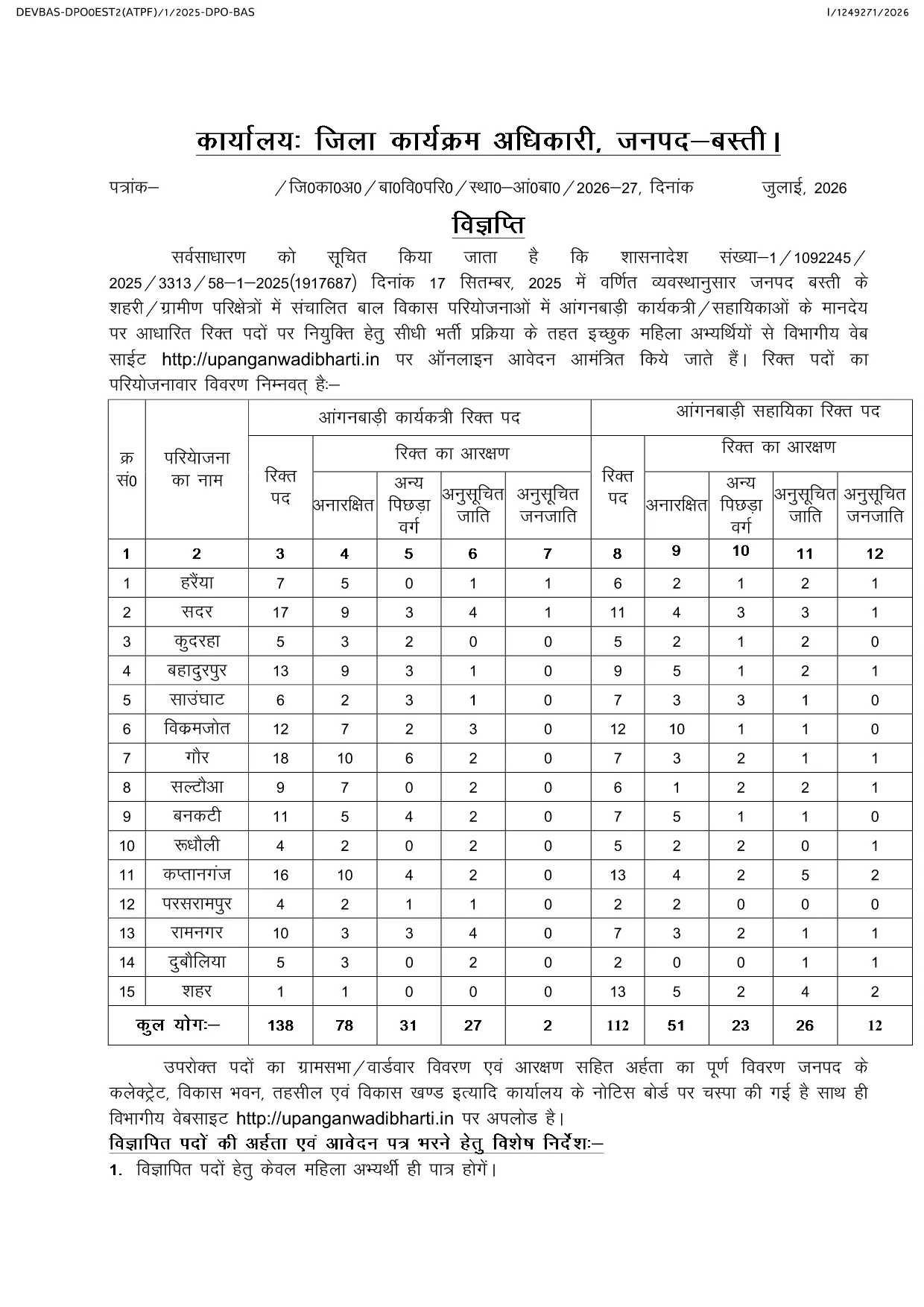
Looking for the official Anganwadi application form for the latest recruitment cycle? Formize lets you open the PDF directly in your browser, fill every field, and submit without ever downloading or printing. The form is fully compatible with the Uttar Pradesh Anganwadi Worker Bharti 2026 notification and follows the Integrated Child Development Services (ICDS) guidelines.

Why Choose Formize for Anganwadi Forms

  • Instant loading of the official PDF – no extra software required.
  • All fields are editable and auto‑saved while you work.
  • Secure, browser‑based filling keeps your personal data private.
  • One‑click download of the completed PDF for submission.

How to Complete the Anganwadi Application Online

Simply click the "Fill out this form" button below. The Formize PDF Filler app will load the document, and you can start entering your details right away.

Eligibility & Required Documents

Before you begin, make sure you meet the basic criteria and have the following documents ready:

  • Age between 18 and 35 years (relaxations applicable as per UP government rules).
  • Minimum educational qualification: 10+2 or equivalent.
  • Proof of residence in the village/ward you are applying for.
  • Recent passport‑size photograph, signature, and scanned ID proof.

Common Mistakes to Avoid

  • Leaving mandatory fields blank – the form will not submit.
  • Uploading photos that do not meet size or format requirements.
  • Entering incorrect village or ward codes – double‑check the official notification.
  • Failing to review the preview before final submission.

Ready to start? Click the button below, fill out the form, and submit your application with confidence.

ՀՏՀ
  • Is there any fee to fill the Anganwadi application form online?

    No. The Anganwadi application form is completely free to fill and download using Formize.

  • Can I edit the form after I have downloaded it?

    Yes. The PDF remains fully editable, but it is recommended to complete and review the form before the first download to avoid errors.

  • What file formats are accepted for photo and signature uploads?

    Upload JPG or PNG images. The maximum file size is 200 KB for each image.

  • Do I need a PDF reader to use Formize?

    No. Formize works entirely in the browser, so you do not need any additional PDF software.

  • How can I be sure my data is secure?

    All data is processed locally in your browser and never stored on our servers unless you choose to download the completed PDF.

  • What should I do if I encounter an error while filling the form?

    Refresh the page and reopen the form. If the problem persists, clear your browser cache or try a different browser.

  • When is the last date to submit the Anganwadi application?

    The last date varies by district. Refer to the official notification linked on the page for the exact deadline for your district.

ԻՆՉՊԵՍ

Ինչպես լրացնել Anganwadi application form-ն անվճար, առցանց՝ 4 հեշտ քայլերով.

  1. 1
    Open the Form
    Click the "Fill out this form" button on the page. The Formize PDF Filler app will load the Anganwadi application PDF directly in your browser.
  2. 2
    Enter Your Details
    Complete each field—personal information, education, residence, and upload your photo and signature. All changes are saved automatically.
  3. 3
    Review & Validate
    Use the preview function to double‑check every entry. Ensure all mandatory fields are filled and documents meet the size requirements.
  4. 4
    Download & Submit
    After confirming the preview, click the download button to save the filled PDF. Submit the file according to the instructions in the official notification.
Ձևավորել PDF Filler հավելվածը
ՄԱՍԻՆ

Anganwadi application form ձևանմուշ

PDF փաստաթուղթը դիտելու և լրացնելու գործառույթների ավանդական փաթեթով, որը զուգորդվում է վեբ հավելվածի առավելությունների և արձագանքող դասավորության հետ, դուք կարող եք լրացնել Anganwadi application form-ը րոպեների ընթացքում:

ՀԱՏԿՈՒԹՅՈՒՆՆԵՐ

PDF լցոնիչ

Առցանց Anganwadi application form-ը լրացնելու ամենահեշտ ձևը

  • Արագ լրացրեք Anganwadi application form
    Փնտրու՞մ եք միջոց՝ արագորեն լրացնելու Anganwadi application form առցանց: Մեր առցանց անվճար PDF ձևաթուղթ լրացնողի միջոցով դուք կիմանաք, թե ինչպես խմբագրել և լրացնել այս pdf փաստաթուղթը մեկ րոպեից պակաս ժամանակում:
  • Հեշտ օգտագործման առցանց PDF խմբագիր
    Հոգնե՞լ եք PDF ֆայլեր տպելուց, որպեսզի կարողանաք դրանք խմբագրել, նախքան նորից սկանավորելը և հետ ուղարկելը: Խմբագրել PDF փաստաթղթերը անվճար առցանց: Օգտագործեք մեր առցանց pdf խմբագրիչը ժամանակ և թուղթ խնայելու համար:
  • Հիանալի գործիքներ, բոլոր հարթակներ
    Զարմանում եք, թե ինչպես լրացնել Anganwadi application form-ը Mac-ում, կամ գուցե ինչպես անվճար օգտագործել PDF լցոնիչը: Մեր առցանց PDF գործիքներն աշխատում են բոլոր հարթակներում:
  • Անվտանգ ֆայլերի պահպանում
    Ավարտված «Anganwadi application form» ֆայլերը պահվում են պաշտպանված տվյալների բազայում, որը կառավարվում է Amazon Cloud հոսթինգի կողմից: Ցանկացած ժամանակ կարող եք ջնջել ձեր ֆայլերը մեր համակարգից: Ամեն դեպքում, այս ֆայլերը ավտոմատ կերպով ջնջվում են 24 ժամ հետո:
  • Զրուցեք Anganwadi application form-ի հետ
    Զրուցեք «Anganwadi application form»-ի հետ Chatize-ում, որը PDF ընթերցողի անվճար օգնական է: Հարցեր տվեք և ստացեք պատասխաններ «Anganwadi application form»-ից։ Պարզապես սեղմեք վերևում գտնվող Զրույց փաստաթղթի հետ կոճակը:

Ջնջել լրացման նիստը

Ջնջե՞լ ընտրված լրացման աշխատաշրջանը: Այս դեպքում ձևը լրացնելու ձեր առաջընթացը կկորչի:

Ջնջել խմբագրման նիստը

Ջնջե՞լ ընտրված խմբագրման աշխատաշրջանը: Այս դեպքում ձևը ստեղծելու և խմբագրելու ձեր առաջընթացը կկորչի: