
Ընտրել լեզուն

Form 1118 Schedule I – Fillable PDF

  1. Երկիր ԱՄՆ
  2. Լեզու Անգլերեն
  3. Գործունեություն Հարկեր
  4. բաժին Ներքին եկամուտների ծառայություն
Form 1118 Schedule I – Fillable PDF

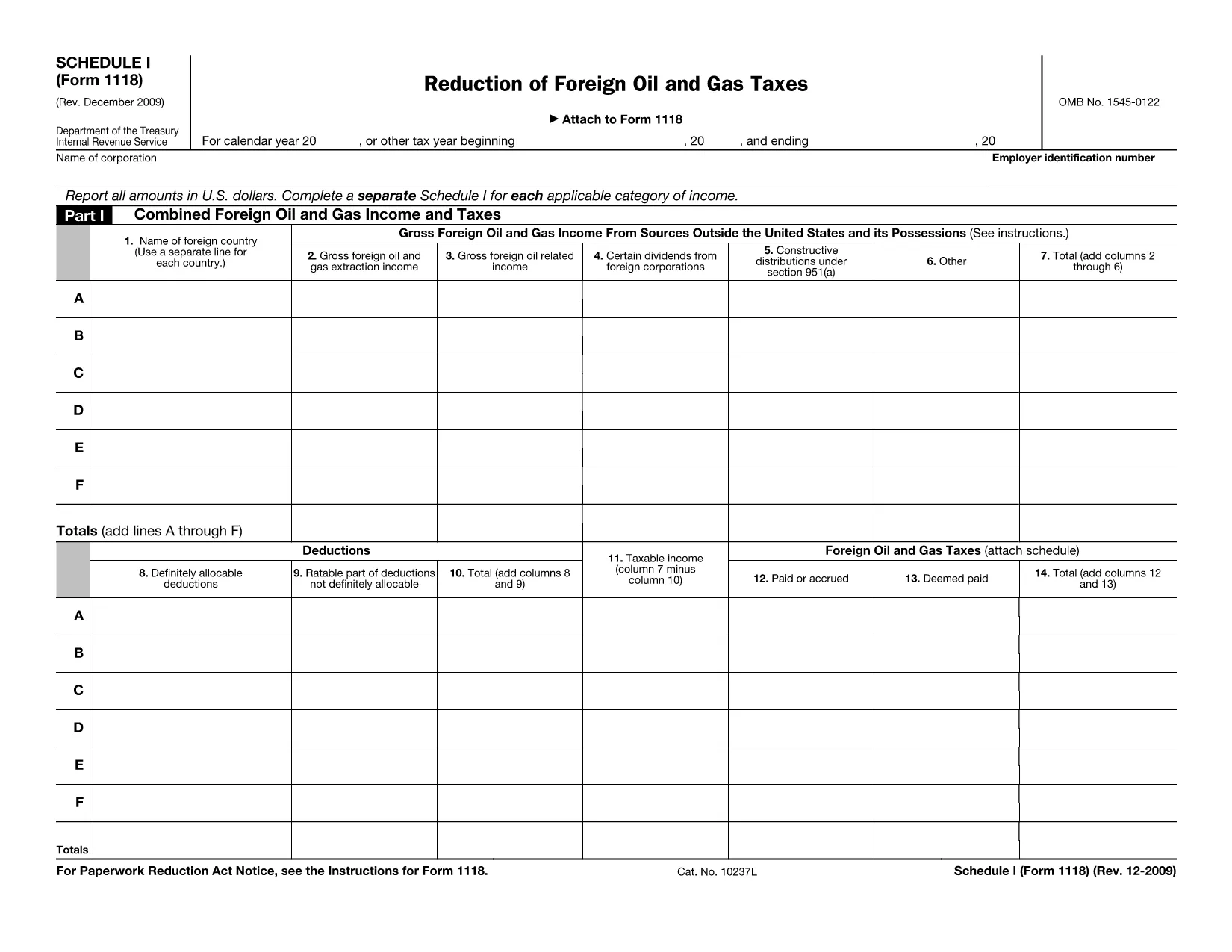
Form 1118 Schedule I is part of the IRS Form 1118 series used by U.S. corporations to claim a foreign tax credit for oil and gas taxes paid abroad. This schedule specifically reports reductions of foreign oil and gas taxes, allowing you to calculate the credit you can apply against your U.S. tax liability.

Our fillable PDF version lets you complete Schedule I directly in your browser—no extra software needed. Simply click the "Fill out this form" button, enter your numbers, and download the completed file for your tax return.

Below you’ll find a quick guide on how to use the form, common pitfalls to watch for, and answers to the most frequent questions.

ՀՏՀ
  • Who needs to file Form 1118 Schedule I?

    U.S. corporations that paid foreign oil and gas taxes and want to claim a reduction of those taxes as a foreign tax credit must complete Schedule I.

  • Can I use the fillable PDF for a paper return?

    Yes. After filling out the form online, download the completed PDF and attach it to your paper Form 1118 submission.

  • What is the difference between Schedule I and Schedule II?

    Schedule I deals with reductions of foreign oil and gas taxes, while Schedule II reports other foreign tax credits not related to oil and gas.

  • Do I need a tax professional to complete Schedule I?

    While many corporations can complete it themselves, complex foreign tax situations may benefit from professional advice.

  • How do I correct a mistake after I’ve downloaded the PDF?

    Open the saved PDF in the Formize PDF Filler again, make the correction, and re‑download the updated version.

  • Is there a filing deadline for Schedule I?

    Schedule I must be filed with Form 1118 by the corporate tax return due date, including extensions.

  • What supporting documents should I keep?

    Retain foreign tax payment statements, oil and gas production reports, and any calculations used to determine the reduction.

ԻՆՉՊԵՍ

Ինչպես լրացնել Form 1118 Schedule I-ն անվճար, առցանց՝ 5 հեշտ քայլերով.

  1. 1
    Click the Fill‑out Button
    On the page, locate the blue “Fill out this form” button and click it. This launches the Formize PDF Filler app.
  2. 2
    Wait for the Formize PDF Filler to Load
    The filler loads a secure, cloud‑based editor. This usually takes a few seconds.
  3. 3
    Enter Your Information
    Type directly into each field of Schedule I. Use the instructions on the form to know which numbers belong in each line.
  4. 4
    Review and Validate
    Double‑check every entry for accuracy. The filler will highlight any required fields you missed.
  5. 5
    Save or Download the Completed Form
    When you’re satisfied, click “Save” to store the file in your Formize account or “Download” to get a PDF copy you can attach to your tax return.
Ձևավորել PDF Filler հավելվածը
ՄԱՍԻՆ

Հարկային ձևեր

Form 1118 Schedule I-ը հարկային ձևերից մեկն է, որն օգտագործվում է համապատասխան հարկային մարմնին հարկերի հետ կապված տեղեկատվությունը զեկուցելու համար: Կան տարբեր տեսակի հարկային ձևեր, ներառյալ դաշնային, նահանգային և տեղական հարկային ձևերը, որոնք կարող են տարբեր լինել՝ կախված հարկ վճարողի հանգամանքներից և գտնվելու վայրից:

ՀԱՏԿՈՒԹՅՈՒՆՆԵՐ

PDF լցոնիչ

Առցանց Form 1118 Schedule I-ը լրացնելու ամենահեշտ ձևը

  • Արագ լրացրեք Form 1118 Schedule I
    Փնտրու՞մ եք միջոց՝ արագորեն լրացնելու Form 1118 Schedule I առցանց: Մեր առցանց անվճար PDF ձևաթուղթ լրացնողի միջոցով դուք կիմանաք, թե ինչպես խմբագրել և լրացնել այս pdf փաստաթուղթը մեկ րոպեից պակաս ժամանակում:
  • Հեշտ օգտագործման առցանց PDF խմբագիր
    Հոգնե՞լ եք PDF ֆայլեր տպելուց, որպեսզի կարողանաք դրանք խմբագրել, նախքան նորից սկանավորելը և հետ ուղարկելը: Խմբագրել PDF փաստաթղթերը անվճար առցանց: Օգտագործեք մեր առցանց pdf խմբագրիչը ժամանակ և թուղթ խնայելու համար:
  • Հիանալի գործիքներ, բոլոր հարթակներ
    Զարմանում եք, թե ինչպես լրացնել Form 1118 Schedule I-ը Mac-ում, կամ գուցե ինչպես անվճար օգտագործել PDF լցոնիչը: Մեր առցանց PDF գործիքներն աշխատում են բոլոր հարթակներում:
  • Անվտանգ ֆայլերի պահպանում
    Ավարտված «Form 1118 Schedule I» ֆայլերը պահվում են պաշտպանված տվյալների բազայում, որը կառավարվում է Amazon Cloud հոսթինգի կողմից: Ցանկացած ժամանակ կարող եք ջնջել ձեր ֆայլերը մեր համակարգից: Ամեն դեպքում, այս ֆայլերը ավտոմատ կերպով ջնջվում են 24 ժամ հետո:
  • Զրուցեք Form 1118 Schedule I-ի հետ
    Զրուցեք «Form 1118 Schedule I»-ի հետ Chatize-ում, որը PDF ընթերցողի անվճար օգնական է: Հարցեր տվեք և ստացեք պատասխաններ «Form 1118 Schedule I»-ից։ Պարզապես սեղմեք վերևում գտնվող Զրույց փաստաթղթի հետ կոճակը:

Ջնջել լրացման նիստը

Ջնջե՞լ ընտրված լրացման աշխատաշրջանը: Այս դեպքում ձևը լրացնելու ձեր առաջընթացը կկորչի:

Ջնջել խմբագրման նիստը

Ջնջե՞լ ընտրված խմբագրման աշխատաշրջանը: Այս դեպքում ձևը ստեղծելու և խմբագրելու ձեր առաջընթացը կկորչի: