
Ընտրել լեզուն

IRS Form 12203 – Request for Appeals Review (Fillable PDF)

  1. Երկիր ԱՄՆ
  2. Լեզու Անգլերեն
  3. Գործունեություն Հարկեր
  4. բաժին Ներքին եկամուտների ծառայություն
IRS Form 12203 – Request for Appeals Review (Fillable PDF)

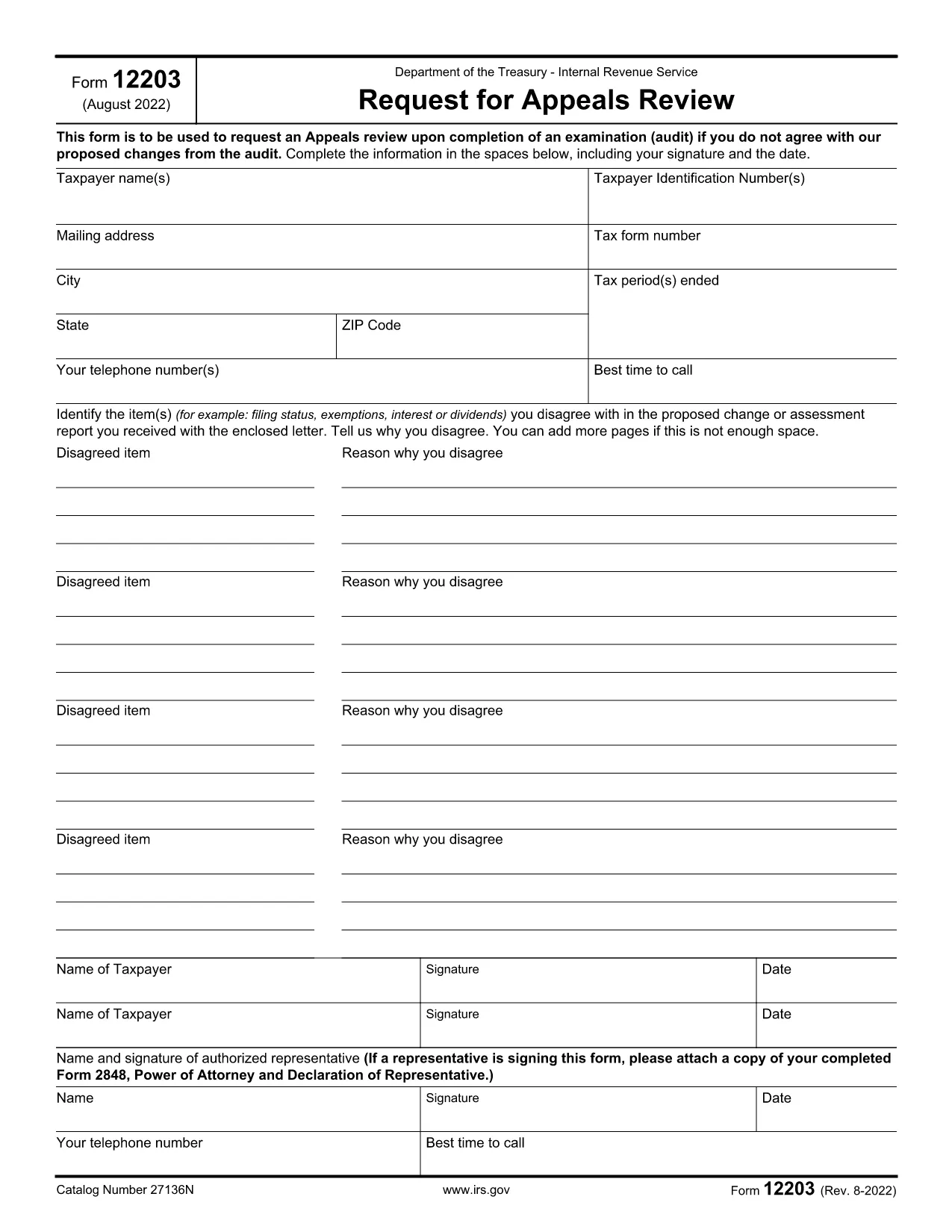
If you received an IRS audit letter and disagree with the proposed adjustments of $25,000 or less, IRS Form 12203 is the official request to have your case reviewed by the Independent Office of Appeals. On Formize.com you can open the form as a fillable PDF, complete it online, and submit it without any extra software.

What Is IRS Form 12203?

Form 12203, titled Request for Appeals Review, is a one‑page document used by taxpayers to ask the IRS Appeals Office to reconsider audit findings. It is designed for “small‑case” disputes, meaning the total amount in controversy does not exceed $25,000.

When Can You Use Form 12203?

  • After the audit is complete and you have received an audit letter.
  • The disputed amount is $25,000 or less for each tax year.
  • You want to appeal without first filing a formal written protest.

How to Complete the Fillable PDF Online

Instead of downloading the PDF and editing it with a separate editor, simply click the "Fill out this form" button on this page. The Formize PDF Filler app will load, letting you type directly into each field.

  1. Click "Fill out this form" – the fillable version opens in your browser.
  2. Enter your taxpayer information exactly as it appears on your tax return or audit letter.
  3. List each disagreed item (up to four) with a brief explanation and supporting facts.
  4. Sign electronically and provide a contact phone number.
  5. Download the completed PDF or submit it directly to the IRS using the instructions on the final page.

Common Mistakes to Avoid

  • Using the wrong form: Form 12203 is only for cases ≤ $25,000. Larger disputes require Form 12204.
  • Leaving fields blank: Incomplete taxpayer information can delay processing.
  • Not attaching supporting documentation: Include any relevant statements, receipts, or legal citations.
  • Misspelling names or SSNs: Errors cause the IRS to reject the appeal.

By following these steps and double‑checking your entries, you’ll increase the chance that the Appeals Office reviews your case promptly.

ՀՏՀ
  • What is the purpose of IRS Form 12203?

    Form 12203 is used to request a review by the IRS Independent Office of Appeals when you disagree with audit adjustments of $25,000 or less.

  • Can I use Form 12203 for a case larger than $25,000?

    No. For disputes over $25,000 you must file Form 12204 (Request for Appeals Review – Large Case).

  • Do I need a tax professional to fill out Form 12203?

    You can complete the form yourself, but a qualified tax professional can help ensure accuracy and provide supporting documentation.

  • How many items can I list on the form?

    You can list up to four disagreed items directly on the form. Additional items can be attached as supplemental pages.

  • What happens after I submit Form 12203?

    The Appeals Office will review your request, may contact you for clarification, and will issue a decision in writing.

  • Is the fillable PDF on Formize secure?

    Yes. Formize uses SSL encryption, and the PDF is processed locally in your browser, so your personal data stays private.

  • Can I save my progress and finish later?

    Absolutely. The Formize filler lets you download a partially completed PDF to resume editing at any time.

  • Where do I send the completed Form 12203?

    Follow the mailing address listed in the form’s instructions, which is usually the Appeals Office address for your region.

ԻՆՉՊԵՍ

Ինչպես լրացնել IRS Form 12203-ն անվճար, առցանց՝ 5 հեշտ քայլերով.

  1. 1
    Open the Fillable Form
    Click the "Fill out this form" button on the page. The Formize PDF Filler loads instantly in your browser.
  2. 2
    Enter Taxpayer Information
    Type your name, SSN/ITIN/EIN, mailing address, and phone number exactly as they appear on your tax return or audit letter.
  3. 3
    List Disagreed Items
    For each item you contest, provide a concise description, the amount in dispute, and the reason you disagree.
  4. 4
    Sign and Review
    Add your electronic signature, review all entries for accuracy, and make sure any supporting documents are attached.
  5. 5
    Download or Submit
    Save the completed PDF to your computer or follow the on‑screen instructions to submit it directly to the IRS.
Ձևավորել PDF Filler հավելվածը
ՄԱՍԻՆ

Հարկային ձևեր

IRS Form 12203-ը հարկային ձևերից մեկն է, որն օգտագործվում է համապատասխան հարկային մարմնին հարկերի հետ կապված տեղեկատվությունը զեկուցելու համար: Կան տարբեր տեսակի հարկային ձևեր, ներառյալ դաշնային, նահանգային և տեղական հարկային ձևերը, որոնք կարող են տարբեր լինել՝ կախված հարկ վճարողի հանգամանքներից և գտնվելու վայրից:

ՀԱՏԿՈՒԹՅՈՒՆՆԵՐ

PDF լցոնիչ

Առցանց IRS Form 12203-ը լրացնելու ամենահեշտ ձևը

  • Արագ լրացրեք IRS Form 12203
    Փնտրու՞մ եք միջոց՝ արագորեն լրացնելու IRS Form 12203 առցանց: Մեր առցանց անվճար PDF ձևաթուղթ լրացնողի միջոցով դուք կիմանաք, թե ինչպես խմբագրել և լրացնել այս pdf փաստաթուղթը մեկ րոպեից պակաս ժամանակում:
  • Հեշտ օգտագործման առցանց PDF խմբագիր
    Հոգնե՞լ եք PDF ֆայլեր տպելուց, որպեսզի կարողանաք դրանք խմբագրել, նախքան նորից սկանավորելը և հետ ուղարկելը: Խմբագրել PDF փաստաթղթերը անվճար առցանց: Օգտագործեք մեր առցանց pdf խմբագրիչը ժամանակ և թուղթ խնայելու համար:
  • Հիանալի գործիքներ, բոլոր հարթակներ
    Զարմանում եք, թե ինչպես լրացնել IRS Form 12203-ը Mac-ում, կամ գուցե ինչպես անվճար օգտագործել PDF լցոնիչը: Մեր առցանց PDF գործիքներն աշխատում են բոլոր հարթակներում:
  • Անվտանգ ֆայլերի պահպանում
    Ավարտված «IRS Form 12203» ֆայլերը պահվում են պաշտպանված տվյալների բազայում, որը կառավարվում է Amazon Cloud հոսթինգի կողմից: Ցանկացած ժամանակ կարող եք ջնջել ձեր ֆայլերը մեր համակարգից: Ամեն դեպքում, այս ֆայլերը ավտոմատ կերպով ջնջվում են 24 ժամ հետո:
  • Զրուցեք IRS Form 12203-ի հետ
    Զրուցեք «IRS Form 12203»-ի հետ Chatize-ում, որը PDF ընթերցողի անվճար օգնական է: Հարցեր տվեք և ստացեք պատասխաններ «IRS Form 12203»-ից։ Պարզապես սեղմեք վերևում գտնվող Զրույց փաստաթղթի հետ կոճակը:

Ջնջել լրացման նիստը

Ջնջե՞լ ընտրված լրացման աշխատաշրջանը: Այս դեպքում ձևը լրացնելու ձեր առաջընթացը կկորչի:

Ջնջել խմբագրման նիստը

Ջնջե՞լ ընտրված խմբագրման աշխատաշրջանը: Այս դեպքում ձևը ստեղծելու և խմբագրելու ձեր առաջընթացը կկորչի: