
Ընտրել լեզուն

Form 14414 – IRS Group Exemption Ruling Questionnaire (Fillable PDF)

  1. Երկիր ԱՄՆ
  2. Լեզու Անգլերեն
  3. Գործունեություն Հարկեր
  4. բաժին Ներքին եկամուտների ծառայություն
Form 14414 – IRS Group Exemption Ruling Questionnaire (Fillable PDF)

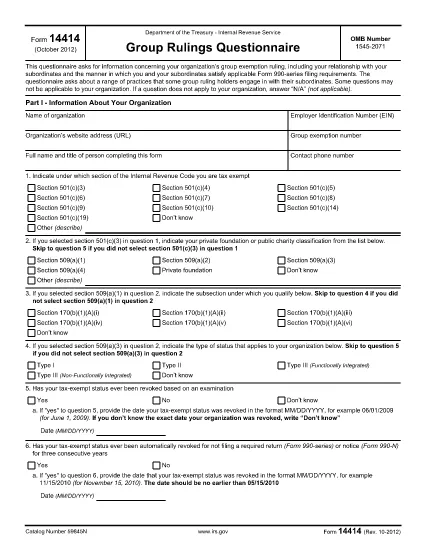
Form 14414 is the Internal Revenue Service’s questionnaire used by organizations that hold a group exemption ruling. It collects detailed information about the relationship between the parent organization and its sub‑organizations, as well as how filing requirements for the Form 990 series are satisfied.

What Is Form 14414?

This PDF asks for data on:

  • Organizational structure and control.
  • Financial reporting practices for each subordinate.
  • Compliance with IRS filing rules.

Completing the form accurately helps the IRS maintain your group exemption status and avoid penalties.

How to Fill Out Form 14414 with Formize

Instead of downloading the PDF and opening a separate editor, you can fill the form directly on our site:

  1. Click the "Fill out this form" button on the page.
  2. Wait a few seconds while the Formize PDF Filler app loads.
  3. Enter your information in each fillable field. The interface saves your progress automatically.
  4. When you’re done, click Submit to download a completed, printable copy.

This method ensures a smooth, browser‑based experience without extra software.

Common Mistakes to Avoid

  • Leaving required fields blank. The filler highlights missing data before you can submit.
  • Mismatching EINs. Double‑check that the parent and subordinate EINs are entered exactly as they appear on official documents.
  • Using outdated versions. Always use the latest PDF (revision 10‑2012) provided by the IRS.

Where to Submit the Completed Form

After you download the completed PDF, mail it to the address listed in the form’s instructions or submit it electronically if your organization has an approved e‑file arrangement with the IRS.

Need more guidance? Review the IRS instructions on the PDF itself or consult a qualified tax professional.

ՀՏՀ
  • Is Form 14414 required for all tax‑exempt organizations?

    Only organizations that hold a group exemption ruling must complete Form 14414. Individual exempt entities use other forms, such as Form 990‑N.

  • Can I save my progress and finish later?

    Yes. The Formize filler saves your entries locally in the browser, allowing you to close the window and resume later.

  • Do I need special software to fill the form?

    No. The fillable PDF works entirely within your web browser—no Adobe Acrobat or other PDF editor is required.

  • What revision of Form 14414 should I use?

    Use the latest revision (Rev. 10‑2012) available from the IRS. The link on this page points to that exact version.

  • How do I know if I entered data correctly?

    The Formize filler highlights required fields and shows error messages if the format (e.g., EIN) is invalid.

  • Where do I send the completed questionnaire?

    Follow the mailing address in the form’s instructions or submit electronically if your organization has an IRS e‑file agreement.

  • Is there a fee to use the Formize filler?

    No. Formize provides free, secure filling for IRS Form 14414.

  • Can I edit the PDF after I download it?

    Yes, but the Formize version is already fully completed. Any further edits would require a PDF editor.

ԻՆՉՊԵՍ

Ինչպես լրացնել Form 14414-ն անվճար, առցանց՝ 4 հեշտ քայլերով.

  1. 1
    Open the Fillable Form
    Click the "Fill out this form" button on the page. The Formize PDF Filler will open in your browser.
  2. 2
    Enter Your Information
    Type directly into each highlighted field. The app saves your entries automatically.
  3. 3
    Review and Submit
    Use the built‑in validation to check for missing or incorrect data, then click "Submit" to download the completed PDF.
  4. 4
    Print or Email
    Print the finished form for mailing or attach the PDF to your electronic submission as instructed by the IRS.
Ձևավորել PDF Filler հավելվածը
ՄԱՍԻՆ

Դաշնային հարկային ձևեր

Form 14414-ը դաշնային հարկային ձևերից մեկն է, որն օգտագործվում է Միացյալ Նահանգների Ներքին եկամուտների ծառայությանը (IRS) դաշնային եկամտահարկը զեկուցելու և ներկայացնելու համար: Այս ձևաթղթերն օգտագործվում են անհատների, ձեռնարկությունների և կազմակերպությունների կողմից՝ իրենց եկամուտները, պահումները և այլ համապատասխան տեղեկատվություն, որոնք անհրաժեշտ են իրենց դաշնային հարկային պարտավորությունը հաշվարկելու համար:

Ամենատարածված դաշնային հարկի ձևը Ձև 1040ն է, որն օգտագործվում է անհատ հարկատուների կողմից` իրենց անձնական եկամտահարկը հայտնելու համար: Այլ սովորաբար օգտագործվող ձևերը ներառում են Ձև 1065 գործընկերության համար, Ձև 1120 կորպորացիաների համար, և Ձև 990 հարկերից ազատված կազմակերպությունների համար:

Դաշնային հարկային ձևերը սովորաբար պահանջում են հարկ վճարողներից զեկուցել եկամտի տարբեր աղբյուրների մասին, ինչպիսիք են աշխատավարձերը, աշխատավարձերը և թեյավճարները, ինչպես նաև եկամուտները ներդրումներից, վարձակալած գույքից և այլ աղբյուրներից: Ձևաթղթերը նաև թույլ են տալիս հարկ վճարողներին պահանջել պահումներ և վարկեր տարբեր ծախսերի համար, ինչպիսիք են բարեգործական ներդրումները, հիփոթեքային տոկոսները և առողջապահական ծախսերը:

Կարևոր է ճշգրիտ և ժամանակին ներկայացնել դաշնային հարկային ձևերը, քանի որ դա չկատարելը կարող է հանգեցնել տույժերի և տոկոսների գանձման IRS-ից:

ՀԱՏԿՈՒԹՅՈՒՆՆԵՐ

PDF լցոնիչ

Առցանց Form 14414-ը լրացնելու ամենահեշտ ձևը

  • Արագ լրացրեք Form 14414
    Փնտրու՞մ եք միջոց՝ արագորեն լրացնելու Form 14414 առցանց: Մեր առցանց անվճար PDF ձևաթուղթ լրացնողի միջոցով դուք կիմանաք, թե ինչպես խմբագրել և լրացնել այս pdf փաստաթուղթը մեկ րոպեից պակաս ժամանակում:
  • Հեշտ օգտագործման առցանց PDF խմբագիր
    Հոգնե՞լ եք PDF ֆայլեր տպելուց, որպեսզի կարողանաք դրանք խմբագրել, նախքան նորից սկանավորելը և հետ ուղարկելը: Խմբագրել PDF փաստաթղթերը անվճար առցանց: Օգտագործեք մեր առցանց pdf խմբագրիչը ժամանակ և թուղթ խնայելու համար:
  • Հիանալի գործիքներ, բոլոր հարթակներ
    Զարմանում եք, թե ինչպես լրացնել Form 14414-ը Mac-ում, կամ գուցե ինչպես անվճար օգտագործել PDF լցոնիչը: Մեր առցանց PDF գործիքներն աշխատում են բոլոր հարթակներում:
  • Անվտանգ ֆայլերի պահպանում
    Ավարտված «Form 14414» ֆայլերը պահվում են պաշտպանված տվյալների բազայում, որը կառավարվում է Amazon Cloud հոսթինգի կողմից: Ցանկացած ժամանակ կարող եք ջնջել ձեր ֆայլերը մեր համակարգից: Ամեն դեպքում, այս ֆայլերը ավտոմատ կերպով ջնջվում են 24 ժամ հետո:
  • Զրուցեք Form 14414-ի հետ
    Զրուցեք «Form 14414»-ի հետ Chatize-ում, որը PDF ընթերցողի անվճար օգնական է: Հարցեր տվեք և ստացեք պատասխաններ «Form 14414»-ից։ Պարզապես սեղմեք վերևում գտնվող Զրույց փաստաթղթի հետ կոճակը:

Ջնջել լրացման նիստը

Ջնջե՞լ ընտրված լրացման աշխատաշրջանը: Այս դեպքում ձևը լրացնելու ձեր առաջընթացը կկորչի:

Ջնջել խմբագրման նիստը

Ջնջե՞լ ընտրված խմբագրման աշխատաշրջանը: Այս դեպքում ձևը ստեղծելու և խմբագրելու ձեր առաջընթացը կկորչի: