
Ընտրել լեզուն

IRS Form 15230 – Mobility Statement (Fillable PDF)

  1. Երկիր ԱՄՆ
  2. Լեզու Անգլերեն
  3. Գործունեություն Հարկեր
  4. բաժին Ներքին եկամուտների ծառայություն
IRS Form 15230 – Mobility Statement (Fillable PDF)

What Is Form 15230?

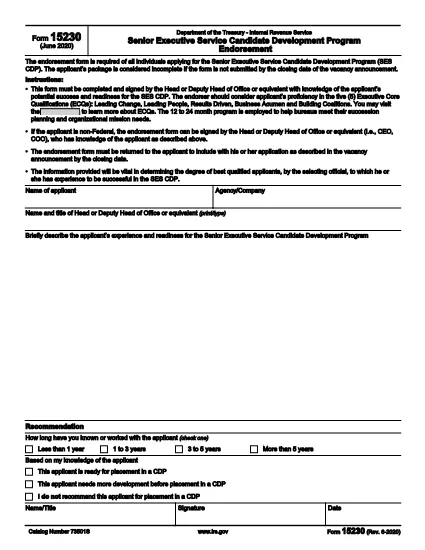
Form 15230, also known as the Mobility Statement for the Senior Executive Service Candidate Development Program (SES CDP), is an official IRS document used to capture a candidate’s willingness and ability to relocate for senior executive positions within the federal government. The form is required during the SES CDP application process and helps selecting officials assess mobility readiness.

How to Fill Out Form 15230 Online

Instead of printing, scanning, or manually editing the PDF, you can complete the form instantly with Formize’s built‑in PDF Filler. Follow these simple steps:

  1. Click the “Fill out this form” button on this page.
  2. Wait a few seconds while the Formize PDF Filler app loads the fillable version of Form 15230.
  3. Enter your personal information, current position, and mobility preferences directly in the browser.
  4. Use the signature field to e‑sign the form with a mouse, touch, or stylus.
  5. Review all entries for accuracy, then click Submit to download the completed PDF or save it to your cloud storage.

Common Mistakes to Avoid

  • Leaving required fields blank – the form will not accept submission if mandatory sections are empty.
  • Mismatching dates and locations – ensure the geographic areas you select match your actual willingness to relocate.
  • Using an outdated version – always start with the latest PDF (Rev. 6‑2020) provided by the IRS.
  • Signing with a scanned image – use the built‑in e‑signature tool for a legally binding signature.

Download the Official PDF

If you prefer to keep a copy of the original document, you can download the official IRS PDF directly from the link below. The file is the same version that Formize loads for online completion.

Download IRS Form 15230 (PDF)

FAQs About Form 15230

Below are answers to the most common questions candidates ask about this mobility statement.

ՀՏՀ
  • What is the purpose of Form 15230?

    Form 15230 records a candidate’s willingness and ability to relocate for senior executive roles in the SES Candidate Development Program.

  • Do I need to print the PDF to fill it out?

    No. With Formize you can fill, sign, and save the form entirely online – no printing required.

  • Can I use a scanned signature?

    A scanned image is not legally binding. Use the e‑signature field in the Formize filler for a valid signature.

  • Which version of the form should I use?

    Always use the latest revision (Rev. 6‑2020). The link on this page points to the current IRS version.

  • What happens after I submit the form?

    You will receive a completed PDF that you can download or store in the cloud. Submit the file to your agency’s HR or SES CDP office as instructed.

  • Is Form 15230 required for all federal job applications?

    It is required only for candidates applying to the Senior Executive Service Candidate Development Program.

  • Where can I get help if I have questions about the form?

    Contact your agency’s human‑resources office or review the IRS instructions included in the PDF.

ԻՆՉՊԵՍ

Ինչպես լրացնել Form 15230-ն անվճար, առցանց՝ 5 հեշտ քայլերով.

  1. 1
    Click the Fill‑out Button
    Press the “Fill out this form” button on the page to launch the Formize PDF Filler.
  2. 2
    Wait for the Filler to Load
    The app loads the fillable version of Form 15230 in a few seconds – no download required.
  3. 3
    Enter Your Information
    Complete all required fields: personal details, current position, and mobility preferences.
  4. 4
    Add Your Electronic Signature
    Use the built‑in signature tool to sign with a mouse, finger, or stylus.
  5. 5
    Review and Save
    Check the form for accuracy, then click Submit to download the completed PDF or save it to your cloud storage.
Ձևավորել PDF Filler հավելվածը
ՄԱՍԻՆ

Դաշնային հարկային ձևեր

Form 15230-ը դաշնային հարկային ձևերից մեկն է, որն օգտագործվում է Միացյալ Նահանգների Ներքին եկամուտների ծառայությանը (IRS) դաշնային եկամտահարկը զեկուցելու և ներկայացնելու համար: Այս ձևաթղթերն օգտագործվում են անհատների, ձեռնարկությունների և կազմակերպությունների կողմից՝ իրենց եկամուտները, պահումները և այլ համապատասխան տեղեկատվություն, որոնք անհրաժեշտ են իրենց դաշնային հարկային պարտավորությունը հաշվարկելու համար:

Ամենատարածված դաշնային հարկի ձևը Ձև 1040ն է, որն օգտագործվում է անհատ հարկատուների կողմից` իրենց անձնական եկամտահարկը հայտնելու համար: Այլ սովորաբար օգտագործվող ձևերը ներառում են Ձև 1065 գործընկերության համար, Ձև 1120 կորպորացիաների համար, և Ձև 990 հարկերից ազատված կազմակերպությունների համար:

Դաշնային հարկային ձևերը սովորաբար պահանջում են հարկ վճարողներից զեկուցել եկամտի տարբեր աղբյուրների մասին, ինչպիսիք են աշխատավարձերը, աշխատավարձերը և թեյավճարները, ինչպես նաև եկամուտները ներդրումներից, վարձակալած գույքից և այլ աղբյուրներից: Ձևաթղթերը նաև թույլ են տալիս հարկ վճարողներին պահանջել պահումներ և վարկեր տարբեր ծախսերի համար, ինչպիսիք են բարեգործական ներդրումները, հիփոթեքային տոկոսները և առողջապահական ծախսերը:

Կարևոր է ճշգրիտ և ժամանակին ներկայացնել դաշնային հարկային ձևերը, քանի որ դա չկատարելը կարող է հանգեցնել տույժերի և տոկոսների գանձման IRS-ից:

ՀԱՏԿՈՒԹՅՈՒՆՆԵՐ

PDF լցոնիչ

Առցանց Form 15230-ը լրացնելու ամենահեշտ ձևը

  • Արագ լրացրեք Form 15230
    Փնտրու՞մ եք միջոց՝ արագորեն լրացնելու Form 15230 առցանց: Մեր առցանց անվճար PDF ձևաթուղթ լրացնողի միջոցով դուք կիմանաք, թե ինչպես խմբագրել և լրացնել այս pdf փաստաթուղթը մեկ րոպեից պակաս ժամանակում:
  • Հեշտ օգտագործման առցանց PDF խմբագիր
    Հոգնե՞լ եք PDF ֆայլեր տպելուց, որպեսզի կարողանաք դրանք խմբագրել, նախքան նորից սկանավորելը և հետ ուղարկելը: Խմբագրել PDF փաստաթղթերը անվճար առցանց: Օգտագործեք մեր առցանց pdf խմբագրիչը ժամանակ և թուղթ խնայելու համար:
  • Հիանալի գործիքներ, բոլոր հարթակներ
    Զարմանում եք, թե ինչպես լրացնել Form 15230-ը Mac-ում, կամ գուցե ինչպես անվճար օգտագործել PDF լցոնիչը: Մեր առցանց PDF գործիքներն աշխատում են բոլոր հարթակներում:
  • Անվտանգ ֆայլերի պահպանում
    Ավարտված «Form 15230» ֆայլերը պահվում են պաշտպանված տվյալների բազայում, որը կառավարվում է Amazon Cloud հոսթինգի կողմից: Ցանկացած ժամանակ կարող եք ջնջել ձեր ֆայլերը մեր համակարգից: Ամեն դեպքում, այս ֆայլերը ավտոմատ կերպով ջնջվում են 24 ժամ հետո:
  • Զրուցեք Form 15230-ի հետ
    Զրուցեք «Form 15230»-ի հետ Chatize-ում, որը PDF ընթերցողի անվճար օգնական է: Հարցեր տվեք և ստացեք պատասխաններ «Form 15230»-ից։ Պարզապես սեղմեք վերևում գտնվող Զրույց փաստաթղթի հետ կոճակը:

Ջնջել լրացման նիստը

Ջնջե՞լ ընտրված լրացման աշխատաշրջանը: Այս դեպքում ձևը լրացնելու ձեր առաջընթացը կկորչի:

Ջնջել խմբագրման նիստը

Ջնջե՞լ ընտրված խմբագրման աշխատաշրջանը: Այս դեպքում ձևը ստեղծելու և խմբագրելու ձեր առաջընթացը կկորչի: