
Ընտրել լեզուն

IRS Form 4136 – Fillable PDF for Fuel Tax Credits

  1. Երկիր ԱՄՆ
  2. Լեզու Անգլերեն
  3. Գործունեություն Հարկեր
  4. բաժին Ներքին եկամուտների ծառայություն
IRS Form 4136 – Fillable PDF for Fuel Tax Credits

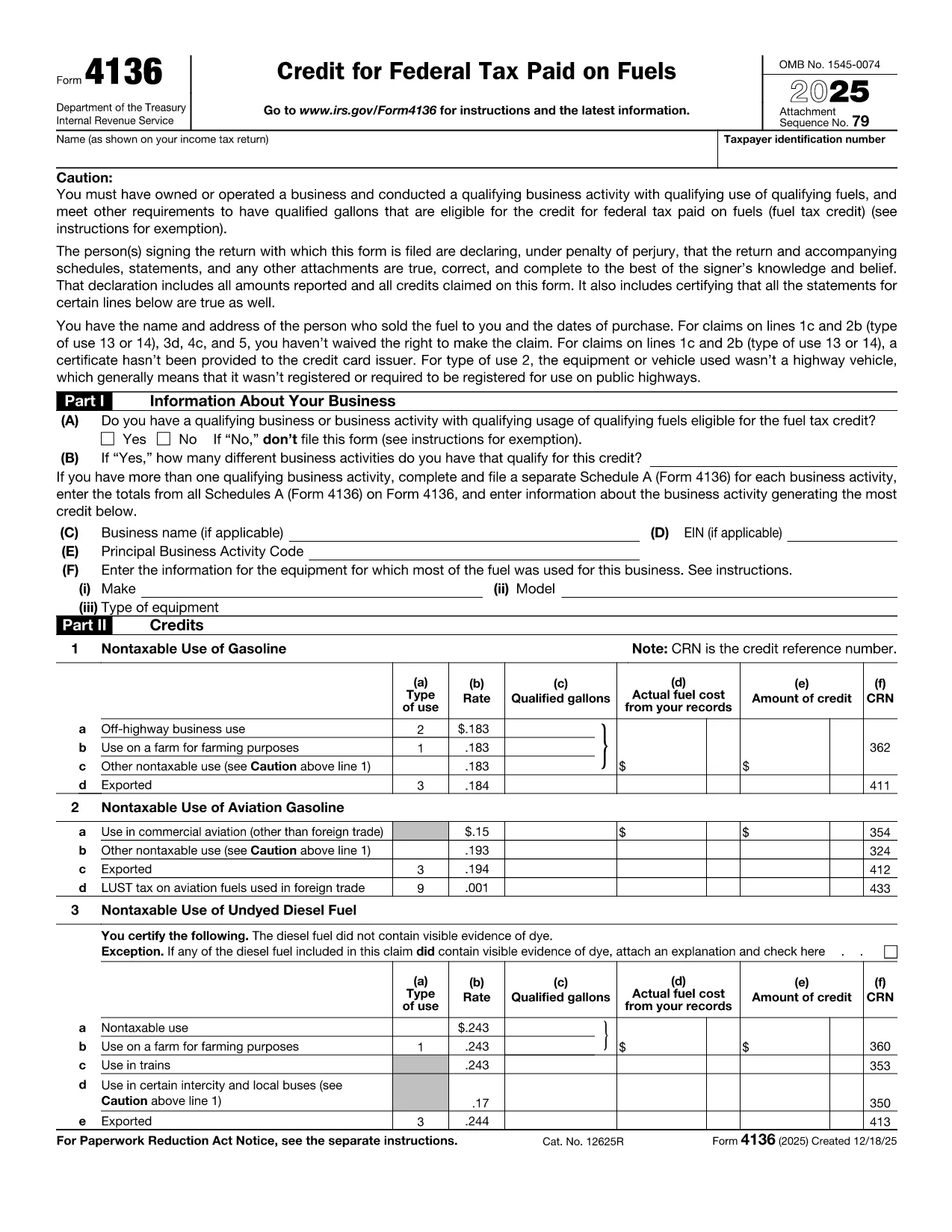
Form 4136, Credit for Federal Tax Paid on Fuels, lets eligible taxpayers claim a credit for excise taxes paid on gasoline, diesel, aviation gasoline, kerosene, and other qualified fuels. Whether you run a farming operation, a construction fleet, or an aviation business, this form can reduce your tax liability.

What Is Form 4136 and Who Can Use It?

The IRS issues Form 4136 to businesses and individuals who use fuel for non‑taxable purposes such as off‑highway equipment, farming, or export. The credit applies to:

  • Gasoline used on farms, construction sites, or in certain commercial vehicles.
  • Diesel fuel for off‑road machinery.
  • Aviation gasoline for eligible aircraft.
  • Kerosene and other special fuels.

If you are the ultimate purchaser of the fuel, you are the only party who can claim the credit.

How to Complete the Fillable Form 4136 on Formize

Instead of downloading the PDF and editing it with a separate program, simply click the “Fill out this form” button on this page. The Formize PDF Filler app will load the official fillable version of Form 4136, letting you:

  1. Enter your business name, EIN, and filing year.
  2. Select the type of fuel and the qualified use (e.g., off‑highway, farm, export).
  3. Input gallons used and the calculated credit amount.
  4. Electronically sign and submit the form directly to the IRS portal (if you have e‑file capability) or print for mailing.

The interface is fully responsive, saves your progress automatically, and validates entries to reduce errors.

Common Mistakes to Avoid When Filing Form 4136

  • Using personal fuel purchases: Only fuel used for business or qualified non‑taxable purposes qualifies.
  • Incorrect rate application: Each fuel type has a specific credit rate; double‑check the IRS rate table.
  • Missing export documentation: If you claim export credits, attach a bill of lading or customs receipt.
  • Failing to sign: The form requires a signature under penalty of perjury; the Formize app adds a digital signature field.

Download the Official Fillable PDF

When you need an offline copy, you can download the current IRS version of Form 4136 directly from the link below. The file is a fillable PDF, compatible with Adobe Acrobat, Foxit, and the Formize online editor.

Download IRS Form 4136 (PDF)

Հրահանգներ

ՀՏՀ
  • What types of fuel qualify for a credit on Form 4136?

    Gasoline, diesel fuel, aviation gasoline, kerosene, and other fuels listed in the IRS instructions qualify when used for non‑taxable purposes such as off‑highway business use, farming, or export.

  • Can I claim a credit for fuel used in personal vehicles?

    No. The credit is only available for fuel used in business operations or other qualified non‑taxable uses. Personal use does not qualify.

  • Do I need supporting documentation for the credit?

    Yes. Keep receipts, fuel invoices, and, for exported fuel, a bill of lading or customs documentation. The IRS may request these records during an audit.

  • Is the fillable PDF compatible with all PDF editors?

    The official Form 4136 PDF is fillable in Adobe Acrobat, Foxit Reader, and the Formize online editor. All fields retain their functionality across platforms.

  • How often is Form 4136 updated?

    The IRS releases a new version each tax year. The link provided points to the current version; older versions are available in the IRS prior‑year archive.

  • Can I file Form 4136 electronically?

    Yes, if you use tax software that supports IRS e‑file for fuel credits. Otherwise, print the completed form, sign it, and mail it with your return.

  • What is the deadline to submit Form 4136?

    Form 4136 must be filed with the tax return for the year in which the fuel was used, typically by the April filing deadline (or October if you file an extension).

ԻՆՉՊԵՍ

Ինչպես լրացնել Form 4136-ն անվճար, առցանց՝ 3 հեշտ քայլերով.

  1. 1
    Open the Fillable Form
    Click the “Fill out this form” button on the page. The Formize PDF Filler app will load the official Form 4136.
  2. 2
    Enter Your Information
    Fill in your business name, EIN, fuel type, gallons used, and select the appropriate credit rate. The app validates each field in real time.
  3. 3
    Sign and Save
    Add your digital signature, review the summary, and either download the completed PDF for mailing or submit it electronically if you have e‑file access.
Ձևավորել PDF Filler հավելվածը
ՄԱՍԻՆ

Դաշնային հարկային ձևեր

Form 4136-ը դաշնային հարկային ձևերից մեկն է, որն օգտագործվում է Միացյալ Նահանգների Ներքին եկամուտների ծառայությանը (IRS) դաշնային եկամտահարկը զեկուցելու և ներկայացնելու համար: Այս ձևաթղթերն օգտագործվում են անհատների, ձեռնարկությունների և կազմակերպությունների կողմից՝ իրենց եկամուտները, պահումները և այլ համապատասխան տեղեկատվություն, որոնք անհրաժեշտ են իրենց դաշնային հարկային պարտավորությունը հաշվարկելու համար:

Ամենատարածված դաշնային հարկի ձևը Ձև 1040ն է, որն օգտագործվում է անհատ հարկատուների կողմից` իրենց անձնական եկամտահարկը հայտնելու համար: Այլ սովորաբար օգտագործվող ձևերը ներառում են Ձև 1065 գործընկերության համար, Ձև 1120 կորպորացիաների համար, և Ձև 990 հարկերից ազատված կազմակերպությունների համար:

Դաշնային հարկային ձևերը սովորաբար պահանջում են հարկ վճարողներից զեկուցել եկամտի տարբեր աղբյուրների մասին, ինչպիսիք են աշխատավարձերը, աշխատավարձերը և թեյավճարները, ինչպես նաև եկամուտները ներդրումներից, վարձակալած գույքից և այլ աղբյուրներից: Ձևաթղթերը նաև թույլ են տալիս հարկ վճարողներին պահանջել պահումներ և վարկեր տարբեր ծախսերի համար, ինչպիսիք են բարեգործական ներդրումները, հիփոթեքային տոկոսները և առողջապահական ծախսերը:

Կարևոր է ճշգրիտ և ժամանակին ներկայացնել դաշնային հարկային ձևերը, քանի որ դա չկատարելը կարող է հանգեցնել տույժերի և տոկոսների գանձման IRS-ից:

ՀԱՏԿՈՒԹՅՈՒՆՆԵՐ

PDF լցոնիչ

Առցանց Form 4136-ը լրացնելու ամենահեշտ ձևը

  • Արագ լրացրեք Form 4136
    Փնտրու՞մ եք միջոց՝ արագորեն լրացնելու Form 4136 առցանց: Մեր առցանց անվճար PDF ձևաթուղթ լրացնողի միջոցով դուք կիմանաք, թե ինչպես խմբագրել և լրացնել այս pdf փաստաթուղթը մեկ րոպեից պակաս ժամանակում:
  • Հեշտ օգտագործման առցանց PDF խմբագիր
    Հոգնե՞լ եք PDF ֆայլեր տպելուց, որպեսզի կարողանաք դրանք խմբագրել, նախքան նորից սկանավորելը և հետ ուղարկելը: Խմբագրել PDF փաստաթղթերը անվճար առցանց: Օգտագործեք մեր առցանց pdf խմբագրիչը ժամանակ և թուղթ խնայելու համար:
  • Հիանալի գործիքներ, բոլոր հարթակներ
    Զարմանում եք, թե ինչպես լրացնել Form 4136-ը Mac-ում, կամ գուցե ինչպես անվճար օգտագործել PDF լցոնիչը: Մեր առցանց PDF գործիքներն աշխատում են բոլոր հարթակներում:
  • Անվտանգ ֆայլերի պահպանում
    Ավարտված «Form 4136» ֆայլերը պահվում են պաշտպանված տվյալների բազայում, որը կառավարվում է Amazon Cloud հոսթինգի կողմից: Ցանկացած ժամանակ կարող եք ջնջել ձեր ֆայլերը մեր համակարգից: Ամեն դեպքում, այս ֆայլերը ավտոմատ կերպով ջնջվում են 24 ժամ հետո:
  • Զրուցեք Form 4136-ի հետ
    Զրուցեք «Form 4136»-ի հետ Chatize-ում, որը PDF ընթերցողի անվճար օգնական է: Հարցեր տվեք և ստացեք պատասխաններ «Form 4136»-ից։ Պարզապես սեղմեք վերևում գտնվող Զրույց փաստաթղթի հետ կոճակը:

Ջնջել լրացման նիստը

Ջնջե՞լ ընտրված լրացման աշխատաշրջանը: Այս դեպքում ձևը լրացնելու ձեր առաջընթացը կկորչի:

Ջնջել խմբագրման նիստը

Ջնջե՞լ ընտրված խմբագրման աշխատաշրջանը: Այս դեպքում ձևը ստեղծելու և խմբագրելու ձեր առաջընթացը կկորչի: