
Ընտրել լեզուն

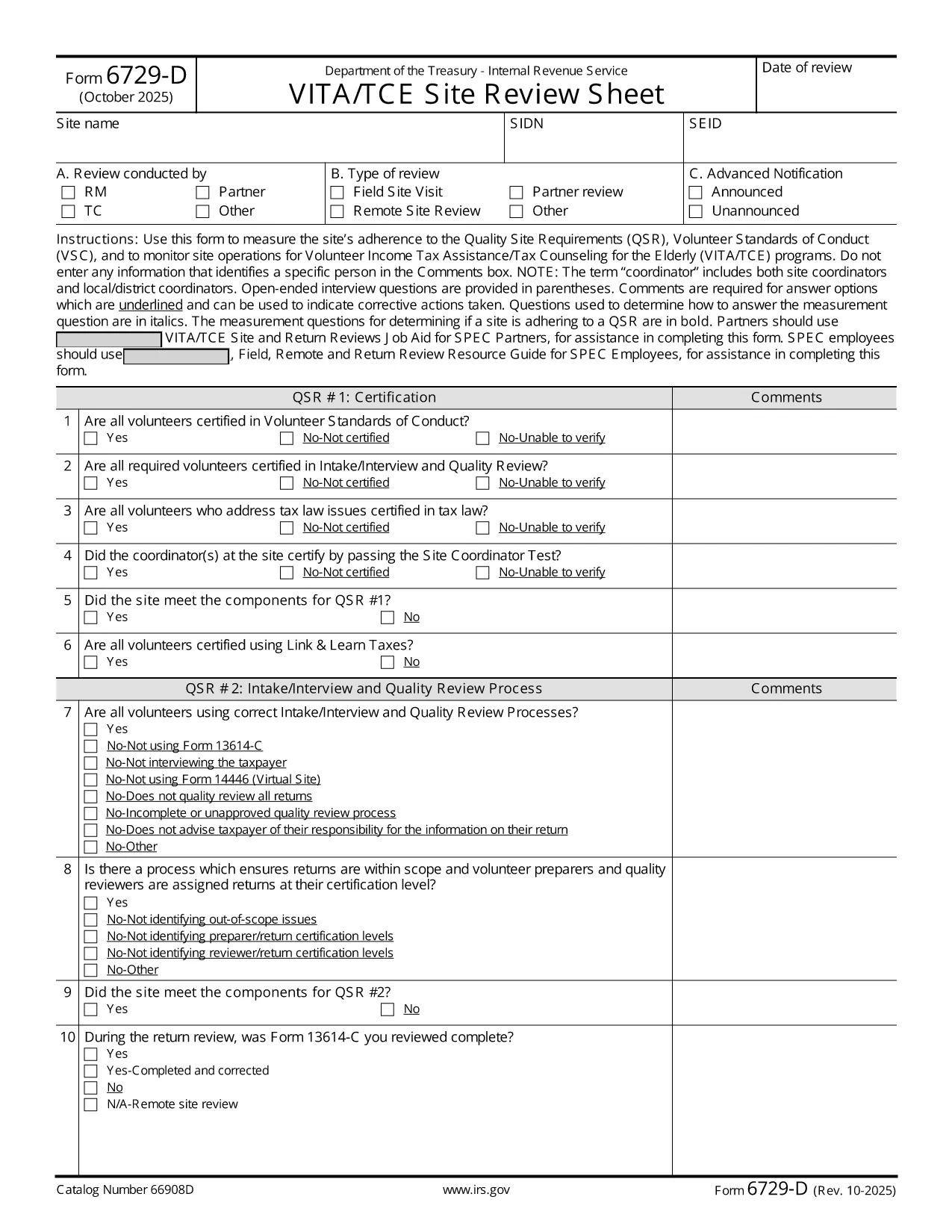
Form 6729-D – Fillable PDF for VITA/TCE Site Review

  1. Երկիր ԱՄՆ
  2. Լեզու Անգլերեն
  3. Գործունեություն Հարկեր
  4. բաժին Ներքին եկամուտների ծառայություն
Form 6729-D – Fillable PDF for VITA/TCE Site Review

The IRS Form 6729-D (Site Review Sheet) is used by Volunteer Income Tax Assistance (VITA) and Tax Counseling for the Elderly (TCE) programs to evaluate a site’s compliance with the Quality Site Requirements (QSR) and Volunteer Standards of Conduct (VSC). This fillable PDF version lets you complete the form instantly in your browser—no extra PDF editor required.

What Is Form 6729-D?

Form 6729-D records the results of a site review, covering:

  • Adherence to Quality Site Requirements (QSR)
  • Volunteer Standards of Conduct (VSC)
  • Operational observations for VITA/TCE sites
  • Comments from the site coordinator (without personal identifiers)

The form is mandatory for any VITA/TCE location that receives IRS funding or oversight.

How to Complete the Form Online

Instead of downloading the PDF and opening a separate editor, simply click the "Fill out this form" button on this page. Our Formize PDF Filler app will load the document directly in your browser. Follow these steps:

  1. Click the blue Fill out this form button.
  2. Wait a few seconds while the Formize PDF Filler loads.
  3. Enter the required information in each field. Required fields are marked with an asterisk (*).
  4. Use the Comments box for observations—avoid entering names or personal data.
  5. When finished, click Save & Download to get a completed copy, or click Submit if your organization has integrated a secure upload.

Common Mistakes to Avoid

  • Including personal identifiers in the Comments section – the IRS prohibits names, SSNs, or any data that could identify a specific volunteer or client.
  • Leaving required fields blank – an asterisk (*) indicates a mandatory entry; the form will not save until these are completed.
  • Using an outdated version – always verify the revision date (current revision is Rev. 10‑2025).
  • Incorrect date format – use MM/DD/YYYY as shown in the example field.

Where to Submit the Completed Form

After saving the filled PDF, email it to your regional VITA/TCE coordinator or upload it through your organization’s secure portal. Keep a copy for your records in case the IRS requests follow‑up documentation.

Need more guidance? Review the IRS instructions linked below or contact your local VITA/TCE supervisor.

ՀՏՀ
  • Do I need Adobe Acrobat to fill Form 6729-D?

    No. The Formize PDF Filler works in any modern browser, so you can complete the form without installing additional software.

  • Can I edit the form after I download it?

    Yes, you can reopen the saved PDF in the Formize filler or any compatible PDF editor, but it’s easier to make changes before downloading.

  • What revision of Form 6729-D is this?

    The PDF linked is the latest revision, Rev. 10‑2025, as published by the IRS.

  • Is it okay to type a volunteer’s name in the Comments box?

    No. The IRS explicitly forbids entering any personal identifiers, including names, in the Comments section.

  • Where should I send the completed form?

    Email the saved PDF to your regional VITA/TCE coordinator or upload it via your organization’s secure portal, following your local procedures.

  • What if I make a mistake after submitting?

    Contact your coordinator immediately. You can submit a corrected version of the form with a brief note explaining the change.

  • Is there a paper version of Form 6729-D?

    Yes, the IRS provides a printable PDF, but the fillable version saves time and reduces errors.

  • Do I need to sign the form electronically?

    If your organization requires an electronic signature, use the signature field provided in the filler. Otherwise, a printed signature after printing is acceptable.

ԻՆՉՊԵՍ

Ինչպես լրացնել Form 6729-D-ն անվճար, առցանց՝ 3 հեշտ քայլերով.

  1. 1
    Open the Fillable Form
    Click the blue “Fill out this form” button on the page. The Formize PDF Filler loads the Form 6729-D directly in your browser.
  2. 2
    Enter Required Information
    Complete each field marked with an asterisk (*). Use the Comments box for observations, but do not include personal identifiers.
  3. 3
    Save or Submit
    When all fields are filled, click “Save & Download” to keep a copy, or click “Submit” if your organization provides a secure upload option.
Ձևավորել PDF Filler հավելվածը
ՄԱՍԻՆ

Հարկային ձևեր

Form 6729-D-ը հարկային ձևերից մեկն է, որն օգտագործվում է համապատասխան հարկային մարմնին հարկերի հետ կապված տեղեկատվությունը զեկուցելու համար: Կան տարբեր տեսակի հարկային ձևեր, ներառյալ դաշնային, նահանգային և տեղական հարկային ձևերը, որոնք կարող են տարբեր լինել՝ կախված հարկ վճարողի հանգամանքներից և գտնվելու վայրից:

ՀԱՏԿՈՒԹՅՈՒՆՆԵՐ

PDF լցոնիչ

Առցանց Form 6729-D-ը լրացնելու ամենահեշտ ձևը

  • Արագ լրացրեք Form 6729-D
    Փնտրու՞մ եք միջոց՝ արագորեն լրացնելու Form 6729-D առցանց: Մեր առցանց անվճար PDF ձևաթուղթ լրացնողի միջոցով դուք կիմանաք, թե ինչպես խմբագրել և լրացնել այս pdf փաստաթուղթը մեկ րոպեից պակաս ժամանակում:
  • Հեշտ օգտագործման առցանց PDF խմբագիր
    Հոգնե՞լ եք PDF ֆայլեր տպելուց, որպեսզի կարողանաք դրանք խմբագրել, նախքան նորից սկանավորելը և հետ ուղարկելը: Խմբագրել PDF փաստաթղթերը անվճար առցանց: Օգտագործեք մեր առցանց pdf խմբագրիչը ժամանակ և թուղթ խնայելու համար:
  • Հիանալի գործիքներ, բոլոր հարթակներ
    Զարմանում եք, թե ինչպես լրացնել Form 6729-D-ը Mac-ում, կամ գուցե ինչպես անվճար օգտագործել PDF լցոնիչը: Մեր առցանց PDF գործիքներն աշխատում են բոլոր հարթակներում:
  • Անվտանգ ֆայլերի պահպանում
    Ավարտված «Form 6729-D» ֆայլերը պահվում են պաշտպանված տվյալների բազայում, որը կառավարվում է Amazon Cloud հոսթինգի կողմից: Ցանկացած ժամանակ կարող եք ջնջել ձեր ֆայլերը մեր համակարգից: Ամեն դեպքում, այս ֆայլերը ավտոմատ կերպով ջնջվում են 24 ժամ հետո:
  • Զրուցեք Form 6729-D-ի հետ
    Զրուցեք «Form 6729-D»-ի հետ Chatize-ում, որը PDF ընթերցողի անվճար օգնական է: Հարցեր տվեք և ստացեք պատասխաններ «Form 6729-D»-ից։ Պարզապես սեղմեք վերևում գտնվող Զրույց փաստաթղթի հետ կոճակը:

Ջնջել լրացման նիստը

Ջնջե՞լ ընտրված լրացման աշխատաշրջանը: Այս դեպքում ձևը լրացնելու ձեր առաջընթացը կկորչի:

Ջնջել խմբագրման նիստը

Ջնջե՞լ ընտրված խմբագրման աշխատաշրջանը: Այս դեպքում ձևը ստեղծելու և խմբագրելու ձեր առաջընթացը կկորչի: