
Ընտրել լեզուն

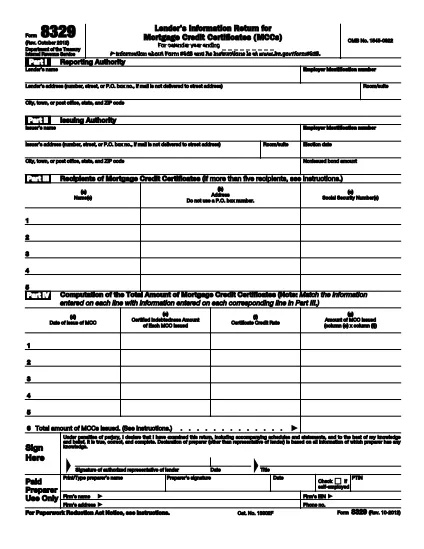
IRS Form 8329 – Fillable PDF for Mortgage Credit Certificates

  1. Երկիր ԱՄՆ
  2. Լեզու Անգլերեն
  3. Գործունեություն Հարկեր
  4. բաժին Ներքին եկամուտների ծառայություն
IRS Form 8329 – Fillable PDF for Mortgage Credit Certificates

The IRS Form 8329 is the official document lenders use to report the issuance of Mortgage Credit Certificates (MCCs) to the Internal Revenue Service. Accurate reporting helps borrowers claim the tax credit on their returns and keeps lenders compliant with federal tax rules.

Formize offers a free, fully fillable, and e‑sign‑ready version of Form 8329. You can complete the form directly in your browser—no Adobe Acrobat or other PDF editor required.

Key benefits of using the Formize fillable PDF:

  • Instant online editing and auto‑save.
  • Secure e‑signature that meets ESIGN standards.
  • One‑click download or direct email to the IRS.
  • Accessible version for users with disabilities.

Below you’ll find everything you need to know about the form, who should file it, and step‑by‑step instructions to finish it quickly and correctly.

ՀՏՀ
  • What is the purpose of IRS Form 8329?

    Form 8329 is used by lenders to report the issuance of Mortgage Credit Certificates (MCCs) to the IRS, allowing borrowers to claim a tax credit for mortgage interest.

  • Who is required to file Form 8329?

    Any lender that issues MCCs must file Form 8329 for each calendar year in which the certificates were issued.

  • When is the filing deadline for Form 8329?

    Form 8329 must be filed by January 31 of the year following the calendar year in which the MCCs were issued.

  • Can I file Form 8329 electronically?

    Yes. By using Formize’s fillable PDF you can complete, e‑sign, and download the form for electronic submission to the IRS.

  • Do I need special software to fill out Form 8329?

    No. The Formize fillable PDF works in any modern web browser—no Adobe Acrobat or other PDF editor is required.

  • Is the Formize filler secure?

    Absolutely. All data is processed over HTTPS, and the e‑signature feature meets federal ESIGN compliance standards.

  • What common mistakes should I avoid?

    Typical errors include missing the lender’s EIN, incomplete MCC details, and forgetting the authorized representative’s signature. Use Formize’s validation prompts to catch these before submission.

  • Can I save my progress and return later?

    Yes. Formize automatically saves your entries in the browser session, allowing you to pause and resume without losing data.

  • Where do I send the completed Form 8329?

    Mail the completed form to the IRS Center in Ogden, UT, or follow any electronic filing instructions provided by your state or lender’s compliance department.

  • Is there a cost to download the fillable PDF?

    No. Formize provides this fillable version of Form 8329 completely free of charge.

ԻՆՉՊԵՍ

Ինչպես լրացնել IRS Form 8329-ն անվճար, առցանց՝ 5 հեշտ քայլերով.

  1. 1
    Open the Fillable Form
    Click the “Fill out this form” button on the page. The Formize PDF Filler app loads directly in your browser.
  2. 2
    Enter Required Information
    Type the lender’s name, EIN, MCC details, borrower information, and any other fields highlighted in red.
  3. 3
    Add Your Electronic Signature
    Use the built‑in e‑sign tool to place a legally binding signature. The signature complies with the IRS’s ESIGN requirements.
  4. 4
    Review & Validate
    Double‑check every entry for accuracy. Formize automatically validates common formatting errors.
  5. 5
    Download or Email
    When you’re satisfied, click “Download PDF” to save a copy or use the “Email” option to send the completed form directly to the IRS or your internal compliance team.
Ձևավորել PDF Filler հավելվածը
ՄԱՍԻՆ

Դաշնային հարկային ձևեր

IRS Form 8329-ը դաշնային հարկային ձևերից մեկն է, որն օգտագործվում է Միացյալ Նահանգների Ներքին եկամուտների ծառայությանը (IRS) դաշնային եկամտահարկը զեկուցելու և ներկայացնելու համար: Այս ձևաթղթերն օգտագործվում են անհատների, ձեռնարկությունների և կազմակերպությունների կողմից՝ իրենց եկամուտները, պահումները և այլ համապատասխան տեղեկատվություն, որոնք անհրաժեշտ են իրենց դաշնային հարկային պարտավորությունը հաշվարկելու համար:

Ամենատարածված դաշնային հարկի ձևը Ձև 1040ն է, որն օգտագործվում է անհատ հարկատուների կողմից` իրենց անձնական եկամտահարկը հայտնելու համար: Այլ սովորաբար օգտագործվող ձևերը ներառում են Ձև 1065 գործընկերության համար, Ձև 1120 կորպորացիաների համար, և Ձև 990 հարկերից ազատված կազմակերպությունների համար:

Դաշնային հարկային ձևերը սովորաբար պահանջում են հարկ վճարողներից զեկուցել եկամտի տարբեր աղբյուրների մասին, ինչպիսիք են աշխատավարձերը, աշխատավարձերը և թեյավճարները, ինչպես նաև եկամուտները ներդրումներից, վարձակալած գույքից և այլ աղբյուրներից: Ձևաթղթերը նաև թույլ են տալիս հարկ վճարողներին պահանջել պահումներ և վարկեր տարբեր ծախսերի համար, ինչպիսիք են բարեգործական ներդրումները, հիփոթեքային տոկոսները և առողջապահական ծախսերը:

Կարևոր է ճշգրիտ և ժամանակին ներկայացնել դաշնային հարկային ձևերը, քանի որ դա չկատարելը կարող է հանգեցնել տույժերի և տոկոսների գանձման IRS-ից:

ՀԱՏԿՈՒԹՅՈՒՆՆԵՐ

PDF լցոնիչ

Առցանց IRS Form 8329-ը լրացնելու ամենահեշտ ձևը

  • Արագ լրացրեք IRS Form 8329
    Փնտրու՞մ եք միջոց՝ արագորեն լրացնելու IRS Form 8329 առցանց: Մեր առցանց անվճար PDF ձևաթուղթ լրացնողի միջոցով դուք կիմանաք, թե ինչպես խմբագրել և լրացնել այս pdf փաստաթուղթը մեկ րոպեից պակաս ժամանակում:
  • Հեշտ օգտագործման առցանց PDF խմբագիր
    Հոգնե՞լ եք PDF ֆայլեր տպելուց, որպեսզի կարողանաք դրանք խմբագրել, նախքան նորից սկանավորելը և հետ ուղարկելը: Խմբագրել PDF փաստաթղթերը անվճար առցանց: Օգտագործեք մեր առցանց pdf խմբագրիչը ժամանակ և թուղթ խնայելու համար:
  • Հիանալի գործիքներ, բոլոր հարթակներ
    Զարմանում եք, թե ինչպես լրացնել IRS Form 8329-ը Mac-ում, կամ գուցե ինչպես անվճար օգտագործել PDF լցոնիչը: Մեր առցանց PDF գործիքներն աշխատում են բոլոր հարթակներում:
  • Անվտանգ ֆայլերի պահպանում
    Ավարտված «IRS Form 8329» ֆայլերը պահվում են պաշտպանված տվյալների բազայում, որը կառավարվում է Amazon Cloud հոսթինգի կողմից: Ցանկացած ժամանակ կարող եք ջնջել ձեր ֆայլերը մեր համակարգից: Ամեն դեպքում, այս ֆայլերը ավտոմատ կերպով ջնջվում են 24 ժամ հետո:
  • Զրուցեք IRS Form 8329-ի հետ
    Զրուցեք «IRS Form 8329»-ի հետ Chatize-ում, որը PDF ընթերցողի անվճար օգնական է: Հարցեր տվեք և ստացեք պատասխաններ «IRS Form 8329»-ից։ Պարզապես սեղմեք վերևում գտնվող Զրույց փաստաթղթի հետ կոճակը:

Ջնջել լրացման նիստը

Ջնջե՞լ ընտրված լրացման աշխատաշրջանը: Այս դեպքում ձևը լրացնելու ձեր առաջընթացը կկորչի:

Ջնջել խմբագրման նիստը

Ջնջե՞լ ընտրված խմբագրման աշխատաշրջանը: Այս դեպքում ձևը ստեղծելու և խմբագրելու ձեր առաջընթացը կկորչի: