
Ընտրել լեզուն

Form 8916-A – Fillable PDF for Schedule M‑3 Attachments

  1. Երկիր ԱՄՆ
  2. Լեզու Անգլերեն
  3. Գործունեություն Հարկեր
  4. բաժին Ներքին եկամուտների ծառայություն
Form 8916-A – Fillable PDF for Schedule M‑3 Attachments

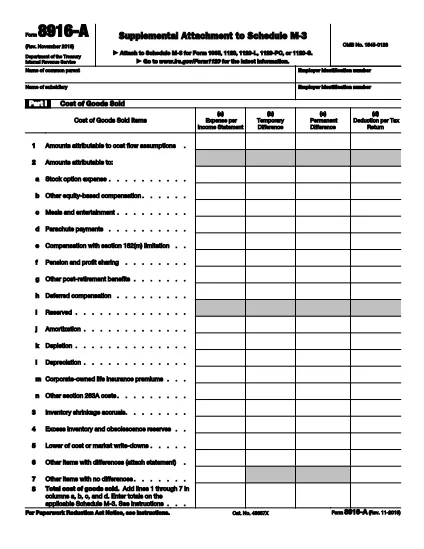
Form 8916‑A, Supplemental Attachment to Schedule M‑3, is the IRS‑approved schedule used to detail cost of goods sold, interest income, and interest expense when filing Schedule M‑3 with a partnership, corporation, or S‑corporation return.

This page provides a direct link to the official fillable PDF, step‑by‑step instructions for completing the form online with Formize, and answers to the most common questions taxpayers have.

Whether you are preparing a 1065, 1120, or 1120‑S return, the fillable version saves time, reduces errors, and lets you submit a clean, printable PDF straight from your browser.

ՀՏՀ
  • What type of returns require Form 8916‑A?

    Form 8916‑A is required when a partnership (Form 1065), corporation (Form 1120), or S‑corporation (Form 1120‑S) includes cost of goods sold, interest income, or interest expense on Schedule M‑3.

  • Can I file Form 8916‑A electronically?

    Yes. The fillable PDF can be completed online with Formize and then uploaded with your electronic return through most tax software that supports Schedule M‑3.

  • Do I need to fill out all three parts of the form?

    Only the parts that apply to your return need to be completed. If you have no interest expense, for example, you can leave Part III blank.

  • What is the difference between columns (a)‑(d) on Schedule M‑3 and Form 8916‑A?

    Columns (a) and (d) are for the first year a corporation files Schedule M‑3 and are optional. Form 8916‑A focuses on columns (b) and (c), which capture adjustments between book and tax amounts.

  • Is there a printable version of the form after I finish?

    Yes. After completing the fillable PDF, you can click “Print” or “Download” to get a printer‑ready version that matches the IRS’s official layout.

  • Where can I find the official instructions for Form 8916‑A?

    The official IRS instructions are included in the PDF linked below and on the IRS website under “Form 8916‑A Instructions.”

ԻՆՉՊԵՍ

Ինչպես լրացնել Form 8916-A-ն անվճար, առցանց՝ 5 հեշտ քայլերով.

  1. 1
    Click the Fillable Form Button
    On this page, click the “Fill out this form” button. The Formize PDF Filler app will open in a new tab.
  2. 2
    Wait for the Formize PDF Filler to Load
    The app loads the official IRS Form 8916‑A PDF. You’ll see editable fields highlighted in blue.
  3. 3
    Enter Your Information
    Complete Part I (Cost of Goods Sold), Part II (Interest Income), and Part III (Interest Expense). Use positive numbers for over‑statements and negative numbers for under‑statements as the IRS instructions describe.
  4. 4
    Review and Validate
    After entering all amounts, click “Validate” to let Formize check for missing required fields or calculation errors.
  5. 5
    Save, Print, or Export
    When you’re satisfied, click “Save” to store the completed PDF in your browser, or choose “Print” or “Download” to keep a copy for your records.
Ձևավորել PDF Filler հավելվածը
ՄԱՍԻՆ

Հարկային ձևեր

Form 8916-A-ը հարկային ձևերից մեկն է, որն օգտագործվում է համապատասխան հարկային մարմնին հարկերի հետ կապված տեղեկատվությունը զեկուցելու համար: Կան տարբեր տեսակի հարկային ձևեր, ներառյալ դաշնային, նահանգային և տեղական հարկային ձևերը, որոնք կարող են տարբեր լինել՝ կախված հարկ վճարողի հանգամանքներից և գտնվելու վայրից:

ՀԱՏԿՈՒԹՅՈՒՆՆԵՐ

PDF լցոնիչ

Առցանց Form 8916-A-ը լրացնելու ամենահեշտ ձևը

  • Արագ լրացրեք Form 8916-A
    Փնտրու՞մ եք միջոց՝ արագորեն լրացնելու Form 8916-A առցանց: Մեր առցանց անվճար PDF ձևաթուղթ լրացնողի միջոցով դուք կիմանաք, թե ինչպես խմբագրել և լրացնել այս pdf փաստաթուղթը մեկ րոպեից պակաս ժամանակում:
  • Հեշտ օգտագործման առցանց PDF խմբագիր
    Հոգնե՞լ եք PDF ֆայլեր տպելուց, որպեսզի կարողանաք դրանք խմբագրել, նախքան նորից սկանավորելը և հետ ուղարկելը: Խմբագրել PDF փաստաթղթերը անվճար առցանց: Օգտագործեք մեր առցանց pdf խմբագրիչը ժամանակ և թուղթ խնայելու համար:
  • Հիանալի գործիքներ, բոլոր հարթակներ
    Զարմանում եք, թե ինչպես լրացնել Form 8916-A-ը Mac-ում, կամ գուցե ինչպես անվճար օգտագործել PDF լցոնիչը: Մեր առցանց PDF գործիքներն աշխատում են բոլոր հարթակներում:
  • Անվտանգ ֆայլերի պահպանում
    Ավարտված «Form 8916-A» ֆայլերը պահվում են պաշտպանված տվյալների բազայում, որը կառավարվում է Amazon Cloud հոսթինգի կողմից: Ցանկացած ժամանակ կարող եք ջնջել ձեր ֆայլերը մեր համակարգից: Ամեն դեպքում, այս ֆայլերը ավտոմատ կերպով ջնջվում են 24 ժամ հետո:
  • Զրուցեք Form 8916-A-ի հետ
    Զրուցեք «Form 8916-A»-ի հետ Chatize-ում, որը PDF ընթերցողի անվճար օգնական է: Հարցեր տվեք և ստացեք պատասխաններ «Form 8916-A»-ից։ Պարզապես սեղմեք վերևում գտնվող Զրույց փաստաթղթի հետ կոճակը:

Ջնջել լրացման նիստը

Ջնջե՞լ ընտրված լրացման աշխատաշրջանը: Այս դեպքում ձևը լրացնելու ձեր առաջընթացը կկորչի:

Ջնջել խմբագրման նիստը

Ջնջե՞լ ընտրված խմբագրման աշխատաշրջանը: Այս դեպքում ձևը ստեղծելու և խմբագրելու ձեր առաջընթացը կկորչի: