Ընտրել լեզուն

IRS Form 945‑X – Fillable PDF for Adjusted Return of Withheld Tax

  1. Երկիր ԱՄՆ
  2. Լեզու Անգլերեն
  3. Գործունեություն Հարկեր
  4. բաժին Ներքին եկամուտների ծառայություն
IRS Form 945‑X – Fillable PDF for Adjusted Return of Withheld Tax

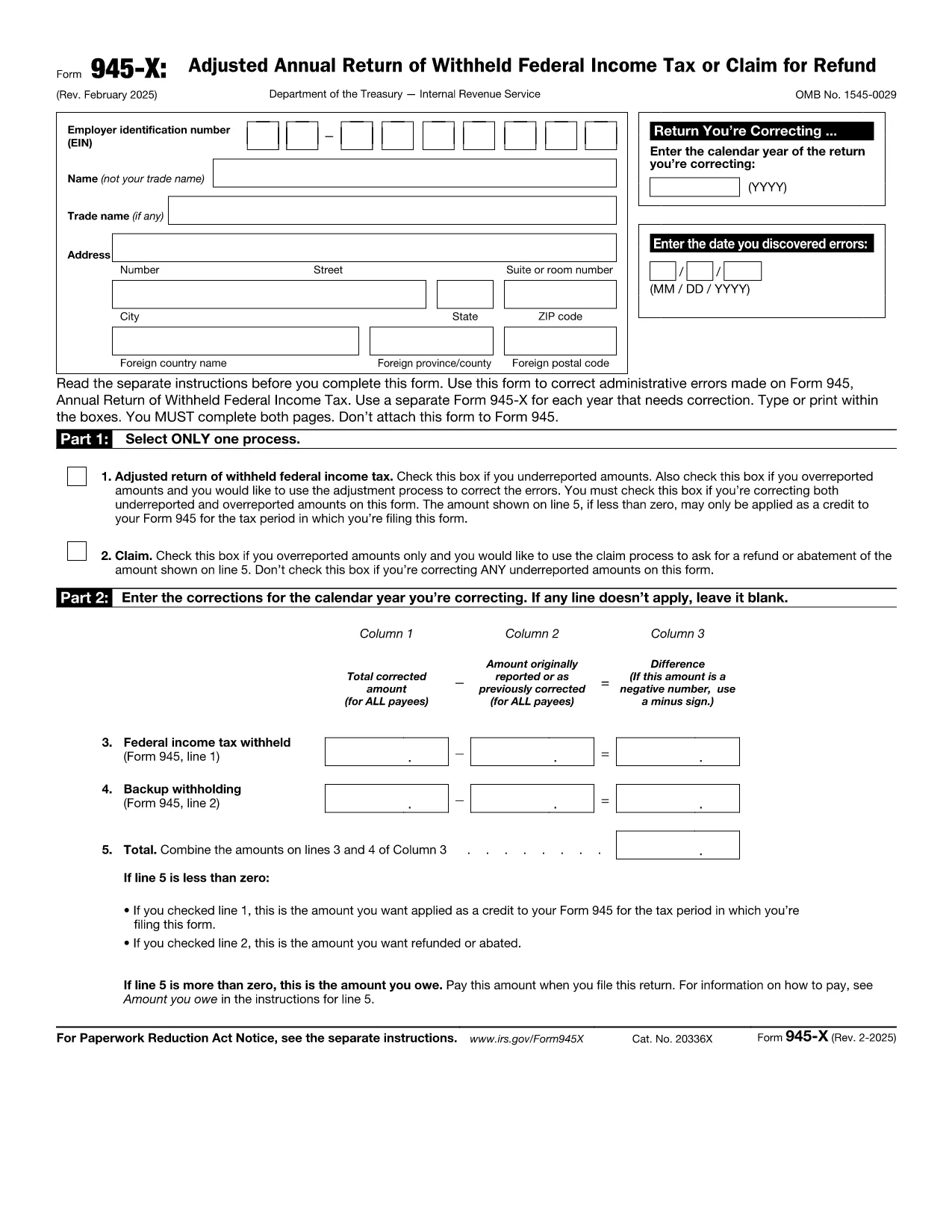
Form 945‑X is the Adjusted Return of Withheld Federal Income Tax used by businesses to correct errors on a previously filed Form 945. Whether you under‑reported, over‑reported, or need to claim a refund, the fillable PDF version lets you make adjustments quickly and accurately.

What Is Form 945‑X?

The IRS requires a separate Form 945‑X for each calendar year you need to correct. The form consists of four parts: selecting the correction process, detailing the corrections, providing a written explanation, and signing the return. It must be completed in full—both pages—and cannot be attached to the original Form 945.

How to Complete Form 945‑X Online with Formize

Instead of downloading the PDF and editing it in a separate program, simply click the "Fill out this form" button on our page. The Formize PDF Filler app will load in your browser, allowing you to type directly into each field, save your progress, and export a completed PDF ready for submission.

Common Mistakes to Avoid When Filing Form 945‑X

  • Leaving the EIN blank: The employer identification number is mandatory on both pages.
  • Incorrect tax year: Ensure the year you are correcting matches the original Form 945 filing.
  • Missing explanation: Line 7 requires a clear, concise reason for the correction.
  • Signature omission: An unsigned Form 945‑X will be rejected by the IRS.

Where to Find the Official PDF Download

You can download the official, up‑to‑date Form 945‑X PDF directly from the IRS website. Our page links to the same file so you always have the correct version.

Ready to correct your withheld tax return? Click the button below, fill out the form in minutes, and submit it with confidence.

Հրահանգներ

ՀՏՀ
  • Do I need a separate Form 945‑X for each year I’m correcting?

    Yes. The IRS requires one Form 945‑X per calendar year with errors. Do not combine multiple years on a single form.

  • Can I file Form 945‑X electronically?

    The IRS does not accept electronic filing for Form 945‑X. After completing the fillable PDF, you must print and mail it to the address listed in the instructions.

  • What is the deadline to submit a Form 945‑X?

    You should file the correction as soon as you discover the error. There is no specific statutory deadline, but filing promptly avoids interest and penalties.

  • Will filing Form 945‑X affect my refund?

    If you over‑reported tax withheld, the negative amount on Line 5 can be applied as a credit to your current Form 945 or result in a refund, depending on IRS processing.

  • Do I need to attach supporting documents?

    Only attach additional documentation if the IRS specifically requests it. Generally, a clear written explanation on Line 7 is sufficient.

  • Is the fillable PDF compatible with Mac and Windows?

    Yes. The Formize PDF Filler works in all modern browsers on both macOS and Windows, so you can complete the form without extra software.

  • Can I save a partially completed Form 945‑X?

    The Formize app automatically saves your progress. You can close the browser and return later to finish the form.

ԻՆՉՊԵՍ

Ինչպես լրացնել Form 945-X-ն անվճար, առցանց՝ 4 հեշտ քայլերով.

  1. 1
    Open the Fillable Form
    Click the "Fill out this form" button on the page. The Formize PDF Filler will launch in a new tab.
  2. 2
    Enter Your Information
    Type directly into each field – EIN, tax year, correction details, and explanation. The app saves your data automatically.
  3. 3
    Review & Sign
    Double‑check all entries, add your electronic signature in the signature box, and click "Save PDF".
  4. 4
    Submit to the IRS
    Print the completed PDF or upload it through the IRS e‑file portal, following the submission instructions in the form.
Ձևավորել PDF Filler հավելվածը
ՄԱՍԻՆ

Հարկային ձևեր

Form 945-X-ը հարկային ձևերից մեկն է, որն օգտագործվում է համապատասխան հարկային մարմնին հարկերի հետ կապված տեղեկատվությունը զեկուցելու համար: Կան տարբեր տեսակի հարկային ձևեր, ներառյալ դաշնային, նահանգային և տեղական հարկային ձևերը, որոնք կարող են տարբեր լինել՝ կախված հարկ վճարողի հանգամանքներից և գտնվելու վայրից:

ՀԱՏԿՈՒԹՅՈՒՆՆԵՐ

PDF լցոնիչ

Առցանց Form 945-X-ը լրացնելու ամենահեշտ ձևը

  • Արագ լրացրեք Form 945-X
    Փնտրու՞մ եք միջոց՝ արագորեն լրացնելու Form 945-X առցանց: Մեր առցանց անվճար PDF ձևաթուղթ լրացնողի միջոցով դուք կիմանաք, թե ինչպես խմբագրել և լրացնել այս pdf փաստաթուղթը մեկ րոպեից պակաս ժամանակում:
  • Հեշտ օգտագործման առցանց PDF խմբագիր
    Հոգնե՞լ եք PDF ֆայլեր տպելուց, որպեսզի կարողանաք դրանք խմբագրել, նախքան նորից սկանավորելը և հետ ուղարկելը: Խմբագրել PDF փաստաթղթերը անվճար առցանց: Օգտագործեք մեր առցանց pdf խմբագրիչը ժամանակ և թուղթ խնայելու համար:
  • Հիանալի գործիքներ, բոլոր հարթակներ
    Զարմանում եք, թե ինչպես լրացնել Form 945-X-ը Mac-ում, կամ գուցե ինչպես անվճար օգտագործել PDF լցոնիչը: Մեր առցանց PDF գործիքներն աշխատում են բոլոր հարթակներում:
  • Անվտանգ ֆայլերի պահպանում
    Ավարտված «Form 945-X» ֆայլերը պահվում են պաշտպանված տվյալների բազայում, որը կառավարվում է Amazon Cloud հոսթինգի կողմից: Ցանկացած ժամանակ կարող եք ջնջել ձեր ֆայլերը մեր համակարգից: Ամեն դեպքում, այս ֆայլերը ավտոմատ կերպով ջնջվում են 24 ժամ հետո:
  • Զրուցեք Form 945-X-ի հետ
    Զրուցեք «Form 945-X»-ի հետ Chatize-ում, որը PDF ընթերցողի անվճար օգնական է: Հարցեր տվեք և ստացեք պատասխաններ «Form 945-X»-ից։ Պարզապես սեղմեք վերևում գտնվող Զրույց փաստաթղթի հետ կոճակը:

Ջնջել լրացման նիստը

Ջնջե՞լ ընտրված լրացման աշխատաշրջանը: Այս դեպքում ձևը լրացնելու ձեր առաջընթացը կկորչի:

Ջնջել խմբագրման նիստը

Ջնջե՞լ ընտրված խմբագրման աշխատաշրջանը: Այս դեպքում ձևը ստեղծելու և խմբագրելու ձեր առաջընթացը կկորչի: