
Ընտրել լեզուն

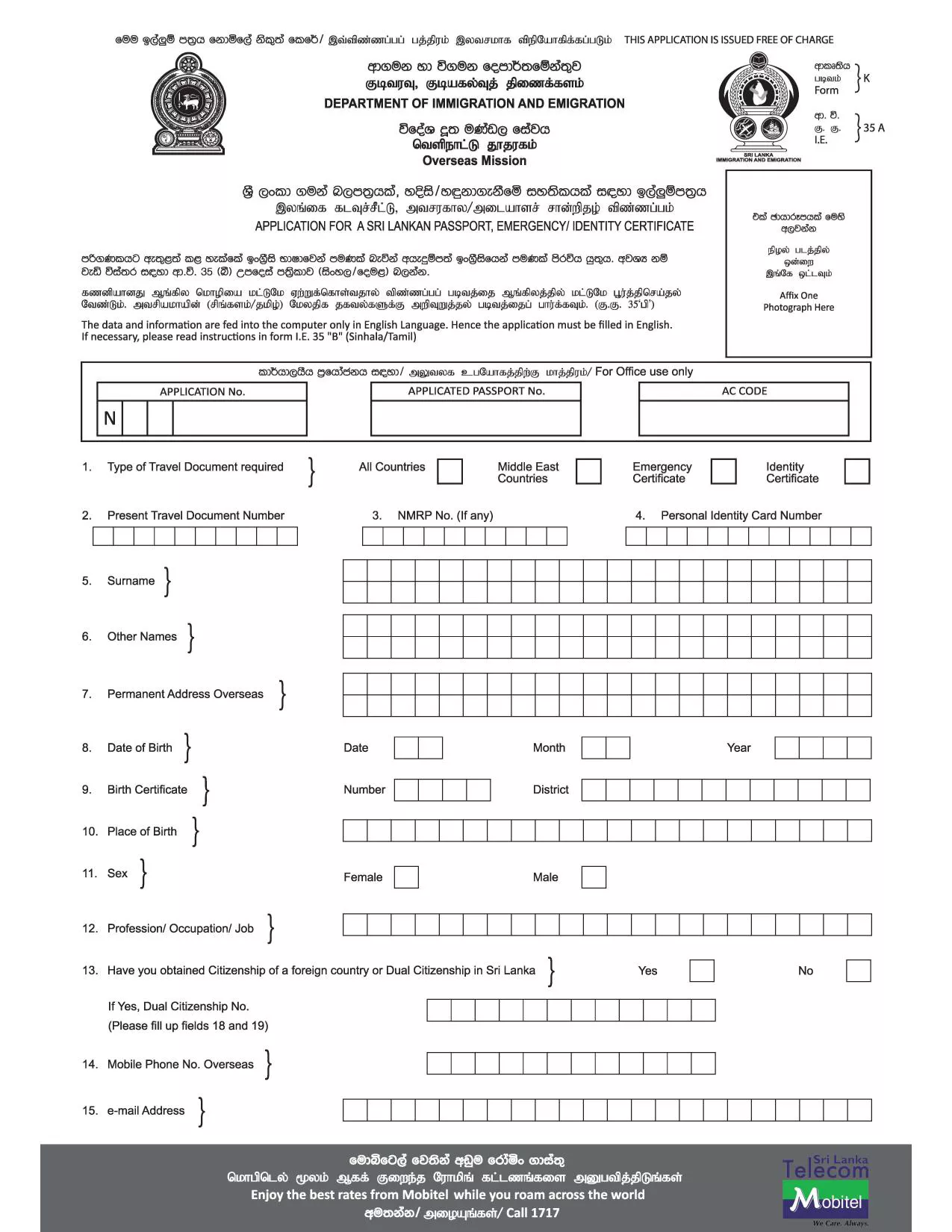
Application Form K‑35 A – Fillable PDF

  1. Լեզու Անգլերեն
  2. Երկիր Շրի Լանկա
  3. Գործունեություն Passports
  4. բաժին Department of Immigration and Emigration
Application Form K‑35 A – Fillable PDF

The Application Form K‑35 A is the official Sri Lankan passport application used for new passports, renewals, and replacements. This fillable PDF lets you enter all required details on your computer, print a clean, legible document, and submit it to the Department of Immigration and Emigration.

What Is Form K‑35 A?

Form K‑35 A collects personal data, citizenship information, travel document numbers, and parental consent for applicants under 16. It is mandatory for Sri Lankan citizens applying from abroad or within Sri Lanka.

How to Complete the Form Online

Instead of downloading the PDF and using a separate editor, simply click the "Fill out this form" button on this page. The Formize PDF Filler app will load in your browser, allowing you to:

  • Enter text directly into each field
  • Save progress and return later
  • Validate required fields before printing
  • Export a completed PDF ready for submission

Common Mistakes to Avoid

  • Leaving required fields blank – the filler will highlight missing information.
  • Using non‑English characters – the form must be completed in English.
  • Incorrect passport numbers – double‑check the numbers on your existing travel document.
  • Missing parental consent for minors – attach the required consent letters.

Where to Submit Your Application

After printing the completed form, attach it to the supporting documents listed on the official instructions and submit it to the nearest Sri Lankan embassy, consulate, or the Department of Immigration and Emigration in Sri Lanka.

Frequently Asked Questions

Scroll down to find quick answers to the most common queries about Form K‑35 A.

ՀՏՀ
  • Can I edit Form K‑35 A on a mobile device?

    Yes. The Formize PDF Filler works on most modern smartphones and tablets, but for best results use a desktop or laptop.

  • Do I need to print the form in color?

    No. A black‑and‑white printout is accepted as long as the text is clear and legible.

  • What supporting documents are required with Form K‑35 A?

    Typically you need a valid ID, current passport (if renewing), birth certificate, and parental consent letters for minors. Check the official instruction PDF for a complete list.

  • How long does it take to process a passport after submitting Form K‑35 A?

    Processing times vary by location, but standard applications usually take 10‑15 business days. Expedited services are available at an additional fee.

  • Is there a fee for downloading the fillable PDF?

    No. The PDF download and online filling are completely free. Fees apply only to the passport issuance itself.

  • Can I save my progress and return later?

    Yes. The Formize filler lets you save the form as a draft in your browser, so you can complete it at your convenience.

ԻՆՉՊԵՍ

Ինչպես լրացնել Application Form K-35 A-ն անվճար, առցանց՝ 4 հեշտ քայլերով.

  1. 1
    Open the Fillable Form
    Click the **Fill out this form** button on the page. The Formize PDF Filler will open in a new tab.
  2. 2
    Enter Your Information
    Type directly into each field. The filler validates required entries and highlights any missing data.
  3. 3
    Save or Export
    When all sections are complete, click **Save** to store a copy in your browser or **Export** to download the finished PDF.
  4. 4
    Print and Submit
    Print the completed PDF on A4 paper, attach the required supporting documents, and submit it to the appropriate Sri Lankan embassy or the Department of Immigration.
Ձևավորել PDF Filler հավելվածը
ՄԱՍԻՆ

Application Form K-35 A ձևանմուշ

PDF փաստաթուղթը դիտելու և լրացնելու գործառույթների ավանդական փաթեթով, որը զուգորդվում է վեբ հավելվածի առավելությունների և արձագանքող դասավորության հետ, դուք կարող եք լրացնել Application Form K-35 A-ը րոպեների ընթացքում:

ՀԱՏԿՈՒԹՅՈՒՆՆԵՐ

PDF լցոնիչ

Առցանց Application Form K-35 A-ը լրացնելու ամենահեշտ ձևը

  • Արագ լրացրեք Application Form K-35 A
    Փնտրու՞մ եք միջոց՝ արագորեն լրացնելու Application Form K-35 A առցանց: Մեր առցանց անվճար PDF ձևաթուղթ լրացնողի միջոցով դուք կիմանաք, թե ինչպես խմբագրել և լրացնել այս pdf փաստաթուղթը մեկ րոպեից պակաս ժամանակում:
  • Հեշտ օգտագործման առցանց PDF խմբագիր
    Հոգնե՞լ եք PDF ֆայլեր տպելուց, որպեսզի կարողանաք դրանք խմբագրել, նախքան նորից սկանավորելը և հետ ուղարկելը: Խմբագրել PDF փաստաթղթերը անվճար առցանց: Օգտագործեք մեր առցանց pdf խմբագրիչը ժամանակ և թուղթ խնայելու համար:
  • Հիանալի գործիքներ, բոլոր հարթակներ
    Զարմանում եք, թե ինչպես լրացնել Application Form K-35 A-ը Mac-ում, կամ գուցե ինչպես անվճար օգտագործել PDF լցոնիչը: Մեր առցանց PDF գործիքներն աշխատում են բոլոր հարթակներում:
  • Անվտանգ ֆայլերի պահպանում
    Ավարտված «Application Form K-35 A» ֆայլերը պահվում են պաշտպանված տվյալների բազայում, որը կառավարվում է Amazon Cloud հոսթինգի կողմից: Ցանկացած ժամանակ կարող եք ջնջել ձեր ֆայլերը մեր համակարգից: Ամեն դեպքում, այս ֆայլերը ավտոմատ կերպով ջնջվում են 24 ժամ հետո:
  • Զրուցեք Application Form K-35 A-ի հետ
    Զրուցեք «Application Form K-35 A»-ի հետ Chatize-ում, որը PDF ընթերցողի անվճար օգնական է: Հարցեր տվեք և ստացեք պատասխաններ «Application Form K-35 A»-ից։ Պարզապես սեղմեք վերևում գտնվող Զրույց փաստաթղթի հետ կոճակը:

Ջնջել լրացման նիստը

Ջնջե՞լ ընտրված լրացման աշխատաշրջանը: Այս դեպքում ձևը լրացնելու ձեր առաջընթացը կկորչի:

Ջնջել խմբագրման նիստը

Ջնջե՞լ ընտրված խմբագրման աշխատաշրջանը: Այս դեպքում ձևը ստեղծելու և խմբագրելու ձեր առաջընթացը կկորչի: