
Ընտրել լեզուն

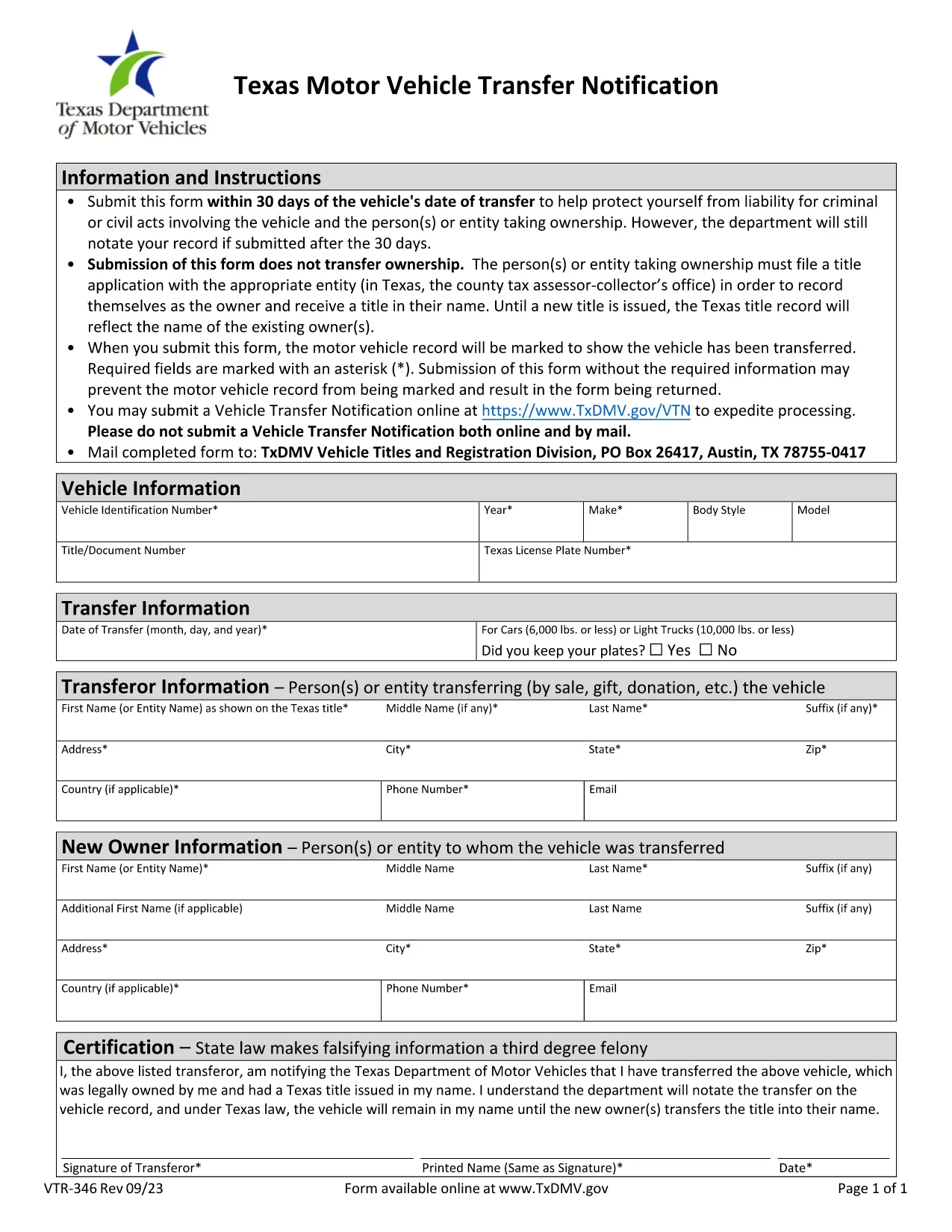
Application Form with Undertaking for Change of Ownership

  1. Լեզու Անգլերեն
  2. Երկիր ԱՄՆ
  3. Գործունեություն Տրանսպորտային միջոցների գրանցում
  4. բաժին Department of Motor Vehicles
Application Form with Undertaking for Change of Ownership

The Application Form with Undertaking for Change of Ownership is the official document required when you transfer the title of a vehicle, boat, or other registered asset to a new owner. This form not only captures the buyer and seller information but also includes an undertaking that protects the seller from future liabilities such as parking tickets or toll violations.

What Is This Form and When Is It Needed?

State motor vehicle departments (DMVs) require this form whenever a title is transferred. It is used for private sales, dealer-to-private sales, and any situation where ownership changes hands. The undertaking clause is essential because it formally releases the seller from responsibility after the transfer is recorded.

How to Complete the Form Online with Formize

Instead of printing, scanning, and mailing a paper copy, you can fill the form directly in your browser using the Formize PDF Filler. The process is fast, secure, and fully compliant with DMV requirements.

Common Mistakes to Avoid

  • Leaving the sale price or odometer reading blank.
  • Not signing the undertaking section.
  • Forgetting to include the VIN (Vehicle Identification Number) in the correct format.
  • Submitting the form without the required proof of identity for both parties.

Where to Submit the Completed Form

After you have filled, reviewed, and signed the form, you can:

  • Upload it through your state’s online DMV portal (if available).
  • Print and hand‑deliver it to your local tax office or DMV.
  • Mail the PDF to the address listed on the form’s instructions.

Using the fillable PDF ensures the data is captured accurately, reducing processing time and avoiding delays in title issuance.

ՀՏՀ
  • Do I need to print the form after filling it online?

    No. The Formize PDF Filler lets you complete, sign, and save the form entirely online. Printing is only required if your local DMV asks for a hard copy.

  • What is the undertaking section for?

    The undertaking releases the seller from future liabilities (e.g., tickets, tolls) after the title transfer is recorded.

  • Can I use this form for a vehicle sold out of state?

    Yes, but you must also comply with the receiving state’s registration requirements. The form’s VIN and sale details remain valid nationwide.

  • How long does it take for the DMV to process the transfer?

    Processing times vary by state, but a correctly completed, electronically signed form typically speeds up the process to 5‑10 business days.

  • What documents should I keep after submitting the form?

    Keep a copy of the signed PDF, a receipt of submission (if online), and any proof of identity for both parties. These may be needed for future reference.

  • Is there a fee for filing this form?

    Yes, most states charge a title transfer fee. Check your local DMV’s fee schedule for the exact amount.

ԻՆՉՊԵՍ

Ինչպես լրացնել change of ownership form-ն անվճար, առցանց՝ 5 հեշտ քայլերով.

  1. 1
    Click the Fill‑out Button
    On this page, click the "Fill out this form" button to launch the Formize PDF Filler.
  2. 2
    Wait for the Formize PDF Filler to Load
    The fillable PDF will open in a secure browser window. No download or installation is required.
  3. 3
    Enter All Required Information
    Complete buyer and seller details, vehicle information, sale price, odometer reading, and the undertaking clause.
  4. 4
    Review and Electronically Sign
    Double‑check every field, then use the built‑in e‑signature tool to sign the form.
  5. 5
    Save or Submit
    Download the finished PDF for your records or submit it directly to the DMV if the portal supports online upload.
Ձևավորել PDF Filler հավելվածը
ՄԱՍԻՆ

Տրանսպորտային միջոցների գրանցման ձևեր

Եթե ​​դուք ունեք կամ վարձակալում եք ավտոմոբիլ, կցասայլ կամ նավ, դուք պետք է կատարեք որոշակի պարտավորություններ՝ ձեր մեքենան օրինական գրանցված և անվտանգ պահելու համար:

change of ownership form-ը Տրանսպորտային միջոցի գրանցման ձևերից մեկն է, որը փաստաթղթեր են, որոնք օգտագործվում են համապատասխան նահանգային կամ մարզային մարմնում մեքենա գրանցելու համար: Այս ձևաթղթերը սովորաբար պահանջվում են, երբ անձը գնում է նոր կամ օգտագործված փոխադրամիջոց կամ երբ նրանք տեղափոխվում են նոր նահանգ կամ նահանգ մեքենայով:

Տրանսպորտային միջոցների գրանցման համար անհրաժեշտ ճշգրիտ պահանջներն ու ձևերը կարող են տարբեր լինել՝ կախված գտնվելու վայրից, սակայն, ընդհանուր առմամբ, գործընթացը ներառում է մեքենայի, սեփականատիրոջ և մեքենայի ցանկացած արգելանքների մասին տեղեկատվություն տրամադրելը:

Գրանցման ձևերն ու վճարները ներկայացնելուց հետո նահանգային կամ մարզային մարմինը մեքենայի տիրոջը կտրամադրի գրանցման վկայական կամ պետհամարանիշ: Այս գրանցումը թույլ է տալիս տրանսպորտային միջոցը օրինական կերպով շահագործել հանրային ճանապարհների և մայրուղիների վրա:

ՀԱՏԿՈՒԹՅՈՒՆՆԵՐ

PDF լցոնիչ

Առցանց change of ownership form-ը լրացնելու ամենահեշտ ձևը

  • Արագ լրացրեք change of ownership form
    Փնտրու՞մ եք միջոց՝ արագորեն լրացնելու change of ownership form առցանց: Մեր առցանց անվճար PDF ձևաթուղթ լրացնողի միջոցով դուք կիմանաք, թե ինչպես խմբագրել և լրացնել այս pdf փաստաթուղթը մեկ րոպեից պակաս ժամանակում:
  • Հեշտ օգտագործման առցանց PDF խմբագիր
    Հոգնե՞լ եք PDF ֆայլեր տպելուց, որպեսզի կարողանաք դրանք խմբագրել, նախքան նորից սկանավորելը և հետ ուղարկելը: Խմբագրել PDF փաստաթղթերը անվճար առցանց: Օգտագործեք մեր առցանց pdf խմբագրիչը ժամանակ և թուղթ խնայելու համար:
  • Հիանալի գործիքներ, բոլոր հարթակներ
    Զարմանում եք, թե ինչպես լրացնել change of ownership form-ը Mac-ում, կամ գուցե ինչպես անվճար օգտագործել PDF լցոնիչը: Մեր առցանց PDF գործիքներն աշխատում են բոլոր հարթակներում:
  • Անվտանգ ֆայլերի պահպանում
    Ավարտված «change of ownership form» ֆայլերը պահվում են պաշտպանված տվյալների բազայում, որը կառավարվում է Amazon Cloud հոսթինգի կողմից: Ցանկացած ժամանակ կարող եք ջնջել ձեր ֆայլերը մեր համակարգից: Ամեն դեպքում, այս ֆայլերը ավտոմատ կերպով ջնջվում են 24 ժամ հետո:
  • Զրուցեք change of ownership form-ի հետ
    Զրուցեք «change of ownership form»-ի հետ Chatize-ում, որը PDF ընթերցողի անվճար օգնական է: Հարցեր տվեք և ստացեք պատասխաններ «change of ownership form»-ից։ Պարզապես սեղմեք վերևում գտնվող Զրույց փաստաթղթի հետ կոճակը:

Ջնջել լրացման նիստը

Ջնջե՞լ ընտրված լրացման աշխատաշրջանը: Այս դեպքում ձևը լրացնելու ձեր առաջընթացը կկորչի:

Ջնջել խմբագրման նիստը

Ջնջե՞լ ընտրված խմբագրման աշխատաշրջանը: Այս դեպքում ձևը ստեղծելու և խմբագրելու ձեր առաջընթացը կկորչի: