
Ընտրել լեզուն

MV2956 Fillable PDF – Wisconsin Vehicle Registration Form

  1. Լեզու Անգլերեն
  2. Երկիր ԱՄՆ
  3. Գործունեություն Տրանսպորտային միջոցների գրանցում
  4. բաժին Department of Motor Vehicles
MV2956 Fillable PDF – Wisconsin Vehicle Registration Form

The MV2956 is the official Wisconsin Department of Motor Vehicles (DMV) form used for vehicle registration changes, special plate applications, and related paperwork. Instead of printing, scanning, and mailing a paper copy, you can now complete the form instantly online with our Fill out this form button powered by the Formize PDF Filler app.

What Is the MV2956 Form?

MV2956 is a fillable PDF that captures essential vehicle information, owner details, and any special requests (e.g., personalized plates). It is required for:

  • Transferring ownership of a vehicle within Wisconsin
  • Updating registration address
  • Applying for specialty or disability plates

How to Fill Out MV2956 Online with Formize

Follow these simple steps to complete the form without leaving your browser:

  • Click the Fill out this form button on this page.
  • The Formize PDF Filler will load in a secure overlay.
  • Enter your information directly into the highlighted fields.
  • Use the built‑in validation to avoid common entry errors.
  • When finished, click Submit to download a completed PDF or Print to send it to the DMV.

Common Mistakes to Avoid

Even with a fillable PDF, a few errors can delay processing:

  • Incorrect VIN: Double‑check the Vehicle Identification Number for typos.
  • Missing signatures: The form requires the owner’s digital signature; use the signature tool in Formize.
  • Outdated address: Ensure the address matches the one on your driver’s license.

Download & Save the PDF

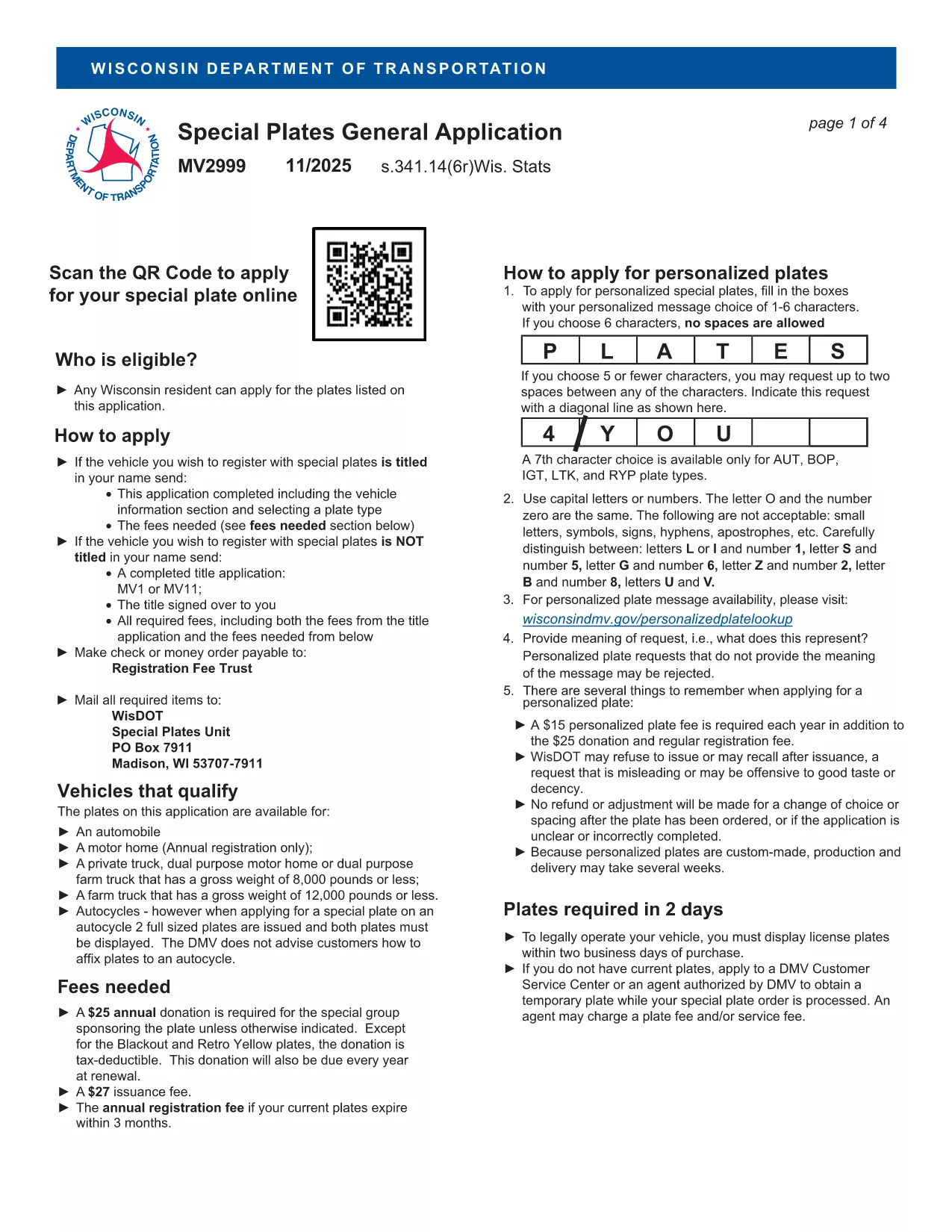
If you prefer a hard copy, you can also download the original MV2999 PDF (the closest available version) and use Formize to fill it out.

Frequently Asked Questions

Below are answers to the most common queries about the MV2956 form.

ՀՏՀ
  • What is the MV2956 form used for?

    It is the Wisconsin DMV’s standard form for vehicle registration changes, ownership transfers, and specialty plate requests.

  • Do I need to print the form after filling it out?

    No. You can download the completed PDF and submit it electronically if the DMV accepts electronic filings, or print it if a hard copy is required.

  • Is there a fee to use the Formize PDF Filler?

    Formize’s basic fillable‑PDF feature is free for users; any DMV filing fees are paid directly to the Wisconsin DMV.

  • Can I save my progress and return later?

    Yes. The Formize app lets you save a draft of the PDF and resume editing at any time.

  • What should I do if I make a mistake?

    Use the “Clear” button to reset a field, or download the PDF, correct it in a PDF editor, and re‑upload.

  • Where do I submit the completed MV2956 form?

    Submit the printed form to your local Wisconsin DMV office or follow any electronic submission instructions provided by the DMV.

  • Is the MV2956 form available in other languages?

    The official form is in English; however, you can use translation tools for assistance while filling it out.

ԻՆՉՊԵՍ

Ինչպես լրացնել MV2956-ն անվճար, առցանց՝ 5 հեշտ քայլերով.

  1. 1
    Click the Fill‑out Button
    Press the “Fill out this form” button on the page to launch the Formize PDF Filler.
  2. 2
    Wait for the Filler to Load
    A secure overlay will appear; the fillable PDF loads automatically.
  3. 3
    Enter Your Information
    Complete each highlighted field, using the built‑in validation to ensure accuracy.
  4. 4
    Review and Sign
    Double‑check all entries, add your digital signature, and click “Submit.”
  5. 5
    Download or Print
    Save the completed PDF to your device or print it for submission to the Wisconsin DMV.
Ձևավորել PDF Filler հավելվածը
ՄԱՍԻՆ

Տրանսպորտային միջոցների գրանցման ձևեր

Եթե ​​դուք ունեք կամ վարձակալում եք ավտոմոբիլ, կցասայլ կամ նավ, դուք պետք է կատարեք որոշակի պարտավորություններ՝ ձեր մեքենան օրինական գրանցված և անվտանգ պահելու համար:

MV2956-ը Տրանսպորտային միջոցի գրանցման ձևերից մեկն է, որը փաստաթղթեր են, որոնք օգտագործվում են համապատասխան նահանգային կամ մարզային մարմնում մեքենա գրանցելու համար: Այս ձևաթղթերը սովորաբար պահանջվում են, երբ անձը գնում է նոր կամ օգտագործված փոխադրամիջոց կամ երբ նրանք տեղափոխվում են նոր նահանգ կամ նահանգ մեքենայով:

Տրանսպորտային միջոցների գրանցման համար անհրաժեշտ ճշգրիտ պահանջներն ու ձևերը կարող են տարբեր լինել՝ կախված գտնվելու վայրից, սակայն, ընդհանուր առմամբ, գործընթացը ներառում է մեքենայի, սեփականատիրոջ և մեքենայի ցանկացած արգելանքների մասին տեղեկատվություն տրամադրելը:

Գրանցման ձևերն ու վճարները ներկայացնելուց հետո նահանգային կամ մարզային մարմինը մեքենայի տիրոջը կտրամադրի գրանցման վկայական կամ պետհամարանիշ: Այս գրանցումը թույլ է տալիս տրանսպորտային միջոցը օրինական կերպով շահագործել հանրային ճանապարհների և մայրուղիների վրա:

ՀԱՏԿՈՒԹՅՈՒՆՆԵՐ

PDF լցոնիչ

Առցանց MV2956-ը լրացնելու ամենահեշտ ձևը

  • Արագ լրացրեք MV2956
    Փնտրու՞մ եք միջոց՝ արագորեն լրացնելու MV2956 առցանց: Մեր առցանց անվճար PDF ձևաթուղթ լրացնողի միջոցով դուք կիմանաք, թե ինչպես խմբագրել և լրացնել այս pdf փաստաթուղթը մեկ րոպեից պակաս ժամանակում:
  • Հեշտ օգտագործման առցանց PDF խմբագիր
    Հոգնե՞լ եք PDF ֆայլեր տպելուց, որպեսզի կարողանաք դրանք խմբագրել, նախքան նորից սկանավորելը և հետ ուղարկելը: Խմբագրել PDF փաստաթղթերը անվճար առցանց: Օգտագործեք մեր առցանց pdf խմբագրիչը ժամանակ և թուղթ խնայելու համար:
  • Հիանալի գործիքներ, բոլոր հարթակներ
    Զարմանում եք, թե ինչպես լրացնել MV2956-ը Mac-ում, կամ գուցե ինչպես անվճար օգտագործել PDF լցոնիչը: Մեր առցանց PDF գործիքներն աշխատում են բոլոր հարթակներում:
  • Անվտանգ ֆայլերի պահպանում
    Ավարտված «MV2956» ֆայլերը պահվում են պաշտպանված տվյալների բազայում, որը կառավարվում է Amazon Cloud հոսթինգի կողմից: Ցանկացած ժամանակ կարող եք ջնջել ձեր ֆայլերը մեր համակարգից: Ամեն դեպքում, այս ֆայլերը ավտոմատ կերպով ջնջվում են 24 ժամ հետո:
  • Զրուցեք MV2956-ի հետ
    Զրուցեք «MV2956»-ի հետ Chatize-ում, որը PDF ընթերցողի անվճար օգնական է: Հարցեր տվեք և ստացեք պատասխաններ «MV2956»-ից։ Պարզապես սեղմեք վերևում գտնվող Զրույց փաստաթղթի հետ կոճակը:

Ջնջել լրացման նիստը

Ջնջե՞լ ընտրված լրացման աշխատաշրջանը: Այս դեպքում ձևը լրացնելու ձեր առաջընթացը կկորչի:

Ջնջել խմբագրման նիստը

Ջնջե՞լ ընտրված խմբագրման աշխատաշրջանը: Այս դեպքում ձևը ստեղծելու և խմբագրելու ձեր առաջընթացը կկորչի: