Ընտրել լեզուն

DL-14S Texas Driver License Application – Fillable PDF

  1. Լեզու Անգլերեն
  2. Երկիր ԱՄՆ
  3. բաժին Department of Public Safety
  4. Գործունեություն Driver Licensing
DL-14S Texas Driver License Application – Fillable PDF

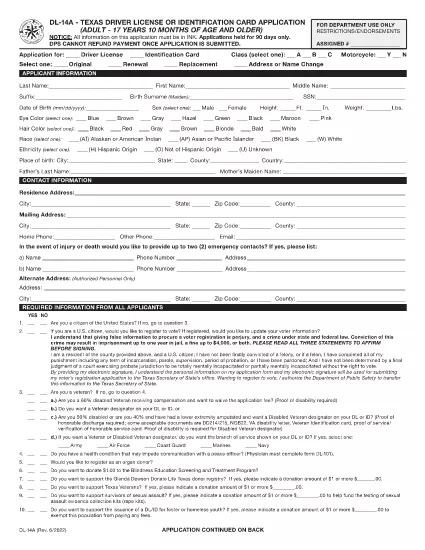
The DL-14S is the official Texas Department of Public Safety (DPS) application used to obtain a new driver’s license or state ID. This fillable PDF lets you complete the entire form online, eliminating the need for paper, ink, and a trip to a DPS office for the initial paperwork.

Formize hosts a secure, browser‑based PDF filler that automatically saves your entries, validates required fields, and lets you export a completed, printable PDF ready for submission.

What Is the DL-14S Form?

DL-14S is the Texas driver license or identification card application for adults (age 18 and older). It collects personal data, residency proof, and a signature that the DPS requires before issuing a license.

How to Complete the DL-14S Online

Instead of downloading the PDF and opening it in a separate editor, simply click the “Fill out this form” button on this page. The Formize PDF Filler app will load in your browser, and you can start typing immediately.

Common Mistakes to Avoid

  • Using a stylus or handwriting – the online filler requires typed text.
  • Leaving required fields blank – Formize highlights missing information before you can submit.
  • Providing outdated address documents – DPS only accepts documents issued within the last 90 days.

Required Documents and Eligibility

Before you start, gather these items:

  • Proof of U.S. citizenship or lawful presence (e.g., birth certificate, passport).
  • Two documents proving Texas residency (utility bill, lease, etc.).
  • Social Security Number verification.
  • If applicable, a name‑change document.

Download and Save Your Completed Form

After you finish, click “Save PDF.” Print the document, sign it in ink (required by DPS), and bring it to your nearest Texas DPS office along with your supporting documents.

Using Formize’s fillable DL-14S saves time, reduces errors, and ensures your application meets Texas DPS standards.

ՀՏՀ
  • Is the DL-14S form free to download?

    Yes. Formize provides the DL-14S PDF at no cost. You only pay any fees required by the Texas DPS when you submit the application.

  • Can I submit the DL-14S electronically?

    The Texas DPS currently requires a printed, signed copy of the DL-14S. The online filler only helps you complete the form; you must still print and sign it.

  • What should I do if I make a mistake while filling the form?

    With Formize you can edit any field before saving. If you discover an error after saving, simply reopen the PDF in the filler, correct it, and save a new version.

  • Do I need to bring the original documents to the DPS office?

    Yes. Bring the original proof of identity, residency, and Social Security Number documents. The DPS will make copies for their records.

  • How long does the DPS take to issue my license after I submit the DL-14S?

    Processing times vary, but most applicants receive their new license or ID within 7‑10 business days after submission.

  • Can I use the DL-14S form for a name change?

    Yes. Include your legal name‑change document (marriage certificate, court order, etc.) with the application.

  • Is the PDF compatible with mobile devices?

    The Formize filler works on most modern browsers, including mobile Chrome and Safari. For best experience, use a desktop or tablet.

ԻՆՉՊԵՍ

Ինչպես լրացնել DL-14S-ն անվճար, առցանց՝ 5 հեշտ քայլերով.

  1. 1
    Open the Fillable Form
    Click the “Fill out this form” button on this page. The Formize PDF Filler will open directly in your browser.
  2. 2
    Enter Your Information
    Type your personal details, address, and Social Security Number into the highlighted fields. The filler validates each entry in real time.
  3. 3
    Review and Save
    When all required fields are completed, click “Save PDF.” A copy of the filled DL-14S will download to your device.
  4. 4
    Print and Sign
    Print the saved PDF, sign it with a black ink pen, and attach any required supporting documents.
  5. 5
    Submit to DPS
    Take the printed, signed form and your documents to the nearest Texas Department of Public Safety office to finalize your license or ID.
Ձևավորել PDF Filler հավելվածը
ՄԱՍԻՆ

DL-14S ձևանմուշ

PDF փաստաթուղթը դիտելու և լրացնելու գործառույթների ավանդական փաթեթով, որը զուգորդվում է վեբ հավելվածի առավելությունների և արձագանքող դասավորության հետ, դուք կարող եք լրացնել DL-14S-ը րոպեների ընթացքում:

ՀԱՏԿՈՒԹՅՈՒՆՆԵՐ

PDF լցոնիչ

Առցանց DL-14S-ը լրացնելու ամենահեշտ ձևը

  • Արագ լրացրեք DL-14S
    Փնտրու՞մ եք միջոց՝ արագորեն լրացնելու DL-14S առցանց: Մեր առցանց անվճար PDF ձևաթուղթ լրացնողի միջոցով դուք կիմանաք, թե ինչպես խմբագրել և լրացնել այս pdf փաստաթուղթը մեկ րոպեից պակաս ժամանակում:
  • Հեշտ օգտագործման առցանց PDF խմբագիր
    Հոգնե՞լ եք PDF ֆայլեր տպելուց, որպեսզի կարողանաք դրանք խմբագրել, նախքան նորից սկանավորելը և հետ ուղարկելը: Խմբագրել PDF փաստաթղթերը անվճար առցանց: Օգտագործեք մեր առցանց pdf խմբագրիչը ժամանակ և թուղթ խնայելու համար:
  • Հիանալի գործիքներ, բոլոր հարթակներ
    Զարմանում եք, թե ինչպես լրացնել DL-14S-ը Mac-ում, կամ գուցե ինչպես անվճար օգտագործել PDF լցոնիչը: Մեր առցանց PDF գործիքներն աշխատում են բոլոր հարթակներում:
  • Անվտանգ ֆայլերի պահպանում
    Ավարտված «DL-14S» ֆայլերը պահվում են պաշտպանված տվյալների բազայում, որը կառավարվում է Amazon Cloud հոսթինգի կողմից: Ցանկացած ժամանակ կարող եք ջնջել ձեր ֆայլերը մեր համակարգից: Ամեն դեպքում, այս ֆայլերը ավտոմատ կերպով ջնջվում են 24 ժամ հետո:
  • Զրուցեք DL-14S-ի հետ
    Զրուցեք «DL-14S»-ի հետ Chatize-ում, որը PDF ընթերցողի անվճար օգնական է: Հարցեր տվեք և ստացեք պատասխաններ «DL-14S»-ից։ Պարզապես սեղմեք վերևում գտնվող Զրույց փաստաթղթի հետ կոճակը:

Ջնջել լրացման նիստը

Ջնջե՞լ ընտրված լրացման աշխատաշրջանը: Այս դեպքում ձևը լրացնելու ձեր առաջընթացը կկորչի:

Ջնջել խմբագրման նիստը

Ջնջե՞լ ընտրված խմբագրման աշխատաշրջանը: Այս դեպքում ձևը ստեղծելու և խմբագրելու ձեր առաջընթացը կկորչի: