
Ընտրել լեզուն

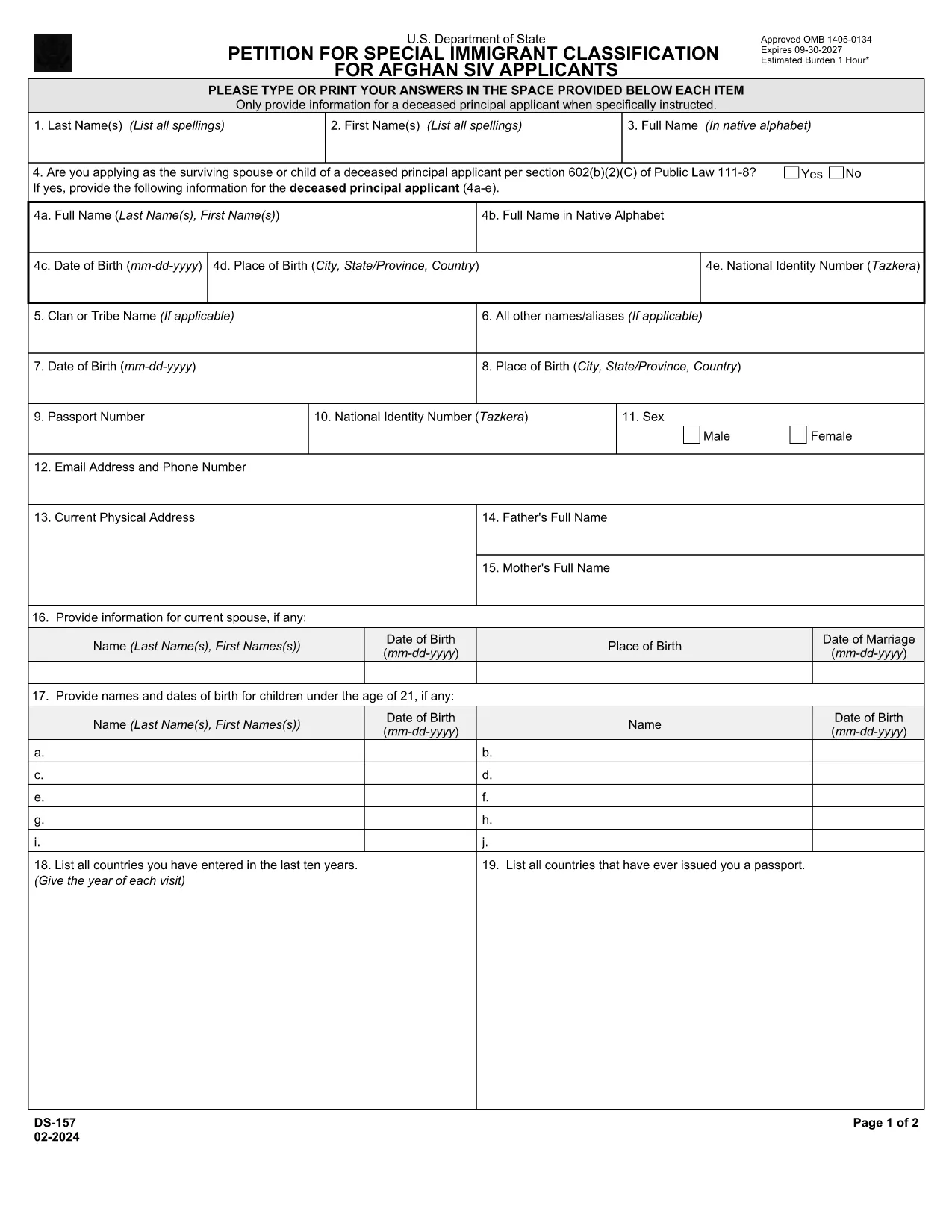
DS-157 Supplemental Nonimmigrant Visa Application – Fillable PDF

  1. Լեզու Անգլերեն
  2. Երկիր ԱՄՆ
  3. բաժին Պետքարտուղարություն
  4. Գործունեություն Վիզաներ
DS-157 Supplemental Nonimmigrant Visa Application – Fillable PDF

The DS-157 (Supplemental Nonimmigrant Visa Application) is required for certain male visa applicants, especially Afghan Special Immigrant Visa (SIV) candidates. It collects detailed personal, employment, and travel information that supports the main DS-160 application.

What is the DS-157 Form?

Issued by the U.S. Department of State, the DS-157 is a supplemental questionnaire that must be submitted with your visa packet. It is a fillable PDF that can be completed electronically, printed, signed, and attached to your visa interview documents.

How to Fill the DS-157 Online with Formize

Formize provides a secure, browser‑based PDF filler so you never need to download, print, or scan the form. Follow these steps:

  • Click the **"Fill out this form"** button on this page.
  • Wait a few seconds while the Formize PDF Filler app loads.
  • Enter your information in the highlighted fields. Use the tab key or click to move between sections.
  • When finished, click **"Save & Download"** to get a copy you can print or email.
  • Sign the form with your finger (touchscreen) or type your signature, then download the completed PDF.

Common Mistakes to Avoid

  • Leaving fields blank – every question must be answered, even if the answer is “None” or “N/A”.
  • Incorrect dates – double‑check birth dates, travel dates, and employment periods.
  • Illegible signatures – use the built‑in e‑signature tool for a clear, legal signature.
  • Mismatched information – ensure details match those on your DS‑160 and supporting documents.

Where to Submit the Completed Form

Print the filled DS-157, sign it in ink if you printed a hard copy, and attach it to your visa interview packet. Submit the package to the U.S. Embassy or Consulate handling your case. Some posts now accept the PDF electronically; verify the specific instructions on your appointment notice.

Download the Official PDF

For reference or offline use, you can download the official, government‑issued PDF directly from the Department of State:

Download DS-157 PDF

Using Formize’s online filler saves you time, reduces errors, and eliminates the need for a scanner.

ՀՏՀ
  • Who must complete the DS-157 form?

    All male non‑immigrant visa applicants between ages 16‑45, including Afghan SIV applicants, must submit a DS-157 in addition to the DS‑160.

  • Is the DS-157 form available in languages other than English?

    The official form is only provided in English. If you need translation assistance, you must provide an accurate English version for the U.S. Embassy.

  • Can I submit the DS-157 electronically?

    Some U.S. posts accept an electronic PDF, but most still require a printed, signed copy. Check the instructions on your appointment notice.

  • Do I need a notarized signature on the DS-157?

    No notarization is required. A regular signature (ink or e‑signature) is sufficient as long as it matches the signature on your other visa documents.

  • What happens if I make a mistake on the DS-157?

    Correct the error by crossing out the mistake neatly, writing the correct information, and initialing the change. If the mistake is extensive, download a fresh copy and refill the form.

  • How long is the DS-157 valid?

    The DS-157 is tied to a specific visa application. If your application is withdrawn or denied, you must obtain a new form for any future applications.

ԻՆՉՊԵՍ

Ինչպես լրացնել ds-157-ն անվճար, առցանց՝ 4 հեշտ քայլերով.

  1. 1
    Open the Formize filler
    Click the "Fill out this form" button on the page. The Formize PDF Filler will open in a new tab.
  2. 2
    Enter your information
    Type directly into each highlighted field. Use the tab key or click to move to the next question.
  3. 3
    Add your signature
    Use the built‑in e‑signature tool to sign with your finger or mouse. The signature is legally binding.
  4. 4
    Save and download
    When all fields are complete, click "Save & Download" to get a copy of the filled PDF. Print it if a hard copy is required.
Ձևավորել PDF Filler հավելվածը
ՄԱՍԻՆ

Վիզայի ձևեր

ds-157-ը վիզայի ձևերից մեկն է, որը փաստաթղթեր են, որոնք օգտագործվում են օտար երկիր մուտք գործելու վիզա ստանալու համար: Վիզան փաստաթուղթ է, որը թույլ է տալիս օտարերկրյա քաղաքացուն մուտք գործել, մնալ և երբեմն աշխատել օտար երկրում որոշակի ժամանակահատվածում: Վիզա ստանալու ճշգրիտ ձևերն ու պահանջները տարբեր են՝ կախված երկրից և վիզայի տեսակից:

Վիզայի ձևաթղթերը սովորաբար պահանջում են անձնական տվյալներ, ինչպիսիք են անունը, ծննդյան ամսաթիվը և անձնագրի տվյալները, ինչպես նաև տեղեկություններ ուղևորության նպատակի և տևողության, նախատեսված նպատակակետի և արդյոք դիմողին նախկինում մերժել են վիզա կամ արտաքսել երկրից: Ձևաթղթերը կարող են պահանջել նաև օժանդակ փաստաթղթեր, ինչպիսիք են անձնագիր, լուսանկարներ և ֆինանսական աջակցության ապացույց:

Միացյալ Նահանգներում վիզայի ամենատարածված ձևերն են DS-160 և DS-260 ձևերը: DS-160 ձևը օգտագործվում է ոչ ներգաղթային վիզա ստանալու համար, մինչդեռ DS-260 ձևը օգտագործվում է ներգաղթային վիզա ստանալու համար: Այս ձևաթղթերը պահանջում են մանրամասն տեղեկություններ դիմողի անձնական և ճանապարհորդական պատմության մասին, ինչպես նաև օժանդակ փաստաթղթեր, ինչպիսիք են անձնագիրը, ճանապարհորդության երթուղին և ֆինանսական գրառումները:

Այլ երկրներ կարող են ունենալ վիզայի տարբեր ձևեր և պահանջներ, սակայն հիմնական գործընթացը սովորաբար ներառում է վիզայի դիմումի լրացում, օժանդակ փաստաթղթերի տրամադրում և ԱՄՆ դեսպանատան կամ հյուպատոսության հյուպատոսական աշխատակցի հետ հարցազրույցի մասնակցությունը: Կարևոր է նշել, որ վիզայի դիմումի գործընթացը կարող է բարդ և ժամանակատար լինել, և խորհուրդ է տրվում, որ վիզա փնտրող անհատները խորհրդակցեն ներգաղթի փաստաբանի կամ այլ որակավորված մասնագետի հետ՝ համոզվելու համար, որ բոլոր անհրաժեշտ ձևերն ու պահանջները բավարարված են:

ՀԱՏԿՈՒԹՅՈՒՆՆԵՐ

PDF լցոնիչ

Առցանց ds-157-ը լրացնելու ամենահեշտ ձևը

  • Արագ լրացրեք ds-157
    Փնտրու՞մ եք միջոց՝ արագորեն լրացնելու ds-157 առցանց: Մեր առցանց անվճար PDF ձևաթուղթ լրացնողի միջոցով դուք կիմանաք, թե ինչպես խմբագրել և լրացնել այս pdf փաստաթուղթը մեկ րոպեից պակաս ժամանակում:
  • Հեշտ օգտագործման առցանց PDF խմբագիր
    Հոգնե՞լ եք PDF ֆայլեր տպելուց, որպեսզի կարողանաք դրանք խմբագրել, նախքան նորից սկանավորելը և հետ ուղարկելը: Խմբագրել PDF փաստաթղթերը անվճար առցանց: Օգտագործեք մեր առցանց pdf խմբագրիչը ժամանակ և թուղթ խնայելու համար:
  • Հիանալի գործիքներ, բոլոր հարթակներ
    Զարմանում եք, թե ինչպես լրացնել ds-157-ը Mac-ում, կամ գուցե ինչպես անվճար օգտագործել PDF լցոնիչը: Մեր առցանց PDF գործիքներն աշխատում են բոլոր հարթակներում:
  • Անվտանգ ֆայլերի պահպանում
    Ավարտված «ds-157» ֆայլերը պահվում են պաշտպանված տվյալների բազայում, որը կառավարվում է Amazon Cloud հոսթինգի կողմից: Ցանկացած ժամանակ կարող եք ջնջել ձեր ֆայլերը մեր համակարգից: Ամեն դեպքում, այս ֆայլերը ավտոմատ կերպով ջնջվում են 24 ժամ հետո:
  • Զրուցեք ds-157-ի հետ
    Զրուցեք «ds-157»-ի հետ Chatize-ում, որը PDF ընթերցողի անվճար օգնական է: Հարցեր տվեք և ստացեք պատասխաններ «ds-157»-ից։ Պարզապես սեղմեք վերևում գտնվող Զրույց փաստաթղթի հետ կոճակը:

Ջնջել լրացման նիստը

Ջնջե՞լ ընտրված լրացման աշխատաշրջանը: Այս դեպքում ձևը լրացնելու ձեր առաջընթացը կկորչի:

Ջնջել խմբագրման նիստը

Ջնջե՞լ ընտրված խմբագրման աշխատաշրջանը: Այս դեպքում ձևը ստեղծելու և խմբագրելու ձեր առաջընթացը կկորչի: