
Ընտրել լեզուն

MVR-3 Fillable PDF – North Carolina DMV Vehicle Form

  1. Լեզու Անգլերեն
  2. Երկիր ԱՄՆ
  3. Գործունեություն Տրանսպորտային միջոցների գրանցում
  4. բաժին Տրանսպորտի վարչություն
  5. Պետություն Հյուսիսային Կարոլինա
MVR-3 Fillable PDF – North Carolina DMV Vehicle Form

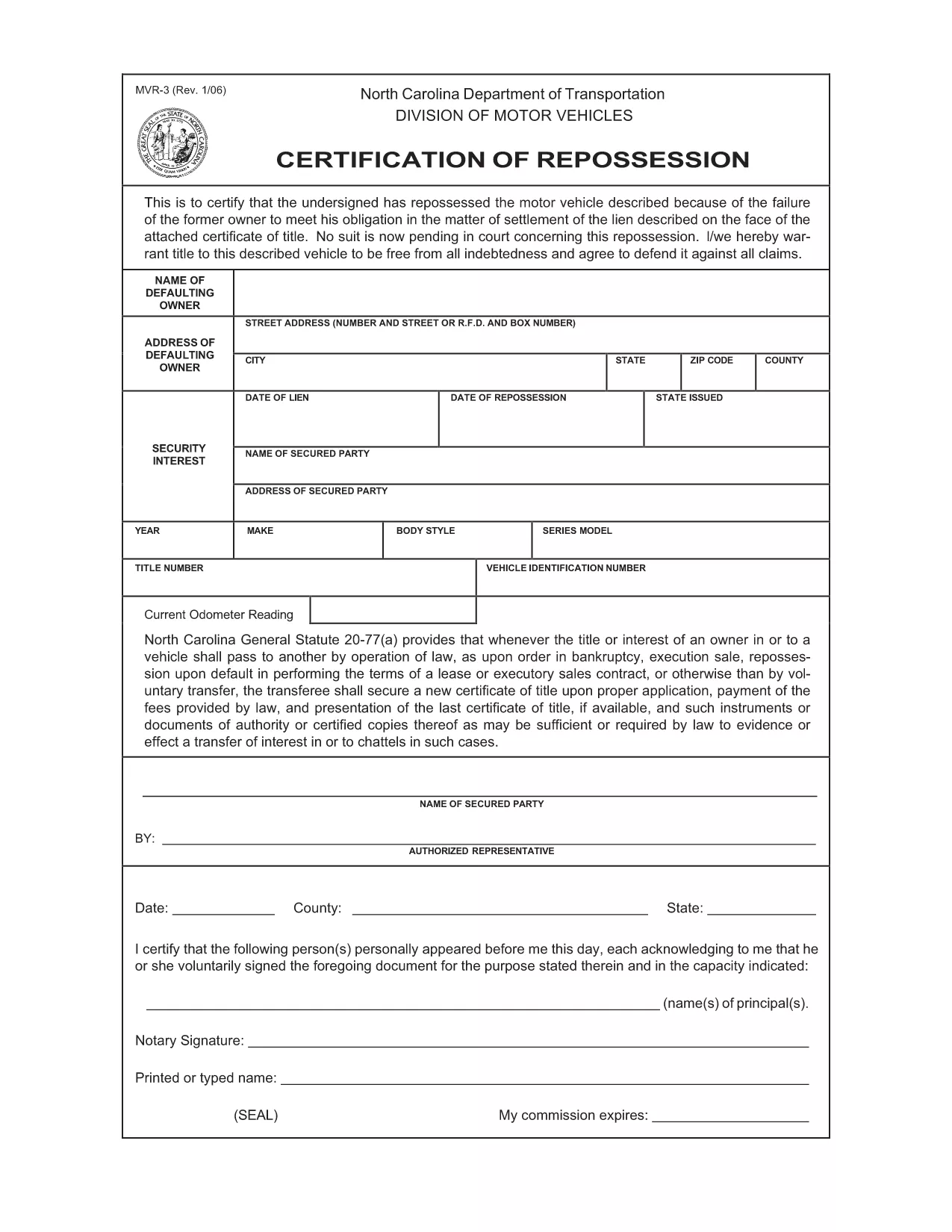
The MVR-3 is the official North Carolina Department of Transportation (NCDOT) vehicle registration application. Whether you’re registering a new vehicle, updating ownership information, or correcting a title, the MVR-3 is the required paperwork.

What Is the MVR-3 Form?

The MVR-3 collects essential vehicle details such as VIN, make, model, year, and current odometer reading. It also captures owner information, lienholder data, and any special exemptions.

Key Sections of the MVR-3

  • Section A – Owner Information: Name, address, driver’s license number.
  • Section B – Vehicle Details: VIN, year, make, model, body style.
  • Section C – Lienholder Data (if applicable): Name and address of the lienholder.
  • Section D – Certification & Signature: Owner’s signature and date.

How to Complete the Form Online

Instead of printing, downloading, and hand‑filling the PDF, use Formize’s built‑in filler:

  1. Click the "Fill out this form" button on this page.
  2. Wait a few seconds while the Formize PDF Filler loads the MVR-3.
  3. Enter your information directly into each field. The filler validates required entries in real time.
  4. Review the completed form for accuracy.
  5. Save a copy to your device or print it for submission at your local NCDOT office.

Common Mistakes & Tips

  • Incorrect VIN: Double‑check the 17‑character VIN; a single digit error can delay processing.
  • Missing Signature: The form is invalid without the owner’s signature and date.
  • Odometer Disclosure: Provide the exact current mileage; tampering can result in penalties.
  • Out‑of‑date Address: Ensure the mailing address matches the one on file with the DMV.

Download & Save Your Completed Form

After filling out the MVR-3 with Formize, you can download a PDF copy for your records or print it for immediate submission. Keep a saved copy in case the DMV requests additional information.

ՀՏՀ
  • What is the purpose of the MVR-3 form?

    The MVR-3 is used to register a vehicle, transfer ownership, or correct title information with the North Carolina DMV.

  • Can I submit the MVR-3 electronically?

    North Carolina currently requires a printed and signed copy for most transactions, but you can fill it out online and print it yourself.

  • Do I need a notary for the MVR-3?

    No notary is required unless a lienholder specifically requests notarization on the lien section.

  • How long does it take for the DMV to process the MVR-3?

    Processing typically takes 7‑10 business days after the form is submitted, provided all information is correct.

  • What should I do if I make a mistake on the form?

    Cross out the error with a single line, initial it, and write the correct information. Alternatively, start a new form to avoid confusion.

  • Is there a fee associated with filing the MVR-3?

    Yes, filing fees vary depending on the transaction type (e.g., title transfer, registration renewal). Check the NCDOT fee schedule for current rates.

  • Where can I get help if I have questions about the MVR-3?

    Contact your local NCDOT office or visit the official NCDOT website for FAQs and contact information.

ԻՆՉՊԵՍ

Ինչպես լրացնել MVR-3-ն անվճար, առցանց՝ 5 հեշտ քայլերով.

  1. 1
    Open the Fillable Form
    Click the "Fill out this form" button on the page to launch the Formize PDF Filler.
  2. 2
    Wait for the Filler to Load
    A short loading screen appears while the MVR-3 PDF is prepared for editing.
  3. 3
    Enter Your Information
    Type directly into each highlighted field. Required fields are marked with an asterisk.
  4. 4
    Review and Validate
    Check every section for completeness. The filler will alert you to any missing or invalid entries.
  5. 5
    Save or Print
    Download the completed PDF to your device or print it for submission at your local NCDOT office.
Ձևավորել PDF Filler հավելվածը
ՄԱՍԻՆ

Տրանսպորտային միջոցների գրանցման ձևեր

Եթե ​​դուք ունեք կամ վարձակալում եք ավտոմոբիլ, կցասայլ կամ նավ, դուք պետք է կատարեք որոշակի պարտավորություններ՝ ձեր մեքենան օրինական գրանցված և անվտանգ պահելու համար:

MVR-3-ը Տրանսպորտային միջոցի գրանցման ձևերից մեկն է, որը փաստաթղթեր են, որոնք օգտագործվում են համապատասխան նահանգային կամ մարզային մարմնում մեքենա գրանցելու համար: Այս ձևաթղթերը սովորաբար պահանջվում են, երբ անձը գնում է նոր կամ օգտագործված փոխադրամիջոց կամ երբ նրանք տեղափոխվում են նոր նահանգ կամ նահանգ մեքենայով:

Տրանսպորտային միջոցների գրանցման համար անհրաժեշտ ճշգրիտ պահանջներն ու ձևերը կարող են տարբեր լինել՝ կախված գտնվելու վայրից, սակայն, ընդհանուր առմամբ, գործընթացը ներառում է մեքենայի, սեփականատիրոջ և մեքենայի ցանկացած արգելանքների մասին տեղեկատվություն տրամադրելը:

Գրանցման ձևերն ու վճարները ներկայացնելուց հետո նահանգային կամ մարզային մարմինը մեքենայի տիրոջը կտրամադրի գրանցման վկայական կամ պետհամարանիշ: Այս գրանցումը թույլ է տալիս տրանսպորտային միջոցը օրինական կերպով շահագործել հանրային ճանապարհների և մայրուղիների վրա:

ՀԱՏԿՈՒԹՅՈՒՆՆԵՐ

PDF լցոնիչ

Առցանց MVR-3-ը լրացնելու ամենահեշտ ձևը

  • Արագ լրացրեք MVR-3
    Փնտրու՞մ եք միջոց՝ արագորեն լրացնելու MVR-3 առցանց: Մեր առցանց անվճար PDF ձևաթուղթ լրացնողի միջոցով դուք կիմանաք, թե ինչպես խմբագրել և լրացնել այս pdf փաստաթուղթը մեկ րոպեից պակաս ժամանակում:
  • Հեշտ օգտագործման առցանց PDF խմբագիր
    Հոգնե՞լ եք PDF ֆայլեր տպելուց, որպեսզի կարողանաք դրանք խմբագրել, նախքան նորից սկանավորելը և հետ ուղարկելը: Խմբագրել PDF փաստաթղթերը անվճար առցանց: Օգտագործեք մեր առցանց pdf խմբագրիչը ժամանակ և թուղթ խնայելու համար:
  • Հիանալի գործիքներ, բոլոր հարթակներ
    Զարմանում եք, թե ինչպես լրացնել MVR-3-ը Mac-ում, կամ գուցե ինչպես անվճար օգտագործել PDF լցոնիչը: Մեր առցանց PDF գործիքներն աշխատում են բոլոր հարթակներում:
  • Անվտանգ ֆայլերի պահպանում
    Ավարտված «MVR-3» ֆայլերը պահվում են պաշտպանված տվյալների բազայում, որը կառավարվում է Amazon Cloud հոսթինգի կողմից: Ցանկացած ժամանակ կարող եք ջնջել ձեր ֆայլերը մեր համակարգից: Ամեն դեպքում, այս ֆայլերը ավտոմատ կերպով ջնջվում են 24 ժամ հետո:
  • Զրուցեք MVR-3-ի հետ
    Զրուցեք «MVR-3»-ի հետ Chatize-ում, որը PDF ընթերցողի անվճար օգնական է: Հարցեր տվեք և ստացեք պատասխաններ «MVR-3»-ից։ Պարզապես սեղմեք վերևում գտնվող Զրույց փաստաթղթի հետ կոճակը:

Ջնջել լրացման նիստը

Ջնջե՞լ ընտրված լրացման աշխատաշրջանը: Այս դեպքում ձևը լրացնելու ձեր առաջընթացը կկորչի:

Ջնջել խմբագրման նիստը

Ջնջե՞լ ընտրված խմբագրման աշխատաշրջանը: Այս դեպքում ձևը ստեղծելու և խմբագրելու ձեր առաջընթացը կկորչի: