
Ընտրել լեզուն

OL 801 Student License Application – Fillable PDF

  1. Լեզու Անգլերեն
  2. Երկիր ԱՄՆ
  3. Գործունեություն Վարորդական իրավունք
  4. Պետություն Կալիֆորնիա
OL 801 Student License Application – Fillable PDF

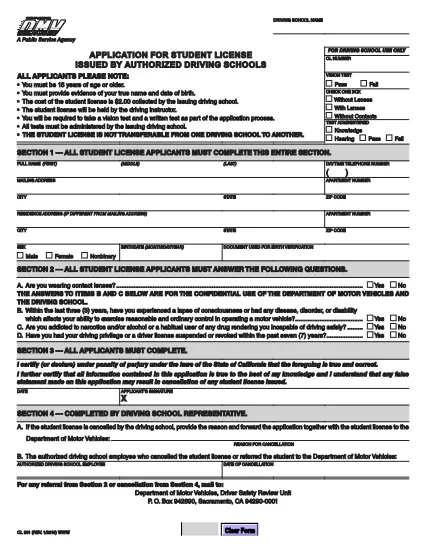
The OL 801 is the California Department of Motor Vehicles (DMV) application used by driving schools and students to obtain a learner’s permit or student driver license. This form must be completed accurately before you can start behind‑the‑wheel training.

Formize makes the process effortless. Instead of printing, scanning, or editing the PDF manually, simply click the Fill out this form button on this page. Our secure PDF filler loads the official DMV document, lets you type directly into each field, and saves a completed copy that you can print or email.

What Is the OL 801 Form?

The OL 801 collects essential information about the student driver, the driving school, and any required endorsements. California law requires a signed, completed form before a student can be issued a provisional license.

How to Complete the OL 801 Online

Follow the step‑by‑step guide below to finish the form in minutes:

  • Click the “Fill out this form” button.
  • Wait for the Formize PDF Filler app to load the official DMV PDF.
  • Enter the requested details – student name, address, school information, and signatures.
  • Review the completed form for accuracy.
  • Download, print, or email the filled PDF directly from the filler.

Common Mistakes to Avoid

  • Leaving any required field blank – the DMV will reject incomplete submissions.
  • Using an outdated version of the form – always use the latest PDF linked below.
  • Incorrectly entering the school’s license number – double‑check with your driving school.
  • Forgetting the student’s signature; an unsigned form is invalid.

Where to Submit Your Completed Form

After filling out the OL 801, you can submit it in one of three ways:

  1. Mail it to the DMV Driver Safety Review Unit, P.O. Box 942890, Sacramento, CA 94290‑0001.
  2. Bring a printed copy to your local DMV office.
  3. Upload a scanned copy through the California DMV online portal (if available).

Download the Official PDF

For reference or offline use, you can also download the original, unfilled PDF directly from the California DMV:

Official OL 801 PDF (2020 version)

ՀՏՀ
  • What is the purpose of the OL 801 form?

    The OL 801 is used by California driving schools to apply for a student driver license (learner’s permit) for their students. It verifies the student’s eligibility and records the school’s endorsement.

  • Do I need a printed copy to submit the form?

    Yes. The DMV requires a hard copy with original signatures. You can print the completed PDF from Formize after filling it out online.

  • Can I edit the PDF after I download it?

    Once you download the filled PDF, you can still edit it with any PDF editor, but the Formize filler already lets you complete all fields accurately before download.

  • Is the Formize filler free to use?

    Yes, filling out the OL 801 with Formize’s online PDF filler is completely free and does not require any software installation.

  • How often is the OL 801 form updated?

    The California DMV updates the form as needed. The version linked here (2020) is the current official version; always use the latest PDF from the DMV website.

  • What should I do if I make a mistake while filling out the form?

    If you notice an error before downloading, simply correct it in the Formize filler. If you’ve already printed it, you may need to start a new form or cross out the mistake and initial it, depending on DMV guidelines.

  • Where can I mail the completed OL 801?

    Mail the signed form to: Department of Motor Vehicles, Driver Safety Review Unit, P. O. Box 942890, Sacramento, CA 94290‑0001.

  • Do I need any additional documents with the OL 801?

    Typically you’ll need a copy of the student’s ID, proof of residency, and the driving school’s certification. Check the DMV checklist for your specific situation.

ԻՆՉՊԵՍ

Ինչպես լրացնել OL 801-ն անվճար, առցանց՝ 4 հեշտ քայլերով.

  1. 1
    Click the Fill‑out Button
    Press the “Fill out this form” button on this page to launch the Formize PDF Filler.
  2. 2
    Wait for the Filler to Load
    The app loads the official OL 801 PDF in a secure viewer. This takes only a few seconds.
  3. 3
    Enter All Required Information
    Type directly into each field – student details, school information, and signatures. Use the tab key to move quickly between fields.
  4. 4
    Save, Print, or Email
    When you’re finished, click “Save”. You can download the completed PDF, print it for a hard copy, or email it straight to the DMV.
Ձևավորել PDF Filler հավելվածը
ՄԱՍԻՆ

Վարորդական իրավունքի հայտի ձևեր

OL 801-ը վարորդական իրավունքի ձևերից մեկն է, որն օգտագործվում է վարորդական իրավունք ստանալու համար դիմելու կամ վարորդական վկայականների հետ կապված տարբեր ծառայություններ պահանջելու համար: Այս ձևաթղթերը սովորաբար տրամադրվում են այն ստորաբաժանման կամ գործակալության կողմից, որը պատասխանատու է վարորդական վկայականներ տրամադրելու համար որոշակի իրավասությունում, ինչպիսին է Միացյալ Նահանգների Ավտոմեքենաների դեպարտամենտը (DMV):

Վարորդական վկայականի ընդհանուր ձևերը ներառում են.

Վարորդի լիցենզիայի դիմում. այս ձևն օգտագործվում է նոր վարորդական իրավունք ստանալու կամ գոյություն ունեցողը թարմացնելու համար: Այն սովորաբար պահանջում է անձնական տեղեկություններ, ինչպիսիք են անունը, հասցեն, ծննդյան ամսաթիվը և սոցիալական ապահովության համարը:

Նույնականացման փաստաթղթեր. որոշ իրավասություններ պահանջում են անձը հաստատող հատուկ փաստաթղթեր` դիմողի ինքնությունը և բնակության վայրը ստուգելու համար: Դրանք կարող են ներառել այնպիսի ձևեր, ինչպիսիք են ծննդյան վկայականը, անձնագիրը կամ սոցիալական ապահովության քարտը:

Տեսողության քննություն. վարորդական իրավունքի վկայական ստանալու համար շատ դիմումներ պահանջում են տեսողության փորձաքննության ձև, որտեղ լիազորված բժիշկը կամ ակնաբուժության մասնագետը հավաստում է, որ դիմորդը համապատասխանում է մեքենա վարելու համար տեսողության նվազագույն պահանջներին:

Վարորդի կրթության ձևաթղթեր. որոշ դեպքերում անհատները կարող են անհրաժեշտ լինել վարորդի կրթության դասընթացն ավարտելու ապացույց ներկայացնել, օրինակ՝ վարորդի կրթության ավարտի վկայական կամ հրահանգչի ստորագրած ձևը:

Բժշկական գնահատում. որոշ բժշկական պայմաններ կարող են պահանջել լրացուցիչ ձևաթղթեր լրացնել առողջապահական մասնագետի կողմից: Այս ձևաթղթերը ստուգում են վարորդի ֆիզիկական և մտավոր պատրաստվածությունը մեքենա վարելու համար:

Հասցեի փոփոխման ձև. Եթե վարորդական իրավունքի վկայականի սեփականատերը տեղափոխվում է նոր հասցե, նա կարող է անհրաժեշտ լինել լրացնել հասցեի փոփոխության ձևը` վարորդական իրավունքի մասին տեղեկությունները թարմացնելու համար:

Վարորդական իրավունքի ձևերը կարելի է ձեռք բերել տեղական DMV գրասենյակից կամ ներբեռնել նրանց կայքից: Կարևոր է ուշադիր լրացնել և ներկայացնել պահանջվող ձևաթղթերը՝ ուղեկցող փաստաթղթերի հետ միասին՝ ապահովելու համար դիմումի կամ սպասարկման սահուն գործընթաց:

ՀԱՏԿՈՒԹՅՈՒՆՆԵՐ

PDF լցոնիչ

Առցանց OL 801-ը լրացնելու ամենահեշտ ձևը

  • Արագ լրացրեք OL 801
    Փնտրու՞մ եք միջոց՝ արագորեն լրացնելու OL 801 առցանց: Մեր առցանց անվճար PDF ձևաթուղթ լրացնողի միջոցով դուք կիմանաք, թե ինչպես խմբագրել և լրացնել այս pdf փաստաթուղթը մեկ րոպեից պակաս ժամանակում:
  • Հեշտ օգտագործման առցանց PDF խմբագիր
    Հոգնե՞լ եք PDF ֆայլեր տպելուց, որպեսզի կարողանաք դրանք խմբագրել, նախքան նորից սկանավորելը և հետ ուղարկելը: Խմբագրել PDF փաստաթղթերը անվճար առցանց: Օգտագործեք մեր առցանց pdf խմբագրիչը ժամանակ և թուղթ խնայելու համար:
  • Հիանալի գործիքներ, բոլոր հարթակներ
    Զարմանում եք, թե ինչպես լրացնել OL 801-ը Mac-ում, կամ գուցե ինչպես անվճար օգտագործել PDF լցոնիչը: Մեր առցանց PDF գործիքներն աշխատում են բոլոր հարթակներում:
  • Անվտանգ ֆայլերի պահպանում
    Ավարտված «OL 801» ֆայլերը պահվում են պաշտպանված տվյալների բազայում, որը կառավարվում է Amazon Cloud հոսթինգի կողմից: Ցանկացած ժամանակ կարող եք ջնջել ձեր ֆայլերը մեր համակարգից: Ամեն դեպքում, այս ֆայլերը ավտոմատ կերպով ջնջվում են 24 ժամ հետո:
  • Զրուցեք OL 801-ի հետ
    Զրուցեք «OL 801»-ի հետ Chatize-ում, որը PDF ընթերցողի անվճար օգնական է: Հարցեր տվեք և ստացեք պատասխաններ «OL 801»-ից։ Պարզապես սեղմեք վերևում գտնվող Զրույց փաստաթղթի հետ կոճակը:

Ջնջել լրացման նիստը

Ջնջե՞լ ընտրված լրացման աշխատաշրջանը: Այս դեպքում ձևը լրացնելու ձեր առաջընթացը կկորչի:

Ջնջել խմբագրման նիստը

Ջնջե՞լ ընտրված խմբագրման աշխատաշրջանը: Այս դեպքում ձևը ստեղծելու և խմբագրելու ձեր առաջընթացը կկորչի: