
Ընտրել լեզուն

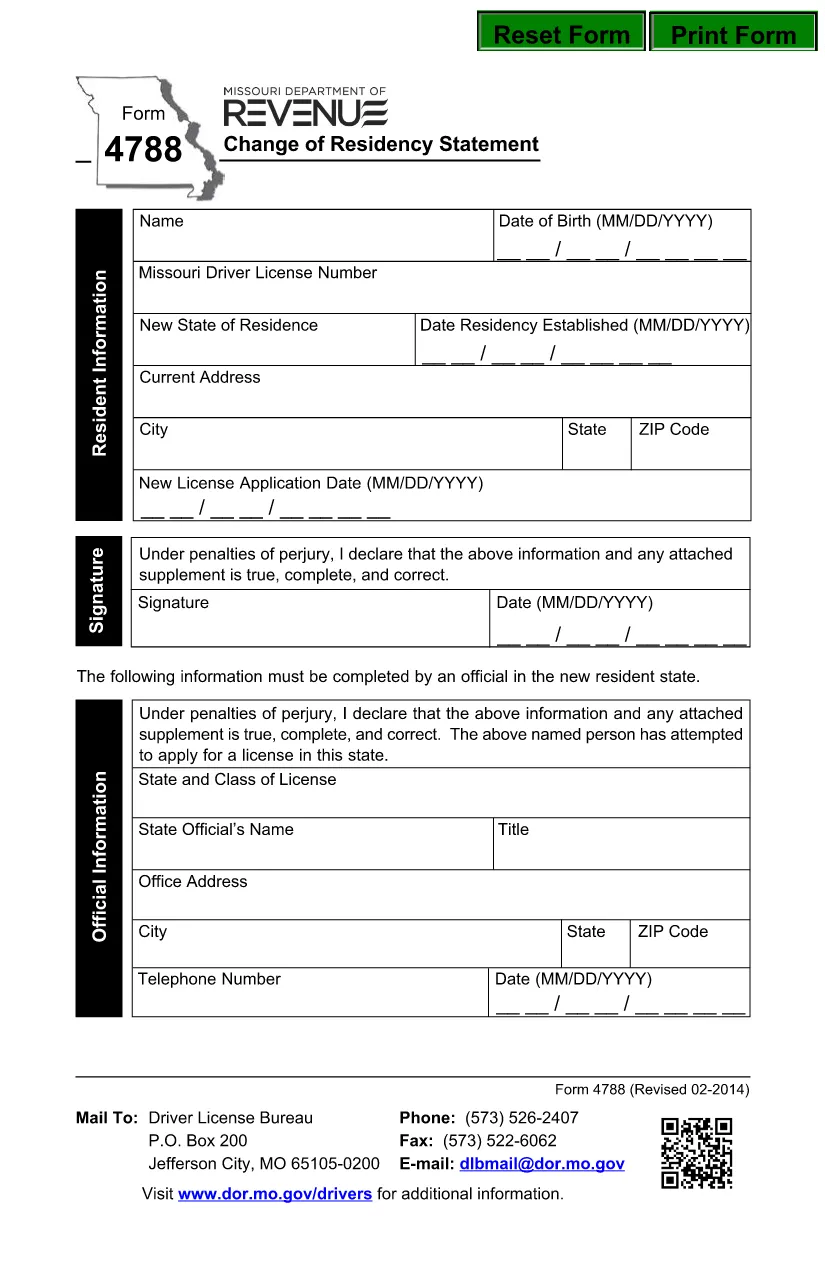
Form 4788 – Change of Residency Statement (Fillable PDF)

  1. Լեզու Անգլերեն
  2. Երկիր ԱՄՆ
  3. Գործունեություն Վարորդական իրավունք
  4. Պետություն Միսսուրի
Form 4788 – Change of Residency Statement (Fillable PDF)

Form 4788, the Change of Residency Statement, is the official document required by the Missouri Department of Revenue when you move into or out of Missouri and need to update your tax residency status. The form must be signed under penalty of perjury, making accuracy essential.

What Is Form 4788?

This form serves as a declaration that you have changed your residency and provides the Department of Revenue with the information needed to adjust state tax withholdings, refunds, and future filings. It is a simple, one‑page PDF that can be completed electronically.

Who Must File Form 4788?

  • Individuals who have moved to Missouri from another state.
  • Missouri residents who have established a new primary residence outside the state.
  • Employees whose employer needs an updated residency status for state tax withholding.

How to Complete the Form Online

Instead of downloading the PDF and using a separate editor, simply click the "Fill out this form" button on this page. The Formize PDF Filler app will load instantly, allowing you to type directly into each field.

Common Mistakes to Avoid

  • Incorrect dates: Use the exact move‑in or move‑out date (MM/DD/YYYY).
  • Missing signature: The form is not valid without a handwritten or electronic signature.
  • Wrong address format: Include street, city, state, and ZIP code.
  • Leaving optional fields blank: Even if a field says "optional," fill it with "N/A" if it does not apply.

Download & Save Your Completed Form

After you finish, you can download the completed PDF, print it for your records, or submit it directly to the Missouri Department of Revenue via mail or their online portal.

Need help? Review the step‑by‑step guide below or check the FAQs for quick answers.

ՀՏՀ
  • Do I need to file Form 4788 if I only lived in Missouri for a few months?

    Yes. Any change in primary residence—whether you moved in or out—requires filing Form 4788 to update your state tax status.

  • Can I submit Form 4788 electronically?

    The Missouri Department of Revenue currently accepts mailed forms. However, you can fill it out online with Formize, save the PDF, and mail the printed copy.

  • What if I make a mistake after submitting?

    Contact the Missouri Department of Revenue immediately. You may need to submit a corrected Form 4788 with a new signature.

  • Is there a filing fee for Form 4788?

    No. Form 4788 is a free residency declaration; there are no processing fees.

  • How long does it take for the Department to process the change?

    Processing typically takes 2‑3 weeks after the mailed form is received, but you can check the status by contacting the Department of Revenue.

  • Can I use the same form for a business address change?

    Form 4788 is intended for individual residency changes. Businesses should use the appropriate Missouri business address change form.

  • Do I need to attach supporting documents?

    Usually a copy of a driver’s license, utility bill, or lease agreement proving the new address is recommended, though not mandatory.

  • What if I’m a non‑resident working in Missouri?

    You still need to file Form 4788 to inform the state of your residency status for accurate tax withholding.

ԻՆՉՊԵՍ

Ինչպես լրացնել Form 4788-ն անվճար, առցանց՝ 5 հեշտ քայլերով.

  1. 1
    Click the Fill Button
    Press the "Fill out this form" button on the page. The Formize PDF Filler app will open in a new window.
  2. 2
    Wait for the Filler to Load
    The app loads in seconds. You’ll see editable fields appear directly on the PDF.
  3. 3
    Enter Your Information
    Type your name, addresses, dates, and any other required details into each highlighted field.
  4. 4
    Add Your Signature
    Use the built‑in signature tool to sign electronically, or print later to sign by hand.
  5. 5
    Save or Submit
    Click "Download" to save a copy, or follow the instructions to email or mail the completed form to the Missouri Department of Revenue.
Ձևավորել PDF Filler հավելվածը
ՄԱՍԻՆ

Վարորդական իրավունքի հայտի ձևեր

Երկրների մեծ մասում վարորդական իրավունքի վկայական ունենալը պարտադիր է, նախքան երթևեկելը: Վարորդական վկայական ստանալը կարևոր իրադարձություն է յուրաքանչյուրի համար, ով ցանկանում է մեքենա վարել:

Form 4788-ը վարորդական իրավունքի վկայականի դիմումի ձևերից մեկն է, որը փաստաթղթեր է, որն օգտագործվում է տեղեկատվություն հավաքելու մարդկանցից, ովքեր ցանկանում են դիմել վարորդական իրավունք ստանալու համար: Այն սովորաբար պարունակում է դաշտեր դիմողի անվան, ծննդյան ամսաթվի, ID համարի, կոնտակտային տվյալների, ինչպես նաև վարորդական իրավունքի պատմության և փորձի համար:

ՀԱՏԿՈՒԹՅՈՒՆՆԵՐ

PDF լցոնիչ

Առցանց Form 4788-ը լրացնելու ամենահեշտ ձևը

  • Արագ լրացրեք Form 4788
    Փնտրու՞մ եք միջոց՝ արագորեն լրացնելու Form 4788 առցանց: Մեր առցանց անվճար PDF ձևաթուղթ լրացնողի միջոցով դուք կիմանաք, թե ինչպես խմբագրել և լրացնել այս pdf փաստաթուղթը մեկ րոպեից պակաս ժամանակում:
  • Հեշտ օգտագործման առցանց PDF խմբագիր
    Հոգնե՞լ եք PDF ֆայլեր տպելուց, որպեսզի կարողանաք դրանք խմբագրել, նախքան նորից սկանավորելը և հետ ուղարկելը: Խմբագրել PDF փաստաթղթերը անվճար առցանց: Օգտագործեք մեր առցանց pdf խմբագրիչը ժամանակ և թուղթ խնայելու համար:
  • Հիանալի գործիքներ, բոլոր հարթակներ
    Զարմանում եք, թե ինչպես լրացնել Form 4788-ը Mac-ում, կամ գուցե ինչպես անվճար օգտագործել PDF լցոնիչը: Մեր առցանց PDF գործիքներն աշխատում են բոլոր հարթակներում:
  • Անվտանգ ֆայլերի պահպանում
    Ավարտված «Form 4788» ֆայլերը պահվում են պաշտպանված տվյալների բազայում, որը կառավարվում է Amazon Cloud հոսթինգի կողմից: Ցանկացած ժամանակ կարող եք ջնջել ձեր ֆայլերը մեր համակարգից: Ամեն դեպքում, այս ֆայլերը ավտոմատ կերպով ջնջվում են 24 ժամ հետո:
  • Զրուցեք Form 4788-ի հետ
    Զրուցեք «Form 4788»-ի հետ Chatize-ում, որը PDF ընթերցողի անվճար օգնական է: Հարցեր տվեք և ստացեք պատասխաններ «Form 4788»-ից։ Պարզապես սեղմեք վերևում գտնվող Զրույց փաստաթղթի հետ կոճակը:

Ջնջել լրացման նիստը

Ջնջե՞լ ընտրված լրացման աշխատաշրջանը: Այս դեպքում ձևը լրացնելու ձեր առաջընթացը կկորչի:

Ջնջել խմբագրման նիստը

Ջնջե՞լ ընտրված խմբագրման աշխատաշրջանը: Այս դեպքում ձևը ստեղծելու և խմբագրելու ձեր առաջընթացը կկորչի: