
Ընտրել լեզուն

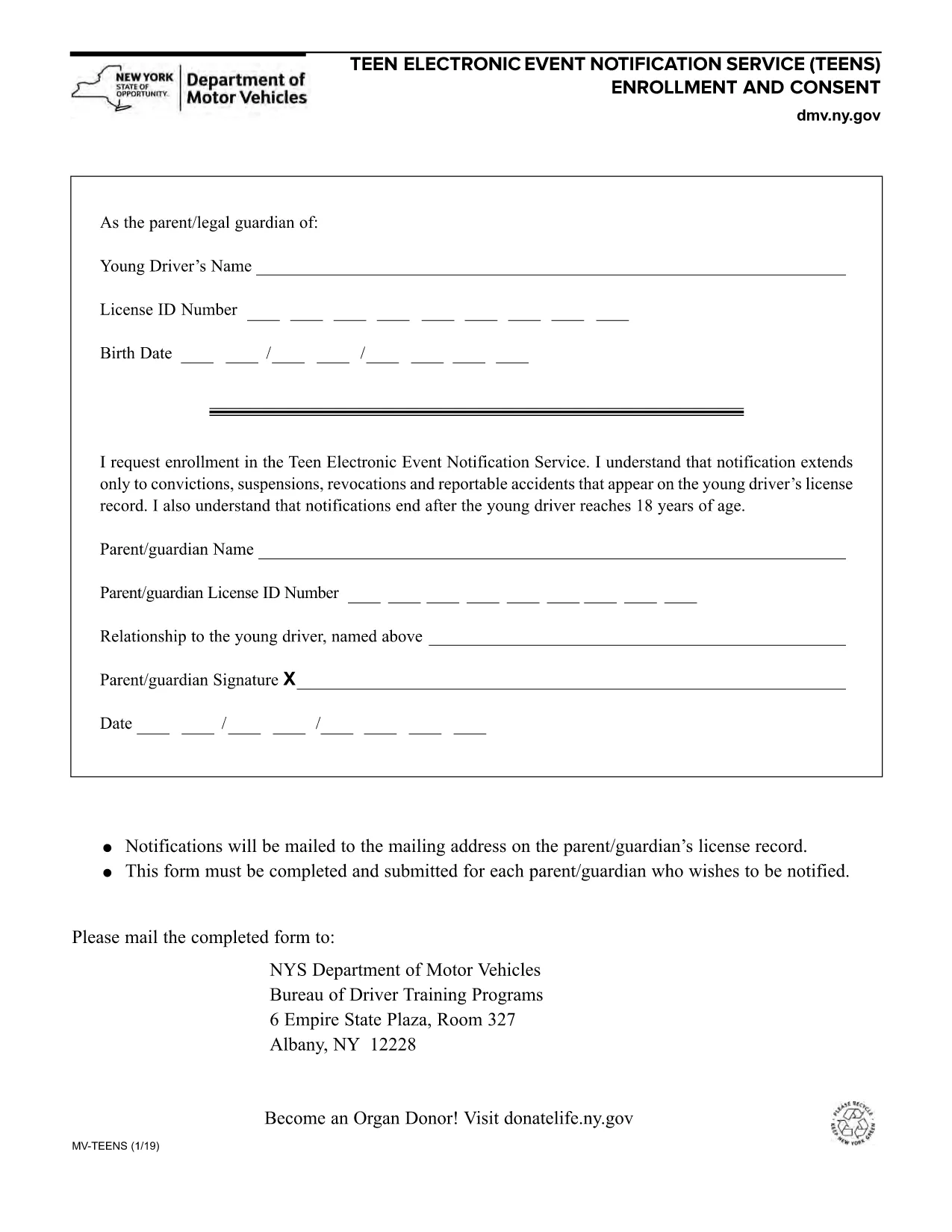
NY DMV MV-TEENS Fillable PDF – Teen Driver Notification Enrollment

  1. Լեզու Անգլերեն
  2. Երկիր ԱՄՆ
  3. Գործունեություն Վարորդական իրավունք
  4. Պետություն Նյու Յորք
NY DMV MV-TEENS Fillable PDF – Teen Driver Notification Enrollment

The MV-TEENS form is the official New York Department of Motor Vehicles (DMV) application for the Teen Electronic Event Notification Service. By enrolling, parents or legal guardians receive electronic alerts for convictions, suspensions, revocations, and reportable accidents that appear on a teen driver’s license record until the driver turns 18.

This fillable PDF is hosted on Formize, allowing you to complete the entire form directly in your browser—no printer, scanner, or PDF editor required. Simply click the “Fill out this form” button, let the Formize PDF Filler load, and start entering the required information.

Below you’ll find step‑by‑step instructions, tips to avoid common errors, and answers to the most frequently asked questions about the MV-TEENS form.

ՀՏՀ
  • Who can enroll in the MV-TEENS service?

    A parent or legal guardian of a driver under 18 years old can enroll on the teen’s behalf.

  • Is there a fee to submit the MV-TEENS form?

    No. The MV-TEENS enrollment is free of charge.

  • What types of notifications will I receive?

    You will receive electronic alerts for convictions, suspensions, revocations, and reportable accidents recorded on the teen’s license.

  • How long does the enrollment stay active?

    Notifications stop automatically when the teen driver reaches 18 years of age.

  • Can I edit the form after I’ve submitted it?

    Once submitted, you must complete a new MV-TEENS form to make changes.

  • Do I need a New York State driver’s license to use this form?

    Yes, the form is only for drivers licensed in New York State.

  • What if I don’t have internet access to fill the form online?

    You can download the PDF, print it, fill it out by hand, and mail it to the address listed on the form.

  • How will I receive the notifications?

    Notifications are sent via email to the address you provide on the form.

ԻՆՉՊԵՍ

Ինչպես լրացնել MV-TEENS-ն անվճար, առցանց՝ 5 հեշտ քայլերով.

  1. 1
    Open the Fillable Form
    Click the “Fill out this form” button on the page. The Formize PDF Filler app will load in a new window.
  2. 2
    Enter Required Information
    Complete each field: driver’s name, date of birth, license number, parent/guardian contact details, and consent statements.
  3. 3
    Review for Accuracy
    Use the built‑in preview to double‑check all entries. Correct any mistakes before proceeding.
  4. 4
    Submit or Save
    When finished, click “Submit” to generate a completed PDF you can download, email, or print. You may also choose “Save” to keep an editable copy.
  5. 5
    Confirmation
    A confirmation screen will appear with a reference number. Keep this number for future correspondence with the NY DMV.
Ձևավորել PDF Filler հավելվածը
ՄԱՍԻՆ

Վարորդական իրավունքի հայտի ձևեր

Երկրների մեծ մասում վարորդական իրավունքի վկայական ունենալը պարտադիր է, նախքան երթևեկելը: Վարորդական վկայական ստանալը կարևոր իրադարձություն է յուրաքանչյուրի համար, ով ցանկանում է մեքենա վարել:

MV-TEENS-ը վարորդական իրավունքի վկայականի դիմումի ձևերից մեկն է, որը փաստաթղթեր է, որն օգտագործվում է տեղեկատվություն հավաքելու մարդկանցից, ովքեր ցանկանում են դիմել վարորդական իրավունք ստանալու համար: Այն սովորաբար պարունակում է դաշտեր դիմողի անվան, ծննդյան ամսաթվի, ID համարի, կոնտակտային տվյալների, ինչպես նաև վարորդական իրավունքի պատմության և փորձի համար:

ՀԱՏԿՈՒԹՅՈՒՆՆԵՐ

PDF լցոնիչ

Առցանց MV-TEENS-ը լրացնելու ամենահեշտ ձևը

  • Արագ լրացրեք MV-TEENS
    Փնտրու՞մ եք միջոց՝ արագորեն լրացնելու MV-TEENS առցանց: Մեր առցանց անվճար PDF ձևաթուղթ լրացնողի միջոցով դուք կիմանաք, թե ինչպես խմբագրել և լրացնել այս pdf փաստաթուղթը մեկ րոպեից պակաս ժամանակում:
  • Հեշտ օգտագործման առցանց PDF խմբագիր
    Հոգնե՞լ եք PDF ֆայլեր տպելուց, որպեսզի կարողանաք դրանք խմբագրել, նախքան նորից սկանավորելը և հետ ուղարկելը: Խմբագրել PDF փաստաթղթերը անվճար առցանց: Օգտագործեք մեր առցանց pdf խմբագրիչը ժամանակ և թուղթ խնայելու համար:
  • Հիանալի գործիքներ, բոլոր հարթակներ
    Զարմանում եք, թե ինչպես լրացնել MV-TEENS-ը Mac-ում, կամ գուցե ինչպես անվճար օգտագործել PDF լցոնիչը: Մեր առցանց PDF գործիքներն աշխատում են բոլոր հարթակներում:
  • Անվտանգ ֆայլերի պահպանում
    Ավարտված «MV-TEENS» ֆայլերը պահվում են պաշտպանված տվյալների բազայում, որը կառավարվում է Amazon Cloud հոսթինգի կողմից: Ցանկացած ժամանակ կարող եք ջնջել ձեր ֆայլերը մեր համակարգից: Ամեն դեպքում, այս ֆայլերը ավտոմատ կերպով ջնջվում են 24 ժամ հետո:
  • Զրուցեք MV-TEENS-ի հետ
    Զրուցեք «MV-TEENS»-ի հետ Chatize-ում, որը PDF ընթերցողի անվճար օգնական է: Հարցեր տվեք և ստացեք պատասխաններ «MV-TEENS»-ից։ Պարզապես սեղմեք վերևում գտնվող Զրույց փաստաթղթի հետ կոճակը:

Ջնջել լրացման նիստը

Ջնջե՞լ ընտրված լրացման աշխատաշրջանը: Այս դեպքում ձևը լրացնելու ձեր առաջընթացը կկորչի:

Ջնջել խմբագրման նիստը

Ջնջե՞լ ընտրված խմբագրման աշխատաշրջանը: Այս դեպքում ձևը ստեղծելու և խմբագրելու ձեր առաջընթացը կկորչի: