
Ընտրել լեզուն

Pennsylvania DL-201 Certification of Motor Vehicle Judgment (Fillable PDF)

  1. Լեզու Անգլերեն
  2. Երկիր ԱՄՆ
  3. Գործունեություն Վարորդական իրավունք
  4. Պետություն Փենսիլվանիա
Pennsylvania DL-201 Certification of Motor Vehicle Judgment (Fillable PDF)

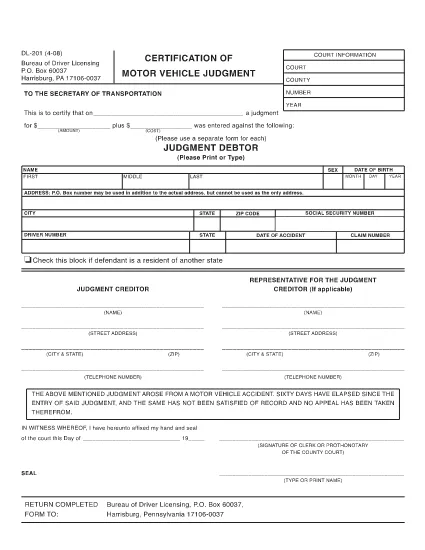
The DL-201 is Pennsylvania's official Certification of Motor Vehicle Judgment. It is required when you need to certify a judgment, lien, or other legal action related to a vehicle registered in PA. Instead of printing, printing, and mailing, you can now fill the form instantly online with Formize’s secure PDF filler.

What Is the DL-201 Form?

The DL-201 is issued by the Pennsylvania Department of Transportation (PennDOT). It records details such as the judgment amount, the vehicle identification number (VIN), and the parties involved. The form is commonly used by attorneys, lienholders, and private individuals to prove a legal claim against a vehicle.

How to Complete the DL-201 Online

Follow these simple steps to fill out the DL-201 without leaving your browser:

  1. Click the "Fill out this form" button on this page.
  2. Wait a few seconds while the Formize PDF Filler app loads the official DL-201 PDF.
  3. Enter the required information into each fillable field (judgment details, VIN, parties, etc.).
  4. Review your entries, then click Submit to download the completed PDF.

Common Mistakes to Avoid

  • Leaving fields blank: Every field marked with an asterisk (*) is mandatory.
  • Incorrect VIN format: Use the 17‑character VIN exactly as it appears on the vehicle title.
  • Mismatched names: Ensure the legal names match the judgment documents.
  • Wrong date format: Use MM/DD/YYYY throughout the form.

Where to Submit the Completed Form

After you download the filled PDF, mail or fax it to the PennDOT Bureau of Driver Licensing at the address printed on the form. Some courts also accept the form electronically; check with your local jurisdiction.

Download the Official PDF

If you prefer to work offline, you can download the official, uneditable version of the DL-201 below. The online filler will use the same document, guaranteeing compliance with PennDOT standards.

Download DL-201 PDF (official)

ՀՏՀ
  • Is the DL-201 form available as a fillable PDF?

    Yes. Formize provides an online fillable version that mirrors the official Pennsylvania DL-201 PDF.

  • Do I need a PDF editor to complete the DL-201?

    No. The Formize PDF Filler works directly in your browser—no additional software is required.

  • Can I save my progress and finish the form later?

    The online filler does not store data. Complete the form in one session, then download the finished PDF.

  • What should I do if I make a mistake after downloading?

    Open the downloaded PDF in any PDF editor, correct the error, and re‑save. Alternatively, refill the form using the online filler.

  • Where do I send the completed DL-201?

    Mail or fax the completed form to the PennDOT Bureau of Driver Licensing address printed on the form, or follow any court‑specific instructions.

  • Is there a filing fee for the DL-201?

    PennDOT does not charge a fee for the DL-201 itself, but related court or lien filing fees may apply.

  • Can I use the DL-201 for vehicles registered in other states?

    The DL-201 is specific to Pennsylvania. Other states have their own certification forms.

ԻՆՉՊԵՍ

Ինչպես լրացնել DL-201-ն անվճար, առցանց՝ 3 հեշտ քայլերով.

  1. 1
    Open the Fillable Form
    Click the "Fill out this form" button on the page. The Formize PDF Filler app will open the DL-201 automatically.
  2. 2
    Enter Your Information
    Complete each fillable field with the required data (judgment details, VIN, parties, dates, etc.).
  3. 3
    Save or Print
    After reviewing, click "Submit" to download the completed PDF. You can then print, mail, or fax it as required.
Ձևավորել PDF Filler հավելվածը
ՄԱՍԻՆ

Վարորդական իրավունքի հայտի ձևեր

Երկրների մեծ մասում վարորդական իրավունքի վկայական ունենալը պարտադիր է, նախքան երթևեկելը: Վարորդական վկայական ստանալը կարևոր իրադարձություն է յուրաքանչյուրի համար, ով ցանկանում է մեքենա վարել:

DL-201-ը վարորդական իրավունքի վկայականի դիմումի ձևերից մեկն է, որը փաստաթղթեր է, որն օգտագործվում է տեղեկատվություն հավաքելու մարդկանցից, ովքեր ցանկանում են դիմել վարորդական իրավունք ստանալու համար: Այն սովորաբար պարունակում է դաշտեր դիմողի անվան, ծննդյան ամսաթվի, ID համարի, կոնտակտային տվյալների, ինչպես նաև վարորդական իրավունքի պատմության և փորձի համար:

ՀԱՏԿՈՒԹՅՈՒՆՆԵՐ

PDF լցոնիչ

Առցանց DL-201-ը լրացնելու ամենահեշտ ձևը

  • Արագ լրացրեք DL-201
    Փնտրու՞մ եք միջոց՝ արագորեն լրացնելու DL-201 առցանց: Մեր առցանց անվճար PDF ձևաթուղթ լրացնողի միջոցով դուք կիմանաք, թե ինչպես խմբագրել և լրացնել այս pdf փաստաթուղթը մեկ րոպեից պակաս ժամանակում:
  • Հեշտ օգտագործման առցանց PDF խմբագիր
    Հոգնե՞լ եք PDF ֆայլեր տպելուց, որպեսզի կարողանաք դրանք խմբագրել, նախքան նորից սկանավորելը և հետ ուղարկելը: Խմբագրել PDF փաստաթղթերը անվճար առցանց: Օգտագործեք մեր առցանց pdf խմբագրիչը ժամանակ և թուղթ խնայելու համար:
  • Հիանալի գործիքներ, բոլոր հարթակներ
    Զարմանում եք, թե ինչպես լրացնել DL-201-ը Mac-ում, կամ գուցե ինչպես անվճար օգտագործել PDF լցոնիչը: Մեր առցանց PDF գործիքներն աշխատում են բոլոր հարթակներում:
  • Անվտանգ ֆայլերի պահպանում
    Ավարտված «DL-201» ֆայլերը պահվում են պաշտպանված տվյալների բազայում, որը կառավարվում է Amazon Cloud հոսթինգի կողմից: Ցանկացած ժամանակ կարող եք ջնջել ձեր ֆայլերը մեր համակարգից: Ամեն դեպքում, այս ֆայլերը ավտոմատ կերպով ջնջվում են 24 ժամ հետո:
  • Զրուցեք DL-201-ի հետ
    Զրուցեք «DL-201»-ի հետ Chatize-ում, որը PDF ընթերցողի անվճար օգնական է: Հարցեր տվեք և ստացեք պատասխաններ «DL-201»-ից։ Պարզապես սեղմեք վերևում գտնվող Զրույց փաստաթղթի հետ կոճակը:

Ջնջել լրացման նիստը

Ջնջե՞լ ընտրված լրացման աշխատաշրջանը: Այս դեպքում ձևը լրացնելու ձեր առաջընթացը կկորչի:

Ջնջել խմբագրման նիստը

Ջնջե՞լ ընտրված խմբագրման աշխատաշրջանը: Այս դեպքում ձևը ստեղծելու և խմբագրելու ձեր առաջընթացը կկորչի: